
1. انتهى المنتجview
The YiBiChin AN-MR21GC is a universal magic remote control designed for various 2021 LG Smart TV models. It features magic pointer and intelligent voice control functions, allowing for quick and intuitive navigation and command execution. This remote enhances your TV viewing experience with convenient access to features and content.
1.1 التوافق
This remote control is compatible with the following 2021 LG TV series:
- LG OLED TVs: G1, C1, A1 series
- LG Mini-LED QNED TVs: QNED99, QNED90 series
- LG NanoCell TVs: NANO99, NANO90, NANO85, NANO80, NANO75 series
- LG UHD TVs: UP80, UP75 series
Note: This remote control does not feature NFC functionality.

الشكل 1: الأمام والجانب والخلف views of the YiBiChin AN-MR21GC Magic Remote.

Figure 2: The remote control highlighting its universal compatibility with 2021 LG Smart TVs.
2. الإعداد
2.1 تركيب البطارية
The remote control requires two AA batteries (not included) for operation. Follow these steps to install them:
- حدد موقع غطاء حجرة البطارية في الجزء الخلفي من جهاز التحكم عن بعد.
- قم بتحريك الغطاء للأسفل لفتح الحجرة.
- قم بإدخال بطاريتين AA، مع التأكد من محاذاة الأطراف الموجبة (+) والسالبة (-) بشكل صحيح مع المؤشرات الموجودة داخل الحجرة.
- قم بإدخال غطاء حجرة البطارية في مكانه مرة أخرى حتى يصدر صوت نقرة آمنة.

Figure 3: Correct installation of AA batteries into the remote control.
2.2 طريقة الاقتران
To enable the magic pointer and voice functions, the remote control must be paired with your LG Smart TV. Ensure your TV is connected to a WiFi network for these functions to work correctly. If you are replacing an original remote, it is recommended to disconnect it and remove its batteries before pairing the new remote, as only one smart remote can be paired at a TV at a time.
Follow these steps to pair your remote:
- Manually turn on your LG Smart TV using the power button on the TV itself.
- Point the YiBiChin AN-MR21GC remote control directly towards your TV from a close distance.
- اضغط مع الاستمرار على Scroll Wheel (OK button) on the remote control for a few seconds until the pairing process is complete. A confirmation message should appear on your TV screen.
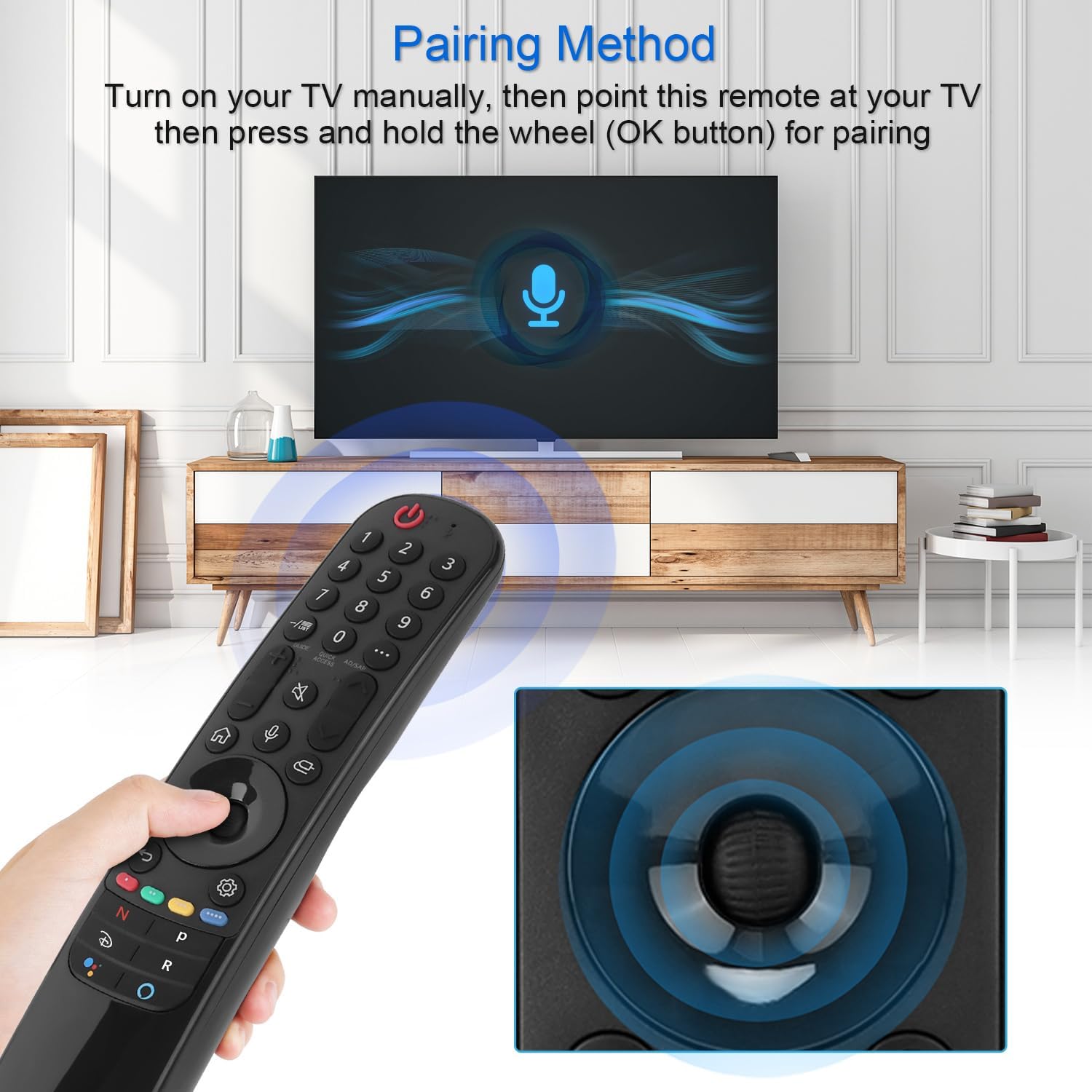
Figure 4: Demonstrating the pairing process by holding the OK button while pointing at the TV.
3. تعليمات التشغيل
The YiBiChin AN-MR21GC remote control offers multiple ways to interact with your LG Smart TV, including traditional button presses, a magic pointer, and voice commands.
3.1 الوظائف الأساسية
- زر الطاقة: تشغيل التلفزيون أو إيقاف تشغيله.
- أزرار الأرقام (0-9): حدد القنوات مباشرة.
- رفع/خفض الصوت: يضبط مستوى صوت التلفزيون.
- القناة لأعلى/لأسفل: تغيير القنوات التلفزيونية.
- زر كتم الصوت: كتم صوت التلفزيون أو إلغاء كتمه.
- زر الصفحة الرئيسة: Accesses the TV's main smart interface.
- زر الرجوع: يعود إلى الشاشة أو القائمة السابقة.
3.2 Magic Pointer Function
Once paired, the remote acts as a pointer, allowing you to move a cursor on the TV screen by simply moving the remote in the air. This provides an intuitive way to select items, scroll through menus, and interact with applications.
3.3 التحكم الصوتي
اضغط على زر الميكروفون to activate voice control. Speak clearly into the remote to issue commands, search for content, or control smart home devices connected to your TV. Voice commands allow for rapid access to desired programs and videos, with a response time of approximately 0.2 seconds.
3.4 أزرار الوصول السريع
The remote includes dedicated shortcut buttons for popular streaming services, providing instant access to your favorite entertainment platforms.
3.5 التحكم عن بعد
The remote utilizes stable infrared and Bluetooth signals, offering a control distance of up to 33 feet (10 meters), ensuring reliable operation from various positions within your room.

Figure 5: The remote's effective operating range and quick response time.
4. الصيانة
4.1 استبدال البطارية
When the remote control's performance degrades (e.g., unresponsive buttons, weak signal), it is likely time to replace the batteries. Follow the battery installation steps in Section 2.1 to replace the two AA batteries.
4.2 التنظيف
لتنظيف جهاز التحكم عن بعد، استخدم قطعة قماش ناعمة وجافة. لإزالة الأوساخ المستعصية، افركها برفق.ampبلّل قطعة القماش بالماء أو بمنظف لطيف غير كاشط. تجنب استخدام المواد الكيميائية القاسية أو الرطوبة الزائدة، لأن ذلك قد يُتلف المكونات الإلكترونية لجهاز التحكم عن بُعد.
5. استكشاف الأخطاء وإصلاحها
5.1 عدم استجابة جهاز التحكم عن بعد
- التحقق من البطاريات: Ensure batteries are correctly installed and not depleted. Replace them if necessary.
- إعادة إقران جهاز التحكم عن بعد: If the remote becomes unresponsive, try re-pairing it with your TV by following the steps in Section 2.2.
- العوائق: تأكد من عدم وجود أي عوائق بين جهاز التحكم عن بعد وجهاز استقبال الأشعة تحت الحمراء الخاص بالتلفزيون.
5.2 Pointer or Voice Function Not Working
- اتصال واي فاي: Verify that your LG Smart TV is connected to a stable WiFi network. The pointer and voice functions rely on this connection.
- إعادة إقران جهاز التحكم عن بعد: Re-pairing the remote (Section 2.2) can often resolve issues with these advanced functions.
- Original Remote Interference: Ensure no other smart remote is actively paired with the TV, or that the original remote's batteries have been removed.
6. المواصفات
| ماركة | YiBiChin |
| اسم الموديل | AN-MR21GC |
| الأجهزة المتوافقة | 2021 LG Smart TVs (OLED, QNED, NanoCell, UHD series) |
| تكنولوجيا الاتصال | Wi-Fi, Infrared, Bluetooth |
| نوع وحدة التحكم | Voice Control, Pointer |
| مصدر الطاقة | تعمل بالبطارية |
| نوع البطارية | 2 × AA (غير متضمنة) |
| الحد الأقصى للمدى | 10 أمتار (33 قدم) |
| وقت الاستجابة | 0.2 seconds (for voice commands) |
| الأبعاد (الطول × العرض × الارتفاع) | 19.2 x 5.7 x 3.1 cm (7.6 x 2.2 x 1.2 inches) |
| وزن العنصر | 110 جرام (3.88 أونصة) |
| لون | أسود |

الشكل 6: أبعاد المنتج لجهاز التحكم عن بعد.
7. الضمان والدعم
YiBiChin is committed to providing quality replacement remote controls and excellent customer service. While specific warranty details are not provided in this manual, we offer dedicated support for our products.
7.1 دعم العملاء
If you have any questions, encounter issues, or require assistance with your YiBiChin AN-MR21GC Magic Remote, please do not hesitate to contact our customer support team. We aim to respond to all inquiries within 24 hours.
For support, please refer to the contact information provided with your purchase or visit the official YiBiChin store page on Amazon.
Thank you for choosing YiBiChin.