
1. المقدمة
This manual provides instructions for the setup, operation, and maintenance of your FightBox F1-UFB-UP5 All Buttons Leverless Arcade Game Controller. This controller is designed for use with various gaming platforms including PlayStation 5, PlayStation 4, PlayStation 3, PC, Xbox Series X, and Nintendo Switch.
2. انتهى المنتجview
The FightBox F1-UFB-UP5 is a high-performance leverless arcade controller, featuring an all-button layout for precise input. It incorporates the Brook Universal Fighting Board (UFB) and UFB-UP5 for broad platform compatibility and low-latency performance. The controller is equipped with Sanwa buttons, known for their responsiveness and durability.

This image illustrates the FightBox F1-UFB-UP5 controller alongside its internal components, specifically highlighting the Brook Universal Fighting Board and the UFB-UP5 module, which enable multi-platform compatibility.

من أعلى إلى أسفل view of the FightBox F1-UFB-UP5 controller, showcasing its all-button layout with red and black Sanwa buttons and the 'FIGHTBOX' branding.
3. الإعداد
The FightBox F1-UFB-UP5 controller connects to your gaming platform via a standard USB cable. No additional drivers are typically required for console use, but PC users may need to ensure proper drivers are installed for optimal performance.
- Connect the USB cable from the controller to an available USB port on your gaming console (PlayStation 5, PlayStation 4, PlayStation 3, Xbox Series X, Nintendo Switch) or PC.
- The controller should be automatically recognized by most systems. For PC, if not automatically recognized, check your operating system's device manager for driver updates or visit the Brook webموقع لتحميل برامج التشغيل المحددة.
- Ensure the correct input mode is selected if your console requires it (refer to your console's documentation).
4. تعليمات التشغيل
The F1-UFB-UP5 features a leverless button layout, replacing the traditional joystick with directional buttons for precise movement inputs. The primary action buttons are arranged for intuitive gameplay.

This diagram illustrates the button assignments for the PlayStation versions of the FightBox F1-UFB-UP5 controller. It identifies the USB port, Touchpad, Share, R3, L3, Option, and Home buttons, along with the directional and action buttons.
- أزرار الاتجاه: The four red buttons on the left side control movement (Up, Down, Left, Right).
- أزرار العمل: The eight black buttons on the right side are for primary game actions.
- زر الخيارات: Typically used for pausing games or accessing menus.
- زر الصفحة الرئيسية: Returns to the console's main menu or dashboard.
- زر المشاركة: Used for sharing gameplay content (on PlayStation platforms).
- لوحة اللمس: Functions as a touchpad input (on PlayStation platforms).
- R3/L3 Buttons: These buttons correspond to pressing down the right and left analog sticks on a standard controller.
For specific button mappings on different platforms (Xbox, Nintendo Switch), the controller automatically adapts. Consult your game's control settings for customization options.
5. الصيانة
Proper maintenance ensures the longevity and performance of your FightBox F1-UFB-UP5 controller.
- تنظيف: Use a soft, dry cloth to wipe down the surface of the controller. For stubborn marks, a slightly damp يمكن استخدام قطعة قماش مبللة بصابون لطيف، ثم مسحها بقطعة قماش جافة. تجنب استخدام المنظفات الكاشطة أو المذيبات.
- تخزين: Store the controller in a cool, dry place away from direct sunlight and extreme temperatures.
- العناية بالكابلات: Avoid sharp bends or kinks in the USB cable. Disconnect by pulling the plug, not the cable itself.
- العناية بالأزرار: Do not apply excessive force to the buttons. If a button feels sticky, it may require professional cleaning or replacement.
6. استكشاف الأخطاء وإصلاحها
If you encounter issues with your FightBox F1-UFB-UP5 controller, refer to the following common solutions.
- لم يتم التعرف على وحدة التحكم:
- تأكد من توصيل كابل USB بشكل آمن بكل من وحدة التحكم وجهاز الألعاب/الكمبيوتر.
- جرب منفذ USB مختلفًا.
- أعد تشغيل جهازك أو جهاز الكمبيوتر الخاص بك.
- For PC, check device manager for driver issues and update if necessary.
- الأزرار لا تستجيب:
- Verify the controller is powered on and connected.
- اختبر الأزرار في لعبة مختلفة أو قائمة نظام مختلفة لتحديد المشكلة.
- If only specific buttons are affected, they may require cleaning or replacement.
- تأخر الإدخال:
- Ensure you are using a direct USB connection, avoiding unpowered USB hubs.
- Check for any background processes on your PC that might be consuming resources.
- Ensure your console's firmware and game software are up to date.
7. المواصفات
Detailed specifications for the FightBox F1-UFB-UP5 All Buttons Leverless Arcade Game Controller.
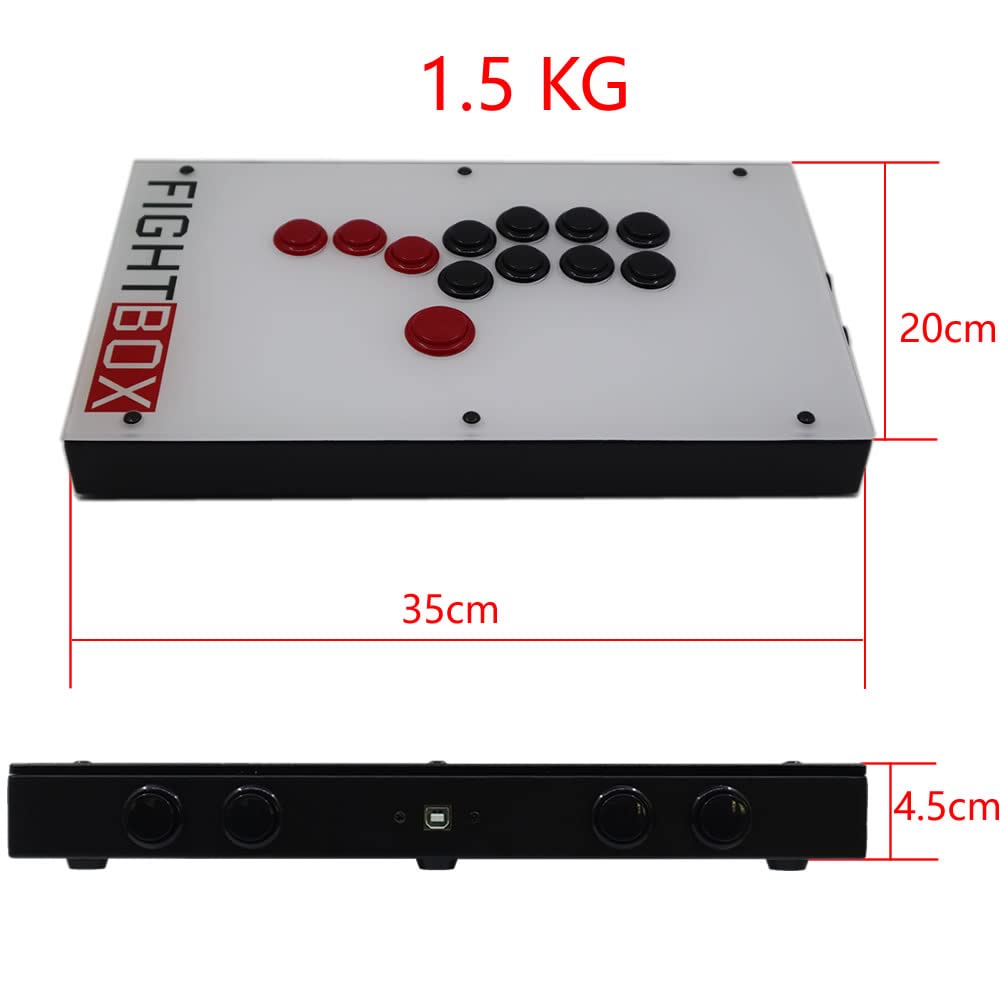
This image provides the physical dimensions of the FightBox F1-UFB-UP5 controller, showing a length of 35cm, width of 20cm, and height of 4.5cm, with a total weight of 1.5 kg.
| ميزة | التفاصيل |
|---|---|
| نموذج | F1-UFB-UP5 |
| ماركة | FightBox |
| الاتصال | USB |
| نوع وحدة التحكم | Leverless Arcade Controller |
| كمية الأزرار | 12 |
| المميزات الخاصة | لوحة اللمس |
| الأجهزة المتوافقة | PlayStation 5, PlayStation 4, PlayStation 3, PC, Xbox Series X, Nintendo Switch |
| الأبعاد (الطول × العرض × الارتفاع) | 15.75 × 9.84 × 3.94 بوصة (حوالي 35 × 20 × 4.5 سم) |
| وزن | 1.5 كيلوغرام |
| المجلس الداخلي | Brook Universal Fighting Board (UFB) + UFB-UP5 |
| أزرار | سانوا |
| رمز المنتج العالمي/رقم GTIN | 635648885254 |
8. الضمان والدعم
For warranty information and technical support, please refer to the official FightBox webالموقع أو تواصل مع بائع التجزئة. احتفظ بإيصال الشراء كإثبات للشراء.
لمزيد من المساعدة، قم بزيارة: FightBox Official Store