
مقدمة
The mophie powerstation Go is a versatile portable device designed to provide power in various emergency situations. It functions as a car jump starter, a portable power bank for mobile devices, and a bright LED work light. This manual provides essential instructions for safe and effective use, maintenance, and troubleshooting of your powerstation Go.
معلومات السلامة
Read all safety warnings and instructions before using this product. Failure to follow these instructions may result in electric shock, fire, or serious injury.
- Do not expose the powerstation Go to moisture or extreme temperatures.
- لا تحاول فك أو تعديل الجهاز.
- يحفظ بعيدًا عن متناول الأطفال.
- Ensure proper polarity when connecting jumper cables to a vehicle battery. Incorrect connection can cause damage or injury.
- Use only the provided jumper cables and charging accessories.
- تجنب التعرض المطول لأشعة الشمس المباشرة.
- إذا ارتفعت درجة حرارة الجهاز بشكل مفرط، فتوقف عن استخدامه فوراً.
محتويات الحزمة
- mophie powerstation Go
- Mini Jumper Cables
- كابل الشحن (USB-C إلى USB-A)
- دليل المستخدم
المنتج انتهىview
Familiarize yourself with the components of your mophie powerstation Go.


- مصباح يدوي LED: Located at one end, provides bright illumination.
- ضوء العمل: Integrated into the body, offers broad area lighting.
- زر الطاقة: Activates the device and checks battery status.
- مؤشر البطارية LED: يعرض مستوى الشحن المتبقي.
- منفذ إخراج USB-A: لشحن الأجهزة المحمولة.
- منفذ كابل التوصيل: Dedicated port for connecting the mini jumper cables.
- منفذ إدخال USB-C: For recharging the powerstation Go.
الإعداد: الشحن الأولي
Before first use, fully charge your mophie powerstation Go.
- Connect the provided USB-C charging cable to the USB-C input port on the powerstation Go.
- Connect the other end of the charging cable to a compatible USB wall adapter (not included) or a powered USB port.
- The LED battery indicator lights will illuminate and flash, indicating the charging status. All four lights will be solid when fully charged.
- قد يختلف وقت الشحن حسب مصدر الطاقة.
تعليمات التشغيل
1. تشغيل السيارة عن طريق القفز
Ensure the powerstation Go is at least 50% charged before attempting to jump start a vehicle.
- Connect the mini jumper cables to the jumper cable port on the powerstation Go. Ensure a secure connection.
- قم بتوصيل أحمر clamp to the positive (+) terminal of the vehicle's dead battery.
- قم بتوصيل أسود clamp to a metal part of the vehicle's chassis (unpainted, non-moving part) or the negative (-) terminal of the battery, if accessible and safe.
- Once connected, the powerstation Go will automatically perform safety checks. Wait for the indicator light on the jumper cable connector to turn solid green.
- Start your vehicle. If it doesn't start immediately, wait 30 seconds and try again. Do not attempt more than three consecutive jump starts.
- بمجرد بدء تشغيل السيارة، افصل السلك الأسود على الفورamp، ثم اللون الأحمرamp, and finally disconnect the jumper cables from the powerstation Go.
2. Charging Mobile Devices
Use the USB-A output port to charge your smartphone, tablet, or other USB-powered devices.

- Connect your device's USB charging cable to the USB-A output port on the powerstation Go.
- The powerstation Go will automatically begin charging your device. The LED battery indicator lights will show the remaining charge.
- افصل جهازك بمجرد اكتمال الشحن.
3. Using the LED Flashlight and Work Light
The powerstation Go features both a focused LED flashlight and a broad work light.
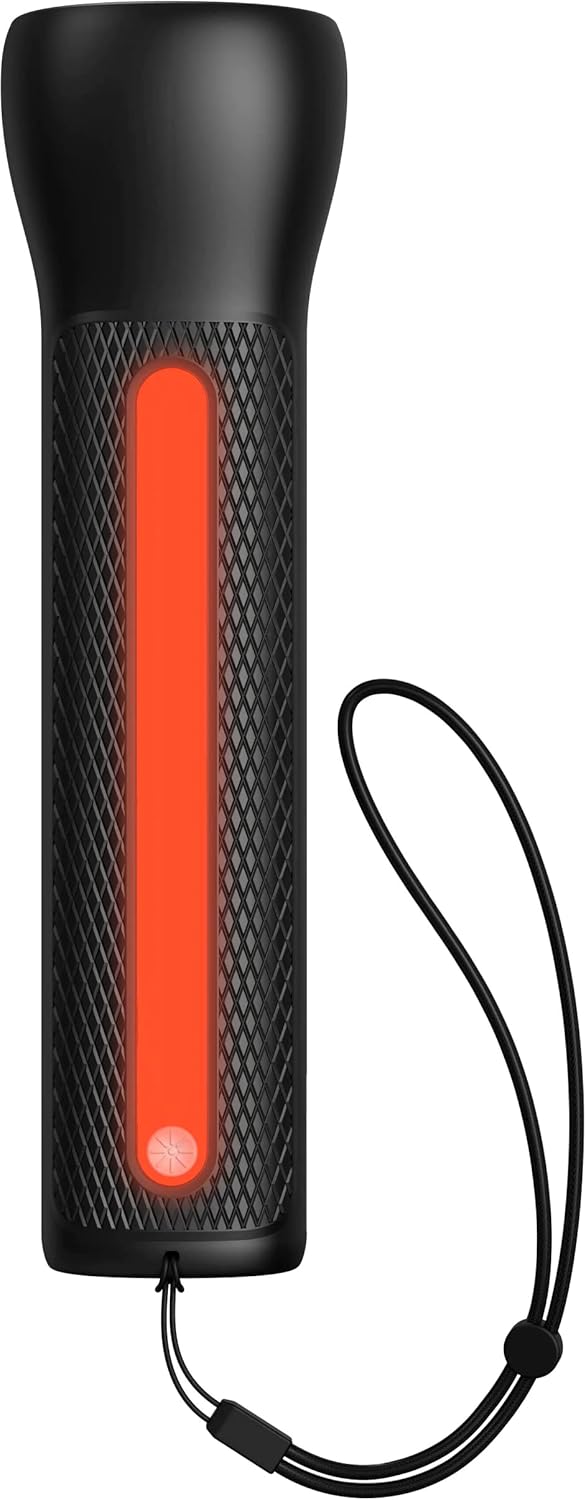

- To activate the LED Flashlight: Press and hold the power button for 2 seconds. Press again to cycle through modes (high, low, strobe, off).
- To activate the Work Light: Double-press the power button. Double-press again to cycle through modes (white, red, flashing red, off).
صيانة
- تنظيف: امسح الجهاز بقطعة قماش ناعمة وجافة. لا تستخدم مواد كيميائية قاسية أو مواد كاشطة.
- تخزين: Store the powerstation Go in a cool, dry place away from direct sunlight. For optimal battery life, recharge the device every 3 months if not in regular use.
- العناية بالبطارية: The internal battery is not user-replaceable. Do not attempt to open the device.
استكشاف الأخطاء وإصلاحها
| مشكلة | السبب المحتمل | حل |
|---|---|---|
| الجهاز لا يشحن | كابل الشحن أو المحول معطل؛ انسداد المنفذ. | Try a different USB-C cable and wall adapter. Ensure ports are clean and free of debris. |
| السيارة لا تعمل ببطارية خارجية | Low powerstation Go charge; incorrect cable connection; severely dead battery. | Ensure powerstation Go is fully charged. Verify correct clamp polarity. Check vehicle battery for severe damage. Consult vehicle manual. |
| Mobile device not charging | Powerstation Go battery low; faulty USB cable; device incompatibility. | Recharge powerstation Go. Try a different USB cable. Ensure your device is compatible with standard USB charging. |
| الأضواء لا تعمل | Powerstation Go battery low; incorrect button press. | Recharge powerstation Go. Refer to "Using the LED Flashlight and Work Light" section for correct operation. |
تحديد
- ماركة: موفي
- رقم الموديل: mpsgrgd-FL36630
- رقم قطعة الشركة المصنعة: 401107454
- سعة البطارية: 9900 مللي أمبير (36.6 واط في الساعة)
- المجلدtage: 12 Volts (for jump starting)
- وزن المنتج: 1.07 كيلوغرام
- أبعاد: 30.3 × 24.69 × 10.79 سم (الحزمة)
- المميزات الخاصة: LED Indicator Lights, 450-lumen LED Flashlight, Spark-proof Jumper Cables
- Automotive Service Type: شاحنة، سيارة
الضمان والدعم
For warranty information and customer support, please visit the official mophie webالموقع الإلكتروني أو تواصل مع قسم خدمة العملاء. احتفظ بإثبات الشراء لطلبات الضمان.
الدعم عبر الإنترنت: www.mophie.com/support