
1. المقدمة
شكرا لك على الشراءasing the Ysametp 5G WiFi Bluetooth Projector. This device is designed to provide a high-quality home theater experience with its native 1080p Full HD resolution, 4K support, and integrated Android system. Please read this manual thoroughly before using the projector to ensure proper operation and to maximize its lifespan.
2. معلومات السلامة
يرجى مراعاة احتياطات السلامة التالية لمنع تلف جهاز العرض وضمان سلامة المستخدم:
- مزود الطاقة: Use only the specified power adapter. Ensure the power outlet voltagيتوافق مع متطلبات جهاز العرض.
- تهوية: لا تسد فتحات التهوية. تأكد من وجود تدفق هواء كافٍ حول جهاز العرض لمنع ارتفاع درجة حرارته.
- الموقع: ضع جهاز العرض على سطح مستوٍ وثابت. تجنب وضعه في ضوء الشمس المباشر، أو بالقرب من مصادر الحرارة، أو في بيئات ذات رطوبة عالية أو غبار.
- تنظيف: افصل الكهرباء قبل التنظيف. استخدم قطعة قماش ناعمة وجافة. لا تستخدم منظفات سائلة أو بخاخات.
- حماية العين: لا تنظر مباشرة إلى عدسة جهاز العرض عندما يكون الضوءamp يتم تشغيله، لأن الضوء الساطع يمكن أن يسبب تلفًا للعين.
- الإصلاحات: لا تحاول إصلاح جهاز العرض بنفسك. قم بإحالة جميع أعمال الصيانة إلى فنيين مؤهلين.
3. محتويات العبوة
تأكد من وجود جميع العناصر في العبوة:
- Ysametp 5G WiFi Bluetooth Projector (Model DE-M8-E-An)
- جهاز التحكم عن بعد
- Power Cable (AC 220V with Schuko plug)
- كابل HDMI
- دليل المستخدم
4. انتهى المنتجview
تعرّف على مكونات جهاز العرض وواجهاته.
4.1 الجبهة View

الصورة: الجبهة view of the Ysametp Projector, highlighting the projection lens and side ventilation grilles.
4.2 Rear and Side Interfaces
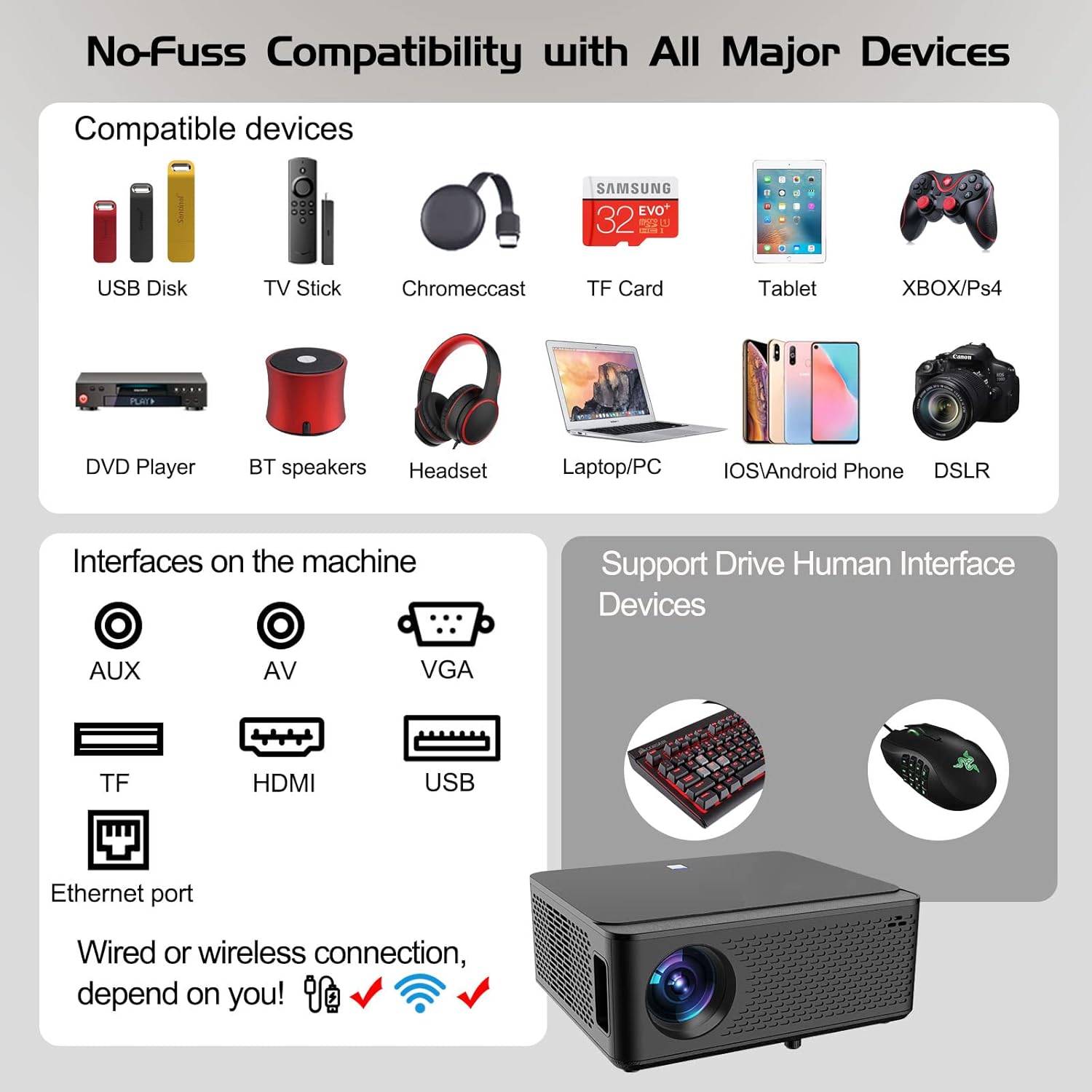
Image: Diagram illustrating the various input and output ports available on the Ysametp Projector, including USB, HDMI, AV, VGA, TF card slot, and Ethernet port.
The projector features a comprehensive set of ports for versatile connectivity:
- منفذ إيثرنت: للاتصال بالإنترنت السلكي.
- منفذ VGA: For connecting to older computers.
- منفذ USB-A: For connecting USB flash drives or external devices.
- منفذ HDMI: For high-definition audio and video input from various sources.
- مدخلات AV: For connecting analog audio/video devices.
- مخرج صوت 3.5 ملم: لتوصيل مكبرات الصوت الخارجية أو سماعات الرأس.
- فتحة بطاقة TF: For reading media from Micro SD cards.
- مدخلات الطاقة: لتوصيل كابل الطاقة المترددة.
4.3 الضوابط العليا
The top of the projector includes a power button for basic on/off functionality. Further controls are available via the remote control and the on-screen display.
4.4 تعديل التركيز
A mechanical focus adjustment screw is located on the side of the lens for manual image clarity control.
5. الإعداد
5.1 التنسيب
Position the projector on a stable surface. The projection distance will determine the screen size. For optimal viewing, ensure the projector is perpendicular to the projection surface.
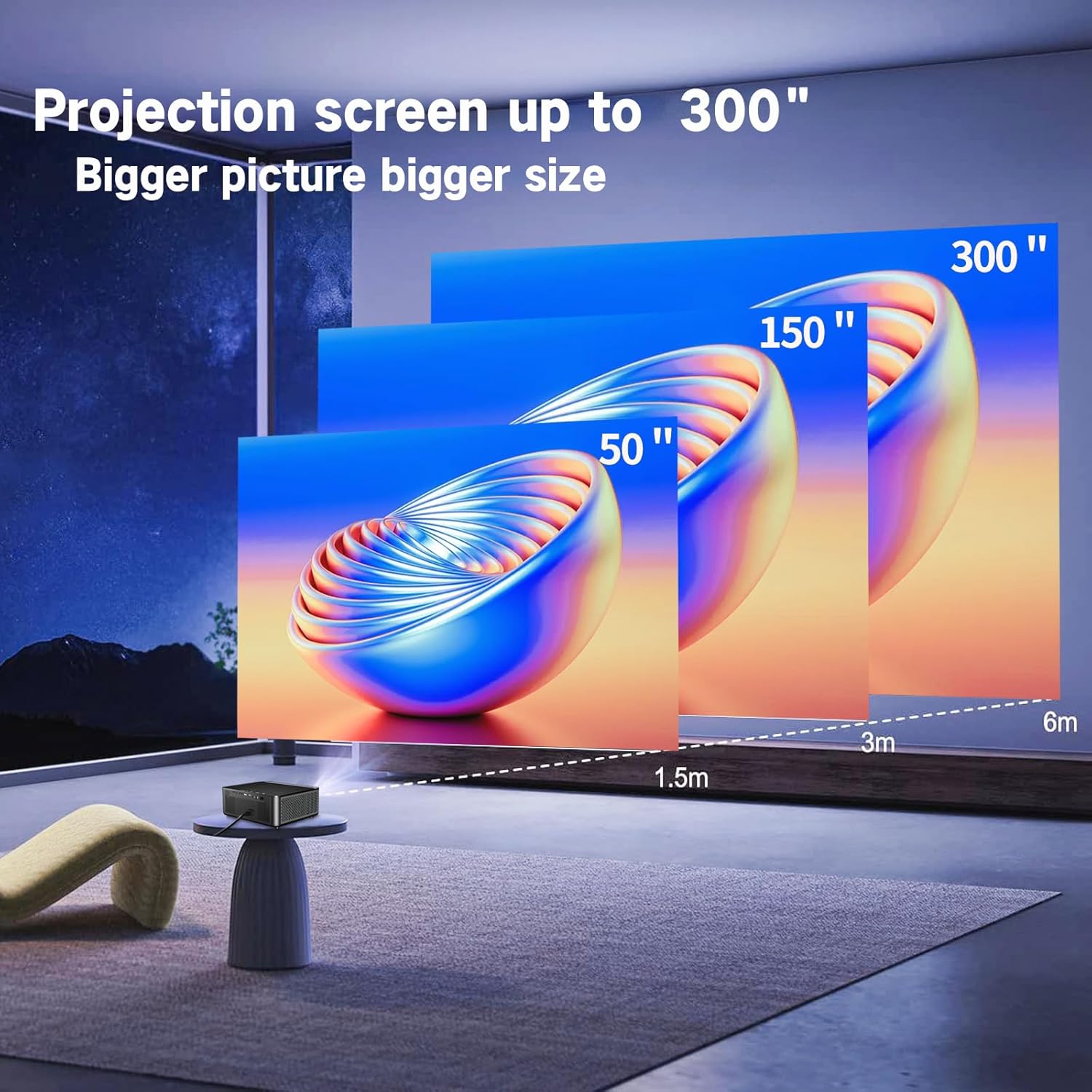
Image: Illustration demonstrating recommended projection distances for achieving screen sizes of 50, 150, and 300 inches.
5.2 توصيل الطاقة
- قم بتوصيل كابل الطاقة بمدخل الطاقة الخاص بجهاز العرض.
- قم بتوصيل الطرف الآخر من كابل الطاقة بمأخذ كهربائي مناسب.
5.3 التشغيل المبدئي
- اضغط على زر الطاقة الموجود على جهاز العرض أو جهاز التحكم عن بعد لتشغيل الجهاز.
- Allow a few moments for the projector to boot up.
5.4 التركيز وتصحيح الانحراف
After powering on, adjust the image for clarity and proper geometry:
- ركز: Rotate the mechanical focus adjustment screw near the lens until the image appears sharp and clear.
- تصحيح الانحراف: If the projected image is trapezoidal (wider at the top or bottom), use the 4D keystone correction feature via the on-screen menu to adjust the image corners until it forms a perfect rectangle.

Image: Diagram showing how 4P/4D keystone correction can be used to adjust the corners of a projected image to achieve a rectangular shape.
6. تعليمات التشغيل
6.1 توصيل الأجهزة الخارجية
The projector supports various connection methods:
- HDMI: Connect gaming consoles (PS4, Xbox), laptops, or other HDMI-enabled devices using an HDMI cable.
- USB: Insert a USB flash drive into the USB-A port to play media fileس مباشرة.
- بطاقة TF: Insert a Micro SD (TF) card into the TF card slot to access media.
- VGA/AV: Use these ports for older devices requiring analog connections.
- بلوتوث: قم بتوصيل مكبرات الصوت أو سماعات الرأس بتقنية البلوتوث للحصول على صوت محسّن.

Image: The projector shown with various compatible devices, including laptops, smartphones, gaming consoles, USB drives, and external speakers, demonstrating its versatile connectivity.
6.2 Using the Integrated Android System
The projector comes with an integrated Android system, allowing access to a wide range of applications.

Image: The projector displaying its Android interface, featuring icons for popular streaming services and apps such as Netflix, YouTube, Prime Video, Hulu, Spotify, and TikTok.
- إتصال شبكة: Connect the projector to your home Wi-Fi network via the settings menu or use an Ethernet cable for a wired connection.
- الوصول إلى التطبيق: Navigate the Android interface using the remote control. You can download and install applications from the Google Play Store.
- جاري: Enjoy content from pre-installed or downloaded streaming services.
6.3 5G WiFi Screen Mirroring
Mirror your smartphone, tablet, or PC screen wirelessly to the projector.

Image: A family enjoying content mirrored from a smartphone onto the large projected screen, illustrating the 5G WiFi Screen Mirroring feature for iOS, Android, and Windows devices.
- تأكد من أن كلاً من جهاز العرض وجهازك متصلان بشبكة واي فاي 5G نفسها.
- Select the "Screen Mirroring" option on the projector's menu.
- On your smartphone/tablet/PC, activate its screen mirroring function (e.g., "Smart View" for Android, "AirPlay" for iOS, "Cast" for Windows).
- Select the projector from the list of available devices to establish the connection.
7. الصيانة
7.1 تنظيف العدسة
امسح عدسة جهاز العرض برفق بقطعة قماش ناعمة وخالية من الوبر، مُخصصة للأسطح البصرية. لا تستخدم منظفات كاشطة أو قوة مفرطة.
7.2 تنظيف جسم جهاز العرض
Use a soft, dry cloth to clean the exterior of the projector. Avoid using harsh chemicals or solvents.
7.3 Optical Engine Protection
The projector features a full-sealed optical engine designed to prevent dust from entering the internal components, reducing the need for frequent internal cleaning and extending the device's lifespan.

الصورة: داخلية view diagram of the projector's full-sealed optical engine, highlighting its design to prevent dust from entering and affecting performance.
7.4 لترamp حياة
The projector utilizes advanced SmarEco technology to minimize energy consumption and extend the lamp's lifespan up to 60,000 hours, providing long-term reliability.

الصورة: رسم تخطيطي مفصل يوضحasing the projector's lamp technology, indicating a lifespan of over 30,000 hours.
8. استكشاف الأخطاء وإصلاحها
إذا واجهت مشكلات مع جهاز العرض الخاص بك، فراجع المشكلات والحلول الشائعة التالية:
| مشكلة | السبب المحتمل | حل |
|---|---|---|
| لا توجد صورة على الشاشة. | Power cable loose; incorrect input source; device not connected. | Check power connections. Select correct input source (HDMI, AV, etc.). Ensure external device is powered on and connected properly. |
| الصورة غير واضحة. | Focus not adjusted; projector too far/close. | اضبط حلقة التركيز على العدسة. تأكد من أن جهاز العرض ضمن مسافة العرض المثلى. |
| Image is trapezoidal. | جهاز العرض غير عمودي على الشاشة. | Use the 4D keystone correction feature in the settings menu to adjust the image shape. |
| لا يوجد صوت. | Volume too low; external audio device not connected; incorrect audio output selected. | Increase volume. Check external speaker/headphone connection. Ensure correct audio output is selected in settings. |
| لا يمكن الاتصال بشبكة الواي فاي. | كلمة المرور غير صحيحة؛ خارج النطاق؛ مشكلة في الشبكة. | تحقق من كلمة مرور الواي فاي. قرّب جهاز العرض من جهاز التوجيه. أعد تشغيل جهاز التوجيه وجهاز العرض. |
9. المواصفات
Key technical specifications for the Ysametp 5G WiFi Bluetooth Projector (Model DE-M8-E-An):
- ماركة: يسامطة
- رقم الموديل: DE-M8-E-An
- لون: أسود
- نوع المنتج: جهاز عرض محمول
- تقنية الاتصال: HDMI, USB, Wi-Fi (5G), Bluetooth
- المميزات الخاصة: Integrated WiFi, Android System, 4D Keystone Correction
- الأجهزة المتوافقة: Game Consoles, Speakers, Laptops, Smartphones, Tablets
- دقة العرض: دقة أصلية 1920 × 1080 (Full HD)
- الحد الأقصى لدقة العرض: 4096 × 2160 (دعم دقة 4K)
- نوع العرض: دي إل بي
- أبعاد المنتج: 26 طول × 23 عرض × 11 ارتفاع سم
- عامل الشكل: محمول
- نوع التركيب: حامل الطاولة
- Lamp عمر: تصل إلى 60,000 ساعة

Image: A visual comparison highlighting the projector's 20,000 Lumens brightness, Native 1080P resolution, and 4K support, contrasting it with a lower specification projector.
10. الضمان والدعم
The Ysametp Projector comes with a 3-year service warranty. For technical support or warranty claims, please contact Ysametp customer service through your purchase platform or the official Ysametp webموقع.