
ALONEFIRE PL500
ALONEFIRE PL500 Clip-on Light Instruction Manual
Model: PL500 | Brand: ALONEFIRE
مقدمة
Thank you for choosing the ALONEFIRE PL500 Clip-on Light. This versatile and compact light is designed for convenience and hands-free illumination in various situations. With its strong magnetic attachment and multiple light modes, it's an essential accessory for professionals, outdoor enthusiasts, and anyone needing reliable portable lighting.

The ALONEFIRE PL500 Clip-on Light, showcasinيتميز بتصميمه المدمج والمريح.
مميزات المنتج
- Strong Magnetic Ends: Equipped with two powerful magnetic ends, the light securely attaches to metal surfaces or thin fabrics, ensuring it stays in place during use.
- أوضاع إضاءة متعددة: Easily switch between three distinct modes: warm light, red light, and flashing red light, to suit different needs and environments.
- قابلة لإعادة الشحن عبر USB: Conveniently recharge the built-in battery using any standard USB port from a computer, power adapter, laptop, or car charger.
- السطوع الأمثل: Provides 20 lumens of bright white light, suitable for dark environments without being overly intense.
- تطبيق متعدد الاستخدامات: Ideal for use as nurse badge accessories, for night shifts, or clipped onto shirts, pants, caps, backpacks, dog collars, and more.
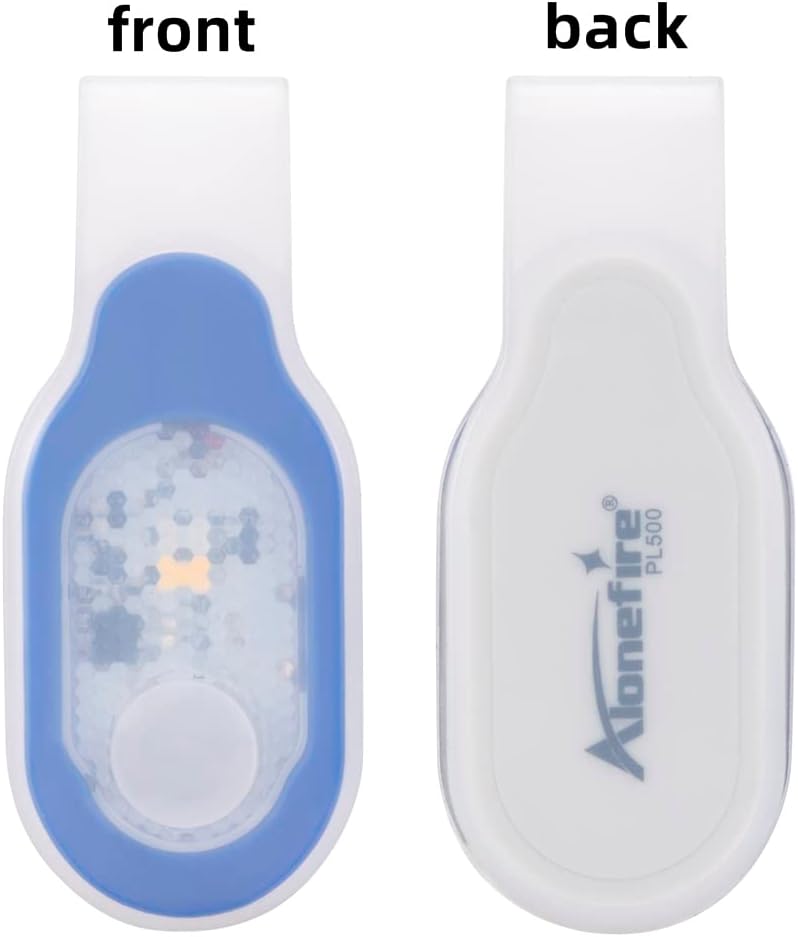
الامام والخلف view of the ALONEFIRE PL500, highlighting the magnetic attachment point on the back.

The ALONEFIRE PL500 demonstrating its white and red light modes in different usage scenarios.

The ALONEFIRE PL500 securely clipped onto a denim jacket, demonstrating its hands-free utility.
ماذا يوجد في الصندوق
Upon opening your ALONEFIRE PL500 package, you will find the following items:
- ALONEFIRE PL500 Clip-on Light
- سلك شحن USB
- Keychain Light (Bonus Item)

The complete contents of the ALONEFIRE PL500 package, including the light, charging cable, and bonus keychain light.
يثبت
Before first use, it is recommended to fully charge your ALONEFIRE PL500 Clip-on Light. To do this, you will need to remove the light unit from its silicone outer shell. This process is straightforward:
- Gently peel back the silicone shell from one end of the light unit.
- Slide the light unit completely out of the silicone casing.
- Locate the micro-USB charging port on the side of the light unit.
- Connect the provided USB charging cable to the light unit and a power source.
Once charged, reinsert the light unit into the silicone shell, ensuring it is properly seated and protected.
تعليمات التشغيل
The ALONEFIRE PL500 features a simple one-hand operation push button switch to control its functions.
- تشغيل/إيقاف: Press the button once to turn the light on. Press and hold the button for a few seconds to turn the light off.
- أوضاع التغيير: While the light is on, press the button repeatedly to cycle through the three available modes: warm light, red light, and flashing red light.

A hand demonstrating how to press the button on the ALONEFIRE PL500 to cycle through light modes.

A visual comparison showing the difference between warm light and white light emitted by the ALONEFIRE PL500.
شحن الجهاز
The ALONEFIRE PL500 is equipped with a rechargeable battery for extended use. Follow these steps to charge your device:
- Remove the light unit from its silicone shell. This is crucial for accessing the charging port.
- Insert the micro-USB end of the provided charging cable into the charging port on the light unit.
- Connect the USB-A end of the cable to a compatible power source (e.g., computer USB port, wall adapter, power bank).
- The indicator light on the unit will turn red while charging and will turn off or change color (depending on the model) when fully charged.
- Once charging is complete, disconnect the cable and carefully reinsert the light unit into its silicone shell.

The ALONEFIRE PL500 light unit detached from its silicone casing, ready for USB charging.
Note: There are no official seller videos available for embedding that demonstrate the charging process. The instructions above provide a detailed guide.
صيانة
To ensure the longevity and optimal performance of your ALONEFIRE PL500 Clip-on Light, follow these maintenance guidelines:
- تنظيف: Wipe the light and its silicone shell with a soft, damp قماش. تجنب استخدام المواد الكيميائية القاسية أو المواد الكاشطة التي قد تلحق الضرر بالسطح.
- العناية بالبطارية: To extend battery life, charge the light promptly when its brightness diminishes. Avoid completely draining the battery before recharging.
- تخزين: Store the light in a cool, dry place away from direct sunlight and extreme temperatures when not in use for extended periods.
استكشاف الأخطاء وإصلاحها
If you encounter any issues with your ALONEFIRE PL500, refer to the following common troubleshooting tips:
- الضوء لا يعمل:
- Ensure the battery is charged. Connect it to a power source and check the charging indicator.
- اضغط مع الاستمرار على زر التشغيل لبضع ثوانٍ للتأكد من أنه ليس مجرد ضغطة سريعة.
- الضوء لا يشحن:
- Verify that the light unit is fully removed from the silicone shell before attempting to charge.
- Check the USB cable for any damage and ensure it's securely connected to both the light and the power source.
- جرب منفذ USB أو محول طاقة مختلفًا.
- Light is Dim:
- The battery level is likely low. Recharge the device fully.
تحديد
| ميزة | التفاصيل |
|---|---|
| رقم الموديل | PL500 |
| لون | Blue_White Light |
| مصدر الطاقة | تعمل بالبطارية |
| نوع مصدر الضوء | قاد |
| مادة | نظام ABS |
| سطوع اللون الأبيض | 20 لومن |
| تكوين خلية البطارية | أيون الليثيوم |
| وقت التشغيل | 5 ساعات |
| أبعاد المنتج (الطول × العرض × الارتفاع) | 3.15 بوصة × 0.78 بوصة × 1.38 بوصة (79 مم × 19 مم × 34 مم) |
| وزن العنصر | 0.634 أونصة (0.02 كجم) |
| مستوى مقاومة الماء | غير مقاوم للماء |
| المميزات الخاصة | Adjustable Light Modes, Durable, Lightweight, Magnetic, Rechargeable |

Detailed dimensions of the ALONEFIRE PL500 for reference.
الضمان والدعم
The ALONEFIRE PL500 Clip-on Light comes with a Full Warranty, ensuring peace of mind regarding your purchase. For any questions, technical support, or warranty claims, please refer to the contact information provided with your product packaging or visit the official ALONEFIRE website. Keeping your purchase receipt is recommended for warranty purposes.
Ask a question about this manual
Ask about setup, troubleshooting, compatibility, parts, safety, or missing instructions. Manuals+ will review the question and use this page’s manual context to help answer it.