
مقدمة
This manual provides essential information for the safe and efficient operation of your E-Lektron Live Power Mixer ST-62P. Please read it thoroughly before using the device and keep it for future reference.
تعليمات السلامة الهامة
- مزود الطاقة: Connect the mixer only to a grounded AC outlet with the specified voltage (230 Volts). Ensure the power cable is not damaged or pinched.
- تهوية: لا تسد فتحات التهوية. تأكد من تدفق الهواء الكافي حول الجهاز لمنع ارتفاع درجة حرارته.
- رُطُوبَة: Do not expose the unit to rain, moisture, or liquids. Avoid placing liquid-filled objects on the mixer.
- الخدمة: لا تحاول خدمة هذا المنتج بنفسك. قم بإحالة جميع أعمال الصيانة إلى أفراد الخدمة المؤهلين.
- الموقع: Place the mixer on a stable, flat surface. Avoid extreme temperatures, direct sunlight, and strong vibrations.
- تنظيف: افصل التيار الكهربائي قبل التنظيف. استخدم قطعة قماش جافة وناعمة. لا تستخدم المنظفات السائلة أو البخاخات.
المنتج انتهىview
The E-Lektron ST-62P is a versatile live power mixer designed for various audio applications. It features multiple input channels, an integrated amplifier, a media player with Bluetooth, and built-in effects.
المميزات الرئيسية:
- Live mixer with 4 microphone or instrument channels, 2 stereo channels, stereo media player channel, and stereo CD/TAPE input.
- Features a powerful integrated amplifier, making the ST-62P central to any performance.
- Fully equipped with a media player, Bluetooth connectivity, channel monitoring, and echo/reverb effects.
- The versatile integrated media player supports playback from an SD card or USB stick, and streams music via Bluetooth from devices like mobile phones.
- The media player also includes a recording function.
- Integrated powerful amplifier with 2 x 250 W music power.
ضوابط اللوحة الأمامية:
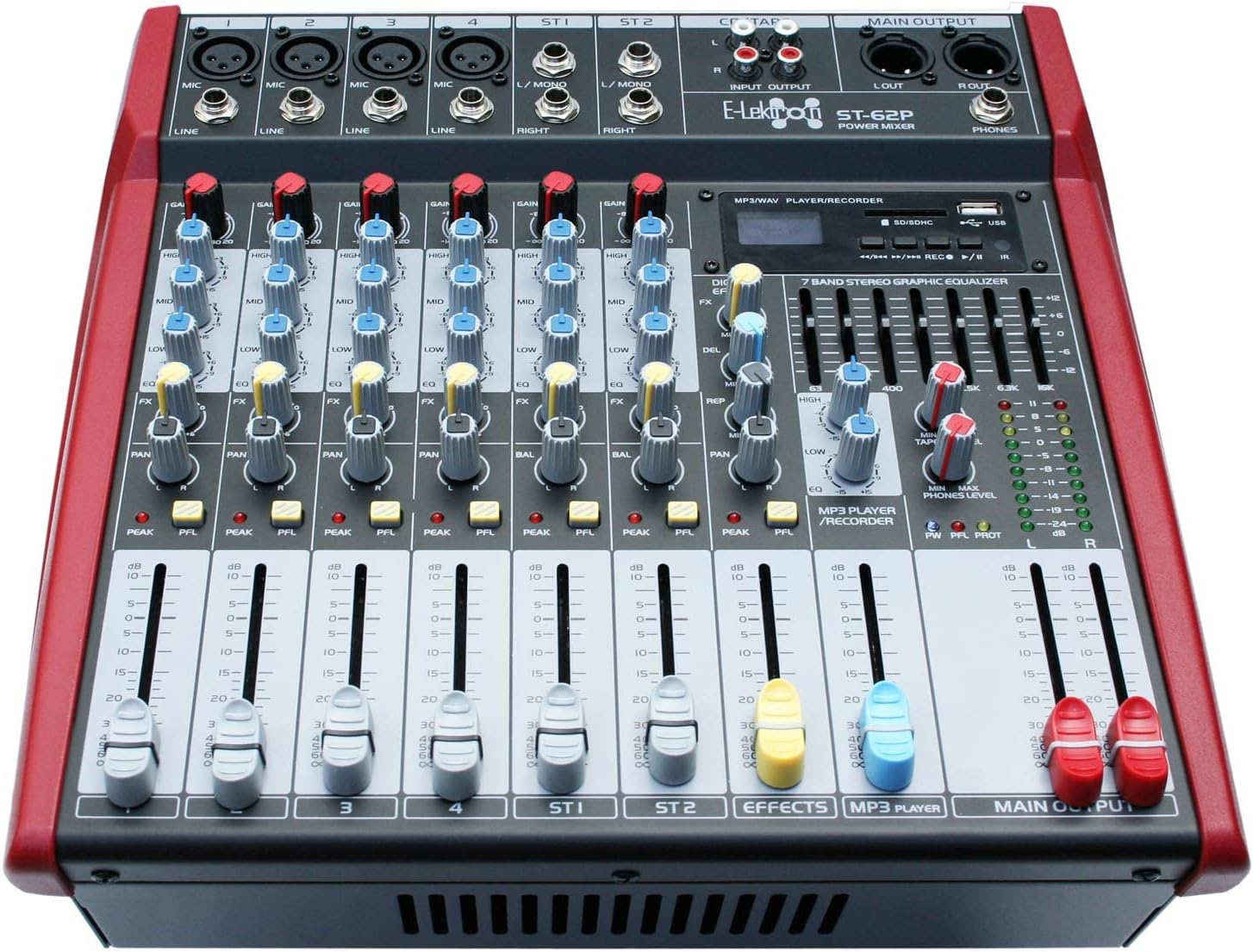
The front panel provides access to all mixing controls, including input gains, equalization, pan, effects sends, and channel faders. The integrated media player and 7-band stereo graphic equalizer are also located here.
يثبت
1. فك التعبئة:
Carefully remove the mixer from its packaging. Verify that all included components are present: the ST-62P mixer, power cable, and user manual.
2. توصيل الطاقة:
Connect the supplied power cable to the AC IN socket on the rear panel of the mixer and then to a suitable 230V AC grounded power outlet. Ensure the power switch is in the OFF position before connecting.
3. توصيلات الإدخال:
- مداخل الميكروفون/الخط (القنوات 1-4): Use XLR cables for microphones or 1/4-inch (6.35mm) jack cables for line-level instruments (e.g., keyboards, guitars with preampس).
- Stereo Inputs (ST1, ST2): Use 1/4-inch (6.35mm) jack cables for stereo line-level sources.
- CD/TAPE Input: Use RCA cables to connect external audio sources like CD players or tape decks.
4. توصيلات الإخراج:
- Speaker Outputs (AMP R OUT, AMP L OUT): Connect your passive speakers to these outputs using NL-2 Speaker plug cables. Ensure your speakers have a rated load impedance of 4 Ohms.
- المخرج الرئيسي (يسار/يمين): Use XLR cables to connect to external power ampأجهزة الرفع أو التسجيل.
- إخراج الهواتف: Connect headphones to the 1/4-inch (6.35mm) jack for monitoring.

تعليمات التشغيل
1. تشغيل / إيقاف التشغيل:
After all connections are made, switch the main power button on the rear panel to the ON position. To power off, switch the button to OFF and then disconnect the power cable.
2. عناصر التحكم في القناة:
- ربح: Adjusts the input sensitivity for each channel. Set this to achieve a strong signal without clipping (PEAK LED should not light up consistently).
- EQ (عالي، متوسط، منخفض): Three-band equalizer for tone shaping. Adjust HIGH for treble, MID for mid-range, and LOW for bass frequencies.
- العملات الأجنبية: يتحكم في كمية الإشارة المرسلة إلى معالج المؤثرات الداخلية.
- مقلاة/ميزان: Pans the mono signal left or right in the stereo field (PAN) or adjusts the balance of a stereo signal (BAL).
- PFL (الاستماع قبل التلاشي): Activates channel monitoring through headphones, independent of the channel fader.
- قناة فيدر: يقوم بضبط مستوى إخراج كل قناة على حدة ليتناسب مع المزيج الرئيسي.
3. Media Player Functions:
The integrated media player supports USB, SD card, and Bluetooth connectivity. It also has a recording function.
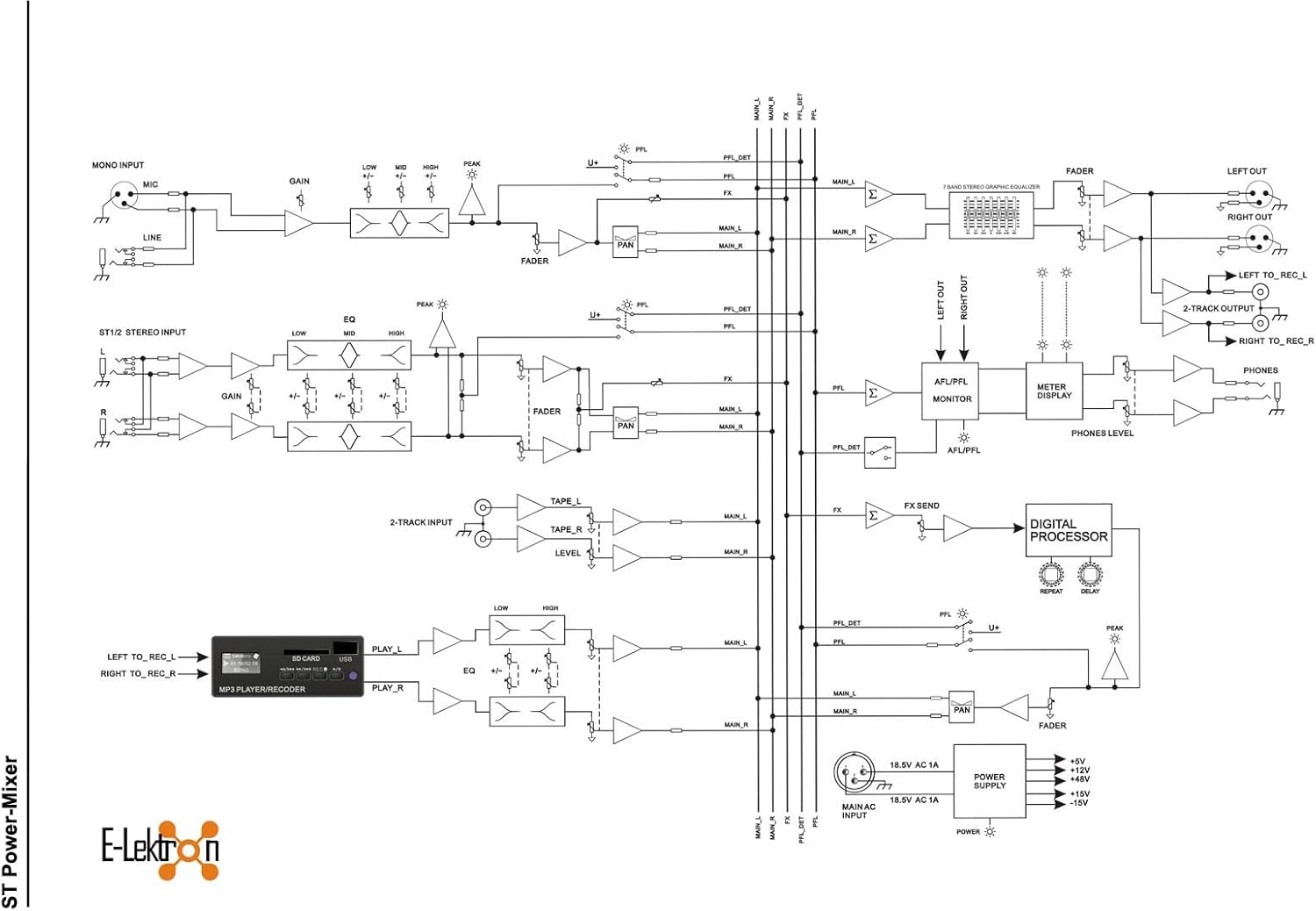
- تشغيل USB/SD: Insert a USB stick or SD card into the respective slot. Use the player controls (Play/Pause, Next, Previous) to navigate and play audio files.
- بلوتوث: Activate Bluetooth on your mobile device and search for the mixer. Pair the devices to stream audio wirelessly.
- تسجيل: The media player can record the main mix directly to a USB stick or SD card. Refer to the media player's specific controls for recording activation.
4. Effects Section:
The mixer includes built-in echo/reverb effects. Use the FX controls on each channel to send signal to the effects processor, and adjust the overall effect level with the dedicated FX RETURN fader.
5. معادل صوت ستيريو ذو 7 نطاقات:
Use the sliders on the 7-band graphic equalizer to fine-tune the overall frequency response of the main mix. Each slider corresponds to a specific frequency band, allowing you to boost or cut frequencies as needed.
6. Main Output:
The MAIN OUTPUT faders control the overall volume of the stereo mix. Adjust these to the desired listening level.
صيانة
تنظيف:
Regularly clean the exterior of the mixer with a soft, dry, lint-free cloth. Do not use abrasive cleaners, solvents, or waxes. Ensure no dust accumulates in the ventilation grilles.
تخزين:
When not in use for extended periods, store the mixer in a cool, dry place, away from direct sunlight and extreme temperatures. Cover the unit to protect it from dust.
استكشاف الأخطاء وإصلاحها
| مشكلة | السبب المحتمل | حل |
|---|---|---|
| لا يوجد طاقة | Power cable disconnected; Power switch off; Outlet fault | تحقق من توصيل كابل الطاقة؛ تأكد من أن مفتاح الطاقة في وضع التشغيل؛ اختبر المنفذ بجهاز آخر. |
| لا يوجد مخرج صوت | Main faders down; Channel faders down; Speaker cables disconnected; Amplifier off/faulty | Raise MAIN OUTPUT faders; Raise individual channel faders; Check speaker connections; Verify external amplifier (if used) is on and working. |
| صوت مشوه | GAIN too high; Input signal too strong; Speaker impedance mismatch | Reduce GAIN on input channels; Reduce input signal level from source; Ensure speakers are 4 Ohms. |
| البلوتوث غير متصل | Bluetooth not enabled on device; Mixer not in pairing mode; Interference | Ensure Bluetooth is active on your device; Check mixer's media player for Bluetooth mode; Move closer to the mixer or reduce other wireless devices. |
المواصفات الفنية
| ميزة | مواصفة |
|---|---|
| رقم الموديل | ST-62P |
| ماركة | إلكترون |
| الشركة المصنعة | E-Lektron |
| اسم نوع المنتج | لايف ميكسر |
| عدد القنوات | 6 |
| أبعاد المنتج (الطول × العرض × الارتفاع) | 32.2 × 32 × 15.3 سم |
| وزن العنصر | 7.2 كيلوغرام |
| تكنولوجيا الاتصال | مساعد، بلوتوث، USB |
| مصدر الطاقة | الكابلات الكهربائية |
| المجلدtage | 230 فولت |
| تكرار | 30000 هرتز |
| مدخل الصوت | إكس إل آر |
| نوع موصل الإخراج | NL-2 Speaker plug, XLR |
| المكونات المضمنة | Power cable, User manual, Mixer |

الضمان والدعم
E-Lektron provides a spare parts availability for 5 years from the date of purchase. For technical support or warranty claims, please contact your retailer or the E-Lektron customer service department. Keep your proof of purchase for warranty validation.