
1. المقدمة
This manual provides detailed instructions for the setup, operation, and maintenance of your XTUGA U-260 Dual Channel UHF Wireless Microphone System. Please read this manual thoroughly before using the product to ensure proper functionality and to maximize its lifespan. Retain this manual for future reference.
2. انتهى المنتجview
The XTUGA U-260 is a professional-grade dual UHF wireless microphone system designed for various applications including church events, karaoke, weddings, and other live events. It features a robust design, adjustable frequencies, and convenient auto-scan and IR pairing functions.
2.1. المكونات المضمنة
- U-260 UHF Wireless Receiver (1 unit)
- UHF Wireless Handheld Microphones (2 units)
- Antennas (2 units)
- محول طاقة (وحدة واحدة)
- دليل المستخدم (وحدة واحدة)
- Audio Cable (1 unit)
- Anti-skid Rings (2 units)
- Power Plugs (2 units)
- Power Cables (2 units)

Figure 2.1: All components included with the XTUGA U-260 Wireless Microphone System, including the receiver, two microphones, antennas, power adapter, cables, and anti-skid rings.
2.2. الميزات الرئيسية
- Dual UHF Channels: Two independent channels with 100 selectable frequencies each (Channel 1: 540.1 - 564.85 MHz; Channel 2: 568.1 - 592.85 MHz).
- Auto Scan Function: Automatically searches for the least interference channel.
- IR Synchronization: Seamlessly pairs the receiver and microphones.
- قفل التردد: Prevents accidental frequency changes.
- عملية بعيدة المدى: Up to 492ft (150 meters) operating distance.
- بناء متين: Microphones feature sturdy metal construction.
- جودة صوت فائقة: High-quality dynamic cartridge designed to limit feedback and interference.
- Rechargeable Microphones: Built-in lithium batteries provide up to 8 hours of use on a 3-hour charge via USB-C.
- Dashboard-Inspired Display: Receiver features a unique display for AF and RF signal indication.

Figure 2.2: The receiver's display screen, featuring a dashboard-inspired design for clear signal indication.
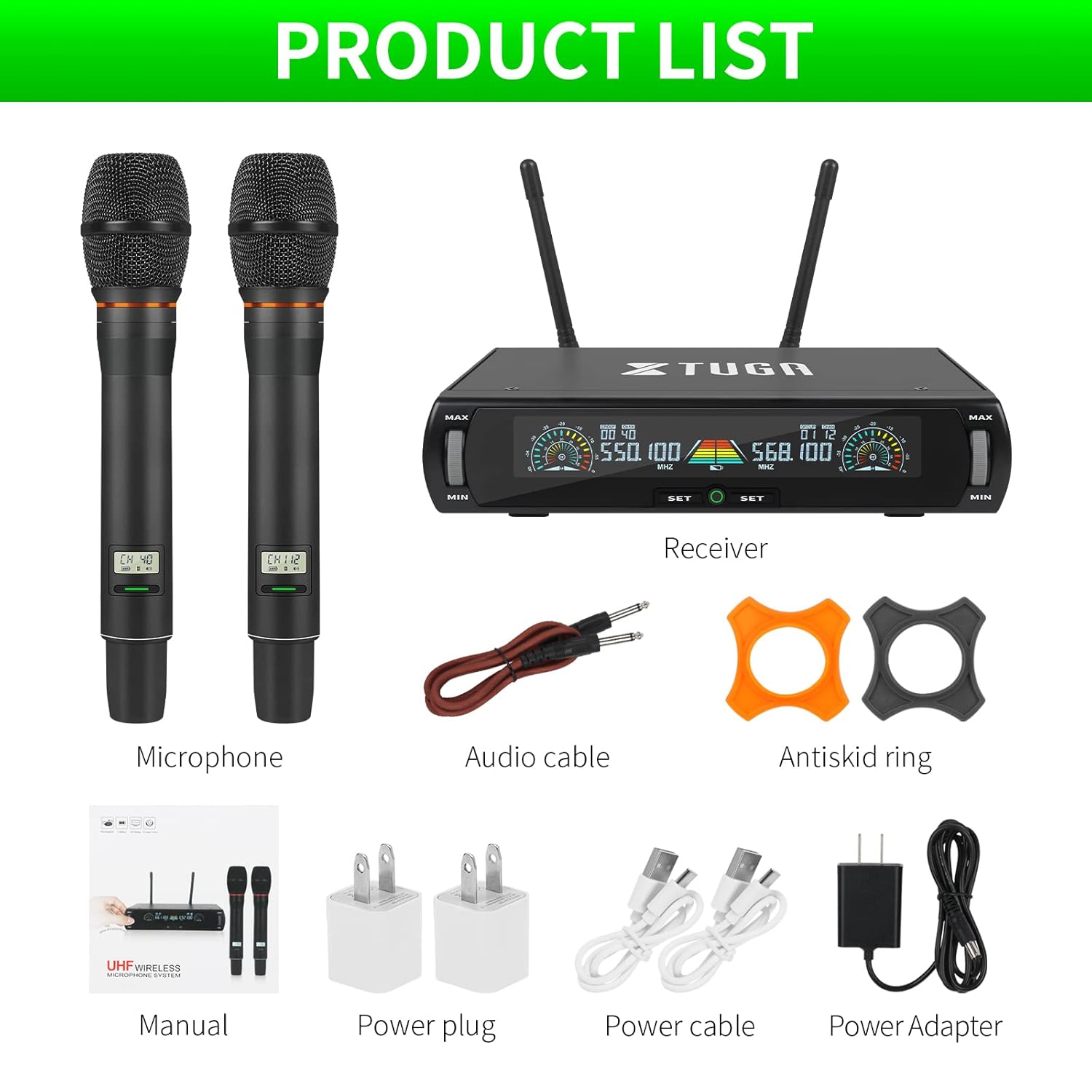
Figure 2.3: Illustration of the microphone's cardioid pickup pattern, designed to reduce noise and capture sound realistically.
2.3. تحديد المكون

الشكل 2.4: مفصل view of the receiver and microphone components.
- التحكم في مستوى الصوت
- Function settings button
- Switch (Power/Mode)
- شاشة العرض
- Power socket (DC 12V)
- مقبس هوائي
- خرج XLR
- Audio output (6.35mm/1/4 inch)
- Steel meshed head (Microphone)
- Display screen (Microphone)
- Switch (Microphone Power)
- Type-C charging port (Microphone)
3. تعليمات الإعداد
- فك مكونات الحزمة: قم بإزالة كافة العناصر من العبوة بعناية.
- ربط الهوائيات: Screw the two antennas into the antenna jacks on the rear of the receiver. Ensure they are securely tightened.
- توصيل الطاقة: Connect the power adapter to the receiver's power socket (DC 12V) and plug it into a suitable power outlet.
- مخرج الصوت:
- For balanced output, connect XLR cables from the receiver's XLR outputs to your mixer or ampمكبر.
- For unbalanced output, use the provided 6.35mm (1/4 inch) audio cable to connect the receiver's audio output to your mixer or ampمكبر.
- مستقبل الطاقة: Press the power switch on the receiver. The display screen should illuminate.
- Charge Microphones: Before first use, ensure both microphones are fully charged using the provided USB-C cables and power plugs. The microphone display will show charging status.
- تشغيل الميكروفونات: Press and hold the power switch on each microphone until its display illuminates.

Figure 3.1: The XTUGA U-260 system ready for operation, showing the receiver with antennas and two handheld microphones.
4. تعليمات التشغيل
4.1. Frequency Selection and IR Pairing
The system features an auto-scan function to find clear frequencies and IR synchronization for easy pairing.

Figure 4.1: Diagram illustrating the IR pairing process between the microphone and receiver.
- Initiate Auto Scan: On the receiver, press the "SET" button three times quickly for the desired microphone channel (left or right). The receiver will scan for the clearest available frequency.
- Select Frequency (Optional): If you wish to manually select a frequency after the scan, rotate the volume knob corresponding to the microphone channel you are adjusting.
- IR Pairing: Once a frequency is displayed on the receiver, hold the front of the microphone (where its display is located) close to the IR sensor on the receiver. The IR sensor is located on the bottom left side of the receiver's screen.
- تأكيد الاقتران: While holding the microphone near the IR sensor, press the "SET" button on the receiver once for the corresponding microphone channel. A small indicator light on the receiver should flash, and the microphone's display will update to show the new frequency, confirming successful pairing. This process may require a couple of attempts to ensure proper alignment and timing.
4.2. Frequency Lock Function
To prevent accidental changes to the selected frequency, use the frequency lock function.

Figure 4.2: Visual representation of the frequency lock function, showing a padlock icon.
- لقفل: Press and hold the "SET" button on the receiver for the desired microphone channel until a lock icon appears on the display.
- لإلغاء القفل: Press and hold the "SET" button again until the lock icon disappears.
4.3. التحكم في مستوى الصوت
Each microphone channel has an independent volume control knob on the receiver. Rotate the "MIN/MAX" knobs to adjust the output volume for each microphone.
4.4. Microphone Charging
The handheld microphones are equipped with built-in rechargeable lithium batteries.

Figure 4.3: Illustration of microphone battery life (8 hours work) and charging time (3 hours) via USB-C.
- Connect a USB-C cable to the charging port at the bottom of the microphone.
- Connect the other end of the USB-C cable to a power adapter or a USB power source.
- A dim red light on the microphone's display bar indicates charging. The light will turn off or change color when fully charged.
- A full charge typically takes approximately 3 hours and provides up to 8 hours of continuous use.
5. الصيانة
- تنظيف: استخدم قطعة قماش ناعمة وجافة لتنظيف جهاز الاستقبال والميكروفونات. لا تستخدم المنظفات السائلة أو المذيبات.
- تخزين: قم بتخزين النظام في مكان بارد وجاف بعيدًا عن أشعة الشمس المباشرة ودرجات الحرارة القصوى عندما لا يكون قيد الاستخدام.
- العناية بالبطارية: For optimal battery life, avoid fully discharging the microphones frequently. Recharge them regularly, especially if storing for extended periods.
- إدارة الكابلات: Ensure all cables are connected securely and are not strained or kinked.
6. استكشاف الأخطاء وإصلاحها
| مشكلة | السبب المحتمل | حل |
|---|---|---|
| لا يوجد إخراج صوت. |
|
|
| Interference or static noise. |
|
|
| لم يتم إقران الميكروفون. |
|
|
| Microphone battery drains quickly. |
|
|
7. المواصفات
| ميزة | التفاصيل |
|---|---|
| نموذج | يو-260 |
| ماركة | XTUGA |
| عامل شكل الميكروفون | نظام ميكروفون (محمول باليد) |
| تكنولوجيا الاتصال | لاسلكي UHF، XLR |
| عدد القنوات | 2 (2x100 selectable frequencies) |
| Frequency Range (Channel 1) | 540.1 - 564.85 ميجاهرتز |
| Frequency Range (Channel 2) | 568.1 - 592.85 ميجاهرتز |
| نطاق التشغيل | حتى 492 قدمًا (150 مترًا) |
| النمط القطبي | Unidirectional (Cardioid Pickup) |
| مقاومة | 600 أوم |
| إشارة إلى نسبة الضوضاء | 120 ديسيبل |
| مصدر طاقة الميكروفون | المدمج في بطارية ليثيوم قابلة للشحن |
| عمر بطارية الميكروفون | تصل إلى 8 ساعة |
| وقت شحن الميكروفون | حوالي 3 ساعات (عبر منفذ USB-C) |
| مصدر طاقة جهاز الاستقبال | محول طاقة تيار مستمر 12 فولت |
| مادة | Metal (Microphones) |
| المكونات المضمنة | Receiver, 2 Handheld Microphones, 2 Antennas, Power Adapter, User Manual, Audio Cable, Anti-skid Rings, Power Plugs, Power Cables |
| وزن العنصر | 2 كجم |
8. الضمان والدعم
XTUGA provides a one-year free warranty period for products with authentic brand logos. For any questions, technical assistance, or warranty claims, please contact XTUGA customer support through your purchase platform or the official XTUGA webموقع.
يرجى الاحتفاظ بإثبات الشراء للتحقق من صحة الضمان.