
1. المقدمة
This manual provides comprehensive instructions for the installation, operation, and maintenance of your SEMAITU Single Din Car Stereo. This unit features Apple CarPlay & Android Auto compatibility, a 7-inch motorized flip-out HD touchscreen, Bluetooth, Mirror Link, backup camera support, FM/USB/SWC/TF/AUX/Subwoofer connectivity, and more. Please read this manual thoroughly before use to ensure proper functionality and safety.
2. ماذا يوجد في الصندوق
عند فتح العبوة، يرجى التأكد من أن جميع المكونات المذكورة أدناه موجودة وفي حالة جيدة:
- 7 Inch HD Single Din Car Stereo
- خلفية عالية الدقة View Camera & Brackets & Frame
- Wire Harness & Disassembly Tool
- Backup Camera Cable & Camera Power Cable
- جهاز التحكم عن بعد
- ميكروفون علاق ميكروفون
- دليل المستخدم (هذا المستند)

Figure 2.1: Included Accessories and Main Unit.
3. الميزات الرئيسية
- المساعدون الصوتيون: Compatible with Apple CarPlay and Android Auto for voice-activated functions like navigation, calls, messages, and music. Features built-in noise-rejecting microphones.
- IPS HD Screen: 7-inch high-definition capacitive touch screen (1024x600 resolution) supporting 1920x1080P video playback. Includes 16-band EQ audio settings.
- Mirror Link & Bluetooth: Supports screen mirroring for Android & iOS devices. Built-in Bluetooth for hands-free calling and wireless audio streaming.
- ايه اتش دي خلفي View آلة تصوير: Equipped with an HD 170° viewing angle lens for wide rear visibility, night vision, and waterproof features. Automatically displays camera feed when reversing.
- Various Formats & AM/FM: Si 4755 Full band Radio with 18 FM and 12 AM station presets. Supports A2DP/AVCTP/AVDTP/AVRCP/HFP/SPP/ATT/GAP/GATT/RFCOMM/SDP/L2CAP formats.
- Motorized Flip-Out Screen: The 7-inch screen can adjust its angle from 60° to 100° and is auto-retractable.

الشكل 3.1: الجبهة view of the SEMAITU Single Din Car Stereo.
4. دليل التثبيت
Before beginning installation, ensure your vehicle's battery is disconnected to prevent electrical shorts. The unit is designed to fit most vehicles with a dashboard size of 188(W)*58(H)*154(D)mm.
4.1 مخطط الأسلاك
Refer to the detailed wiring diagram below for correct connections. Improper wiring can damage the unit or your vehicle's electrical system.

Figure 4.1: Wiring Method for the Car Stereo.
4.2 التثبيت المادي
- Remove your existing car stereo and dashboard trim.
- Connect the wire harness from the new unit to your vehicle's wiring, following the diagram in Figure 4.1.
- If installing the backup camera, route the camera cable from the rear of the vehicle to the stereo unit and connect it as per the diagram.
- Secure the car stereo unit into the dashboard opening.
- Reconnect the vehicle's battery and test the unit's functionality before reassembling the dashboard trim.
5. تعليمات التشغيل
5.1 Apple CarPlay و Android Auto
Connect your iPhone or Android phone via USB cable to enable Apple CarPlay or Android Auto. This allows access to navigation, calls, messages, and music directly from the stereo's touchscreen or via voice commands.
Video 5.1: Demonstration of Apple CarPlay and Android Auto functionality.

Figure 5.1: Apple CarPlay and Android Auto Interface.
5.2 رابط المرآة
The Mirror Link feature allows you to display your smartphone's screen content directly on the car stereo's display. Connect your phone via USB and follow the on-screen prompts to activate mirroring.

Figure 5.2: Mirror Link Functionality.
5.3 اتصال البلوتوث
Pair your mobile phone with the car stereo via Bluetooth for hands-free calling and wireless audio streaming. Navigate to the Bluetooth settings on the stereo, enable Bluetooth on your phone, and select "CAR-BT" (or similar) from the available devices to pair.
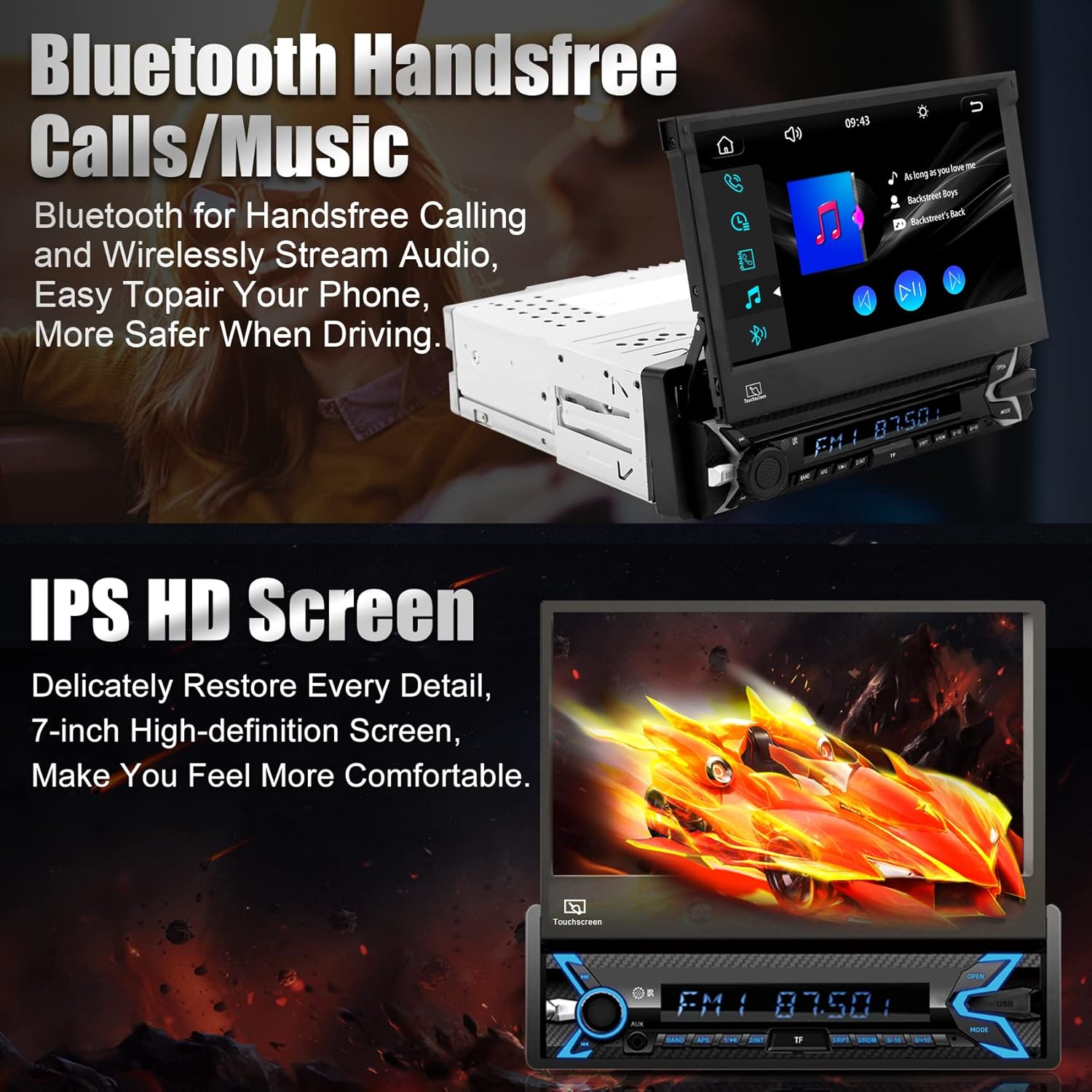
Figure 5.3: Bluetooth Hands-free Calls and Music.
5.4 Media Playback (SD/USB/AUX)
The unit supports various media inputs including TF (SD) card, USB, and AUX. Insert your media device into the corresponding port and select the input source from the main menu to play audio or video files.

Figure 5.4: Supported Media Inputs.
5.5 Radio (FM/AM)
Access the radio function to tune into FM and AM stations. The unit features a Si 4755 Full band Radio, allowing storage of up to 18 FM stations and 12 AM stations.

Figure 5.5: FM/AM Radio Interface.
5.6 Motorized Flip-Out Screen
The 7-inch screen is motorized and can be adjusted for optimal viewing angles (60° to 100°). Use the designated controls on the unit to extend, retract, or adjust the screen angle.

Figure 5.6: Motorized Flip-Out Screen Adjustment.
5.7 خلفي View آلة تصوير
When properly installed, the included AHD rear view camera automatically displays a wide-angle, high-definition view on the stereo screen when the vehicle is shifted into reverse. This feature aids in safe parking and maneuvering.

الشكل 5.7: خلفي View Camera Display.
5.8 DSP and EQ Settings
Customize your audio experience using the Digital Sound Processor (DSP) and 16-band Equalizer (EQ) settings. Access these options through the stereo's menu to adjust sound profiles, balance, fader, and more to your preference.

Figure 5.8: DSP and EQ Settings Interface.
6. المواصفات
| ميزة | التفاصيل |
|---|---|
| أبعاد المنتج | 188 × 58 × 154 ملم (7.40 × 2.28 × 6.06 بوصة) |
| وزن العنصر | 4.05 رطل (1.84 كجم) |
| رقم الموديل | TH0030 (Single Din Car Stereo) |
| حجم الشاشة | 7 بوصة |
| دقة الشاشة | 1024 × 600 عالية الدقة |
| تشغيل الفيديو | Supports 1920x1080P video |
| تكنولوجيا الاتصال | Bluetooth, USB Type A, RCA |
| المميزات الخاصة | Built-In Bluetooth, Touchscreen, Motorized Flip-Out Screen, Apple CarPlay, Android Auto, Mirror Link, Rear View Camera Support, SWC, TF/AUX/USB, DSP, FM/AM Radio |
| وضع إخراج الصوت | ستيريو (تكوين قناة الصوت المحيطي 5.1) |
| الشركة المصنعة | سيمايتو |
7. استكشاف الأخطاء وإصلاحها
If you encounter issues with your SEMAITU car stereo, please refer to the following common troubleshooting steps:
- لا يوجد طاقة: Check all power connections, including the main power wire (yellow), accessory wire (red), and ground wire (black). Ensure the vehicle's fuse for the stereo is not blown.
- لا يوجد صوت: Verify speaker connections are secure and correctly wired. Check the volume level and ensure the mute function is not activated. Confirm the audio source is correctly selected.
- الشاشة لا تستجيب: Try restarting the unit by turning off the vehicle's ignition and turning it back on. If the issue persists, a factory reset may be necessary (refer to the setup menu).
- عدم اتصال CarPlay/Android Auto: Ensure you are using a high-quality USB cable. Check your phone's settings for any prompts or permissions related to CarPlay/Android Auto. Try restarting both the phone and the stereo unit.
- كاميرا النسخ الاحتياطي لا تعرض: Verify the camera's power and video signal connections. Ensure the reverse trigger wire is correctly connected to the vehicle's reverse light circuit.
- مشكلات الاقتران بالبلوتوث: Delete previous pairings from both the stereo and your phone. Ensure Bluetooth is enabled on both devices and that the stereo is in pairing mode.
For more detailed troubleshooting or issues not covered here, please contact SEMAITU customer support.
8. الصيانة
لضمان طول العمر والأداء الأمثل لنظام ستيريو سيارتك، اتبع إرشادات الصيانة التالية:
- تنظيف الشاشة: استخدم قطعة قماش ناعمة وخالية من الوبر لمسح شاشة اللمس برفق. لإزالة البقع الصعبة، امسحها برفق.ampامسح الشاشة بقطعة قماش مبللة بالماء أو بمنظف آمن. تجنب المواد الكاشطة أو المواد الكيميائية القاسية.
- النظافة العامة: حافظ على جهازك خاليًا من الغبار والأوساخ. استخدم فرشاة ناعمة أو هواءً مضغوطًا للتنظيف حول الأزرار والمنافذ.
- درجة حرارة: تجنب تعريض الوحدة لدرجات حرارة شديدة، سواء ساخنة أو باردة، لفترات طويلة.
- تحديثات البرامج: التحقق بشكل دوري من الشركة المصنعة webالموقع الإلكتروني للاطلاع على أي تحديثات متاحة للبرامج الثابتة لتحسين الأداء وإضافة ميزات جديدة.
9. الضمان والدعم
Your SEMAITU car stereo is backed by a commitment to quality. For any questions regarding installation, operation, or warranty claims, please contact SEMAITU customer support. We provide 24/7 online support to assist you.
يمكنك أيضًا الرجوع إلى دليل المستخدم الرسمي بصيغة PDF للحصول على معلومات إضافية: SEMAITU User Guide (PDF)
For direct support, please visit the SEMAITU storefront on Amazon or use the "Ask a question" feature on the product page.