
1. المقدمة
This manual provides essential information for the proper installation, configuration, and operation of your Teltonika RUT951 4G LTE Router. The RUT951 is a robust industrial cellular router designed for professional applications, offering reliable internet connectivity via 4G LTE, Wi-Fi, and Ethernet. It features dual-SIM support for network redundancy and is powered by RutOS, providing advanced customization and security features.
2. انتهى المنتجview
2.1 الميزات الرئيسية
- Dual-SIM 4G LTE cellular connectivity for reliable network access.
- Integrated Wi-Fi (802.11b/g/n) for local wireless networking.
- Four Ethernet interfaces (3x LAN, 1x WAN) for wired connections.
- Powered by RutOS for advanced customization, automation, and security.
- Robust design suitable for various IoT and industrial scenarios.
2.2 محتويات العبوة
The standard package for the Teltonika RUT951 router typically includes:
- Teltonika RUT951 Router Unit
- محول الطاقة
- 2 x Mobile Antennas (SMA)
- 2 x Wi-Fi Antennas (RP-SMA)
- كابل إيثرنت
- دليل البدء السريع
2.3 Router Layout
Familiarize yourself with the router's ports, indicators, and slots.
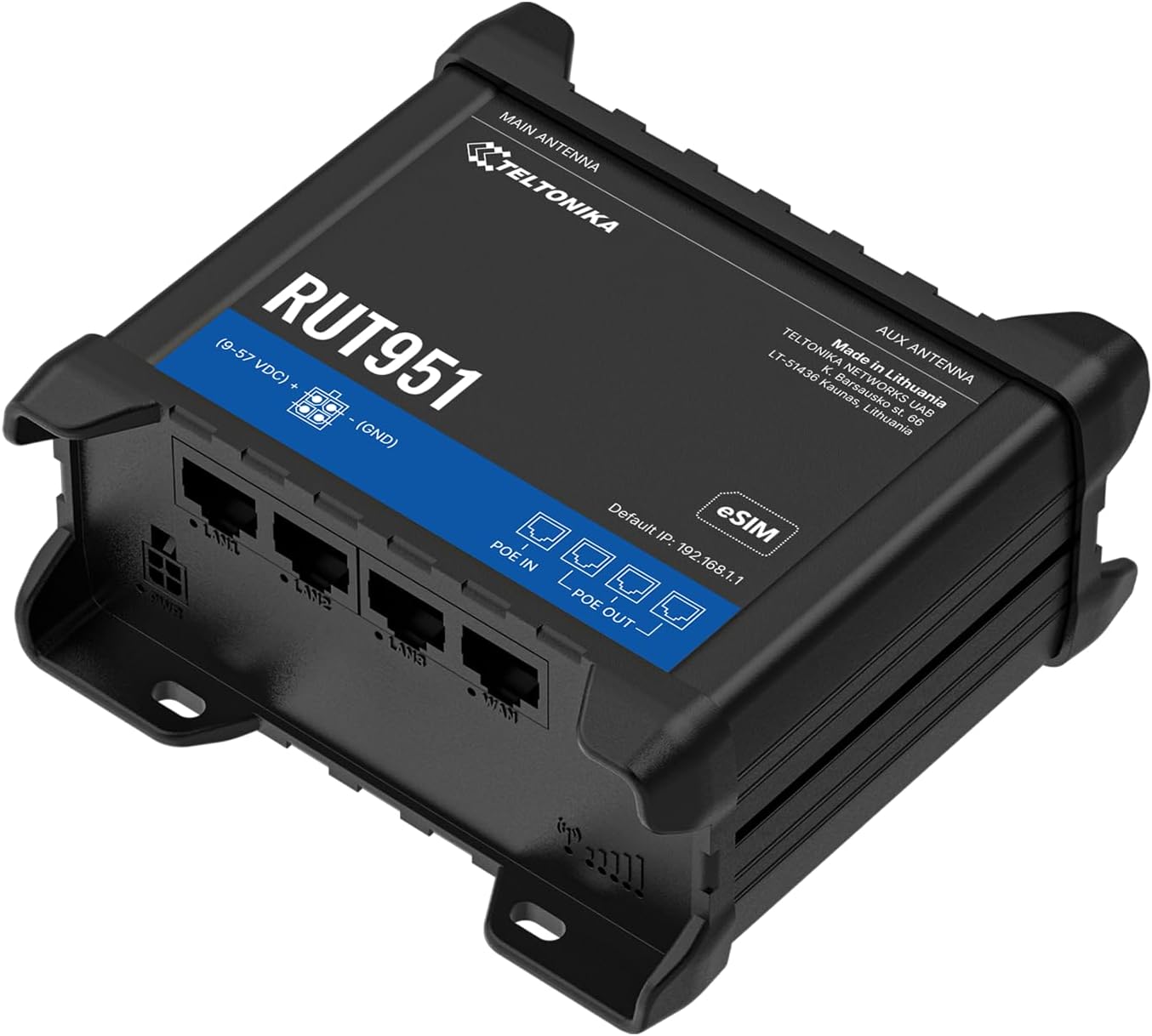
الشكل 1: أمام view of the Teltonika RUT951 router, showing the model name and general design.

الشكل 2: Detailed diagram illustrating the various ports and indicators on the Teltonika RUT951 router, including mobile and Wi-Fi antenna connectors, SIM slots, Ethernet ports, power socket, and LED indicators.
- Mobile AUX Antenna Connector (SMA female): For secondary mobile antenna.
- Mobile MAIN Antenna Connector (SMA female): For primary mobile antenna.
- SIM1 / SIM2 Slots: For inserting cellular SIM cards.
- زر إعادة الضبط: To restore factory settings or reboot.
- Wi-Fi Antenna Connectors (RP-SMA female): For Wi-Fi antennas.
- مقبس طاقة: لتوصيل محول الطاقة.
- منافذ إيثرنت LAN: لتوصيل أجهزة الشبكة المحلية.
- منفذ إيثرنت WAN: For connecting to an external network (e.g., fiber modem).
- مؤشرات LED لقوة إشارة الهاتف المحمول: حدد قوة الإشارة الخلوية.
- Mobile Connection Status LED: Indicates cellular connection status.
- المصابيح LAN: أشر إلى النشاط على منافذ الشبكة المحلية.
- مؤشر WAN LED: Indicates activity on the WAN port.
3. تعليمات الإعداد
3.1 تركيب بطاقة SIM
- Locate the SIM card slots (SIM1 and SIM2) on the top panel of the router.
- Using a SIM ejector tool or a paperclip, gently press the small button next to the SIM slot to open it.
- Insert your activated Mini-SIM card(s) into the slot(s) with the gold contacts facing down and the notched corner oriented correctly.
- Push the SIM tray back into the router until it clicks into place.

الشكل 3: قمة view of the RUT951, highlighting the SIM card slots and antenna connectors.
3.2 اتصال الهوائي
- Screw the two mobile antennas onto the SMA connectors labeled 'MOBILE' (MAIN and AUX) on the top panel.
- Screw the two Wi-Fi antennas onto the RP-SMA connectors labeled 'WIFI' on the top panel.
- Ensure all antennas are securely tightened for optimal signal reception.
3.3 توصيل الطاقة
- Connect the provided power adapter to the power socket on the router.
- قم بتوصيل الطرف الآخر من محول الطاقة بمنفذ طاقة مناسب.
- The router will power on automatically. Observe the power LED indicator.

الشكل 4: قاع view of the RUT951, showing the Ethernet ports and power input.
3.4 اتصال إيثرنت
To connect a device directly to the router:
- Connect one end of an Ethernet cable to any of the LAN ports (LAN1, LAN2, LAN3) on the router.
- Connect the other end of the Ethernet cable to your computer or network device.
- If you are using the router as a WAN gateway, connect your external modem (e.g., fiber modem) to the WAN port.
4. تعليمات التشغيل
4.1 الوصول الأولي إلى WebUI
- Ensure your computer is connected to the router via Ethernet or Wi-Fi. The default Wi-Fi SSID and password can be found on the router's label.
- افتح web المتصفح وأدخل عنوان IP الافتراضي: 192.168.1.1
- You will be prompted for login credentials. The default username is مسؤل. The default password is also مسؤل (or as specified on the router's label).
- Upon first login, you will be guided through a setup wizard to change the default password and configure basic settings.
4.2 تكوين الشبكة
After initial login, you can configure various network settings through the Webواجهة المستخدم:
- إعدادات الشبكة الواسعة (WAN): Configure your cellular (4G LTE) connection, including APN settings, or set up the Ethernet WAN port.
- إعدادات الشبكة المحلية: Manage the local network IP address range and DHCP server.
- اعدادات الواي فاي: Change Wi-Fi SSID, password, security protocols, and channel settings.
- ذو شريحتين: Configure failover or load balancing between the two SIM cards for continuous connectivity.
- شبكة VPN: Set up various VPN protocols for secure remote access.
5. الصيانة
5.1 تحديثات البرامج الثابتة
Regularly updating the router's firmware is crucial for security, performance, and new features. Firmware updates can be performed via the WebUI under the 'System' or 'Firmware' section. Always download firmware from the official Teltonika Networks webموقع.
5.2 إعادة ضبط المصنع
إذا واجهت مشاكل مستمرة أو نسيت بيانات تسجيل الدخول الخاصة بك، يمكنك إجراء إعادة ضبط المصنع:
- With the router powered on, locate the RESET button (refer to Figure 2).
- Press and hold the RESET button for approximately 10 seconds until all LEDs flash.
- حرر الزر. سيعاد تشغيل جهاز التوجيه بإعدادات المصنع الافتراضية.
6. استكشاف الأخطاء وإصلاحها
- لا يوجد اتصال بالإنترنت:
- Check SIM card insertion and activation.
- التحقق من إعدادات APN في WebUI.
- Ensure mobile antennas are securely connected.
- Check cellular signal strength LEDs.
- شبكة الواي فاي لا تعمل:
- تأكد من تفعيل الواي فاي في WebUI.
- Check Wi-Fi antenna connections.
- تحقق من اسم شبكة Wi-Fi (SSID) وكلمة المرور.
- لا يمكن الوصول Webواجهة المستخدم:
- Ensure your device is connected to the router (Ethernet or Wi-Fi).
- Verify your computer's IP settings (should be set to obtain IP automatically).
- حاول مسح ذاكرة التخزين المؤقت للمتصفح الخاص بك أو استخدام متصفح آخر.
- Perform a factory reset if you suspect incorrect IP configuration or forgotten password.
7. المواصفات
| ميزة | مواصفة |
|---|---|
| ماركة | تيلتونيكا |
| اسم الموديل | RUT951 |
| تكنولوجيا الاتصال | Wi-Fi, 4G LTE, 3G, 2G |
| معيار الاتصال اللاسلكي | 802.11b، 802.11g، 802.11n |
| فئة نطاق التردد | النطاق المزدوج |
| عدد المنافذ | 4 (3x LAN, 1x WAN) |
| عرض النطاق الترددي لمنفذ LAN | 100 ميجابايت في الثانية |
| معدل نقل البيانات | 150 Megabits Per Second (Max Upstream) |
| نظام التشغيل | RutOS |
| وزن العنصر | 287 جرام |
| المجلدtage | 30 فولت |
| بروتوكول الأمان | WPS (and others via RutOS) |
| التغطية | Dual SIM network redundancy |
8. معلومات السلامة
- استخدم فقط محول الطاقة المرفق بالجهاز.
- لا تعرض الجهاز للماء أو الرطوبة أو درجات الحرارة العالية.
- تجنب وضع الجهاز بالقرب من مصادر الحرارة أو تحت أشعة الشمس المباشرة.
- تأكد من التهوية المناسبة لمنع ارتفاع درجة الحرارة.
- Do not attempt to open or modify the device. This will void the warranty.
- تخلص من الجهاز وملحقاته بطريقة مسؤولة وفقًا للوائح المحلية.
9. الضمان والدعم
The Teltonika RUT951 router comes with a standard manufacturer's warranty. For detailed warranty terms and conditions, please refer to the documentation included with your product or visit the official Teltonika Networks website. For technical support, firmware downloads, and additional resources, please visit the Teltonika Networks support portal or contact your vendor.