
LiebeWH TOWSM1-100
LiebeWH WiFi Smart Circuit Breaker TOWSM1-100 16A User Manual
Model: TOWSM1-100 | Current Rating: 16A
1. المقدمة
This manual provides essential information for the safe and effective use of your LiebeWH WiFi Smart Circuit Breaker, model TOWSM1-100 16A. This device is designed to offer advanced electrical protection and smart control capabilities for various applications.
The smart circuit breaker integrates overload, short-circuit, over-voltagه، وتحت المجلدtage protection. It supports remote control via a dedicated mobile application and voice control through compatible smart terminals, enhancing convenience and safety in your electrical system.
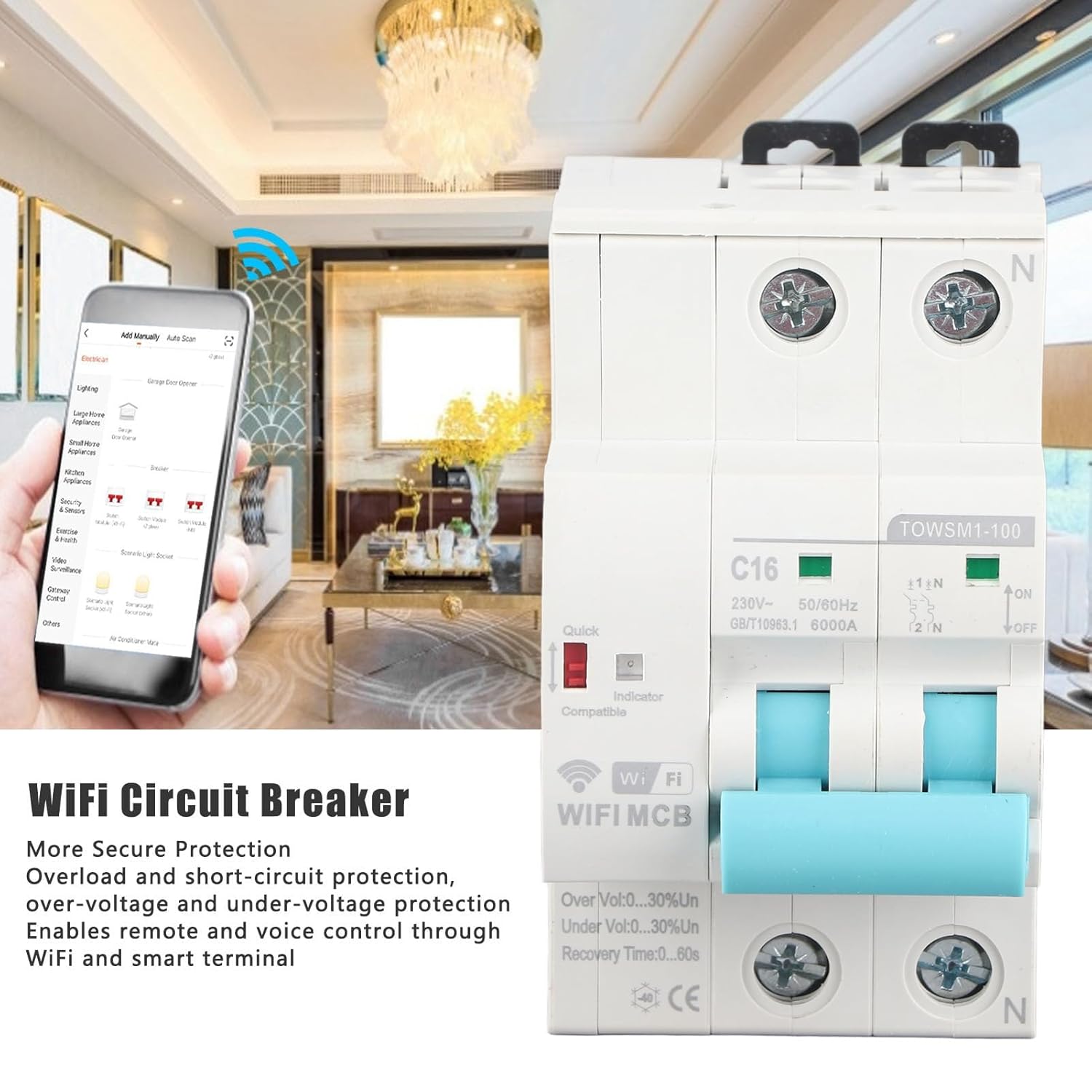
Image 1.1: LiebeWH WiFi Smart Circuit Breaker with remote control via smartphone app.
2. معلومات السلامة
تحذير: Electrical installation and maintenance should only be performed by qualified personnel in accordance with all local and national electrical codes and regulations. Failure to comply with these instructions can result in electric shock, fire, serious injury, or death.
- افصل دائمًا الطاقة عن لوحة الخدمة الرئيسية قبل تثبيت قاطع الدائرة أو صيانته.
- تأكد من التأريض السليم وتوصيلات الأسلاك الصحيحة.
- لا تقم بتشغيل الجهاز إذا كان يبدو تالفًا.
- لا تتجاوز الحجم المقدرtage and current specifications of the device.
- احتفظ بالجهاز بعيدًا عن الماء والرطوبة الزائدة.
3. انتهى المنتجview
The LiebeWH TOWSM1-100 16A is a 2-pole smart circuit breaker designed for DIN rail mounting. It features clear indicators for its status and protection mechanisms.

الصورة 3.1: الجبهة view of the circuit breaker.
المكونات الرئيسية:
- القاطع الرئيسي: Lever for manual ON/OFF operation.
- مؤشر الطاقة: يظهر حالة الطاقة.
- مؤشر واي فاي: Displays the WiFi connection status.
- Quick Indicator: Red indicator for quick trip status.
- محطات: Input and output terminals for wiring connections.
- مشبك تثبيت على سكة DIN: للتثبيت الآمن على سكة DIN القياسية.

Image 3.2: Close-up of indicators and switch, showing 'ON' and 'OFF' positions, 'C16' rating, and 'TOWSM1-100' model.
4. الإعداد والتثبيت
Proper installation is crucial for the safe and reliable operation of the smart circuit breaker. Always ensure power is disconnected before beginning installation.
4.1 Mechanical Installation (DIN Rail Mounting)
- Ensure the main power supply is OFF.
- Locate a suitable position on a standard DIN rail within your electrical panel.
- Engage the top clip of the circuit breaker onto the DIN rail.
- Press the bottom part of the circuit breaker firmly until the bottom clip snaps onto the DIN rail, securing the device in place.

Image 4.1: DIN rail mounting diagram, illustrating 'Tilt Out' and 'Pull Down' actions.
4.2 الأسلاك الكهربائية
- With power still OFF, connect the incoming live (L) and neutral (N) wires to the upper terminals of the circuit breaker.
- Connect the outgoing load live (L) and neutral (N) wires to the lower terminals of the circuit breaker.
- Ensure all wire connections are tight and secure to prevent loose contacts and overheating.
- Verify that the wiring matches the circuit diagram and local electrical standards.

Image 4.2: Close-up of wiring terminals for secure connections.
4.3 App Pairing and Network Connection
- Download the compatible smart home application (e.g., Tuya Smart, Smart Life) from your smartphone's app store.
- تسجيل أو تسجيل الدخول إلى حسابك.
- Power on the circuit breaker. The WiFi indicator should start blinking, indicating it's in pairing mode. If not, refer to the app's instructions for manual pairing mode activation.
- In the app, select "Add Device" or the '+' icon, then choose "Electrical" or "Circuit Breaker".
- اتبع التعليمات التي تظهر على الشاشة لتوصيل الجهاز بشبكة الواي فاي بتردد 2.4 جيجاهرتز.
- Once successfully paired, the WiFi indicator will become solid, and the device will appear in your app.
5. تعليمات التشغيل
5.1 التشغيل اليدوي
- To turn the circuit breaker ON, push the lever upwards to the 'ON' position.
- To turn the circuit breaker OFF, push the lever downwards to the 'OFF' position.
5.2 التحكم عن بعد عبر التطبيق
- افتح تطبيق المنزل الذكي على هاتفك الذكي.
- Select the LiebeWH WiFi Smart Circuit Breaker from your device list.
- Use the virtual switch or controls within the app to turn the circuit breaker ON or OFF remotely.
- The app also provides real-time monitoring of power status and protection events.
5.3 التحكم الصوتي
If integrated with a compatible voice assistant (e.g., Amazon Alexa, Google Assistant), you can control the circuit breaker using voice commands. Refer to your voice assistant's setup guide for connecting smart home devices.
- Example commands: "Alexa, turn on the living room circuit breaker." or "Hey Google, turn off the water heater."
5.4 Automatic Reclosing and Protection Features
The circuit breaker is equipped with automatic reclosing functionality and various protection features:
- حماية من التحميل الزائد: Automatically trips when the current exceeds the rated capacity (16A).
- حماية ماس كهربائى: Trips instantly in case of a short circuit.
- زيادة الحجمtagهـ- الحماية: يحمي الأجهزة المتصلة من الجهد الزائدtage.
- تحت المجلدtagهـ- الحماية: Protects connected devices from insufficient voltage.
- Automatic Reclosing: After a trip event (e.g., temporary overload), the device can automatically attempt to reclose after a configurable recovery time (0-60 seconds), if the fault condition is no longer present. This feature helps maintain continuous power supply where appropriate.
6. الصيانة
The LiebeWH WiFi Smart Circuit Breaker is designed for minimal maintenance. However, periodic checks are recommended to ensure optimal performance and safety.
- التفتيش البصري: قم بفحص قاطع الدائرة بشكل دوري بحثًا عن أي علامات تشير إلى حدوث تلف مادي أو تغير في اللون أو توصيلات فضفاضة.
- تنظيف: If necessary, gently clean the exterior of the device with a dry, soft cloth. Do not use liquid cleaners or solvents.
- فحص الوظائف: Test the manual ON/OFF switch periodically to ensure it operates smoothly.
- تحديثات البرامج الثابتة: Check the smart home application for any available firmware updates for the device to ensure you have the latest features and security enhancements.
For any internal maintenance or repairs, contact a qualified electrician or the manufacturer's support.
7. استكشاف الأخطاء وإصلاحها
| مشكلة | السبب المحتمل | حل |
|---|---|---|
| الجهاز لا يعمل. | لا يوجد مصدر للطاقة؛ الأسلاك غير صحيحة؛ عطل في الجهاز. | Check main power supply. Verify wiring connections. If problem persists, contact support. |
| WiFi indicator is off or blinking slowly. | No WiFi connection; incorrect network settings; device not in pairing mode. | Ensure 2.4GHz WiFi is active. Re-enter pairing mode (refer to app instructions). Check router distance. |
| قواطع الدائرة تتعطل بشكل متكرر. | Overload; short circuit; over/under voltage; faulty appliance. | Reduce load on the circuit. Disconnect appliances to identify faulty ones. Consult an electrician to check for wiring issues. |
| جهاز التحكم عن بعد لا يعمل. | No internet connection; app issue; device offline. | Check your smartphone's internet connection. Ensure the circuit breaker's WiFi indicator is solid. Restart the app. |
8. المواصفات
| ميزة | مواصفة |
|---|---|
| نموذج | TOWSM1-100 |
| التيار المقدر | 16 أمبير |
| تصنيف المجلدtage | تيار متردد 230 فولت |
| تكرار | 50/60 هرتز |
| Ultimate Breaking Capacity (ICU) | 6000 أمبير |
| طريقة التثبيت | دين السكك الحديدية |
| وقت التعافي | 0-60 ثانية |
| مادة | نظام ABS |
| الأبعاد (العبوة) | 10.1 × 8.7 × 5.9 سم |
| الوزن (الحزمة) | 350 جرام |
| الشركة المصنعة | ليبيWH |
| رقم قطعة الشركة المصنعة | LiebeWHqg8v3fzo4p-11 |

Image 8.1: Wide application of the LiebeWH WiFi Smart Circuit Breaker.
9. معلومات الضمان
Specific warranty details for the LiebeWH TOWSM1-100 16A WiFi Smart Circuit Breaker are not provided in the product information. Please refer to the retailer's return policy or contact the manufacturer directly for warranty terms and conditions.
10. الدعم
For technical assistance, troubleshooting beyond this manual, or inquiries regarding your LiebeWH WiFi Smart Circuit Breaker, please contact your point of purchase or the manufacturer's customer support channels.
- الشركة المصنعة: ليبيWH
- الموارد المتاحة على الإنترنت: Check the LiebeWH official website or the smart home app's help section for FAQs and additional support.
Ask a question about this manual
Ask about setup, troubleshooting, compatibility, parts, safety, or missing instructions. Manuals+ will review the question and use this page’s manual context to help answer it.