
1. المقدمة
The Saramonic Blink 100 B5 is an ultra-portable and easy-to-use 2.4GHz wireless microphone system designed to deliver broadcast-quality sound. This system is ideal for content creators using iPhone 15, Android smartphones and tablets, newer iPads, computers, and other devices equipped with a USB-C port. Its compact design and advanced features make it suitable for various applications, including video recording, streaming, and audio recording.

2. ماذا يوجد في الصندوق
- 1 x Blink 100 TX Transmitter
- 1 x Blink 100 RXUC USB-C Receiver
- 1 x Furry Windscreen for TX
- كابل شحن 1 x USB-C
- 1 × حمل الحقيبة

3. مكونات أكثرview
3.1. جهاز إرسال Blink 100 TX
- Built-in Omnidirectional Microphone: Captures clear audio.
- فروي الزجاج الأمامي: Reduces wind noise for outdoor use.
- زر الطاقة: اضغط مع الاستمرار للتشغيل / إيقاف التشغيل.
- زر كتم الصوت: اضغط لكتم/إلغاء كتم صوت الميكروفون.
- NR (Noise Reduction) Button: Press to activate/deactivate active noise cancellation.
- Gain Control (+/-) Buttons: Adjust microphone input level (12-step control).
- مدخل TRS مقاس 3.5 مم: For connecting external lavalier microphones or line-level audio sources.
- منفذ شحن USB-C: For charging the transmitter's internal battery.

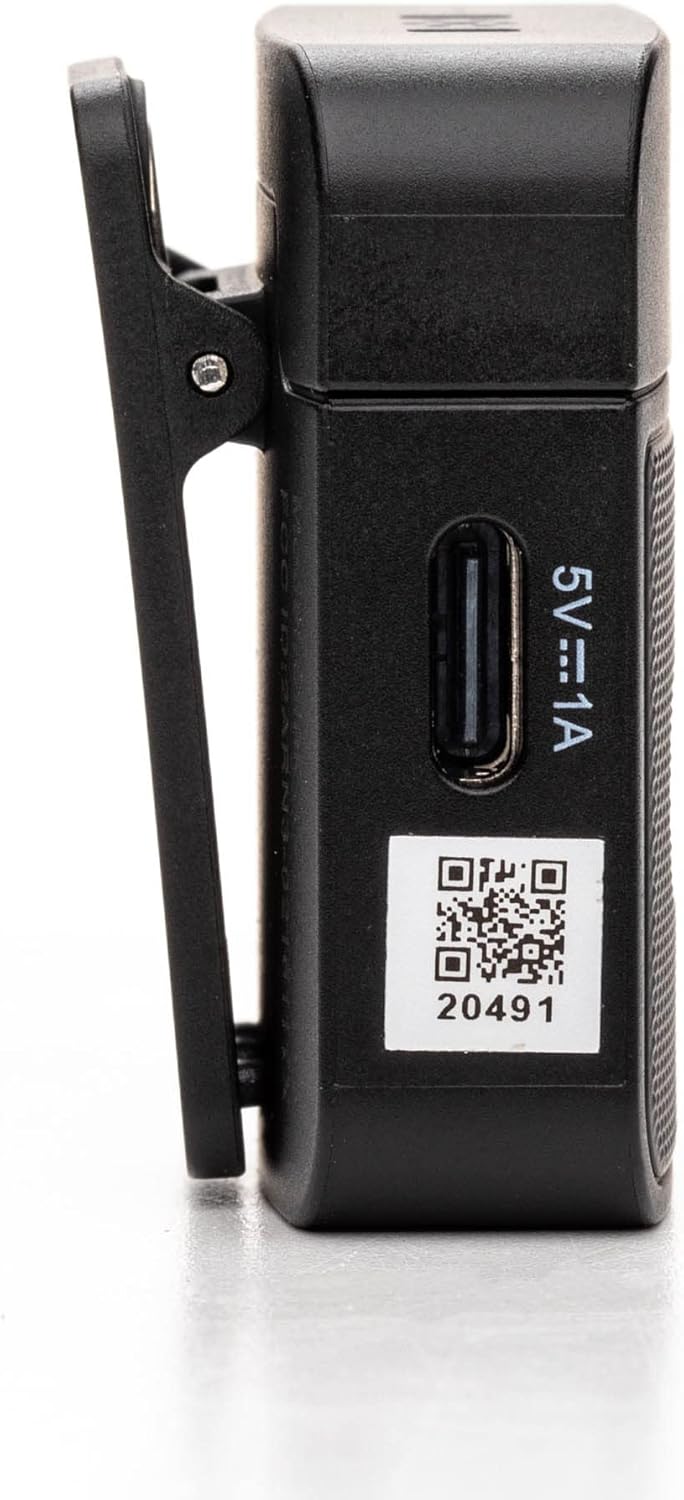
3.2. Blink 100 RXUC USB-C Receiver
- موصل USB-C: Plugs directly into your mobile device or computer.
- USB-C Pass-Through Charging Port: Allows simultaneous charging of your mobile device while the receiver is connected.
- مؤشر الاقتران: LED light indicates pairing status.

4. الإعداد
4.1. Charging the Transmitter
- Connect the supplied USB-C charging cable to the transmitter's USB-C port.
- قم بتوصيل الطرف الآخر من الكابل بمصدر طاقة USB (مثل الكمبيوتر أو محول الحائط).
- The indicator light will show charging status. A full charge provides up to 10 hours of operation.
4.2. توصيل جهاز الاستقبال
- قم بتوصيل جهاز استقبال Blink 100 RXUC مباشرة بمنفذ USB-C الخاص بهاتفك الذكي أو جهازك اللوحي أو جهاز الكمبيوتر.
- The receiver is battery-free and draws power from your device.

4.3. الاقتران التلقائي
The Blink 100 system features automatic pairing. Simply power on the transmitter and plug in the receiver. The units will automatically search for and connect to each other, indicated by a solid blue light on both units. The system also automatically switches channels to avoid static and dropouts.
5. تعليمات التشغيل
5.1. التشغيل الأساسي
- تشغيل/إيقاف التشغيل: Press and hold the power button on the TX transmitter for 2 seconds.
- Wearing the Transmitter: Clip the TX transmitter to your shirt or clothing. For optimal sound, position the microphone approximately 6-8 inches from your mouth.

5.2. اكتساب السيطرة
استخدم + و - buttons on the TX transmitter to adjust the microphone's input gain. There are 12 steps of gain control to achieve optimal audio levels for different recording environments and speaker volumes.
5.3. إلغاء الضوضاء النشط (NR)
اضغط على NR button on the TX transmitter to activate or deactivate the active noise cancellation feature. When activated, the system will reduce ambient background noise, providing clearer audio, especially in noisy environments.
5.4. Muting
اضغط على كتم الصوت button on the TX transmitter to temporarily mute the microphone. Press it again to unmute.
5.5. توصيل مصادر الصوت الخارجية
The 3.5mm TRS input on the TX transmitter allows you to connect external lavalier microphones, headset microphones, or even line-level audio devices (e.g., music players, mixers) for wireless transmission. Ensure the input mode is correctly set on the transmitter if using a line-level source (refer to advanced settings if available, though the Blink 100 series typically auto-detects mic input).
5.6. Powering Your Mobile Device
The RXUC receiver features a USB-C pass-through charging port. This allows you to charge your mobile device simultaneously while the receiver is connected and in use, ensuring extended recording sessions without draining your device's battery.
5.7. فيديو المنتج الرسمي
6. المواصفات
| ميزة | مواصفة |
|---|---|
| ماركة | سارامونيك |
| اسم الموديل | Wireless Audio Transmission Kit |
| رقم موديل العنصر | Saramonic BLINK100 |
| تكنولوجيا الاتصال | 2.4 جيجاهرتز |
| نوع الموصل | يو إس بي من النوع سي |
| الأجهزة المتوافقة | Personal Computer, Smartphones, Tablets |
| عامل شكل الميكروفون | Handheld (Clip-On) |
| النمط القطبي | متعدد الاتجاهات |
| حساسية الصوت | 39 ديسيبل |
| إشارة إلى نسبة الضوضاء | 76 ديسيبل |
| استجابة التردد | 24 جيجاهرتز |
| عدد القنوات | 2 |
| المميزات الخاصة | Battery Indicator Light, Clip, Mute Function, Noise Reduction |
| مصدر الطاقة | كهربائي سلكي (للشحن) |
| البطاريات | مطلوب بطارية ليثيوم بوليمر واحدة (متضمنة) |
| وزن العنصر | 4.8 أونصات |
| أبعاد المنتج (الطول × العرض × الارتفاع) | 3.74 × 2.32 × 4.69 بوصة |
| لون | أسود |
| لاسلكي المدى | يصل مدى الرؤية إلى 164 قدمًا (50 مترًا) |
| مدة تشغيل بطارية جهاز الإرسال | تصل إلى 10 ساعة |
7. استكشاف الأخطاء وإصلاحها
7.1. No Sound or Low Audio Level
- Ensure both the transmitter (TX) and receiver (RXUC) are powered on and successfully paired (solid blue indicator light).
- Check the microphone gain level on the TX transmitter using the +/- buttons. Increase the gain if the audio is too low.
- Verify that the RXUC is securely plugged into your recording device's USB-C port.
- Confirm that your recording application or device settings are configured to use the external microphone input.
- If using an external lavalier, ensure it is properly connected to the TX's 3.5mm TRS input.
7.2. Poor Sound Quality / Interference
- Activate the Noise Reduction (NR) feature on the TX transmitter if recording in a noisy environment.
- Ensure there are no obstructions between the transmitter and receiver, and try to maintain line-of-sight within the 164-foot (50m) range.
- Avoid operating near other 2.4GHz wireless devices (Wi-Fi routers, other wireless mics) that might cause interference.
- Check the furry windscreen is properly installed on the TX's built-in mic when recording outdoors to minimize wind noise.
7.3. مشاكل الاقتران
- Power cycle both the TX transmitter and RXUC receiver.
- Ensure both units are within close proximity during initial pairing.
- The system is designed for automatic pairing. If issues persist, refer to the full Saramonic support documentation online.
7.4. Device Not Charging via RXUC Pass-Through
- Ensure the charging cable is securely connected to both the RXUC's pass-through port and a working power source.
- Verify that your mobile device supports charging via its USB-C port while an accessory is connected.
8. الصيانة
- Keep the devices clean using a soft, dry cloth.
- تجنب تعريض الأجهزة لدرجات الحرارة العالية أو الرطوبة أو أشعة الشمس المباشرة.
- Store the system in the provided carrying pouch when not in use to protect it from dust and damage.
- لا تحاول تفكيك الجهاز أو إصلاحه بنفسك، لأن هذا سيؤدي إلى إبطال الضمان.
9. الضمان والدعم
Saramonic products come with a manufacturer's warranty. For detailed warranty information, product registration, and technical support, please visit the official Saramonic webالموقع أو تواصل مع خدمة العملاء. احتفظ بإيصال الشراء كإثبات للشراء في حال وجود أي مطالبات بالضمان.
لمزيد من المساعدة، يمكنك زيارة Saramonic Store on Amazon.