
1. المقدمة
This manual provides detailed instructions for the installation, operation, and maintenance of your SOGTICPS BL912-40A-WIFI MPPT Solar Charge Controller. This advanced charge controller is designed for off-grid solar applications, compatible with 12V/24V battery systems, including Gel, Flooded, and Lithium types. It features efficient MPPT tracking, an LCD display, dual USB outputs, and WiFi connectivity for remote monitoring.
المميزات الرئيسية:
- Innovative MPPT (Maximum Power Point Tracking) technology for up to 99% tracking efficiency.
- نظام تلقائي 12 فولت/24 فولتtagالكشف الإلكتروني.
- Integrated LCD display for real-time monitoring of temperature, charge current, discharge current, and power generation.
- Comprehensive system protection: over-temperature, over-current, short-circuit, open-circuit, and reverse polarity.
- Compatibility with Gel, Flooded, and Lithium battery types.
- Dual 5V 2A USB outputs for charging mobile devices.
- WiFi communication for remote parameter adjustment and monitoring via a dedicated application.
- Industrial-grade main control chip with 16AD sampدقة لينغ.
- Two-way MOS tube anti-reverse circuit for high-power charging and low heat generation.
2. تعليمات السلامة
يرجى قراءة جميع التعليمات بعناية قبل التركيب والتشغيل. قد يؤدي عدم اتباع هذه التعليمات إلى تلف الوحدة أو الإصابة الشخصية أو تلف الممتلكات.
- Ensure all connections are tight and correct to avoid excessive voltage drop and potential hazards.
- Install the controller indoors, away from direct sunlight, high temperatures, and moisture.
- يُنتج جهاز التحكم حرارة أثناء التشغيل؛ لذا تأكد من وجود تهوية كافية.
- Connect the battery first, then the solar panel, and finally the load. Disconnect in the reverse order: load, solar panel, then battery.
- Do not connect any inverter directly to the load terminals of the controller.
- Ensure the solar panel's open-circuit voltagلا يتجاوز جهد الدائرة المفتوحة (Voc) الحد الأقصى لحجم الإدخال لوحدة التحكمtage.
- Use appropriate circuit breakers or fuses for the battery and solar panel circuits.
- أبعدوا الأطفال عن نظام الطاقة الشمسية.
- لا تحاول تفكيك وحدة التحكم أو إصلاحها بنفسك. اتصل بفنيين مؤهلين للصيانة.
3. انتهى المنتجview
The SOGTICPS BL912-40A-WIFI solar charge controller features a robust design with an intuitive LCD display and multiple connection points.

صورة: أمام view of the SOGTICPS BL912-40A-WIFI Solar Charge Controller, highlighting its security protection features such as short-circuit, overload, overcharge, under-voltagه ، وأكثر من المجلدtagالحماية الإلكترونية.
عناصر:
- شاشة LCD: Shows real-time system status and parameters.
- أزرار التحكم: For navigating menus and setting parameters.
- Solar Panel Input Terminals: قم بتوصيله بالألواح الشمسية.
- أطراف البطارية: قم بتوصيله ببطارية التخزين.
- محطات إخراج الحمل: قم بالتوصيل بأحمال التيار المستمر.
- Dual USB Ports (5V 2A): لشحن الأجهزة الخارجية.
- هوائي WiFi: للاتصالات اللاسلكية.
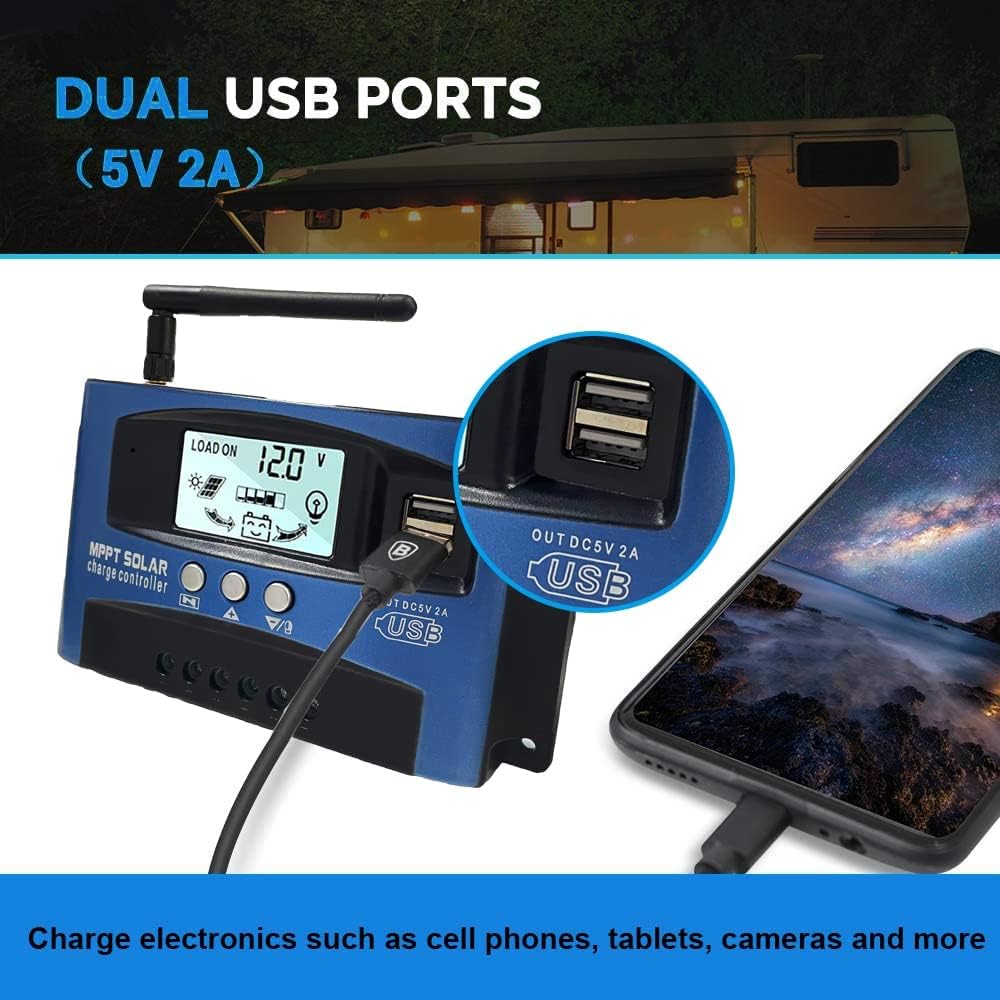
صورة: عن قرب view of the SOGTICPS BL912-40A-WIFI Solar Charge Controller, showing the dual 5V 2A USB ports in use, charging a smartphone.
4. الإعداد والتثبيت
Proper installation is critical for the safe and efficient operation of your solar charge controller. Follow the connection order precisely.
ترتيب التوصيل:
- Connect the Battery First: Connect the battery to the charge controller's battery terminals. Ensure correct polarity (+ to + and - to -). The controller will automatically detect 12V or 24V system voltage.
- توصيل الألواح الشمسية: Connect the solar panels to the charge controller's solar input terminals. Again, observe correct polarity.
- توصيل الحمل بالتيار المستمر (اختياري): Connect your DC loads to the load output terminals.
مهم: When disconnecting, reverse the order: first disconnect the load, then the solar panels, and finally the battery. Failure to follow this order may damage the controller or other components.
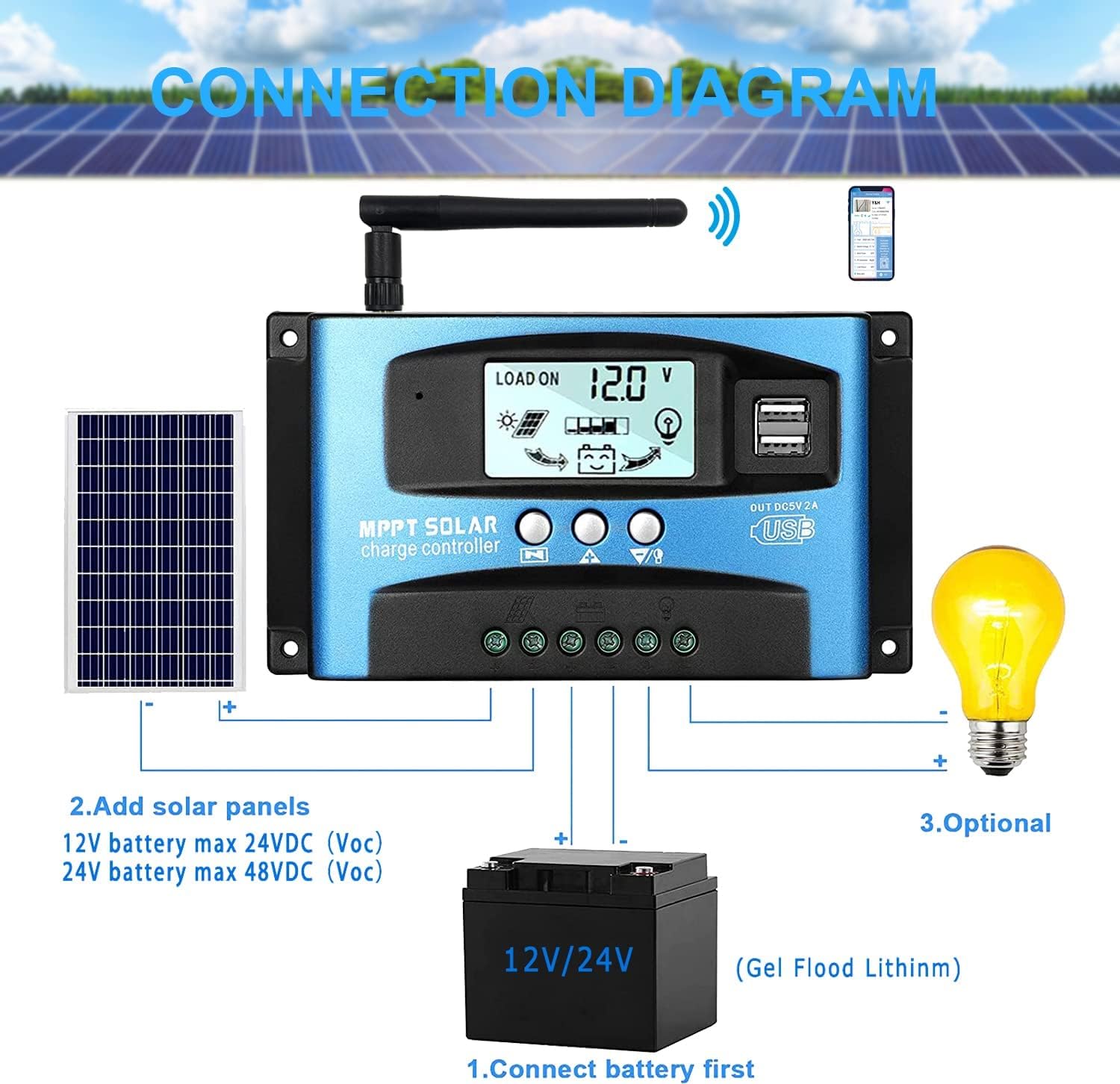
صورة: A clear connection diagram illustrating the proper wiring sequence for the solar charge controller, connecting to a battery, solar panels, and an optional DC load. It emphasizes connecting the battery first.
توافق البطارية:
The controller is compatible with various battery types, including Gel, Flooded (Lead-Acid), and Lithium batteries. Ensure the correct battery type is selected in the controller settings for optimal charging.

صورة: Visual representation showing the SOGTICPS BL912-40A-WIFI Solar Charge Controller's compatibility with Gel, Flooded, and Lithium battery types, indicated by arrows pointing between battery icons and the controller.
5. تعليمات التشغيل
LCD Display and Navigation:
The LCD provides real-time information about your solar system. Use the control buttons to navigate through the display interfaces and adjust parameters.

صورة: A series of LCD screen captures demonstrating the browsing interface and parameter setting process for the SOGTICPS BL912-40A-WIFI Solar Charge Controller. It shows main display, float voltage، إعادة توصيل التفريغ، إيقاف التفريغ، وضع تشغيل الحمل، نوع البطارية، وعرض معلمات العمل.
- واجهة التصفح: اضغط على قائمة طعام button to cycle through different display interfaces, showing information such as main display, float voltage, discharge reconnect voltage, discharge stop voltage, load work mode, battery type, and other work parameters.
- معلمات الإعداد: In interfaces 2-8, press the قائمة طعام button to enter the setting mode. Use the UP و تحت buttons to adjust the values. Press قائمة طعام قم بالتأكيد مرة أخرى ثم اخرج من وضع الإعدادات.
مراقبة شبكة الواي فاي:
The controller supports WiFi connectivity, allowing you to monitor and control your solar system remotely via a smartphone application.

صورة: The SOGTICPS BL912-40A-WIFI Solar Charge Controller shown alongside a smartphone displaying its monitoring application interface. This illustrates the wireless monitoring capability of the PV system.
- تثبيت التطبيق: Download the dedicated application for your smartphone (Android). Refer to the QR code or instructions provided with the product for app download.
- اتصال: Follow the in-app instructions to connect your controller to your local WiFi network.
- المراقبة عن بعد: بمجرد الاتصال ، يمكنك ذلك view real-time data such as temperature, charge current, discharge current, accumulated power generation, battery voltage, and adjust charging modes from anywhere.
6. الصيانة
تضمن الصيانة الدورية طول عمر جهاز التحكم في شحن الطاقة الشمسية وأدائه الأمثل.
- التحقق من الاتصالات: قم بفحص جميع توصيلات الأسلاك بشكل دوري للتأكد من أنها محكمة وخالية من التآكل.
- تنظيف وحدة التحكم: حافظ على وحدة التحكم نظيفة وخالية من الغبار والأوساخ. استخدم قطعة قماش جافة للتنظيف.
- تهوية: Ensure the installation area has adequate ventilation to prevent overheating.
- فحص البطارية: Regularly check battery terminals for corrosion and ensure battery fluid levels (for flooded batteries) are correct.
- مراقبة النظام: Use the LCD display or the WiFi app to monitor system performance and identify any anomalies early.
7. استكشاف الأخطاء وإصلاحها
إذا واجهت مشاكل مع جهاز التحكم في شحن الطاقة الشمسية، فراجع المشاكل والحلول الشائعة التالية:
| مشكلة | السبب المحتمل | حل |
|---|---|---|
| لا يوجد عرض على شاشة LCD | البطارية غير متصلة أو مستوى الصوت منخفضtagهـ؛ عكس القطبية. | تحقق من توصيلات البطارية ومستوى الصوتtagهـ. تأكد من صحة القطبية. |
| البطارية لا تشحن | Solar panels not connected; insufficient sunlight; faulty solar panel; incorrect battery type setting. | Check solar panel connections and ensure adequate sunlight. Verify solar panel functionality. Confirm battery type setting. |
| التحميل لا يعمل | Load disconnected; battery low voltage protection; overload protection. | Check load connections. Charge battery. Reduce load or check for short circuits. |
| WiFi app issues (connection/language) | Incorrect WiFi setup; app region/language settings; firmware issues. | Ensure correct WiFi network and password. Check app settings for language. Contact support if issues persist. |
8. المواصفات
| المعلمة | قيمة |
|---|---|
| نموذج | BL912-40A-WIFI |
| تيار الشحن المقدر | 40 أ |
| حجم النظامtage | الكشف التلقائي 12 فولت / 24 فولت |
| أقصى طاقة دخل من الألواح الكهروضوئية (12 فولت) | 480 واط |
| أقصى طاقة دخل من الألواح الكهروضوئية (24 فولت) | 960 واط |
| حجم اللوحة الشمسية الموصى بهtage | 18V for 12V battery; 36V for 24V battery |
| الاستهلاك الذاتي | <10 مللي أمبير |
| درجة حرارة التشغيل | -14 درجة فهرنهايت إلى 140 درجة فهرنهايت (-10 درجة مئوية إلى 60 درجة مئوية) |
| نوع العرض | شاشة الكريستال السائل |
| مخرج يو اس بي | مزدوج 5 فولت 2 أمبير |
| تواصل | واي فاي |
| الأبعاد (العبوة) | 18 × 11 × 5 سم |
| الوزن (الحزمة) | 330 جرام |
| مرجع الشركة المصنعة | 2-BL912-40A-WIFI-DE |
| رمز المنتج الموحد | 732246237116 |
9. الضمان والدعم
For warranty information and technical support, please refer to the documentation included with your purchase or contact SOGTICPS customer service. Keep your purchase receipt as proof of purchase.