
1. المقدمة
This manual provides detailed instructions for the installation, operation, and maintenance of your Fractal Design Define 7 Nano Black Solid Mini ITX PC Case. Please read this manual thoroughly before beginning assembly to ensure proper installation and to maximize the performance and longevity of your system.
The Define 7 Nano is a compact Mini ITX case designed for silent operation and flexible component support, offering a balance of size and functionality for small form factor builds.

الشكل 1: الجانب الأمامي view of the Fractal Design Define 7 Nano Black Solid Mini ITX PC Case.
2. معلومات السلامة
يجب مراعاة احتياطات السلامة التالية أثناء التثبيت والتشغيل:
- افصل دائمًا مصدر الطاقة من مأخذ الحائط قبل تثبيت أو إزالة أي مكونات.
- ارتدِ سوار معصم مضادًا للكهرباء الساكنة لمنع الضرر الناتج عن التفريغ الكهروستاتيكي (ESD) للمكونات الحساسة.
- تعامل مع المكونات بعناية لتجنب أي ضرر مادي.
- تأكد من وجود تهوية مناسبة حول علبة الكمبيوتر لمنع ارتفاع درجة الحرارة.
- احتفظ بالجراب بعيدًا عن السوائل والرطوبة الزائدة.
- Do not attempt to modify the case structure, as this may void your warranty and pose safety risks.
3. محتويات العبوة
تأكد من وجود جميع المكونات في العبوة:
- Fractal Design Define 7 Nano PC Case
- Accessory Box (screws, zip ties, standoffs, cleaning cloth)
- دليل المستخدم (هذا المستند)
- Pre-installed fans (Dynamic X2 GP-12/GP-14, quantity may vary)

الشكل 2: انفجرت view showing the various removable components of the Define 7 Nano case.
4. الإعداد وتثبيت المكونات
4.1. التحضير
- فتح العلبة: قم بإزالة العلبة من عبوتها بعناية.
- إزالة الألواح الجانبية: The side panels are secured with captive thumbscrews. Loosen the thumbscrews and slide the panels backward to remove them.
- Remove Top Panel (Optional): The top panel can be removed for easier access during installation or for enhanced airflow. Press the release button at the rear of the top panel and lift it off.
- Remove Front Panel (Optional): The front panel can be carefully pulled off from the bottom for access to front fan mounts and dust filters.
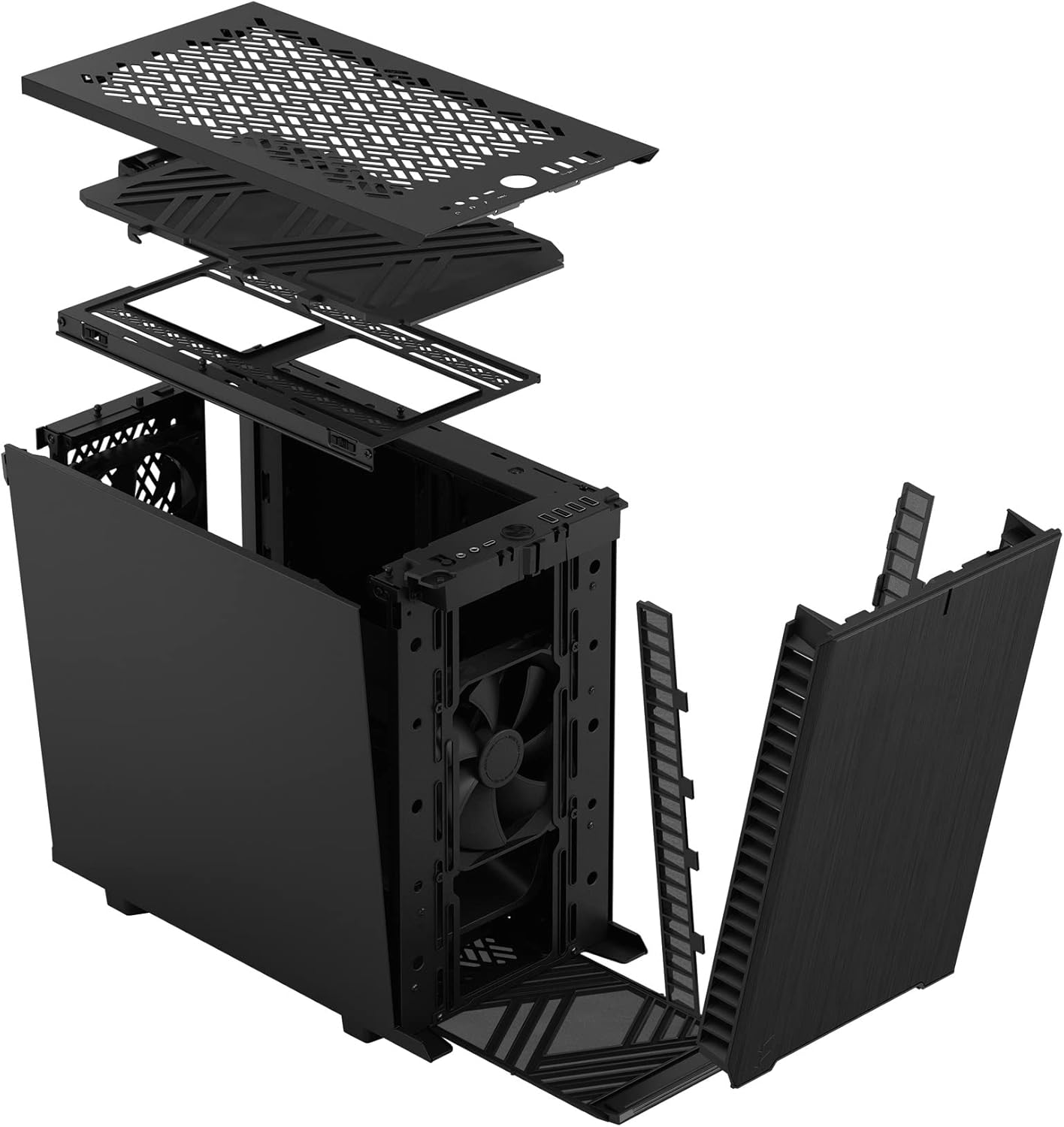
الشكل 3: انفجرت view illustrating the removal process for the front and top panels.
4.2. تركيب اللوحة الأم
The Define 7 Nano supports Mini ITX motherboards.
- تثبيت I/O Shield: If your motherboard requires an I/O shield, install it into the rear opening of the case before mounting the motherboard.
- موقع اللوحة الأم: Align your Mini ITX motherboard with the pre-installed standoffs inside the case.
- لوحة أم آمنة: Use the provided screws from the accessory box to secure the motherboard to the standoffs.
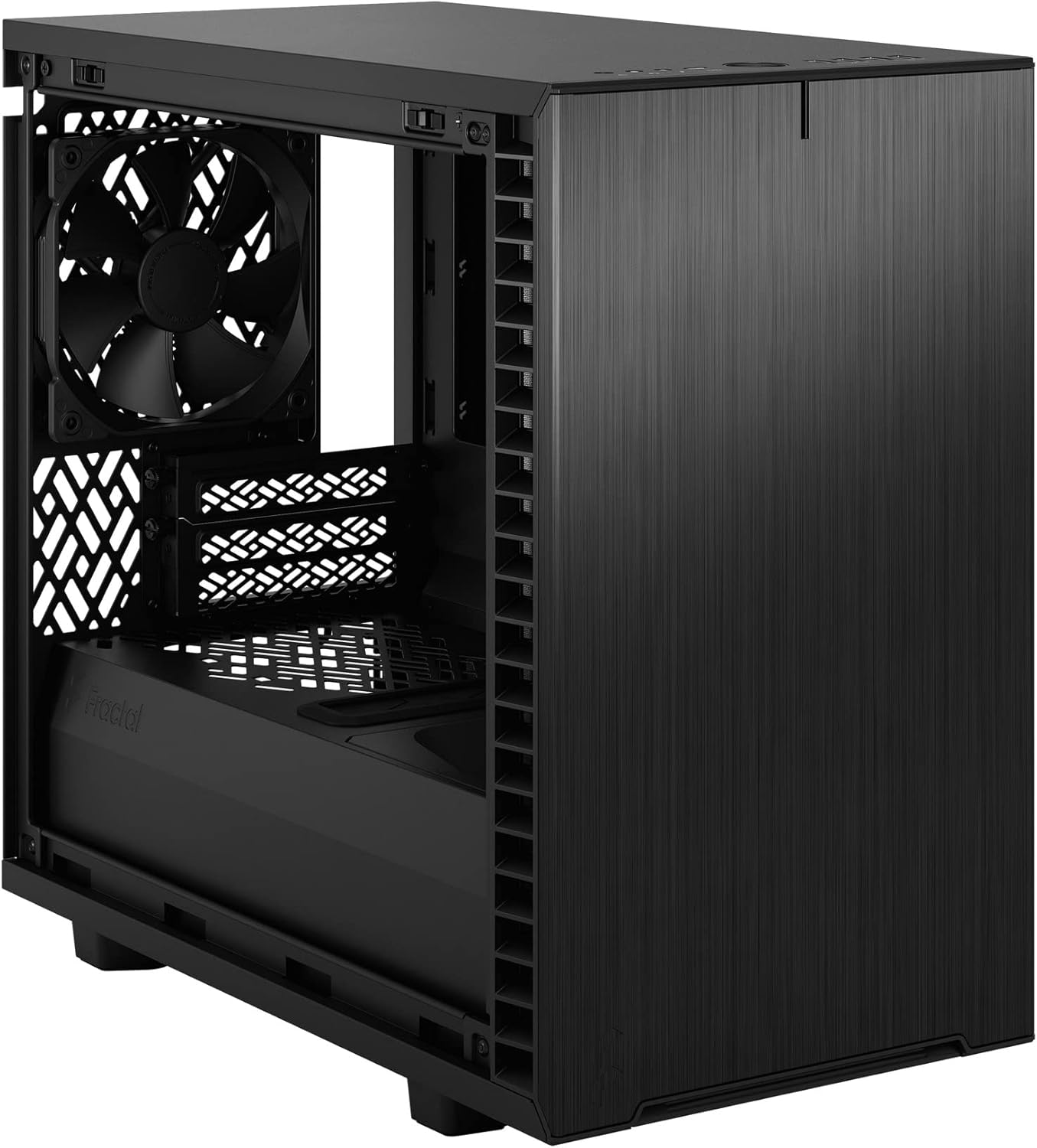
الشكل 4: الداخلية view of the case, highlighting the motherboard mounting area and fan locations.
4.3. تركيب وحدة إمداد الطاقة (PSU)
The Define 7 Nano supports ATX PSUs.
- Mount PSU Bracket: Attach the PSU mounting bracket to your power supply using the screws provided with the PSU.
- Slide PSU into Case: Slide the PSU with the attached bracket into the rear of the case.
- مصدر طاقة آمن: Secure the PSU bracket to the case using the thumbscrews.
4.4. تثبيت محرك التخزين
يدعم هذا الهيكل محركات أقراص الحالة الصلبة (SSD) مقاس 2.5 بوصة ومحركات الأقراص الصلبة (HDD) مقاس 3.5 بوصة.
- محركات أقراص 2.5 بوصة: Mount 2.5" drives to the dedicated SSD brackets located behind the motherboard tray or on the PSU shroud. Secure with screws.
- محركات أقراص 3.5 بوصة: Install 3.5" drives into the drive cage located beneath the PSU shroud. Secure with screws.
4.5. تثبيت بطاقة الرسومات (GPU)
- قم بإزالة أغطية فتحات PCIe: قم بإزالة أغطية فتحة PCIe الضرورية من الجزء الخلفي للعلبة.
- Insert GPU: Carefully insert your graphics card into the primary PCIe slot on the motherboard.
- وحدة معالجة الرسومات الآمنة: Secure the graphics card to the case using the thumbscrews or standard screws.
4.6. Cooling System Installation (Fans/Radiators)
The Define 7 Nano offers flexible cooling options.
- مراوح أمامية: Up to two 120/140mm fans or a 240/280mm radiator can be installed at the front.
- كبار المشجعين: Up to two 120/140mm fans or a 240mm radiator can be installed at the top (requires removing the solid top panel and installing the ventilated top panel).
- المروحة الخلفية: One 120mm fan can be installed at the rear.
- Bottom Fan: One 120mm fan can be installed at the bottom.
Ensure fans are oriented correctly for optimal airflow (intake or exhaust).
4.7. إدارة الكابلات
The case features routing channels and Velcro straps behind the motherboard tray for organized cable management.
- كابلات الطريق: Pass power and data cables through the rubber grommets to the back of the motherboard tray.
- الكابلات الآمنة: Use the pre-installed Velcro straps and included zip ties to bundle and secure cables.

الشكل 5: الجزء الخلفي الداخلي view demonstrating the cable management system with Velcro straps.
4.8. توصيلات اللوحة الأمامية
قم بتوصيل كابلات اللوحة الأمامية بالموصلات المقابلة على اللوحة الأم لديك:
- Power Button (PWR SW)
- Reset Button (RESET SW)
- Power LED (PWR LED)
- HDD Activity LED (HDD LED)
- موصل USB 3.0
- USB Type-C Header (if applicable)
- رأس صوت عالي الدقة
راجع دليل اللوحة الأم لمعرفة مواقع الموصلات الدقيقة.
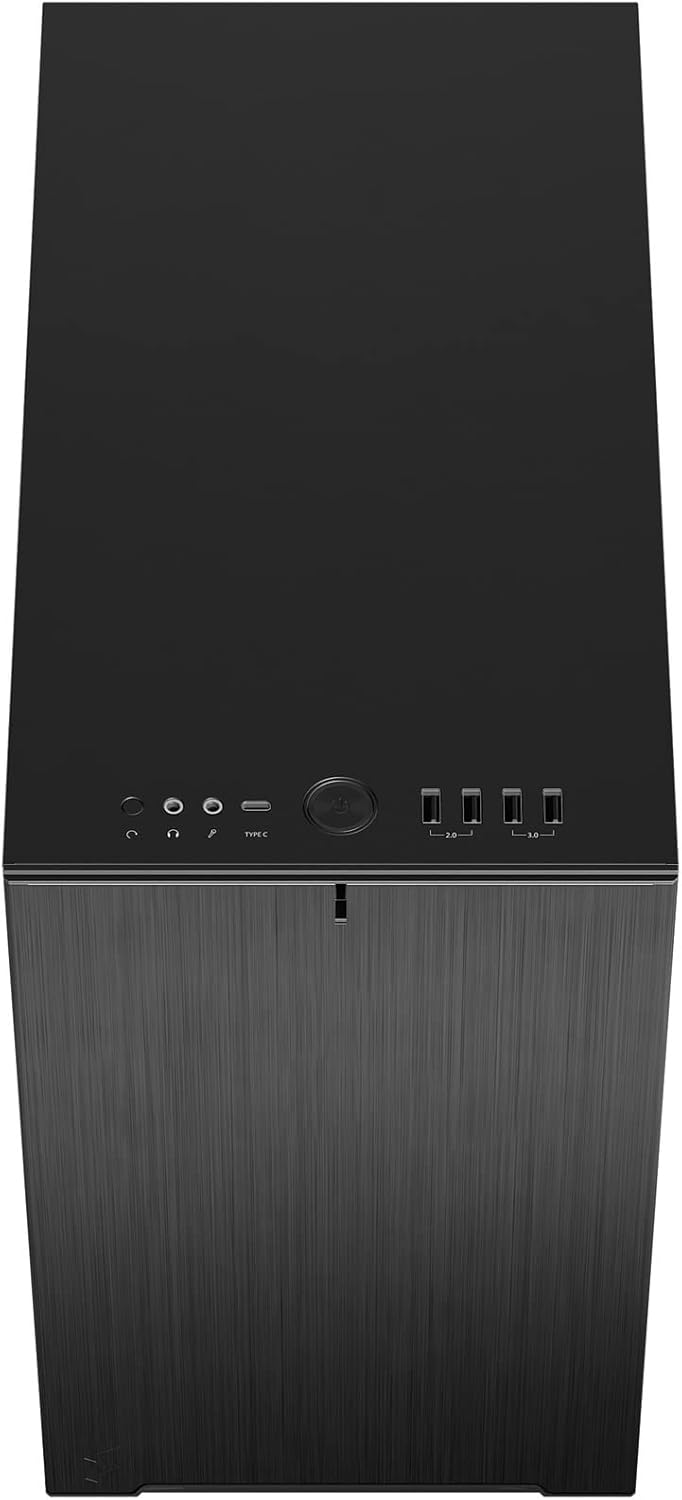
الشكل 6: الجزء العلوي الأمامي view displaying the front I/O panel with USB ports, audio jacks, and power button.
5. تعليمات التشغيل
5.1. تشغيل / إيقاف التشغيل
- تشغيل الطاقة: Press the power button located on the front I/O panel.
- إيقاف التشغيل: Initiate a shutdown from your operating system. Alternatively, press and hold the power button for 5 seconds for a forced shutdown.
5.2. Using Front Panel Ports
توفر لوحة الإدخال/الإخراج الأمامية وصولاً سهلاً إلى:
- منافذ USB 3.0: لنقل البيانات بسرعة عالية مع الأجهزة المتوافقة.
- منفذ USB من النوع C: For modern devices requiring a Type-C connection.
- مقابس الصوت: لتوصيل سماعات الرأس والميكروفونات.
6. الصيانة
تساعد الصيانة الدورية على ضمان الأداء الأمثل وطول عمر مكونات جهاز الكمبيوتر الخاص بك.
6.1. تنظيف فلتر الغبار
The Define 7 Nano is equipped with easily removable dust filters to prevent dust buildup inside the case.
- المرشح الأمامي: Can be accessed by removing the front panel.
- أفضل فلتر: Located beneath the ventilated top panel (if installed).
- فلتر سفلي: Slides out from the front of the case.
Clean filters regularly (e.g., monthly) by rinsing them with water and allowing them to dry completely, or by using a soft brush or compressed air.
6.2 تنظيف بشكل عام
- استخدمي قطعة قماش ناعمةamp cloth to wipe down the exterior surfaces of the case.
- تجنب استخدام المواد الكيميائية القاسية أو المواد الكاشطة التي قد تؤدي إلى إتلاف الطبقة النهائية.
- For interior cleaning, use compressed air to remove dust from components. Ensure the system is powered off and unplugged.
7. استكشاف الأخطاء وإصلاحها
يتناول هذا القسم المشكلات الشائعة التي قد تواجهها.
7.1. لا يوجد طاقة / النظام لا يبدأ
- التحقق من توصيلات الطاقة: Ensure the PSU is properly connected to the wall outlet and the power switch on the PSU is in the 'ON' position. Verify all internal power cables (24-pin ATX, 8-pin CPU, PCIe, SATA) are securely connected.
- رؤوس اللوحة الأمامية: Double-check that the power button header (PWR SW) is correctly connected to the motherboard.
- Motherboard/CPU: تأكد من أن وحدة المعالجة المركزية وذاكرة الوصول العشوائي مثبتتان بشكل صحيح.
7.2. الضوضاء المفرطة
- ضوضاء المروحة: Check if any fan cables are obstructing fan blades. Ensure fans are securely mounted. Consider adjusting fan speeds in your motherboard's BIOS/UEFI or operating system.
- اهتزاز: Ensure all components (PSU, drives, GPU) are securely fastened to prevent rattling.
7.3. ارتفاع درجة الحرارة
- تدفق الهواء: Verify that fans are oriented correctly (intake/exhaust) and that there is adequate airflow.
- فلاتر الغبار: Clean dust filters regularly to prevent restricted airflow.
- المعجون الحراري: Ensure CPU cooler has proper thermal paste application.
8. المواصفات
| ميزة | مواصفة |
|---|---|
| اسم الموديل | Define 7 Nano |
| رقم الموديل | FD-C-DEF7N-01 |
| نوع الحالة | برج صغير |
| التوافق مع اللوحة الأم | ميني آي تي إكس |
| الأبعاد (الطول × العرض × الارتفاع) | الأبعاد التقريبية: 18.74 × 11.38 × 17.91 بوصة (العبوة) |
| وزن | حوالي 18.37 رطل |
| مادة | الألومنيوم |
| لون | أسود صلب |
| منافذ الإدخال / الإخراج الأمامية | 5x USB 3.0, Audio In/Out, Power Button |
| حجرات القيادة | 2.5" SSD, 3.5" HDD (specific quantities vary by configuration) |
| طريقة التبريد | هواء |
| مراوح مثبتة مسبقًا | Dynamic X2 GP-12 (rear), Dynamic X2 GP-14 (front) |
9. الضمان والدعم
Fractal Design products are manufactured to the highest quality standards and come with a limited warranty. For detailed warranty information, please refer to the official Fractal Design webالموقع أو بطاقة الضمان المرفقة مع المنتج الخاص بك.
For technical support, troubleshooting assistance, or to inquire about replacement parts, please visit the official Fractal Design support page:
www.fractal-design.com/support/
Please have your product model number (FD-C-DEF7N-01) and proof of purchase ready when contacting support.