
1. المقدمة
The OC Acoustic Newport Plug-in Bluetooth Speakers offer a convenient and clutter-free audio solution. Designed to plug directly into any standard electrical outlet, these speakers eliminate the need for charging cables and free up counter space. Enjoy crisp, loud sound without the hassle of batteries or wires.

الصورة: الجبهة view of the OC Acoustic Newport Plug-in Bluetooth Speaker.
2. ماذا يوجد في الصندوق
تأكد من وجود جميع العناصر في العبوة:
- OC Acoustic Newport Plug-in Bluetooth Speakers (Pair)
- USB charging cable (for device charging via speaker's USB port)
3. الإعداد
Follow these steps to set up your Newport Plug-in Bluetooth Speakers:
- قم بالتوصيل: Insert the speaker directly into any standard electrical outlet. The speaker is designed to not block the second plug.
- تشغيل الطاقة: Once plugged in, the speaker will automatically power on. A light indicator will confirm it is ready for pairing.

Image: The Newport speaker plugged into a wall outlet.
4. تعليمات التشغيل
4.1 اقتران بلوتوث
To connect your device to the Newport speaker via Bluetooth:
- Ensure the Newport speaker is plugged into an outlet and powered on.
- على هاتفك الذكي أو جهازك اللوحي، انتقل إلى إعدادات البلوتوث.
- قم بتشغيل البلوتوث.
- Scan for available devices. The Newport speaker will appear as "Newport_XXXX" (where XXXX is a unique identifier).
- Select "Newport_XXXX" from the list to pair. A confirmation sound will indicate successful pairing.
4.2 Party Mode (Multiroom Audio)
To create a multiroom audio system with multiple Newport speakers:
- Ensure all Newport speakers are plugged in and powered on.
- Pair your primary device to one Newport speaker following the Bluetooth Pairing instructions above.
- Refer to the OC Acoustic app or additional documentation for specific instructions on linking multiple Newport speakers for Party Mode, as this feature typically requires app control.
4.3 Built-in USB Type-A Charging Port
The Newport speaker includes a USB Type-A port for convenient charging of your mobile devices.
- Locate the USB port on the side of the speaker.
- قم بتوصيل كابل شحن USB الخاص بجهازك بهذا المنفذ.
- سيبدأ جهازك بالشحن.
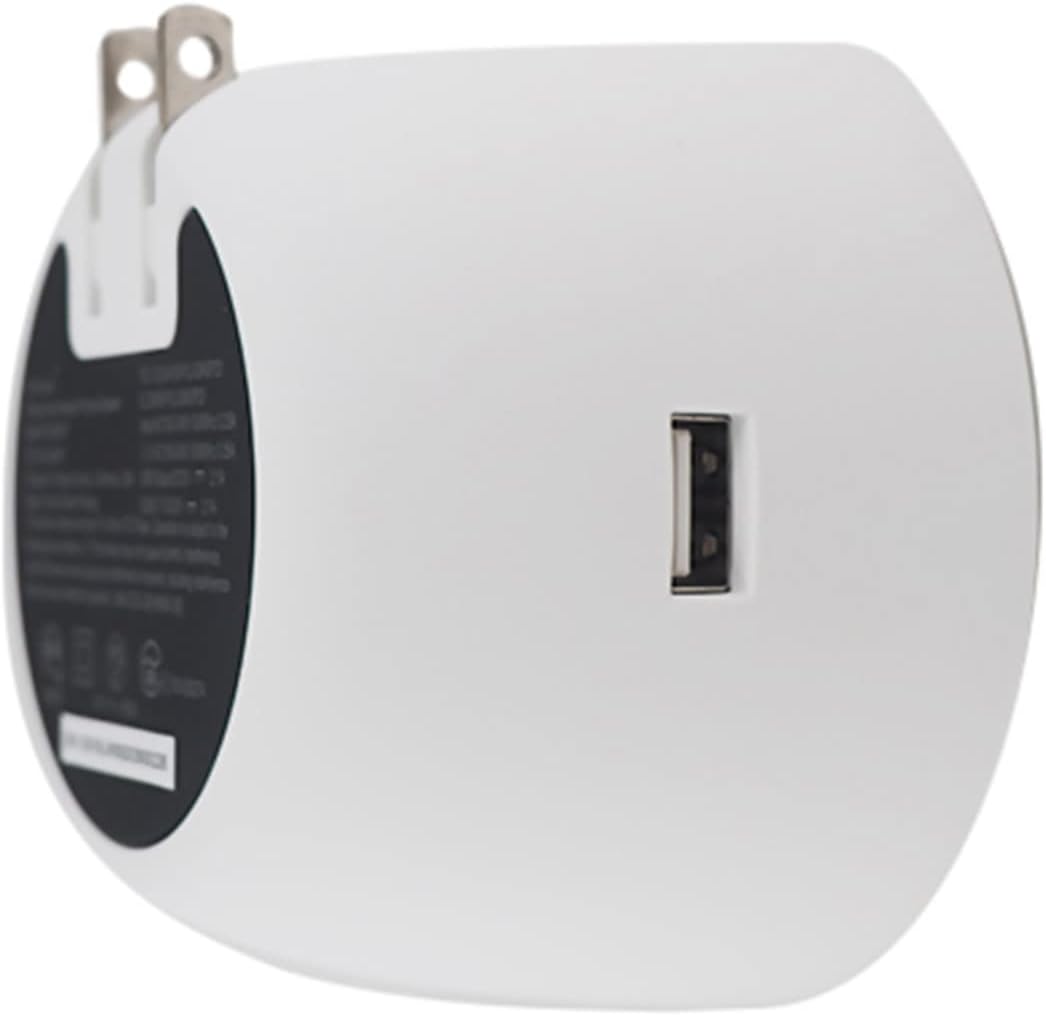
الصورة: الخلف view of the Newport speaker, highlighting the USB charging port.
5. استكشاف الأخطاء وإصلاحها
5.1 Unit Pairing but No Sound
If your device shows as paired but you hear no sound:
- على جهازك، انتقل إلى إعدادات البلوتوث.
- Locate the paired Newport speaker (e.g., "Newport_5da9").
- Select the information icon (usually an 'i' in a circle) next to the speaker name.
- Choose the option to "Forget This Device" or "Unpair".
- Restart the pairing process from Section 4.1.
5.2 Reconnecting After Unplugging
If you unplug your Newport speaker and then plug it back in, it may not automatically reconnect to your device.

Image: Close-up of the Newport speaker, indicating the power button location.
حل: After plugging the speaker back into the outlet, press the power button on the speaker to re-establish the connection with your previously paired device.
6. المواصفات
| ميزة | التفاصيل |
|---|---|
| ماركة | او سي الصوتية |
| اسم الموديل | Newport Plug-in Bluetooth Speakers - Pair |
| رقم الموديل | JBLSENSELITEBLKAM |
| تكنولوجيا الاتصال | بلوتوث، يو اس بي |
| نوع التركيب | المكونات الإضافية |
| نوع السماعة | مكبر صوت بلوتوث |
| مميزات اضافية | منفذ يو اس بي |
| قطر الصبووفر | 2 بوصة |
| لون | Light Gray/White |
| مقاوم للماء | خطأ شنيع |
| نوع الضمان | محدود |
| طريقة التحكم | يلمس |
| حجم السماعة | 2 بوصة |
| قطر مكبر الصوت | 2 بوصة |
| مدى البلوتوث | 20.12 مترا |
| نوع وحدة التحكم | Battery powered (refers to connected device) |
| أبعاد المنتج: العمق × العرض × الارتفاع | 2.48 بوصة عمق × 3.64 بوصة عرض × 3.35 بوصة ارتفاع |
| وزن العنصر | 2 رطل |
| الأجهزة المتوافقة | الهاتف الذكي والكمبيوتر اللوحي |
| مصدر الطاقة | كهرباء سلكية |
| الوسائط المدمجة | كابل شحن يو اس بي |
| عدد العناصر | 2 |
| رمز المنتج الموحد | 683950295810 |
| الشركة المصنعة | او سي الصوتية |
| عدد قنوات الصوت | 2.0 |
| التكنولوجيا اللاسلكية | بلوتوث |
| تقنية توصيل مكبر الصوت الفرعي | لاسلكي |
| بروتوكول الاتصال | بلوتوث |
| رقم GTIN | 683950295810 |

Image: Dimensions of the Newport Plug-in Bluetooth Speaker.
7. فيديو المنتج
شاهد الفيديو الرسمي للمنتج للحصول على المزيدview of the OC Acoustic Newport Plug-in Bluetooth Speakers:
فيديو: عرض فيديو رسمي للمنتجasing the features and use of the OC Acoustic Newport speakers.
8. الضمان والدعم
8.1 معلومات الضمان
The OC Acoustic Newport Plug-in Bluetooth Speakers come with a ضمان محدود من الشركة المصنعة لمدة عام واحديغطي هذا الضمان عيوب المواد والتصنيع في ظل الاستخدام العادي. يُرجى الاحتفاظ بإيصال الشراء للمطالبة بالضمان.
8.2 دعم العملاء
For technical assistance, warranty claims, or general inquiries, please visit the official OC Acoustic website or contact their customer support. Refer to the product packaging or the brand's online resources for the most current contact information.