
مقدمة
The LINQ 9-Port Pro Studio USB-C Docking Station (Model LQ48020) is a versatile multiport hub designed to expand connectivity and storage for your USB-C enabled devices. This device integrates multiple essential ports and an NVMe M.2 SSD enclosure into a single, compact unit, providing high-speed data transfer, video output, network connectivity, and power delivery.

الشكل 1: زيادةview of the LINQ 9-Port Pro Studio USB-C Docking Station with connected devices, highlighting its various ports and features.
يثبت
Follow these steps to set up your LINQ 9-Port Pro Studio USB-C Docking Station:
- الاتصال بجهاز المضيف: Plug the integrated USB-C cable from the docking station into a compatible USB-C port on your laptop, tablet, or other host device. Ensure the USB-C port on your host device supports DisplayPort Alternate Mode (Alt Mode) and Power Delivery for full functionality.
- توصيل الطاقة (اختياري ولكن موصى به): For optimal performance and to charge your host device, connect a USB-C Power Delivery (PD) charger (up to 100W) to the docking station's USB-C PD input port.
- NVMe M.2 SSD Installation:
- Carefully open the NVMe enclosure cover on the docking station.
- Insert your NVMe M.2 SSD into the designated slot. Ensure it is properly seated.
- Secure the SSD with the provided fastener (if applicable).
- Close the enclosure cover securely.

الشكل 2: Installation of an NVMe M.2 SSD into the docking station's dedicated enclosure.
- توصيل الأجهزة الطرفية: Connect your desired peripherals (monitor, keyboard, mouse, Ethernet cable, SD card, USB drives) to the corresponding ports on the docking station.
تعليمات التشغيل
The docking station provides a variety of ports for enhanced functionality:
- منفذ USB-C لتوصيل الطاقة (PD): Connect your USB-C power adapter to this port to charge your host device (up to 100W) and power the docking station simultaneously.
- منفذ HDMI 2.0: Connect an HDMI cable from this port to an external monitor or display for video output up to 4K resolution at 60Hz.
- منافذ USB 3.2 من الجيل الأول: Utilize the USB-A and USB-C data ports for connecting external storage devices, keyboards, mice, or other USB peripherals. These ports support data transfer speeds up to 10 Gigabits per second (10Gbps).
- 2.5Gbps Multi-Gigabit Ethernet Port: Connect an Ethernet cable to this port for a stable and high-speed wired network connection, supporting speeds up to 2.5 Gigabits per second (2.5Gbps).
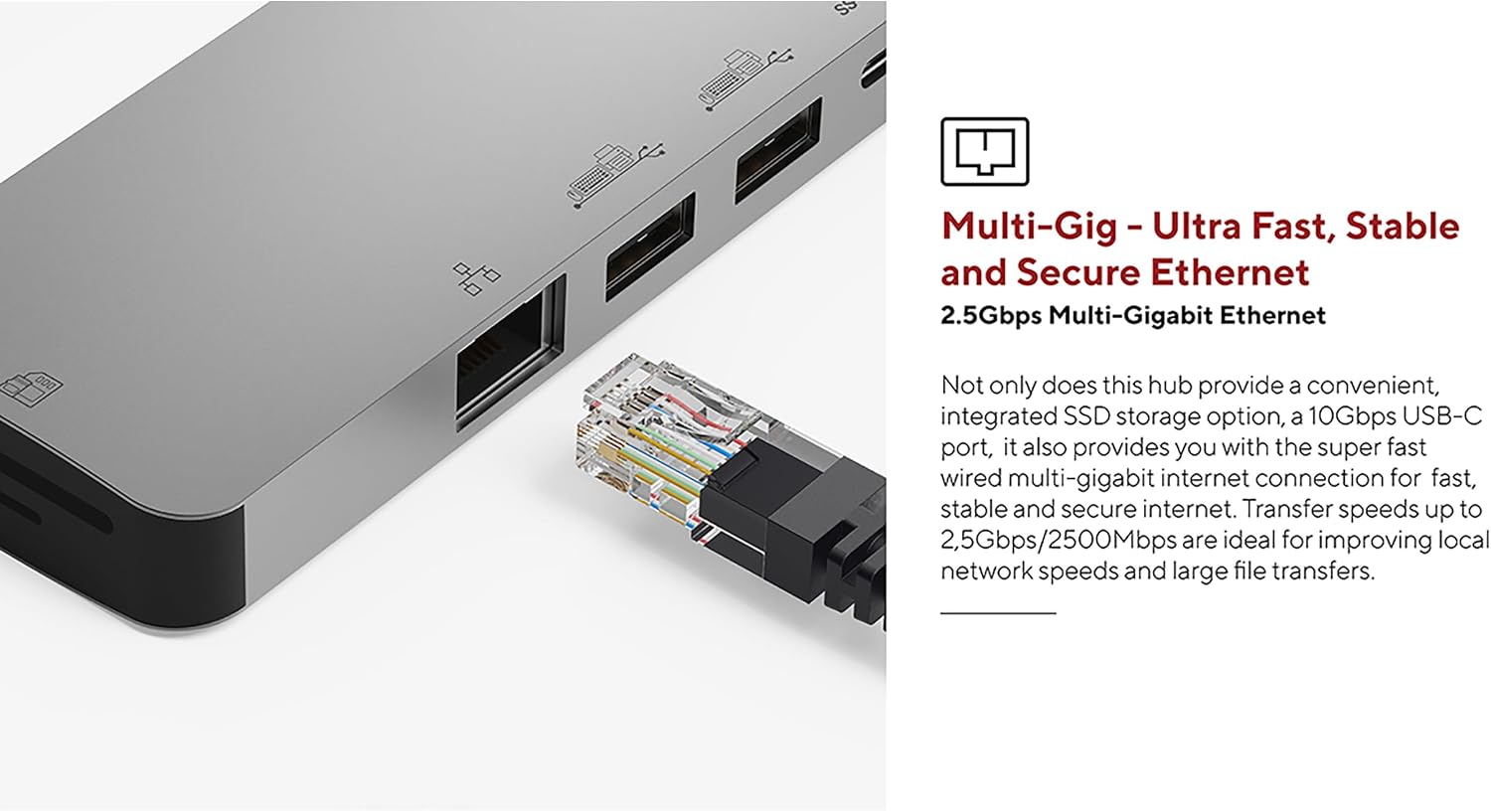
الشكل 3: The 2.5Gbps Multi-Gigabit Ethernet port for high-speed wired network access.
- قارئ بطاقات UHS-II SD 4.0: Insert an SD card into the card reader slot for fast data transfer, supporting speeds up to 300MB/s. This is ideal for photographers and videographers.

الشكل 4: The UHS-II SD 4.0 Card Reader for high-speed memory card access.
- NVMe M.2 SSD Enclosure: The integrated NVMe M.2 SSD enclosure allows you to expand your storage with an NVMe SSD, providing data transfer speeds up to 10Gbps. This is suitable for fast backups and quick access to large files.

الشكل 5: The docking station in use, demonstrating multiple connected peripherals.
صيانة
To ensure the longevity and optimal performance of your docking station, follow these maintenance guidelines:
- تنظيف: Use a soft, dry, anti-static cloth to clean the exterior of the docking station. Avoid using liquid cleaners or solvents, as they may damage the finish or internal components.
- تخزين: عند عدم الاستخدام، قم بتخزين محطة الإرساء في مكان بارد وجاف بعيدًا عن أشعة الشمس المباشرة ودرجات الحرارة القصوى.
- تهوية: Ensure the docking station has adequate airflow around it during operation to prevent overheating, especially when multiple high-power devices or an NVMe SSD are in use.
- العناية بالكابلات: Avoid bending or twisting the integrated USB-C cable excessively. Always grasp the connector when plugging or unplugging to prevent damage to the cable or port.
استكشاف الأخطاء وإصلاحها
إذا واجهت مشكلات مع محطة الإرساء الخاصة بك، فراجع المشكلات والحلول الشائعة التالية:
- لا يوجد إخراج للعرض:
- تأكد من أن منفذ USB-C الخاص بجهازك المضيف يدعم وضع DisplayPort البديل.
- تأكد من توصيل كابل HDMI بشكل آمن بكل من محطة الإرساء والشاشة.
- Verify the monitor input source is set correctly (e.g., HDMI 1, HDMI 2).
- Try connecting the monitor directly to your host device (if possible) to rule out monitor or cable issues.
- أجهزة USB غير معترف بها:
- Ensure the docking station is properly connected to your host device.
- حاول توصيل جهاز USB بمنفذ مختلف على محطة الإرساء.
- Connect the USB device directly to your host device to confirm it is functional.
- If using high-power USB devices, ensure a power adapter is connected to the docking station's PD port.
- سرعات نقل البيانات البطيئة:
- Ensure your connected devices and cables support the advertised speeds (e.g., USB 3.2 Gen 2 for 10Gbps).
- Verify that your host device's USB-C port supports the necessary bandwidth.
- Avoid using excessively long or low-quality cables.
- مشاكل الاتصال بالشبكة:
- تحقق من اتصال كابل Ethernet بكل من محطة الإرساء وجهاز التوجيه/المودم الخاص بك.
- Verify that your network drivers are up to date on your host device.
- Test your Ethernet cable and network connection with another device if possible.
- NVMe SSD Not Detected:
- Ensure the NVMe SSD is correctly installed and seated firmly in its slot.
- Check your operating system's disk management utility to see if the drive is detected but uninitialized or unformatted.
- Ensure the SSD is an NVMe M.2 drive; SATA M.2 SSDs are not supported.
تحديد
| ميزة | مواصفة |
|---|---|
| رقم الموديل | LQ48020 |
| الأبعاد (الطول × العرض × الارتفاع) | 21.5 x 8 x 21.5 cm (approx. 4.6 x 7.92 x 0.95 cm for main unit) |
| وزن | 119 جرام |
| مادة | الألومنيوم |
| لون | رمادي |
| إجمالي الموانئ | 9 |
| اتصال مضيف USB-C | 1 (integrated cable) |
| توصيل الطاقة عبر USB-C | حتى 100 وات |
| مخرج HDMI | 4K @ 60Hz (HDMI 2.0) |
| منافذ بيانات USB | Multiple (USB-A, USB-C) |
| سرعة نقل بيانات USB | 10 Gigabits per second (USB 3.2 Gen 2) |
| منفذ إيثرنت | 2.5Gbps Multi-Gigabit |
| قارئ البطاقات | UHS-II SD 4.0 (up to 300MB/s) |
| ضميمة NVMe M.2 SSD | Yes, up to 10Gbps (does not support SATA SSD) |
| أنظمة التشغيل المتوافقة | Linux (and generally macOS, Windows with USB-C Alt Mode support) |
الضمان والدعم
This LINQ 9-Port Pro Studio USB-C Docking Station comes with a ضمان الشركة المصنعة لمدة عامين.
For technical support, warranty claims, or further assistance, please contact your retailer or visit the official LINQ webموقع لمعلومات الاتصال.