1. المقدمة
Thank you for choosing the Generic TA8131 Digital Light Meter. This device is designed for precise measurement of illumination (lux/Fc) in various environments. Its split design allows for flexible sensor placement, making it ideal for photography, environmental testing, and general light measurement applications. Please read this manual thoroughly before operation to ensure safe and correct use.
2. مواصفات المنتج
- Mini lux meter with stable, safe, and reliable measurement.
- Wide measurement range of 0-100,000 lux with automatic/manual range shift.
- Measuring unit is switchable: Lux or Fc.
- MAX / MIN / Data Hold functions for enhanced accuracy.
- LCD display with backlight for easy operation in low-light conditions.
- Data recording capacity for up to 50 measurement data sets.
3. معلومات السلامة
To ensure safe operation and to obtain the best performance from the meter, please observe the following safety precautions:
- Do not operate the meter in environments with explosive gas, vapor, or dust.
- Avoid exposing the meter to direct sunlight, high temperatures, or high humidity.
- Keep the meter dry. Do not immerse it in water or other liquids.
- قم بإزالة البطاريات إذا لم يتم استخدام الجهاز لفترة طويلة لمنع التسرب.
- نظّف العداد بقطعة قماش ناعمة وجافة. لا تستخدم منظفات أو مذيبات كاشطة.
- Do not attempt to modify or disassemble the meter. Refer all servicing to qualified personnel.
4. محتويات العبوة
عند تفريغ الأمتعة، يرجى التأكد من أن جميع العناصر المدرجة أدناه موجودة وغير تالفة:
- 1 x Digital Light Meter (Main Unit)
- 1 × حقيبة واقية
- 1 × دليل المستخدم
5. انتهى الجهازview
The TA8131 Digital Light Meter consists of a main display unit and a separate photoreceptor sensor connected by a coiled cable. This split design allows for flexible positioning of the sensor to accurately measure light without obstructing the display.

الشكل 5.1: خلفي view of the main unit and the photoreceptor sensor. The main unit shows a battery compartment and a serial number label. The sensor has a coiled cable for extension.
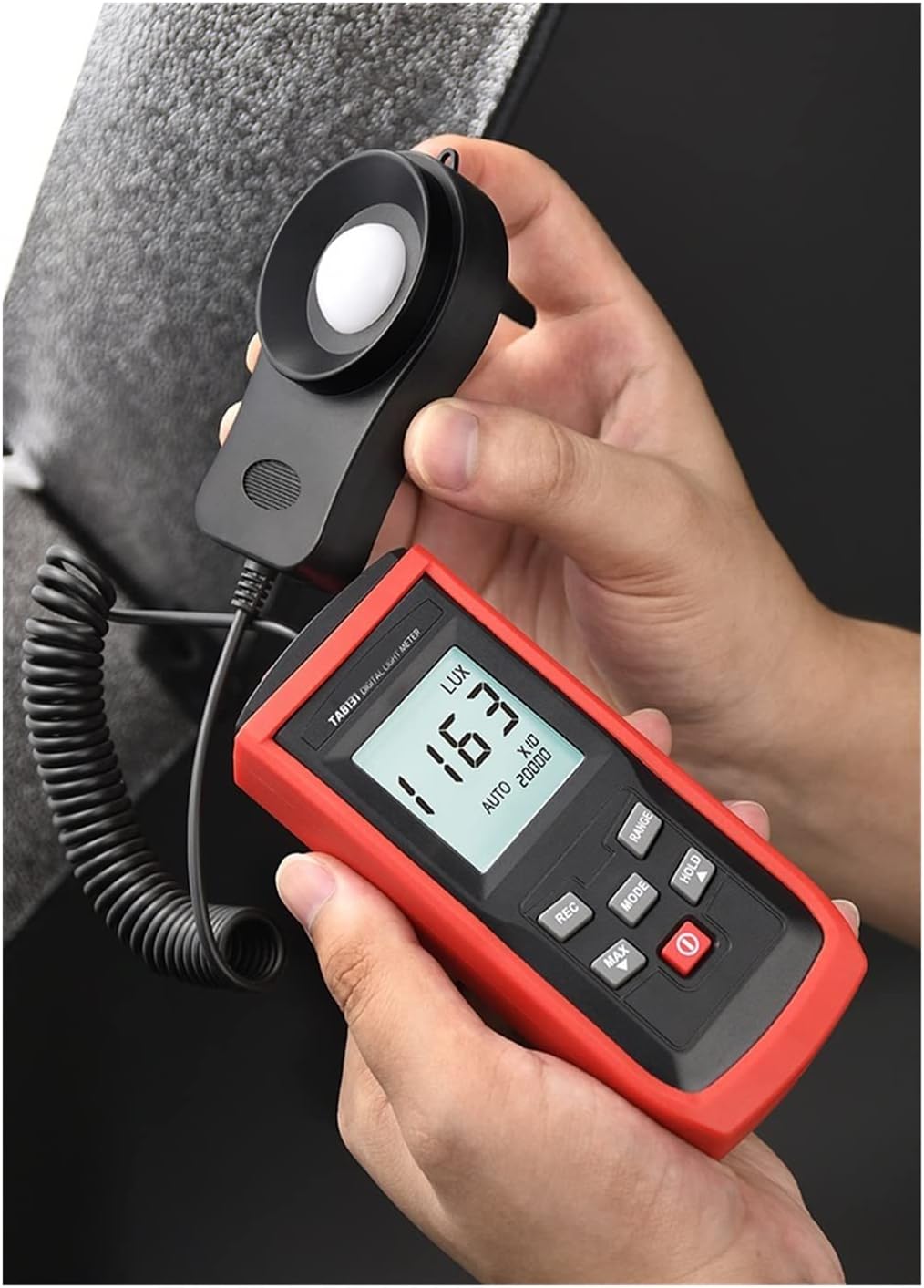
الشكل 5.2: الجبهة view of the TA8131 in use. The main unit features an LCD display showing a light reading of '163 LUX' and control buttons for various functions. The separate sensor is held nearby.
5.1 الوحدة الرئيسية
- شاشة LCD: Shows measurement readings, units (Lux/Fc), and function indicators (MAX, MIN, HOLD, AUTO, RANGE).
- أزرار التحكم:
- POWER (Red button): تشغيل العداد أو إيقاف تشغيله.
- اتجاهات: Switches between Lux and Fc units.
- RANGE: Toggles between automatic and manual measurement ranges.
- معلق: تجميد القراءة الحالية على الشاشة.
- ماكس دقيقة: Displays the maximum or minimum recorded value.
- تسجيل: يقوم بتفعيل وضع تسجيل البيانات.
5.2 Photoreceptor Sensor
The sensor contains a photodiode with an additional filter, designed to meet CIE Photopic Spectral Response standards. It is connected to the main unit via a coiled cable that can extend up to 1300mm (51.18 inches) for flexible measurement positioning.

Figure 5.3: The extended cable of the photoreceptor sensor, demonstrating its reach for versatile light measurement.
6. الإعداد
6.1 تركيب البطارية
- حدد موقع غطاء حجرة البطارية في الجزء الخلفي من الوحدة الرئيسية.
- حرك الغطاء لفتحه.
- أدخل بطاريتين (2) من نوع AAA، مع مراعاة القطبية الصحيحة (+/-) كما هو موضح داخل الحجرة.
- أعد تركيب غطاء حجرة البطارية بشكل آمن.
Note: Batteries are not included in the package. Please use fresh AAA alkaline batteries for optimal performance.
6.2 اتصال الاستشعار
The photoreceptor sensor is permanently connected to the main unit via a coiled cable. No additional connection steps are required. Ensure the cable is not excessively stretched or kinked during use to prevent damage.
7. تعليمات التشغيل
7.1 تشغيل/إيقاف التشغيل
اضغط على الأحمر قوة button to turn the meter on. Press and hold the قوة اضغط على الزر مرة أخرى لإيقاف تشغيل العداد.
7.2 أخذ القياس
- Turn on the meter. The LCD will display the current light intensity.
- Position the photoreceptor sensor at the location where you wish to measure light. Ensure the sensor's dome is facing the light source.
- اقرأ قيمة القياس على شاشة LCD.
7.3 اختيار الوحدة (لوكس/شمعة)
اضغط على وضع button to switch between Lux and Foot-candle (Fc) units. The selected unit will be displayed on the LCD.
7.4 Range Selection (Auto/Manual)
The meter defaults to automatic range selection. To switch to manual range, press the RANGE button. Repeatedly pressing RANGE will cycle through available manual ranges (e.g., 200, 2000, 20000, 100000 Lux). To return to auto-ranging, press and hold the RANGE button until "AUTO" appears on the display.
7.5 وظيفة الاحتفاظ بالبيانات
اضغط على يمسك button to freeze the current reading on the display. The "HOLD" indicator will appear. Press يمسك again to release the data hold function and resume live measurements.
7.6 قياس الحد الأقصى/الأدنى
اضغط على الحد الأقصى/الحد الأدنى button to display the maximum recorded light intensity since the meter was turned on. Press it again to display the minimum recorded light intensity. A third press will return to live measurement. The "MAX" or "MIN" indicator will be shown on the display.

Figure 7.1: The meter displaying the minimum recorded value in auto-range mode.
7.7 تسجيل البيانات
The meter can store up to 50 sets of measurement data.
- اضغط على ريك button to enter data recording mode. The "REC" indicator will appear.
- في كل مرة تضغط فيها ريك, the current measurement will be saved. The display may briefly show the record number.
- To exit recording mode, press and hold the ريك زر.

Figure 7.2: The meter's capability to store up to 50 data sets.

Figure 7.3: Illustration of the automatic data recording feature, showing multiple readings being stored.
8. الصيانة
8.1 التنظيف
امسح عداد Casing and sensor with a soft, dry cloth. Do not use abrasive materials, solvents, or harsh chemicals, as these may damage the plastic components or the sensor's optical surface.
8.2 استبدال البطارية
عند ظهور مؤشر انخفاض البطارية على شاشة LCD، استبدل البطاريات فورًا لضمان دقة القراءات. راجع القسم 6.1 للاطلاع على تعليمات تركيب البطاريات.
8.3 التخزين
If the meter is not used for an extended period, remove the batteries to prevent leakage. Store the meter in its protective bag in a cool, dry place, away from direct sunlight and extreme temperatures.
9. استكشاف الأخطاء وإصلاحها
- No Display / Meter Does Not Turn On:
- تأكد من تركيب البطاريات بشكل صحيح مع مراعاة القطبية المناسبة.
- استبدلها ببطاريات AAA جديدة.
- قراءات غير دقيقة:
- Ensure the sensor's dome is clean and unobstructed.
- Verify the correct unit (Lux/Fc) is selected.
- Check if the meter is in the appropriate measurement range (Auto or Manual).
- Avoid measuring in rapidly changing light conditions if stable readings are required.
- "OL" or Overload Display:
- The measured light intensity exceeds the current range. Switch to a higher manual range or enable auto-ranging.
10. المواصفات

Figure 10.1: Detailed product specifications for the TA8131 model.
| المعلمة | Specification (TA8131) |
|---|---|
| نموذج | TA8131 (Split model) |
| مدى القياس | 200Lux, 2000Lux, 20000Lux, 100000Lux (20/200/2000/10000 Fc) |
| دقة | 0.1Lux (for 200Lux range); 1Lux (for other ranges) |
| دقة | ±3% rdg ± 10dgts (<10,000 lux) ±4% rdg ± 10dgts (>10,000 lux) |
| الدقة الإجمالية | For C.I.E Standard Lighting A (2856K) |
| Sampمعدل لينغ | مرات 2 / ثانية |
| قابلية التكرار | ±2% |
| اختيار النطاق | Automatic / Manual measurement |
| تسجيل البيانات | 50 measurement data sets (delayed recording function) |
| الاستجابة الطيفية | Meets CIE Photopic |
| مستقبلة للضوء | Photodiode with additional filter lens |
| اختيار الوحدة | Lux / Fc |
| وظيفة الاحتفاظ بالبيانات | Yes (HOLD) |
| ماكس/مين ريكوردز | نعم |
| شاشة LCD | Max Display 1999 (4-digit LCD display) |
| حجم شاشة LCD | 35*32 مم |
| بطارية | شنومكس x آا (غير مدرجة) |
| Product Size (Main Unit) | 125*55*30 ملم |
| حجم المستشعر | 87*55*20 ملم |
| وزن | حوالي 180 جرام |
11. الضمان والدعم
This product is covered by the standard manufacturer's warranty. For warranty claims, technical support, or service inquiries, please contact the retailer or manufacturer directly. Please retain your purchase receipt as proof of purchase.
