
1. Introduction to the ESP32-WROVER-IE Module
The EBYTE ESP32-WROVER-IE is a versatile Wi-Fi module designed for a wide range of applications, including low-power sensor networks, wearable electronic devices, and demanding tasks such as speech encoding, audio streaming, and MP3 decoding. It integrates the powerful ESP32-D0WD-V3 chip, featuring an Xtensa dual-core 32-bit LX6 microprocessor.
This module offers robust connectivity with IEEE802.11b/g/n protocol support, operating in the 2.4~2.5GHz frequency band. It boasts a transmission distance of up to 400 meters and an antenna output power of 20dBm, ensuring broad wireless communication range. Its low sleep current, less than 5 µA, makes it highly suitable for battery-powered applications.

Figure 1: Physical dimensions of the ESP32-WROVER-IE module, showing its compact size of approximately 31.4mm by 18mm.
المميزات الرئيسية:
- حل الشريحة: ESP32-D0WD-V3 with Xtensa dual-core 32-bit LX6 microprocessor.
- ذاكرة: 448 KB ROM, 520 KB SRAM, 16 KB RTC SRAM.
- تردد الساعة: Supports up to 240 MHz.
- المعيار اللاسلكي: IEEE802.11b/g/n (2.4~2.5GHz).
- واجهة الاتصال: UART I/O.
- الهوائي: Ipex antenna for flexible integration.
- استهلاك منخفض للطاقة: Sleep current less than 5 µA, ideal for battery-powered devices.
- التكامل العالي: Excellent performance in wireless transmission distance and network connectivity.

Figure 2: Illustration highlighting the ultra-low power consumption capabilities of the ESP32 module, featuring an ultra-low power RF architecture and power-saving patents for extended battery life.
2. المواصفات الفنية
The following table provides detailed technical specifications for the ESP32-WROVER-IE module.
| مواصفة | قيمة |
|---|---|
| ماركة | ايبايت |
| رقم الموديل | ESP32-WROVER-IE |
| تكنولوجيا الاتصال | واي فاي |
| معيار الاتصال اللاسلكي | 802.11b/g/n |
| عدد المعالجات | 2 (Dual-core LX6) |
| تكرار | 2.4~2.5 جيجاهرتز |
| مسافة الإرسال | حتى 400 متر |
| نوع الهوائي | إيبكس |
| الواجهة | UART I/O |
| ذاكرة للقراءة فقط | 448 كيلو بايت |
| سرام | 520 كيلو بايت |
| RTC SRAM | 16 كيلو بايت |
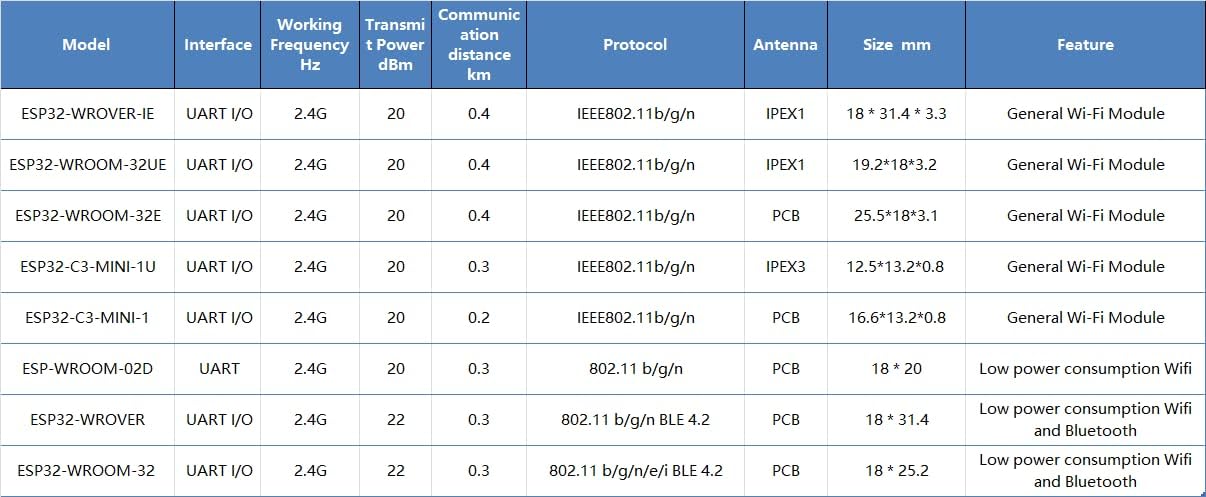
Figure 3: Detailed comparison table showing various EBYTE ESP32 modules, including their interfaces, frequencies, transmit power, communication distances, protocols, antenna types, sizes, and features.
3. الإعداد والتكامل
The ESP32-WROVER-IE module is designed for integration into custom hardware or development boards. Proper setup is crucial for optimal performance.
3.1 اتصال الأجهزة
- مزود الطاقة: قم بتوصيل الوحدة بمصدر طاقة مستقر ضمن نطاق الجهد المحدد لهاtage range. Refer to the datasheet for exact voltagالمتطلبات.
- واجهة وارت: Connect the module's UART (Universal Asynchronous Receiver/Transmitter) pins (TX, RX, GND) to your host microcontroller or development board. Ensure correct voltage levels (e.g., 3.3V).
- اتصال الهوائي: Attach a compatible Ipex antenna to the module's Ipex connector. Ensure the connection is secure to achieve the specified communication range.
- دبابيس GPIO: Utilize the available General Purpose Input/Output (GPIO) pins for connecting sensors, actuators, or other peripherals as required by your application.
3.2 تكوين البرنامج
- بيئة التطوير: Install the ESP-IDF (Espressif IoT Development Framework) or a compatible Arduino IDE environment with ESP32 board support.
- تحميل البرامج الثابتة: Use the chosen development environment to compile and upload your application firmware to the ESP32-WROVER-IE module via the UART interface.
- الاختبار الأولي: After uploading, perform basic tests to verify Wi-Fi connectivity and communication with your host system.
4. تشغيل الوحدة
Once the ESP32-WROVER-IE module is integrated and programmed, its operation depends on the specific application firmware.
4.1 اتصال Wi-Fi
- وضع المحطة: The module can connect to an existing Wi-Fi network (router) to access the internet or communicate with other devices on the local network.
- وضع نقطة الوصول (AP): The module can create its own Wi-Fi network, allowing other devices to connect directly to it.
- الوضع المشترك: The module can operate as both a station and an access point simultaneously.
4.2 اتصالات البيانات
The module supports various communication protocols over Wi-Fi, including TCP/IP, UDP, HTTP, MQTT, and more, enabling data exchange with cloud services, local servers, or other IoT devices.

الشكل 4: مثالample of the ESP32 module's application in smart home environments, enabling wireless connectivity for various devices and systems.

الشكل 5: مثالample of the ESP32 module's application in industrial automation, contributing to reliable and efficient control systems.
5. Maintenance and Handling
To ensure the longevity and reliable operation of your ESP32-WROVER-IE module, follow these guidelines:
- كهرباء ساكنة: Handle the module with care, preferably in an ESD-safe environment, to prevent damage from static discharge.
- الظروف البيئية: Operate and store the module within its specified temperature and humidity ranges. Avoid extreme conditions.
- الحماية الجسدية: Protect the module from physical impact, excessive bending, or pressure, especially on the antenna connector and pins.
- تنظيف: If necessary, clean the module gently with a dry, soft brush or compressed air. Avoid liquids or harsh chemicals.
- تحديثات البرامج الثابتة: Regularly check for and apply firmware updates from Espressif or EBYTE to benefit from performance improvements, bug fixes, and security enhancements.
6. استكشاف الأخطاء وإصلاحها
If you encounter issues with your ESP32-WROVER-IE module, consider the following troubleshooting steps:
- لا يوجد طاقة:
- التحقق من مستوى الطاقةtagه والقدرة الحالية.
- Check all power connections for proper contact.
- مشكلات الاتصال بشبكة Wi-Fi:
- تأكد من توصيل الهوائي بشكل آمن.
- Check Wi-Fi credentials (SSID, password) in your firmware.
- Verify that the Wi-Fi network is within range and operating on the 2.4GHz band.
- Confirm that the module's firmware includes Wi-Fi functionality and is correctly initialized.
- UART Communication Problems:
- Check TX/RX connections (ensure TX of one device connects to RX of the other).
- Verify baud rate settings match between the module and the host.
- تأكيد المجلدtage levels are compatible (e.g., 3.3V).
- الوحدة لا تستجيب:
- Try a hard reset by cycling the power.
- Re-upload the firmware to ensure it's not corrupted.
- تحقق من وجود أي دوائر قصر أو أسلاك غير صحيحة على لوحة الدوائر المطبوعة الخاصة بك.
7. الضمان والدعم
For specific warranty information and technical support, please refer to the official EBYTE webالموقع أو تواصل مع خدمة العملاء مباشرةً. احتفظ بإيصال الشراء لطلبات الضمان.
الشركة المصنعة: ايبايت
نموذج: ESP32-WROVER-IE