
1. انتهى المنتجview
The Sanpyl 3G/4G LTE Base Hat Module is designed to provide 3G/4G LTE connectivity to various single board computers. It features a Mini PCI-E socket for compatible cellular modules and a Nano SIM card slot. This module can also operate independently via a Micro USB connection.
المميزات الرئيسية:
- Compatible with 40-pin GPIO header boards such as Raspberry Pi 4, 3, 2, B+.
- Efficient power circuit supporting up to 3 Amps.
- Wide operating temperature range: -40℃ to 80℃.
- Clip-in Mini PCI-E socket for various LTE, UMTS/HSPA+, and GSM/GPRS/ modules.
- Accessible Nano SIM card socket.
- Can be used standalone with a PC/Laptop via Micro USB.
2. محتويات العبوة
تأكد من تضمين جميع العناصر المذكورة أدناه في طردك. في حال وجود أيٍّ منها مفقودًا أو تالفًا، يُرجى التواصل مع خدمة العملاء.
- 1 x 3G/4G LTE Base Hat Module
- 1 x USB 2.0 to Micro USB Cable
- شنومكس x برغي سائق
- 1 x Accessories Package (screws, standoffs)
- 1 × دليل المستخدم (هذه الوثيقة)

الشكل 2.1: محتويات العبوة
3. مواصفات المنتج
| ميزة | مواصفة |
|---|---|
| نوع العنصر | 3G/4G LTE Base Hat |
| نطاق درجة حرارة العمل | -40 درجة مئوية ~ 80 درجة مئوية |
| واجهة الأجهزة | USB |
| بروتوكول ربط البيانات | USB |
| دعم السلطة | حتى 3 Amps |
| أبعاد المنتج (الطول × العرض × الارتفاع) | 85 x 55mm (3.3 x 2.2 بوصة) |
| وزن | 0.11 كيلوغرام |
| رقم الموديل | Sanpyl8gz9xgpbk78326 |
4. التوافق
Compatible Host Boards:
- راسبيري باي 4
- راسبيري باي 3
- راسبيري باي 2
- راسبيري باي بي+
- لوحة أسوس تينكر
- روك 64
- Samsung ARTIK's Board
- لاتيه باندا
Compatible Mini PCI-E Modules:
- For Quectel: EC25/EC21/EC20/UC20/LTE-EP06 Series
- For Sierra Wireless: AirPrime MC Series
- For Telit: LM960, LE910V2, HE910, LE910Cx Series
- For Huawei: ME909s-120, ME909s-821 Series
- For Simcom: SIM7100, SIM7230 Series
- For ZTE: ZM8620 Series
- For U-Blox: MPCI-L2 Series
- For Thales: PLS62W, mPLS8, mPLAS9 Series
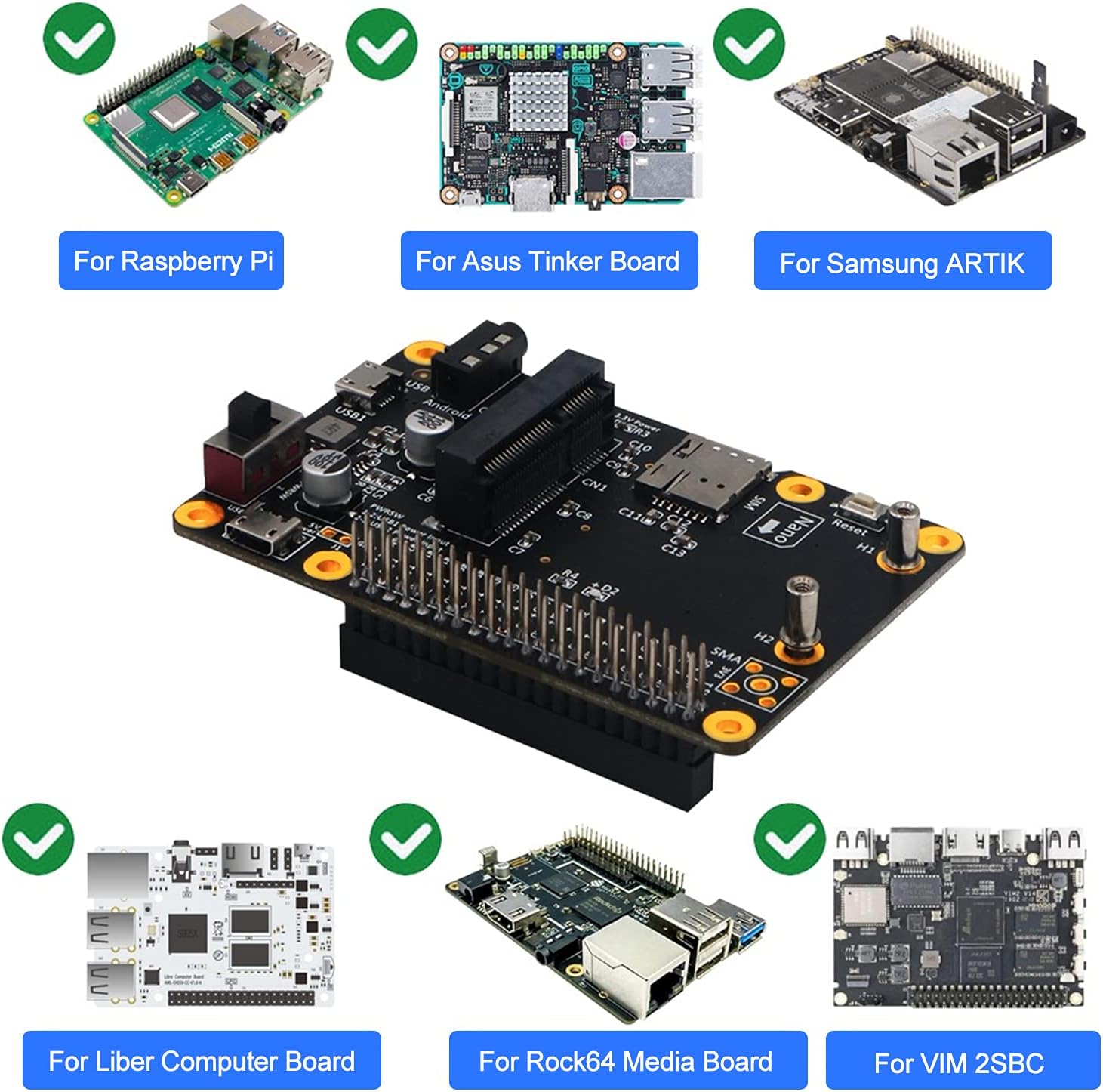
Figure 4.1: Compatible Single Board Computers
5. Product Layout and Dimensions
Familiarize yourself with the various components and their locations on the module.

Figure 5.1: Module Component Layout
The module's physical dimensions are provided for integration planning.

الشكل 5.2: أبعاد المنتج
6. تعليمات الإعداد
Follow these steps to set up your 3G/4G LTE Base Hat Module.
- Attach the HAT to your Host Board: Carefully align the 40-pin GPIO header of the Base Hat Module with the corresponding pins on your compatible single board computer (e.g., Raspberry Pi). Press down gently until it is securely seated.
- Install Mini PCI-E Module: Insert your compatible 3G/4G LTE Mini PCI-E module into the designated slot on the Base Hat. Secure it with the provided screws if necessary.
- أدخل بطاقة نانو سيم: Locate the Nano SIM card socket on the Base Hat. Insert your activated Nano SIM card into the slot until it clicks into place. Ensure the card is oriented correctly.
- توصيل الهوائيات (اختياري): If your Mini PCI-E module requires external antennas, connect them to the appropriate SMA connectors on the Base Hat.
- توصيل الطاقة: Connect the Micro USB cable to the 'Main USB' port on the Base Hat. Connect the other end to a power source or your host board's USB port. Alternatively, if using the module standalone, connect it to a PC/Laptop via Micro USB.
- Power Selection Switch: Adjust the power selection switch (PWR SW) if needed, based on your specific setup and power requirements.

الشكل 6.1: مثال التثبيتample
7. تعليمات التشغيل
Once the module is physically set up and powered, follow these general steps for operation:
- تشغيل الطاقة: Ensure your host board or PC is powered on. The 3.3V Power LED on the Base Hat should illuminate, indicating power.
- تثبيت برنامج التشغيل (إذا لزم الأمر): Depending on your operating system and Mini PCI-E module, you may need to install specific drivers. Refer to the documentation for your chosen Mini PCI-E module for driver requirements.
- تكوين شبكة: Configure your operating system to recognize and connect to the 3G/4G LTE network provided by the module. This typically involves setting up APN (Access Point Name) settings.
- اختبار الاتصال: Verify network connectivity by attempting to access the internet or perform a network test.
- وضع مستقل: When connected to a PC/Laptop via Micro USB, the module should be recognized as a USB modem or network adapter, allowing for direct network access.
8. الصيانة
To ensure the longevity and optimal performance of your Sanpyl 3G/4G LTE Base Hat Module, observe the following maintenance guidelines:
- حافظ على نظافة: Regularly clean the module with a soft, dry cloth. Avoid using liquid cleaners or solvents.
- تجنب الظروف القاسية: Do not expose the module to extreme temperatures, humidity, or direct sunlight beyond its specified operating range.
- التعامل معها بحذر: Avoid dropping or subjecting the module to physical shock. When inserting or removing components, do so gently to prevent damage to connectors and pins.
- تحديثات البرامج الثابتة: Periodically check for firmware updates for your Mini PCI-E module, as these can improve performance and stability.
9. استكشاف الأخطاء وإصلاحها
If you encounter issues with your 3G/4G LTE Base Hat Module, refer to the following common troubleshooting steps:
- لا يوجد مؤشر LED للطاقة: Ensure the Micro USB cable is securely connected and the power source is active. Check the power selection switch (PWR SW) position.
- لم يتم اكتشاف الوحدة: Verify that the Mini PCI-E module is correctly seated in its slot. Ensure the Base Hat is properly connected to the host board's GPIO or via Micro USB to a PC. Check for necessary drivers on your operating system.
- لا يوجد اتصال بالشبكة: Confirm that the Nano SIM card is correctly inserted and activated with a data plan. Check your operating system's network settings, especially the APN configuration. Ensure external antennas (if used) are properly connected.
- الاتصال المتقطع: This could be due to weak cellular signal. Try relocating the device or using external antennas. Ensure the power supply is stable and sufficient (up to 3 Ampس).
- ارتفاع درجة حرارة الوحدة: Ensure adequate ventilation around the module and host board. Operating within the specified temperature range (-40℃ ~ 80℃) is crucial.
- وظيفة إعادة الضبط: If the module becomes unresponsive, press the 'Reset' button (S1) to restart the module.
If problems persist after attempting these steps, consult the documentation for your specific Mini PCI-E module or contact Sanpyl customer support.