
1. المقدمة
This manual provides essential instructions for the installation, operation, and maintenance of your PowMr MPPT 60A Solar Charge Controller. This controller is designed to efficiently manage power flow from your solar panels to your battery bank, ensuring optimal charging and system protection. Please read this manual thoroughly before installation and use to ensure safe and correct operation.
محتويات الحزمة:
- 1 x PowMr MPPT 60A Solar Charge Controller
- 1 × دليل المستخدم (الإنجليزية)
2. تعليمات السلامة
Always observe the following safety precautions to prevent personal injury and damage to the controller or other components:
- تأكد من صحة جميع التوصيلات وتأمينها قبل تشغيل الطاقة.
- The correct connection sequence for the solar controller is to connect the battery first, then the solar panel. Always adhere to this specific order. When disconnecting, follow the reverse order: disconnect solar panel, then battery.
- لا تقم بتفكيك وحدة التحكم أو محاولة إصلاحها بنفسك. اتصل بفنيين مؤهلين للصيانة.
- قم بتثبيت وحدة التحكم في منطقة جيدة التهوية، بعيدًا عن المواد القابلة للاشتعال وأشعة الشمس المباشرة.
- The solar charge controller is equipped with electronic protections against overcharge, over-discharge, overload, and short circuit. It also features battery temperature compensation, enhancing overall operational safety.
- Use appropriate circuit breakers or fuses for all connections to prevent damage from overcurrent.
3. مواصفات المنتج
- تكنولوجيا MPPT المتقدمة: The 60A MPPT solar charge controller features automatic battery voltage detection for 12V, 24V, 36V, and 48V systems. It utilizes advanced Maximum Power Point Tracking (MPPT) technology, ensuring a tracking efficiency of no less than 99.5% and a maximum conversion efficiency of up to 97%.
- توافق البطارية العالمي: Supports various battery types for charging, including sealed, gel, flooded, LiFePO4, and Li(NiCoMn)O2 cells. User-defined battery parameters are available for custom battery types.
- الحماية الشاملة: Equipped with electronic protections against overcharge, over-discharge, overload, and short circuit. Includes battery temperature compensation for enhanced safety and battery longevity.
- شاشة LCD متعددة الوظائف: Provides real-time system information, including solar panel voltage/power, charging current, battery voltagهـ، وحالة التحميل.
- التبريد الفعال: Features forced air cooling with an aluminum alloy construction for effective heat dissipation, maintaining optimal performance even under high temperatures.
- Dual PV and Battery Connection: Designed for straightforward connection of both photovoltaic arrays and battery banks.
- Multiple Load Working Modes: Offers various load control options, including Load OFF, Load always ON, and Time Control.
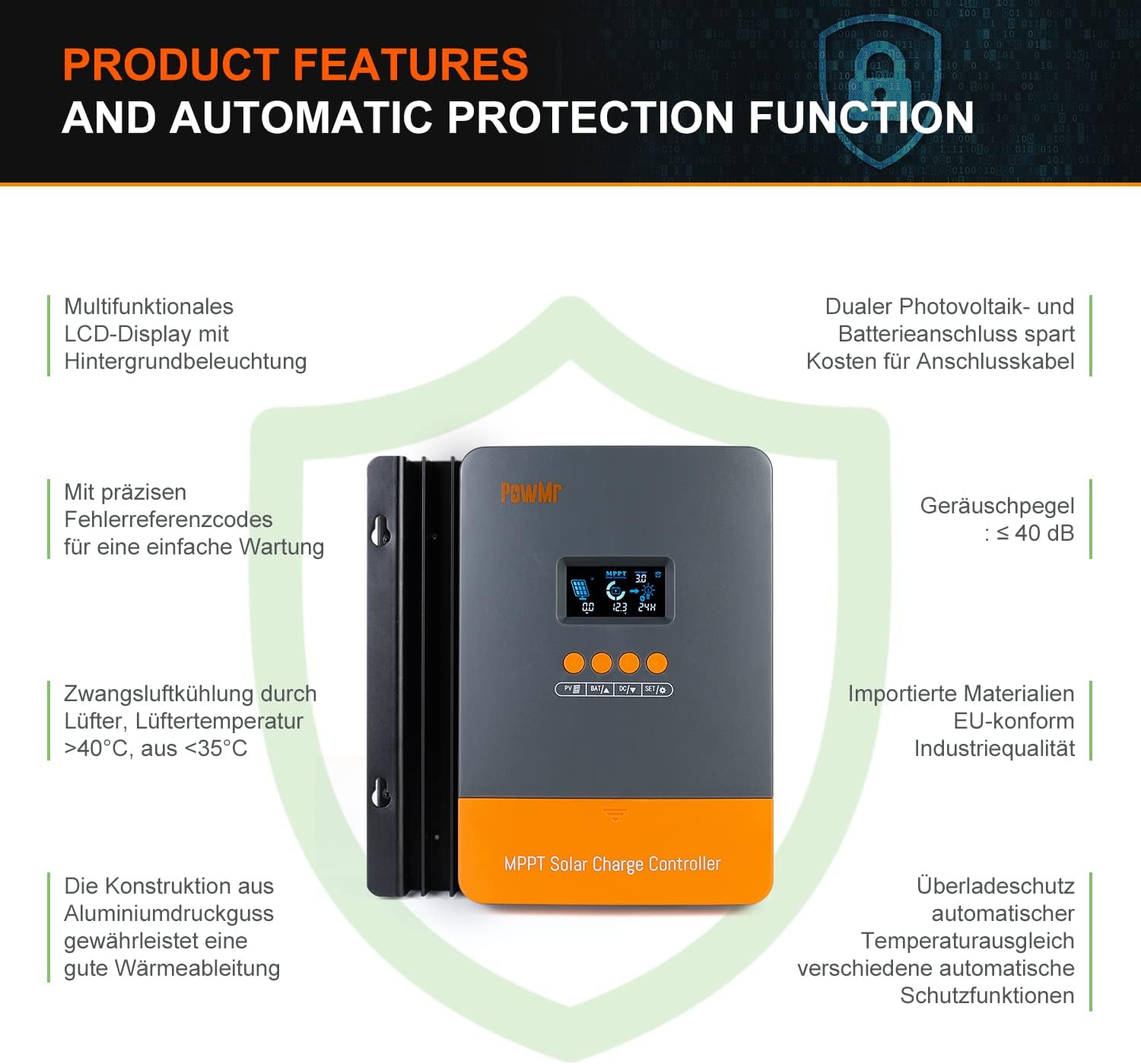
Image: Product features and automatic protection functions. Highlights include a multifunctional LCD display, dual PV and battery connection, precise error codes, forced air cooling, aluminum alloy construction for heat dissipation, and electronic protections.
4. انتهى المنتجview

Image: PowMr MPPT 60A Solar Charge Controller dimensions (165mm x 230mm x 72mm) and its LCD display interface. The display shows solar panel voltage/power, charging current, battery voltage, and load information. Key buttons for PV, Battery, DC Load, and Settings are also visible.
The controller features an intuitive LCD display and control buttons for easy monitoring and configuration. The display provides real-time data on solar input, battery status, and load output.
- أيقونة تشير إلى النهار أو الليل
- Battery icon and SOC (State of Charge)
- وضع العمل
- State and Warning indication
- لوحة للطاقة الشمسية المجلدtage/power/current
- Charging power/charging current/battery voltage
- Load working Mode / Load power / Load current / Load voltage
5. التثبيت والإعداد
5.1 تركيب وحدة التحكم
- Choose a dry, well-ventilated location, protected from direct sunlight, high temperatures, and water.
- Ensure there is sufficient airflow around the controller for proper cooling.
- Mount the controller vertically on a wall or suitable surface using appropriate fasteners.
5.2 توصيلات الأسلاك
مهم: قم دائمًا بتوصيل البطارية أولاً، ثم اللوحة الشمسية، وأخيرًا الحمل. افصلها بترتيب عكسي.
- قم بتوصيل البطارية: Connect the positive and negative terminals of your battery bank to the corresponding battery terminals on the controller. Ensure correct polarity. The controller will automatically detect the battery voltagهـ (12 فولت/24 فولت/36 فولت/48 فولت).
- ربط اللوحة الشمسية: Connect the positive and negative terminals of your solar panel array to the corresponding PV input terminals on the controller. Ensure correct polarity. The maximum open circuit voltage (Voc) from the PV array should not exceed 160V.
- توصيل الحمل المستمر (اختياري): If using a DC load directly from the controller, connect its positive and negative terminals to the load terminals on the controller.

Image: Diagram illustrating recommended wiring configurations for 12V, 24V, 36V, and 48V battery systems, including corresponding input solar power and voltage ranges. Also shows the three load working modes (Load OFF, Load always ON, Time control).
5.3 اختيار نوع البطارية
The controller supports various battery types. You can select the appropriate type through the controller's settings menu. For lithium batteries (LiFePO4, Li(NiCoMn)O2), it is essential to set the specific start and end charging voltages according to the battery manufacturer's specifications. Refer to the detailed instructions in the user manual for proper configuration.

Image: Illustration detailing the supported battery types (Sealed, GEL, Flooded, AGM, Lithium, User Custom Battery) and a graph depicting the four-stage battery charging process: Bulk Charge, Constant Charging (Boost/Equalize), and Float Charge.
6. تعليمات التشغيل
6.1 شاشة LCD والأزرار
The LCD display provides real-time system status. Use the buttons (PV, BAT, DC, SET) to navigate through menus and adjust parameters. Refer to the detailed manual for specific button functions and menu navigation.
6.2 شحن سtages
يستخدم جهاز التحكم نظامًا متعددًاtage charging algorithm to optimize battery life and performance:
- الشحن بالجملة: Charges the battery at maximum current until voltage rises to the absorption level.
- Constant Charging (Boost/Equalize): يحافظ على حجم ثابتtage, allowing the current to gradually decrease. Equalization is a controlled overcharge for flooded batteries to balance cell voltagإِسْ
- تعويم المسؤول: يقلل من حجمtage to a lower level once the battery is fully charged, maintaining it at a safe level to prevent self-discharge.
6.3 أوضاع تشغيل التحميل
The DC load output can be configured with different working modes:
- Load OFF: يكون خرج الحمل متوقفًا دائمًا.
- Load Always ON: مخرج الحمل يعمل باستمرار.
- التحكم بالوقت: The load output operates for a specified duration after sunset.
7. الصيانة
تضمن الصيانة الدورية الأداء الأمثل وطول عمر جهاز التحكم في شحن الطاقة الشمسية الخاص بك:
- قم بفحص جميع توصيلات الأسلاك بشكل دوري للتأكد من إحكامها وخلوها من التآكل.
- Clean the controller's exterior with a dry cloth. Do not use liquids or solvents.
- Ensure the ventilation openings are clear of dust and debris to allow for proper heat dissipation.
- قم بمراقبة شاشة LCD بحثًا عن أي رموز خطأ أو قراءات غير عادية.
8. استكشاف الأخطاء وإصلاحها
If you encounter issues, refer to the following common problems and solutions. For more complex issues, contact customer support.
| مشكلة | السبب المحتمل | حل |
|---|---|---|
| لا يوجد عرض/لا يوجد طاقة | البطارية غير متصلة أو مستوى الصوت منخفضtagهـ؛ قطبية معكوسة. | تحقق من توصيلات البطارية ومستوى الصوتtagهـ. تأكد من صحة القطبية. |
| البطارية لا تشحن | Solar panel not connected; low solar input; PV reversed polarity; battery type misconfigured. | Check solar panel connections and polarity. Verify sufficient sunlight. Confirm correct battery type settings. |
| التحميل لا يعمل | Load mode set to OFF; overload; short circuit; low battery voltage. | Check load mode settings. Reduce load. Inspect for short circuits. Charge battery. |
| تم عرض رمز الخطأ | خطأ محدد في النظام. | Refer to the full user manual for a list of error codes and their corresponding solutions. |
9. المواصفات
| المعلمة | قيمة |
|---|---|
| رقم الموديل | باو-ام60 برو |
| ماركة | باومر |
| تيار الشحن المقدر | 60 أمبير |
| حجم النظامtage | 12V/24V/36V/48V Auto-Identify |
| الأعلى. حجم الإدخال PVtagه المركبات العضوية المتطايرة) | 160 فولت تيار مستمر |
| Max. Solar Panel Power (for 48V system) | 2880W (12V: 720W, 24V: 1440W, 36V: 2160W) |
| كفاءة التتبع | ≥99.5% |
| كفاءة التحويل | تصل إلى 97% |
| أنواع البطاريات المدعومة | Sealed, Gel, Flooded, LiFePO4, Li(NiCoMn)O2, User-defined |
| نوع العرض | شاشة LCD مع إضاءة خلفية |
| أبعاد المنتج (الطول × العرض × الارتفاع) | 16.5 سم × 7.1 سم × 23.1 سم |
| وزن المنتج | 1.3 كجم |
| درجة حرارة التشغيل | -20°C to +50°C (Max. 60°C ambient) |

Image: Universal compatibility of the PowMr 60A MPPT controller compared to other controllers. It highlights higher maximum input solar power and voltage for 12V, 24V, 36V, and 48V systems, supporting SLA, SLD, GEL, AGM, and LiFePO4 battery types.
10. الضمان والدعم
For warranty information, technical support, or any questions regarding your PowMr MPPT 60A Solar Charge Controller, please contact PowMr customer service. Refer to the product packaging or the official PowMr webموقع للحصول على تفاصيل الاتصال.