
PowerDrive PWD2000P
دليل مستخدم محول الطاقة PowerDrive بقدرة 2000 واط
Model: PWD2000P
مقدمة
This manual provides detailed instructions for the safe and efficient operation, installation, and maintenance of your PowerDrive 2000 Watt Power Inverter, Model PWD2000P. This device converts 12V DC power from your vehicle battery into 110V AC power, allowing you to operate various AC devices and charge electronic devices on the go. Please read this manual thoroughly before using the inverter.
معلومات هامة حول السلامة
Always observe the following safety precautions to prevent injury or damage to the inverter or connected devices:
- لا تفتح العاكس جasinز. لا توجد أجزاء قابلة للصيانة من قبل المستخدم بالداخل.
- تأكد من وجود تهوية مناسبة حول العاكس. لا تسد فتحات التبريد.
- أبقِ جهاز العاكس بعيدًا عن الماء والرطوبة والمواد القابلة للاشتعال.
- قم بتوصيل العاكس بمصدر طاقة تيار مستمر 12 فولت فقط.
- Do not exceed the inverter's rated power output (2000 Watts continuous, 4000 Watts surge).
- Always connect the inverter to the battery before plugging in AC devices.
- افصل العاكس عن البطارية عند عدم استخدامه.
- يحتوي هذا المنتج على مواد كيميائية معروفة في ولاية كاليفورنيا بأنها تسبب السرطان والعيوب الخلقية أو غيرها من الأضرار التناسلية. اغسل يديك بعد المناولة.
مكونات المنتج
The PowerDrive 2000 Watt Power Inverter comes with the following components:
- PowerDrive 2000 Watt Power Inverter unit
- 39-inch heavy-duty installation cables (red for positive, black for negative)
- شاشة LCD قابلة للإزالة
- حوامل التثبيت

الشكل 1: أمام view of the PowerDrive 2000 Watt Power Inverter, showing the digital display, power button, Bluetooth indicator, four AC 120V outlets, one USB-C port, and one USB-A port. The unit features a durable yellow and black casinمع فتحات تهوية.

الشكل 2: زيادةview of the PowerDrive 2000 Watt Power Inverter with key dimensions (14.54" length, 9.8" width, 4.25" height) and included accessories. The image displays the inverter unit, red and black 39-inch battery cables, and a 12-foot remote LCD cable.
الإعداد والتثبيت
Proper installation is crucial for the inverter's performance and safety. Follow these steps carefully:
- اختر الموقع: Select a dry, well-ventilated area for mounting the inverter. Ensure it is away from direct sunlight, heat sources, and any flammable materials. The mounting brackets can be used to secure the unit.
- تحضير البطارية: Ensure your vehicle's battery is a 12V DC system. Turn off the vehicle and any accessories.
- توصيل الكابلات:
- قم بتوصيل أحمر (positive) cable to the إيجابي (+) terminal of the inverter.
- قم بتوصيل أسود (negative) cable to the سلبي (-) terminal of the inverter.
- قم بتوصيل الطرف الآخر من أحمر كابل إلى إيجابي (+) terminal of the vehicle battery.
- قم بتوصيل الطرف الآخر من أسود كابل إلى سلبي (-) terminal of the vehicle battery.
مهم: Always connect the inverter terminals first, then the battery terminals. Ensure connections are tight and secure.
- Connect Remote LCD (Optional): If desired, connect the removable LCD screen to the inverter using the provided cable. This allows for remote monitoring and control.
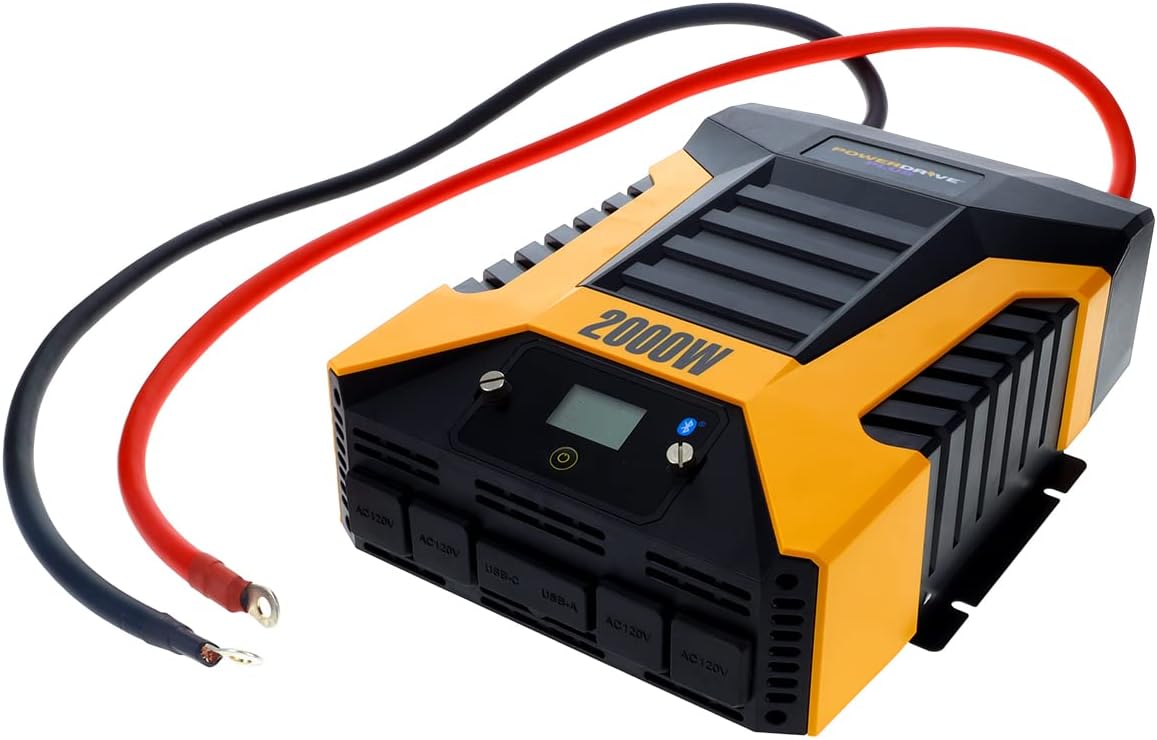
الشكل 3: The PowerDrive 2000 Watt Power Inverter with the red positive and black negative battery cables securely connected to its terminals, ready for connection to a vehicle battery. This illustrates the correct cable attachment for power input.
تعليمات التشغيل
Once installed, the inverter is ready for operation:
- تشغيل: Press the power button on the inverter's front panel or on the remote LCD screen. The digital display will illuminate, showing battery voltagه وإخراج واطtage.
- توصيل الأجهزة: Plug your AC devices into the four 3-prong AC outlets. For charging smartphones and tablets, use the standard USB 2.4 Amp port or the fast-charging USB-C 3.0 Amp ميناء.
- يراقب: The digital display provides real-time information on battery voltage, output power (watts), and any error codes.
- تقنية البلوتوث اللاسلكية:
- تنزيل مجاني PowerDrive Plus app from your smartphone's app store (compatible with Android and iOS).
- Enable Bluetooth on your smartphone and pair it with the inverter.
- The app allows you to remotely monitor battery voltage, output power, and product temperature. You can also set up protections like undervoltage and overload, and power the inverter on/off from a distance.
- إيقاف التشغيل: Press and hold the power button until the display turns off, or use the PowerDrive Plus app. Disconnect devices before turning off the inverter.

الشكل 4: لقطة مقربة من الأمام view of the PowerDrive 2000 Watt Power Inverter, highlighting its four AC 120V outlets, one USB-C port, and one USB-A port. These ports provide versatile power options for various electronic devices and appliances.

الشكل 5: A smartphone screen showing the PowerDrive Plus application interface. The app displays real-time data such as output power (842 watts), battery power percentage (88%), battery voltage (12.6 VDC), and output voltage (120 VAC), along with temperature readings and control options.
صيانة
To ensure the longevity and optimal performance of your PowerDrive inverter, follow these maintenance guidelines:
- حافظ على نظافة: امسح الجزء الخارجي من العاكس بانتظام بقطعة قماش جافة وناعمة. لا تستخدم المنظفات السائلة أو المذيبات.
- تهوية: Ensure the cooling fan vents are clear of dust and debris. The high-speed cooling fan automatically activates when needed and is designed for quiet operation.
- وصلات الكابلات: Periodically check that all cable connections to the battery and inverter terminals are secure and free from corrosion.
- تخزين: عند عدم استخدام العاكس لفترات طويلة، قم بتخزينه في مكان بارد وجاف، مع فصله عن البطارية.

الشكل 6: مؤخرة view of the PowerDrive 2000 Watt Power Inverter, showcasing its two high-speed cooling fans and the robust battery input terminals. Proper airflow through these fans is essential for maintaining optimal operating temperature.
استكشاف الأخطاء وإصلاحها
إذا واجهت مشكلات مع العاكس الخاص بك، راجع المشكلات والحلول الشائعة التالية:
| مشكلة | السبب المحتمل | حل |
|---|---|---|
| لا يوجد خرج طاقة / العاكس لا يعمل |
|
|
| يتوقف العاكس عن العمل بشكل متكرر |
|
|
| تعرض الشاشة الرقمية رمز الخطأ | Specific error condition (e.g., over-voltagه ، تحت المجلدtage, overload, short circuit) | Refer to the PowerDrive Plus app or contact customer support for specific error code interpretations and solutions. Address the underlying issue (e.g., reduce load, check battery). |
مواصفات المنتج
| ميزة | التفاصيل |
|---|---|
| ماركة | باور درايف |
| رقم الموديل | PWD2000 ف |
| الطاقة المستمرة | 2000 واط |
| قوة الطفرة | 4000 واط |
| حجم الإدخالtage | 12 فولت تيار مستمر |
| حجم الإخراجtage | 110 فولت تيار متردد |
| منافذ التيار المتردد | Four 3-prong outlets |
| منافذ USB | منفذ USB 2.4 واحد Amp, One USB-C 3.0 Amp |
| الاتصال | Bluetooth Wireless Technology (PowerDrive Plus App compatible) |
| عرض | Digital display (removable LCD screen) |
| تبريد | مروحة تبريد عالية السرعة |
| وزن العنصر | 9 رطل |
| أبعاد المنتج | 5.7 × 17 × 12 بوصة |
الضمان والدعم
For warranty information, technical support, or service inquiries, please contact PowerDrive customer service. Keep your purchase receipt as proof of purchase.
For additional resources and frequently asked questions, visit the official PowerDrive website or refer to the PowerDrive Plus app.
Ask a question about this manual
Ask about setup, troubleshooting, compatibility, parts, safety, or missing instructions. Manuals+ will review the question and use this page’s manual context to help answer it.