
1. المقدمة
This manual provides essential information for the proper installation, operation, and maintenance of your SUNMI T2s Lite 15.6-inch Android Point of Sale (POS) system. Please read this manual thoroughly before using the device to ensure optimal performance and safety. Keep this manual for future reference.
2. معلومات السلامة
- لا تعرض الجهاز لدرجات حرارة شديدة أو رطوبة أو أشعة الشمس المباشرة.
- تجنب إسقاط الجهاز أو تعريضه لصدمات قوية.
- استخدم فقط محول الطاقة المرفق مع الجهاز. قد يؤدي استخدام محول غير مناسب إلى تلف الجهاز أو نشوب حريق.
- لا تحاول تفكيك الجهاز أو إصلاحه بنفسك. استشر فني صيانة مؤهلًا.
- احتفظ بالجهاز بعيدًا عن الماء أو السوائل الأخرى.
- تأكد من التهوية المناسبة حول الجهاز أثناء التشغيل.
3. محتويات العبوة
تأكد من وجود جميع العناصر في العبوة:
- SUNMI T2s Lite POS Terminal
- محول الطاقة
- كابل الطاقة
- دليل البدء السريع (إن وجد)
- بطاقة الضمان (إن وجدت)
في حال وجود أي عناصر مفقودة أو تالفة، يرجى الاتصال بالبائع على الفور.
4. انتهى المنتجview
The SUNMI T2s Lite is an integrated Android-based POS system designed for retail environments. It features a 15.6-inch capacitive touchscreen display and various connectivity options.
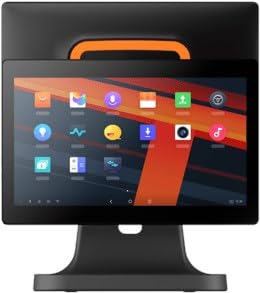
الشكل 4.1: أمام view of the SUNMI T2s Lite POS system. This image displays the main 15.6-inch touchscreen, which is the primary interface for operating the device. The design is compact and suitable for various retail settings.
4.1 مكونات رئيسية
- شاشة لمسية مقاس 15.6 بوصات: High-resolution (1920x1080) capacitive touch interface.
- زر الطاقة: Located typically on the side or rear for turning the device on/off.
- منافذ USB: For connecting peripherals such as barcode scanners, external printers, or cash drawers.
- منفذ إيثرنت: للاتصال بالشبكة السلكية.
- مدخلات الطاقة: لتوصيل محول الطاقة.
- الكاميرا الأمامية: For specific applications requiring image capture.
5. الإعداد
5.1 التفريغ والتنسيب
- قم بإزالة الجهاز وجميع الملحقات من العبوة بعناية.
- Place the POS terminal on a stable, flat surface in a well-ventilated area.
- Ensure there is sufficient space around the device for cable connections and heat dissipation.
5.2 توصيل الطاقة
- قم بتوصيل كابل الطاقة بمحول الطاقة.
- Plug the power adapter into the power input port on the back of the SUNMI T2s Lite.
- قم بتوصيل الطرف الآخر من كابل الطاقة بمأخذ كهربائي مؤرض.
5.3 Initial Boot and Network Connection
- Press and hold the power button until the screen lights up. The device will boot into the Android operating system.
- اتبع التعليمات التي تظهر على الشاشة للإعداد الأولي، بما في ذلك اختيار اللغة والمنطقة الزمنية.
- اتصال واي فاي: اذهب الى الإعدادات > الشبكة والإنترنت > Wi-Fiاختر شبكتك، ثم أدخل كلمة المرور.
- اتصال إيثرنت: Connect an Ethernet cable from your router/switch to the Ethernet port on the device. The device should automatically connect to the wired network.
5.4 توصيل الأجهزة الطرفية
- جهاز USB:٪ s: Plug USB peripherals (e.g., barcode scanner, external printer, cash drawer) into the available USB ports. The system will typically recognize them automatically.
- أجهزة البلوتوث: اذهب الى الإعدادات > الأجهزة المتصلة > البلوتوث, enable Bluetooth, and pair with your desired device.
6. تعليمات التشغيل
6.1 تشغيل/إيقاف التشغيل
- لتشغيل: اضغط مع الاستمرار على زر الطاقة حتى تضيء الشاشة.
- لإيقاف التشغيل: Press and hold the power button until a power menu appears. Select "Power off" and confirm. Alternatively, a short press of the power button will put the device to sleep.
6.2 استخدام شاشة اللمس
- مقبض: To select an item or activate a button.
- انقر مع الاستمرار: To open context menus or drag items.
- انتقاد: To scroll through lists or navigate between screens.
- التكبير والتصغير: لتكبير أو تصغير الصور أو web الصفحات.
6.3 نظام التشغيل أندرويد للملاحة
- الشاشة الرئيسية: The central hub for your applications and widgets.
- درج التطبيقات: الوصول إلى جميع التطبيقات المثبتة.
- لوحة الإشعار: اسحب لأسفل من أعلى الشاشة إلى view الإشعارات والإعدادات السريعة.
- إعدادات: Configure Wi-Fi, Bluetooth, display, sound, and other system options.
6.4 Basic POS Functions
The specific POS functions will depend on the software application installed on your device. Refer to the documentation provided with your POS software for detailed instructions. Generally, you will:
- Launch your POS application from the home screen or app drawer.
- قم بتسجيل الدخول باستخدام بيانات اعتماد المستخدم الخاصة بك.
- Process transactions using the touchscreen and connected peripherals (e.g., scanning items, accepting payments).
- Print receipts if an external or integrated printer is configured.
7. الصيانة
7.1 تنظيف الجهاز
- قم دائمًا بإيقاف تشغيل الجهاز وفصله عن الكهرباء قبل التنظيف.
- استخدم قطعة قماش ناعمة وخالية من الوبر وامسحها برفق.ampened with water or a mild, non-abrasive cleaner to wipe the screen and exterior surfaces.
- لا ترش السوائل مباشرة على الجهاز.
- تجنب استخدام المواد الكيميائية القاسية، أو المذيبات، أو المواد الكاشطة.
7.2 تحديثات البرامج
Regularly check for and install system and application updates to ensure optimal performance, security, and access to new features. You can usually find system updates in الإعدادات > النظام > تحديث النظام.
7.3 التخزين
When not in use for extended periods, store the device in a cool, dry place, away from direct sunlight and extreme temperatures. If storing for a long time, ensure the battery is charged to about 50% to prolong its lifespan.
8. استكشاف الأخطاء وإصلاحها
يتناول هذا القسم المشكلات الشائعة التي قد تواجهها. أما بالنسبة للمشكلات الأكثر تعقيداً، فيُرجى الاتصال بخدمة العملاء.
- لن يتم تشغيل الجهاز:
- تأكد من توصيل محول الطاقة بالجهاز ومأخذ الطاقة العامل بشكل آمن.
- تأكد من أن منفذ الطاقة يعمل.
- Try holding the power button for 10-15 seconds to force a restart.
- Touchscreen is unresponsive:
- أعد تشغيل الجهاز.
- تأكد من أن الشاشة نظيفة وخالية من الحطام أو السوائل.
- Network connection issues (Wi-Fi/Ethernet):
- Check if the Wi-Fi is enabled and you are connected to the correct network with the right password.
- For Ethernet, ensure the cable is properly connected and your router/switch is working.
- أعد تشغيل جهاز التوجيه/المودم الخاص بك.
- Peripherals (e.g., printer, scanner) not working:
- تأكد من توصيل الجهاز الطرفي بشكل صحيح بالمنفذ المناسب.
- Check if the peripheral has its own power supply and is turned on.
- Verify that the necessary drivers or software for the peripheral are installed and configured within your POS application.
9. المواصفات
The following are key technical specifications for the SUNMI T2s Lite:
| ميزة | مواصفة |
|---|---|
| ماركة | سونمي |
| الشركة المصنعة | سونمي |
| دقة العرض الأصلية | 1920 × 1080 بكسل |
| تكنولوجيا الاتصال | Bluetooth, Ethernet, USB, WLAN |
| وصف الكاميرا | أمامي |
| ASIN | B0B53FLFT8 |
10. الضمان والدعم
The SUNMI T2s Lite POS system comes with a standard manufacturer's warranty. Please refer to the warranty card included in your package for specific terms and conditions, including warranty period and coverage details.
For technical support, service, or warranty claims, please contact your authorized SUNMI dealer or the customer support channel specified in your purchase documentation. Ensure you have your product model number (T2s Lite) and ASIN (B0B53FLFT8) ready when contacting support.