
بلاك ماجيك ديزاين سينيكAMPOCHDEF6K2
Blackmagic Design Pocket Cinema Camera 6K G2 Instruction Manual
الموديل: CINECAMPOCHDEF6K2
1. المقدمة
This manual provides essential information for the setup, operation, and maintenance of your Blackmagic Design Pocket Cinema Camera 6K G2. Please read this manual thoroughly before using the camera to ensure proper handling and optimal performance. This camera is designed for professional digital film production, offering advanced features for high-quality video capture.
2. معلومات السلامة
- مزود الطاقة: Use only the specified power supply and battery. Incorrect power sources can damage the camera or cause fire.
- الماء والرطوبة: Do not expose the camera to water or high humidity. This camera is not waterproof.
- درجة حرارة: Operate the camera within the recommended temperature range (typically 0°C to 40°C / 32°F to 104°F). Avoid extreme heat or cold.
- التعامل: تعامل مع الكاميرا بحذر. تجنب سقوطها أو تعريضها لصدمات قوية.
- تركيب العدسة: Always ensure the camera is powered off when attaching or detaching lenses to prevent damage to the sensor or lens mount.
- تنظيف: Use a soft, dry cloth for cleaning. For the sensor, use specialized cleaning kits and follow manufacturer guidelines.
3. محتويات العبوة
تأكد من وجود جميع العناصر في الحزمة الخاصة بك:
- Blackmagic Design Pocket Cinema Camera 6K G2 Body
- مفتاح تفعيل برنامج DaVinci Resolve Studio
- Lens Turret Dust Cap
- حزام الكاميرا
- 30W Power Supply with Locking Connector and International Adapters
- بطارية NP-F570
- NP-F Series Battery USB Charger
4. الكاميرا انتهتview
The Blackmagic Design Pocket Cinema Camera 6K G2 features a compact design with a Super 35 sensor and an active EF/EF-S lens mount. It includes a large, bright adjustable tilt 5-inch LCD display for monitoring and menu navigation.

الشكل 4.1: الجبهة بزاوية view of the Blackmagic Design Pocket Cinema Camera 6K G2, showing the lens mount and grip.

الشكل 4.2: الجبهة view of the camera, highlighting the EF/EF-S lens mount and Super 35 sensor.
4.1. Connections and Ports
The camera offers various connectivity options for audio, video output, and data transfer.

الشكل 4.3: مفصل view of the camera's side panel, showing various input/output ports.
- مدخل الميكروفون: Connect consumer microphones or a timecode master clock.
- مخرج سماعة رأس 3.5 ملم: Supports consumer headphones for audio monitoring.
- Full Size HDMI Connector: Outputs 1080p up to 60fps as clean feed or with camera data.
- USB Expansion Port (USB-C): For recording to external SSD storage or connecting focus demands.
- طاقة 12 فولت تيار مستمر: Main power supply input or for external batteries.
- XLR Audio Connection: Two professional balanced Mini XLR audio inputs with phantom power support.

الشكل 4.4: الجانب view of the camera, illustrating the arrangement of the various ports.
4.2. Rear Panel and Controls
The rear panel features the tilting LCD touchscreen and essential control buttons.

الشكل 4.5: خلفي view of the camera displaying the menu interface on the 5-inch LCD screen.

الشكل 4.6: الزاوية الخلفية view showing the camera's LCD screen tilted for flexible viewزوايا متعددة.
5. الإعداد
5.1. تركيب البطارية وشحنها
- افتح غطاء حجرة البطارية الموجود في الجزء السفلي من الكاميرا.
- Insert the NP-F570 battery, ensuring correct orientation. Close the cover securely.
- To charge, connect the included NP-F series battery USB charger to a power source and attach the battery. Alternatively, connect the camera to the 30W power supply with the battery installed.
5.2. تركيب العدسة
- تأكد من إيقاف تشغيل الكاميرا.
- Remove the lens turret dust cap from the camera body and the rear cap from your EF/EF-S compatible lens.
- Align the red or white index mark on the lens with the corresponding mark on the camera's lens mount.
- أدخل العدسة برفق في الحامل وقم بتدويرها في اتجاه عقارب الساعة حتى تستقر في مكانها.
5.3. إدخال بطاقة الوسائط
The camera supports SD/UHS-II and CFast 2.0 cards, as well as external SSDs via USB-C.
- Locate the SD card slot and CFast 2.0 card slot on the camera body.
- Insert the appropriate card into its slot until it clicks. Ensure the card is correctly oriented.
- For external SSD recording, connect a compatible SSD to the USB-C port.
5.4. تشغيل / إيقاف التشغيل
Press and hold the power button located on the top of the camera until the screen illuminates or turns off.
6. تشغيل الكاميرا
6.1. التسجيل الأساسي
To begin recording, press the red record button on the top of the camera. Press it again to stop recording.

Figure 6.1: Camera menu displaying recording settings such as project frame rate and preferred media.
- Frame Rates and Resolution: Navigate the menu on the LCD to select desired frame rates (e.g., 24 fps, 60 fps) and resolutions (up to 6K).
- File التنسيقات: The camera supports industry-standard formats like Apple ProRes (up to 4K) and 12-bit Blackmagic RAW. Select your preferred format in the recording settings.
6.2. Focusing and Exposure
- ركز: Use the lens's manual focus ring or electronic focus controls if available. The LCD offers focus assist tools.
- ايزو: Adjust the dual gain ISO up to 25,600 to manage sensitivity in various lighting conditions.
- Aperture and Shutter Speed: Control these settings via the camera's physical dials or the touchscreen interface to achieve desired exposure and depth of field.
6.3. تسجيل الصوت
The camera includes a built-in stereo microphone. For professional audio, utilize the mini XLR or 3.5mm inputs for external microphones.
6.4. المراقبة
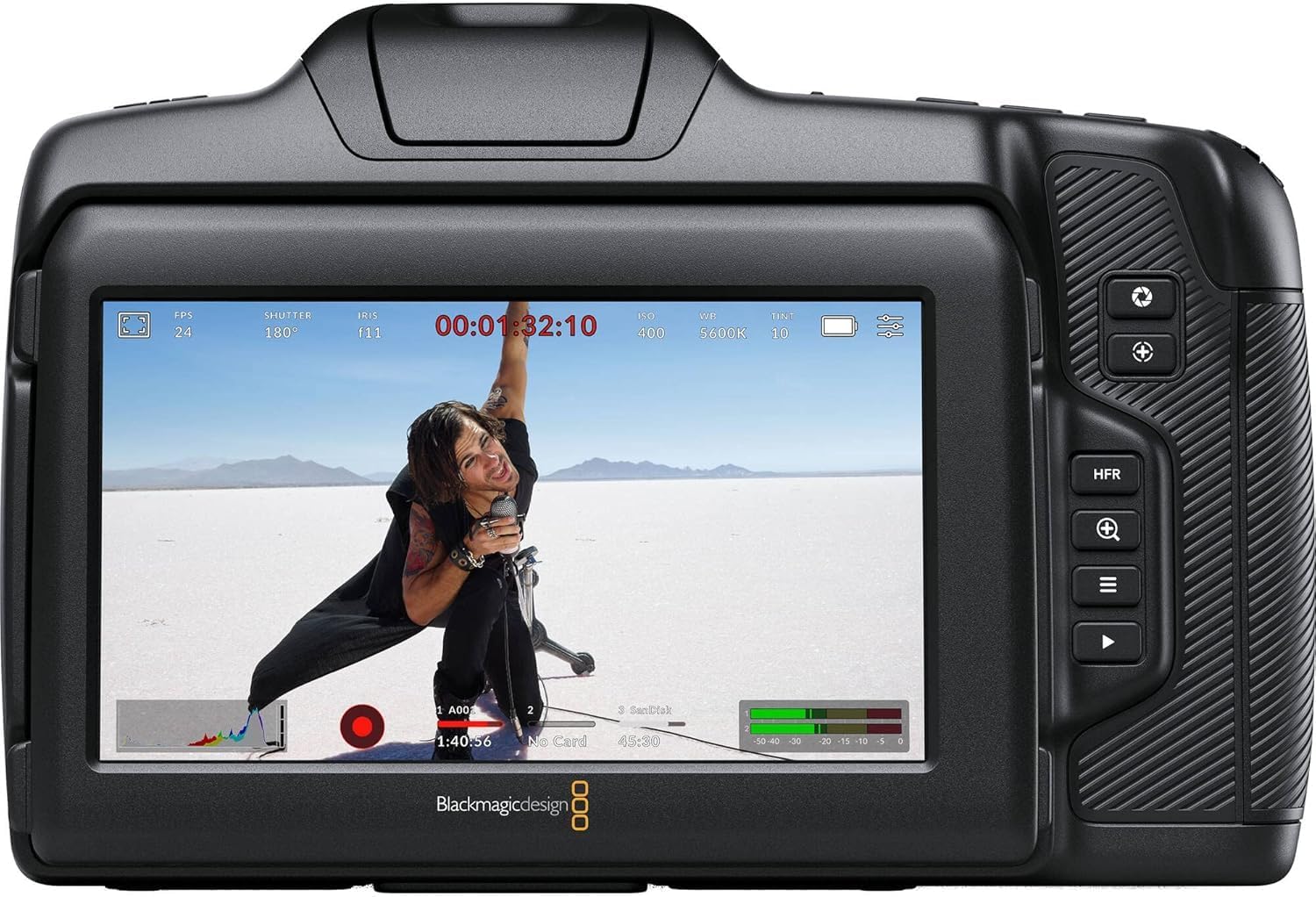
الشكل 6.2: خلفي view of the camera displaying live footage with overlays on the LCD screen.
The 5-inch LCD display provides a clear view من طعامكtage and camera settings. It can be tilted for better viewing angles. An external monitor can be connected via the HDMI port.

Figure 6.3: The camera's tilting LCD screen in an operational setup, demonstrating its flexibility.
6.5. DaVinci Resolve Studio
Your camera includes an activation key for DaVinci Resolve Studio. This software is a comprehensive solution for editing, color correction, visual effects, and audio post-production. Install and activate it on your computer to process your Blackmagic RAW and ProRes footage.
7. الصيانة
7.1. التنظيف
- جسم الكاميرا: Wipe with a soft, dry, lint-free cloth. Do not use harsh chemicals or solvents.
- عدسة: Use a lens brush or air blower to remove dust, then gently clean with a lens cleaning solution and microfiber cloth.
- المستشعر: Sensor cleaning should be performed with extreme care using a specialized sensor cleaning kit. If unsure, consult a professional.
7.2. تحديثات البرامج الثابتة
Periodically check the Blackmagic Design website for firmware updates. Updates can improve performance, add features, and fix bugs. Follow the instructions provided by Blackmagic Design carefully during the update process.
7.3. التخزين
When not in use, store the camera in a cool, dry place, away from direct sunlight and extreme temperatures. Use a protective case to prevent dust and physical damage.
8. استكشاف الأخطاء وإصلاحها
| مشكلة | السبب المحتمل | حل |
|---|---|---|
| الكاميرا لا تعمل | Battery depleted or incorrectly installed; power cable loose. | Charge battery, ensure correct installation. Check power cable connection. |
| توقف التسجيل بشكل غير متوقع | Media card full or too slow; battery low. | Use a faster card (UHS-II, CFast 2.0), free up space, or replace/charge battery. |
| جودة الصورة رديئة | Incorrect exposure settings; dirty lens/sensor. | Adjust ISO, aperture, shutter speed. Clean lens or sensor. |
| لا يوجد تسجيل صوتي | Microphone not connected or configured correctly; audio levels too low. | Check microphone connections and camera audio settings. Adjust input levels. |
9. المواصفات
Key technical specifications for the Blackmagic Design Pocket Cinema Camera 6K G2:
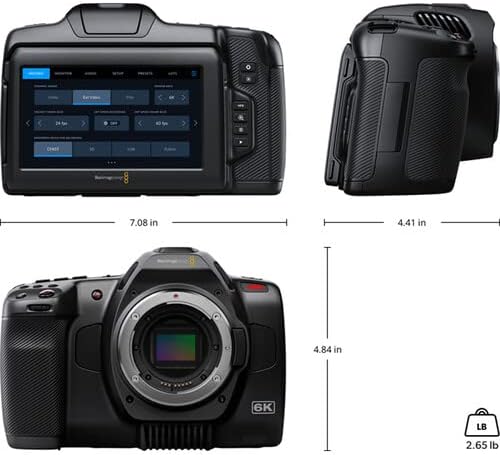
Figure 9.1: Dimensions of the Blackmagic Design Pocket Cinema Camera 6K G2.
| ميزة | التفاصيل |
|---|---|
| رقم الموديل | سينيكAMPOCHDEF6K2 |
| حجم المستشعر | السوبر 35 |
| الدقة الأصلية | 6144 × 3456 |
| النطاق الديناميكي | 13 توقف |
| Dual Gain ISO | حتى 25,600 |
| حامل العدسة | Active EF/EF-S |
| حجم الشاشة | 5 Inches (Adjustable Tilt LCD) |
| وسائط التخزين | SD/UHS-II, CFast 2.0, External SSD via USB-C |
| دقة التقاط الفيديو | 6K |
| تنسيق التقاط الفيديو | Apple ProRes, Blackmagic RAW |
| تنسيق الصوت | WAV, BWF |
| الاتصال | HDMI, USB-C, 3.5mm Audio, Mini XLR Audio, 12V DC |
| وزن العنصر | 3.8 رطل |
| أبعاد المنتج | 9.1 × 9.1 × 9.1 بوصة |
| بطارية | 1 Lithium Ion (NP-F570 included) |
10. الضمان والدعم
For detailed warranty information and technical support, please refer to the official Blackmagic Design webالموقع أو تواصل مع خدمة العملاء. احتفظ بإثبات الشراء لطلبات الضمان.
الموارد المتاحة على الإنترنت: يزور www.blackmagicdesign.com/support for drivers, manuals, and FAQs.
Ask a question about this manual
Ask about setup, troubleshooting, compatibility, parts, safety, or missing instructions. Manuals+ will review the question and use this page’s manual context to help answer it.