
1. المقدمة
The OWON SDS1102 is a 2-channel digital storage oscilloscope designed for a wide range of electronic measurement and analysis tasks. It features a 100 MHz bandwidth, a 1 GSa/s real-time sampling rate, and a clear 7-inch TFT-LCD display. This manual provides essential information for setting up, operating, maintaining, and troubleshooting your device, ensuring optimal performance and longevity.

Figure 1: OWON SDS1102 Digital Oscilloscope
2. معلومات السلامة
يرجى قراءة جميع تعليمات السلامة وفهمها جيداً قبل تشغيل الجهاز. قد يؤدي عدم الالتزام بهذه التعليمات إلى حدوث صدمة كهربائية أو حريق أو تلف للمنتج.
- Use only the power cord supplied with the device.
- Ensure the device is properly grounded to prevent electric shock.
- لا تقم بتشغيل الجهاز في حالة رطبة أو دamp شروط.
- تجنب تعريض الجهاز لأشعة الشمس المباشرة أو درجات الحرارة المرتفعة.
- لا تفتح الجهازasinج؛ إحالة جميع الخدمات إلى الموظفين المؤهلين.
- Verify probe attenuation settings match the oscilloscope's input settings.
3. محتويات العبوة
تأكد من تضمين جميع العناصر المدرجة أدناه في الحزمة الخاصة بك:
- OWON SDS1102 Digital Oscilloscope
- سلك الطاقة
- CD-ROM (containing software and documentation)
- كابل يو اس بي
- مجسات راسم الإشارة (وحدتان)
- Probe Adjustment Tool (screwdriver)
- دليل المستخدم (هذا المستند)
4. انتهى المنتجview
The SDS1102 is designed for efficiency and accuracy in various applications, from electronic circuit debugging to automotive maintenance.
المميزات الرئيسية:
- شاشة إل سي دي عالية الدقة: A 7-inch color TFT-LCD with 65535 colors and 800 x 480 pixel resolution provides clear and concise waveform readings. It supports four automatic cursor modes for precise voltage and time difference measurements.
- ارتفاع Sampمعدل لينغ: Equipped with a 1 GSa/s sampling rate, the device allows for detailed waveform capture and analysis. It includes single waveform recording and playback, and supports plug-and-play USB storage devices.
- Powerful System: Features an auto-range function and supports horizontal, vertical, single/multi-waveform tracking. Probe attenuation settings include 1x, 10x, 100x, and 1000x. It offers 30 types of automatic measurement functions and supports LABVIEW communication for secondary development.
- قابلية النقل: With ultra-thin body design (301 x 152 x 70 mm) and a weight of 1.1 kg, the oscilloscope is highly portable, saving desktop space and operating quietly.

Figure 2: Key features of the SDS1102 Oscilloscope

Figure 3: Compact design and dimensions for portability

Figure 4: Diverse applications of the SDS1102 Oscilloscope
5. الإعداد
5.1 التشغيل الأولي
- Connect the power cord to the oscilloscope and a suitable power outlet.
- اضغط على زر الطاقة لتشغيل الجهاز.
- The 7-inch TFT-LCD display will illuminate, showing the OWON logo and then the main waveform interface.
5.2 معايرة المجس
Before taking measurements, it is crucial to calibrate the oscilloscope probes for accurate readings. This process compensates for any slight variations in the probes as supplied.
- Connect a probe to one of the BNC input connectors (e.g., CH1).
- Ensure the probe's attenuation switch (usually on the probe body) is set to 10x.
- Connect the probe tip to the test point, which is a small metal loop located on the bottom right of the oscilloscope's front panel.
- Attach the black grounding alligator clip of the probe to the lower metal loop, which serves as the ground test point.
- اضغط على الضبط التلقائي button on the oscilloscope. The device will automatically adjust settings to display the test signal. The test point outputs a 1 kHz, 5V square wave.
- Observe the waveform on the screen. If it does not appear as a perfect square wave (e.g., rounded corners or overshoot), use the supplied probe adjustment tool (small screwdriver).
- Carefully insert the screwdriver into the compensation screw on the BNC connector of the probe and adjust it until the displayed square wave is clean and flat on top and bottom, with sharp corners. A slight turn (approximately 1/8th) may be sufficient.
- Repeat this process for all probes you intend to use.
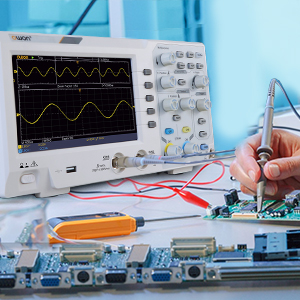
Figure 5: Oscilloscope probe connected to a circuit for testing
6. تعليمات التشغيل
6.1 عرض الموجة الأساسي
- قم بتوصيل المجس بالدائرة التي تريد اختبارها.
- ضبط Vertical Scale (VOLTS/DIV) و Horizontal Scale (SEC/DIV) knobs to get a stable and viewable waveform on the screen.
- استخدم موضع مقابض لتحريك شكل الموجة عموديًا أو أفقيًا.
- اضغط على الضبط التلقائي button for automatic waveform optimization.

Figure 6: Auto-range function in action
6.2 قياسات المؤشر
The SDS1102 supports four automatic cursor modes for precise measurements.
- اضغط على المؤشر زر.
- حدد نوع المؤشر المطلوب (مثل مستوى الصوت)tage, Time) using the menu options.
- Adjust the cursor positions using the multipurpose knob to measure specific points on the waveform.
- The measured values (e.g., ◊V, ◊T) will be displayed on the screen.

Figure 7: Performing cursor measurements
6.3 القياسات التلقائية
The oscilloscope offers 30 types of automatic measurements for quick analysis.
- اضغط على يقيس زر.
- Navigate through the menu to select the desired automatic measurements (e.g., Frequency, Peak-to-Peak Voltage, RMS).
- The selected measurements will be displayed on the screen, updating in real-time.

Figure 8: Automatic measurement display
6.4 Waveform Recording and Playback
The device allows for recording and replaying single waveforms.
- اضغط على حفظ / استدعاء button (or similar function).
- Select the option to record a waveform.
- To replay, select the playback option and choose the desired stored waveform.
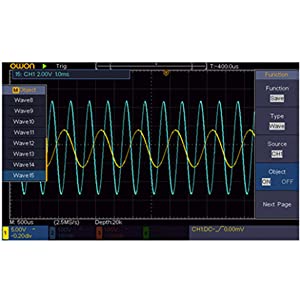
Figure 9: Waveform save and recall menu
6.5 USB Connectivity and PC Control
The SDS1102 supports plug-and-play USB storage devices for saving data and configurations. It also allows for remote communication and control via a computer using the USB interface, with support for LABVIEW and SCPI commands.

Figure 10: USB connection for PC communication and data transfer
7. الصيانة
The OWON SDS1102 is designed for continuous, maintenance-free use under normal operating conditions. However, proper care ensures its longevity and performance.
- تنظيف: استخدم قطعة قماش ناعمة وجافة لتنظيف الجزء الخارجي من جهاز راسم الإشارة. لإزالة الأوساخ المستعصية، استخدم قطعة قماش ناعمة قليلاً.amp cloth with mild detergent can be used, ensuring no liquid enters the device. Do not use abrasive cleaners or solvents.
- تخزين: When not in use, store the oscilloscope in a clean, dry environment, away from extreme temperatures and humidity.
- العناية بالمسبار: Handle probes carefully. Avoid bending or stressing the cables. Keep probe tips clean.
- الصيانة الداخلية: The device does not require user-performed internal maintenance. Do not attempt to open the casing, as this may void the warranty and expose you to electrical hazards.
8. استكشاف الأخطاء وإصلاحها
If you encounter issues with your OWON SDS1102, refer to the following common troubleshooting steps:
| مشكلة | السبب المحتمل | حل |
|---|---|---|
| الجهاز لا يعمل. | Power cord not connected; power outlet faulty; device fault. | Check power cord connection. Test power outlet with another device. If problem persists, contact support. |
| لم يتم عرض أي شكل موجي. | Probe not connected; probe faulty; input signal too small/large; incorrect vertical/horizontal settings. | Ensure probes are securely connected. Check probe functionality. Adjust VOLTS/DIV and SEC/DIV. Use Autoset. |
| Waveform is distorted or noisy. | Uncalibrated probe; poor grounding; external interference. | Perform probe calibration (Section 5.2). Ensure proper grounding. Minimize external electromagnetic interference. |
| USB storage not recognized. | USB device format incompatible; faulty USB device/port. | Ensure USB device is formatted correctly (e.g., FAT32). Try a different USB device or port. |
For issues not covered here, please refer to the full manual on the provided CD-ROM or contact OWON customer support.
9. المواصفات
| ميزة | مواصفة |
|---|---|
| الشركة المصنعة | أوون |
| رقم الموديل | OWON-SDS1102 |
| الأبعاد (الطول × العرض × الارتفاع) | 30.1 × 15.2 × 7 سم |
| وزن | 1.67 كجم |
| عرض | 7-inch Color TFT-LCD, 800 x 480 pixels |
| القنوات | 2 |
| النطاق الترددي | 100 ميجا هرتز |
| Sampمعدل جنيه | 1 جيجاسا/ثانية |
| طول السجل | 10 آلاف نقطة |
| وقت الشروق | ≤1.7 نانوثانية |
| تخفيف المجس | 1x و 10x و 100 x و 1000 x |
| القياسات التلقائية | 30 أنواع |
| الاتصال | USB (for storage, PC communication) |
| دعم البرمجيات | مختبرVIEW, SCPI |
| البطاريات المتضمنة | لا |
| تاريخ أول توفر | 23 يونيو 2022 |

Figure 11: Summary of key technical specifications
10. الضمان والدعم
OWON products are designed for reliability and performance. For warranty information, please refer to the documentation included on the CD-ROM or visit the official OWON website. Information regarding the availability of spare parts is currently unavailable.
For technical support, product inquiries, or service requests, please contact OWON customer service through their official channels. Keep your purchase receipt and product model number (OWON-SDS1102) handy when contacting support.