
1. المقدمة
Thank you for choosing the Kaidi TWS Smart Touch Wireless Earbuds KD-771. These earbuds feature Bluetooth V5.1 for stable connectivity, Smart Touch controls for easy operation, and an IPX4 splash-resistant design, making them suitable for various activities. This manual provides detailed instructions to help you get the most out of your new earbuds.
محتويات الحزمة:
- 1 Pair of Kaidi KD-771 Wireless Earbuds
- 1 حالة الشحن
- 1 USB Charging Cable (Type-C, typically)
- 1 دليل المستخدم
2. الإعداد
2.1 شحن سماعات الأذن وعلبة الشحن
Before first use, fully charge the earbuds and the charging case. The charging case acts as a portable power bank for your earbuds.
- شحن سماعات الأذن: Place the earbuds into their respective slots in the charging case. Ensure the charging contacts align. The indicator lights on the earbuds will show their charging status.
- شحن العلبة: Connect the USB charging cable to the charging port on the case and the other end to a USB power adapter (not included) or a computer USB port. The charging case indicator will illuminate to show charging status. A full charge for the case and earbuds typically takes approximately 4 hours.
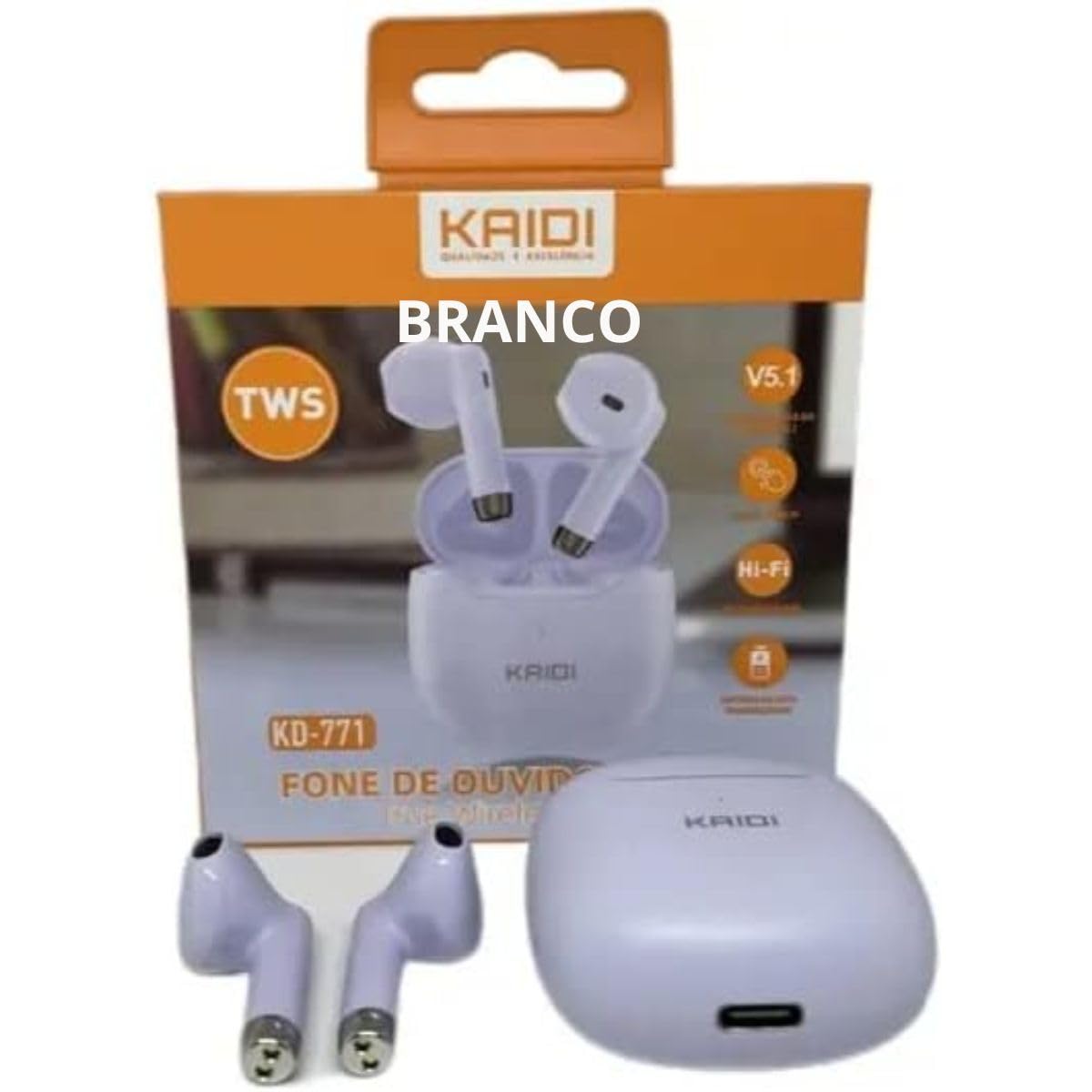
Image: Kaidi KD-771 Earbuds in their charging case. The earbuds are white and sit securely in the case, which is also white. This image illustrates the product's appearance and how the earbuds are stored.
2.2 الاقتران بجهازك
Follow these steps to pair your Kaidi KD-771 earbuds with your smartphone or other Bluetooth-enabled device:
- تشغيل الطاقة: Open the charging case. The earbuds will automatically power on and enter pairing mode. You will hear an audible prompt, and the indicator lights on the earbuds will flash (typically blue and red alternately).
- تفعيل البلوتوث: على جهازك، انتقل إلى إعدادات البلوتوث وتأكد من تشغيل البلوتوث.
- اختر سماعات الأذن: In the list of available Bluetooth devices, look for "KD-771" or a similar name and select it to connect.
- تأكيد: Once connected, you will hear a confirmation sound from the earbuds, and the indicator lights will stop flashing or flash slowly.
ملحوظة: سيتم إعادة توصيل سماعات الأذن تلقائيًا بالجهاز المقترن الأخير عند إخراجها من العلبة، إذا تم تمكين البلوتوث على الجهاز.
3. تعليمات التشغيل
The Kaidi KD-771 earbuds feature Smart Touch controls for convenient operation.
3.1 تشغيل/إيقاف التشغيل
- تشغيل الطاقة: افتح علبة الشحن، أو اضغط مطولاً على منطقة اللمس في كلتا السماعتين لمدة 3 ثوانٍ تقريبًا.
- إيقاف التشغيل: أعد وضع سماعات الأذن في علبة الشحن وأغلق الغطاء، أو اضغط مطولاً على منطقة اللمس في كلتا السماعتين لمدة 5 ثوانٍ تقريبًا.
3.2 تشغيل الموسيقى
- تشغيل/إيقاف مؤقت: Tap the touch area on either the left or right earbud once.
- المسار التالي: اضغط مرتين على منطقة اللمس الموجودة على سماعة الأذن اليمنى.
- المسار السابق: اضغط مرتين على منطقة اللمس الموجودة على سماعة الأذن اليسرى.
3.3 إدارة المكالمات
- الرد/إنهاء المكالمة: انقر على منطقة اللمس في أي من سماعتي الأذن مرة واحدة أثناء مكالمة واردة أو أثناء مكالمة جارية.
- رفض المكالمة: Long-press the touch area on either earbud for approximately 2 seconds during an incoming call.
3.4 مساعد صوتي
- تنشيط مساعد الصوت: انقر ثلاث مرات على منطقة اللمس في أي من سماعتي الأذن.
3.5 التحكم في مستوى الصوت
- ارفع على الصوت: Long-press the touch area on the right earbud.
- تقليل الحجم: Long-press the touch area on the left earbud.
4. الصيانة
4.1 التنظيف
- استخدم قطعة قماش ناعمة وجافة وخالية من الوبر لتنظيف سماعات الأذن وعلبة الشحن.
- لا تستخدم المنظفات الكاشطة أو المذيبات أو البخاخات الهوائية.
- قم بتنظيف جهات اتصال الشحن الموجودة على سماعات الأذن والعلبة برفق باستخدام قطعة قطن جافة لضمان الشحن المناسب.
4.2 التخزين
- عندما لا تكون قيد الاستخدام، قم بتخزين سماعات الأذن في علبة الشحن الخاصة بها لحمايتها والحفاظ عليها مشحونة.
- قم بتخزين الجهاز في مكان بارد وجاف، بعيدًا عن درجات الحرارة العالية وأشعة الشمس المباشرة.
4.3 مقاومة الماء (IPX4)
The Kaidi KD-771 earbuds are rated IPX4, meaning they are splash-resistant. This protects them from splashing water from any direction. They are suitable for light rain or sweaty workouts.
- لا تغمر سماعات الأذن في الماء.
- تجنب تعريضهم لنفثات المياه ذات الضغط العالي.
- تأكد من جفاف سماعات الأذن قبل إعادتها إلى علبة الشحن لمنع تلف نقاط التلامس الخاصة بالشحن.
5. استكشاف الأخطاء وإصلاحها
5.1 سماعات الأذن غير مقترنة
- تأكد من شحن كلا سماعات الأذن.
- قم بإيقاف تشغيل البلوتوث على جهازك ثم قم بتشغيله مرة أخرى.
- Delete "KD-771" from your device's Bluetooth list and try pairing again.
- If only one earbud connects, try resetting the earbuds (refer to the full reset instructions if available in a separate guide, or try placing them back in the case and taking them out again).
5.2 لا يوجد صوت أو مستوى الصوت منخفض
- تحقق من مستوى الصوت على جهازك وسماعات الأذن.
- تأكد من توصيل سماعات الأذن بجهازك بشكل صحيح.
- قم بتنظيف أي حطام من شبكة سماعة الأذن.
5.3 قضايا الشحن
- تأكد من توصيل كابل الشحن بشكل آمن بكل من العلبة ومصدر الطاقة.
- تأكد من أن مصدر الطاقة يعمل.
- قم بتنظيف نقاط اتصال الشحن الموجودة على سماعات الأذن وداخل العلبة.
6. المواصفات
| ميزة | مواصفة |
|---|---|
| رقم الموديل | كيه دي-771 |
| نسخة البلوتوث | رقم V5.1 |
| عمر البطارية (سماعات الأذن) | Approx. 4 hours (talk time/music playback) |
| وقت الشحن | حوالي ساعتين (لشحن العلبة وسماعات الأذن بالكامل) |
| مقاومة الماء | IPX4 (مقاوم للرذاذ) |
| مقاومة | 32 أوم |
| نطاق التردد | 2.400 - 2.485 جيجاهرتز |
| نوع برنامج تشغيل الصوت | سائق المحرك المتوازن |
| طريقة التحكم | يلمس |
| وشملت المكونات | سماعات الأذن، علبة الشحن |
| شهادة ANATEL | 18583-21-14467 |
7. الضمان والدعم
7.1 معلومات الضمان
This Kaidi KD-771 product is covered by a ضمان لمدة 3 شهرًا from the date of purchase against manufacturing defects. Please retain your proof of purchase for warranty claims.
لا يغطي الضمان الأضرار الناجمة عن:
- الاستخدام أو التعامل غير السليم.
- الإصلاحات أو التعديلات غير المصرح بها.
- Accidental damage, drops, or extreme temperatures.
- Water damage beyond the IPX4 rating (e.g., submersion).
7.2 الدعم
For further assistance, troubleshooting, or warranty inquiries, please contact the retailer or the manufacturer (KAIDI) directly. Refer to your purchase documentation for specific contact details.