
1. المقدمة
The Strymon Lex Rotary Speaker Simulator Pedal V2 is designed to provide an authentic rotary speaker experience for guitarists. This manual will guide you through the setup, operation, and maintenance of your Lex V2 pedal, ensuring optimal performance and longevity.
2. ماذا يوجد في الصندوق
- Strymon Lex Rotary Speaker Simulator Pedal V2
- مزود الطاقة
- دليل المستخدم
3. الإعداد
متطلبات الطاقة 3.1
The Lex V2 pedal requires a 9V DC power supply, providing 300 microamps of current. Use only the included power supply or a compatible isolated power supply to prevent damage.
3.2 Connecting Your Pedal
قم بتوصيل آلتك بـ IN jack. For mono output, use the خارج لام jack. For stereo output, connect to both خارج لام و خارج R jacks. The pedal supports both mono and stereo input sources via a TRS input switch.

Figure 1: Rear panel connections of the Lex V2 pedal, including input, output, USB, and EXP/MIDI ports.
3.3 MIDI and Expression Pedal Connectivity
ال EXP/MIDI jack allows for full MIDI control via a TRS 1/4" cable or USB-C. This enables control over various parameters and access to 300 MIDI preset locations. An expression pedal can also be connected here for real-time control of selected parameters.
4. Operating Your Lex V2 Pedal
The Lex V2 offers a comprehensive set of controls to shape your rotary speaker tone. Familiarize yourself with each knob and switch for optimal sound sculpting.
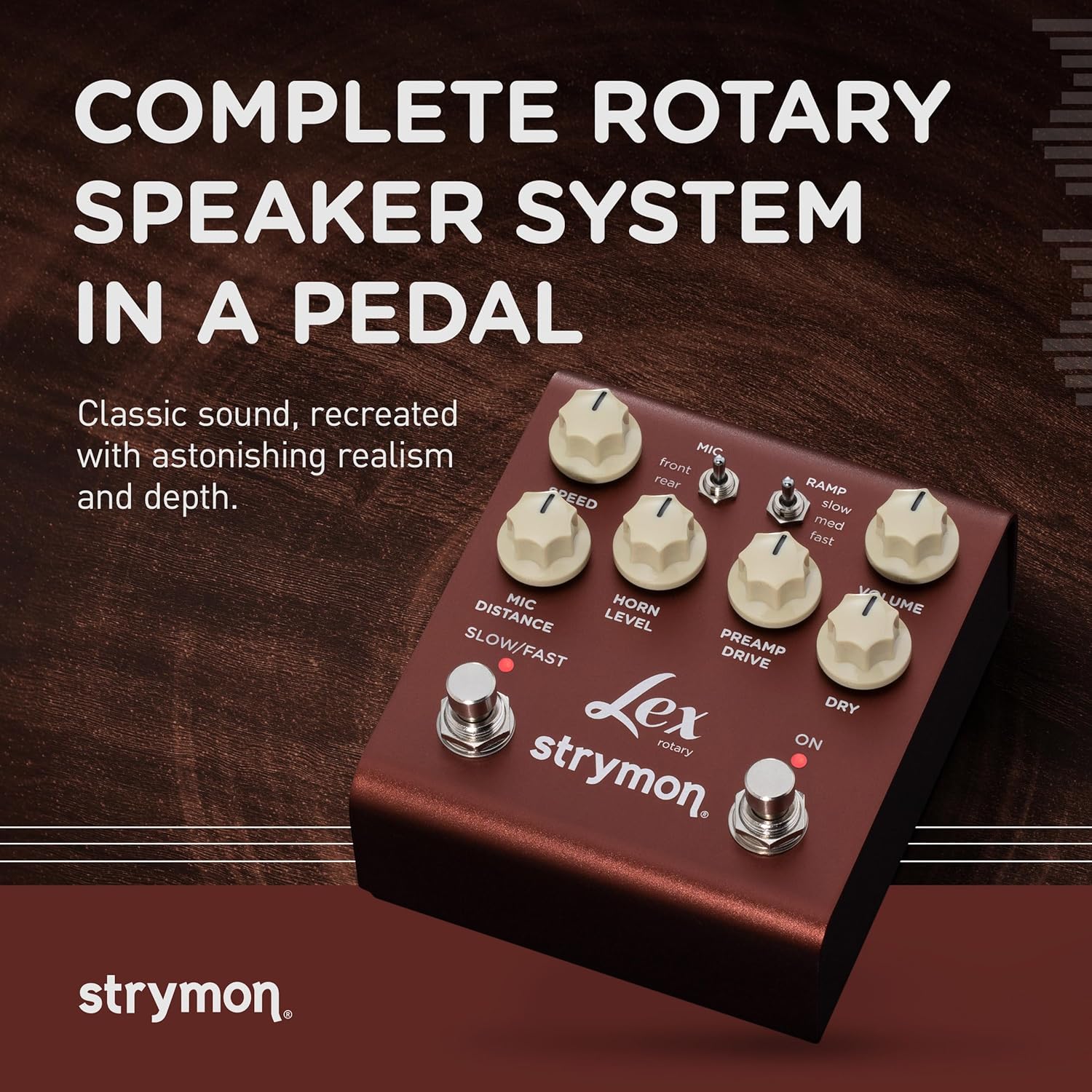
الشكل 2: انتهىview of the Lex V2 pedal's control surface.
4.1 مقابض تحكم
- سرعة: Adjusts the rotation speed of the simulated rotary speaker.
- MIC DISTANCE: Controls the simulated distance of the microphones from the rotary speaker, affecting stereo width and room ambience.
- HORN LEVEL: Adjusts the output level of the rotating horn, allowing it to cut through the mix or blend more subtly.
- قبلAMP قيادة: Adds grit and harmonic richness, simulating the tube-driven amplifier of a classic rotary speaker.
- حجم التداول: Boosts or cuts the overall output level by up to 6dB.
- جاف: Mixes in your dry signal, allowing for parallel processing.

الشكل 3: مفصل view من RAMP, VOLUME, PREAMP DRIVE, and DRY controls.
4.2 Switches and Footswitches
- MIC (front/rear): Selects the microphone placement, either in front or behind the simulated cabinet.
- RAMP (slow/med/fast): Controls the acceleration/deceleration rate when switching between slow and fast rotary speeds.
- SLOW/FAST Footswitch: Toggles between slow and fast rotary speeds. Hold down for a gradual rotary brake effect.
- ON Footswitch: يشارك أو يتجاوز التأثير.

الشكل 4: مفصل view of the MIC, SPEED, MIC DISTANCE, HORN LEVEL, and SLOW/FAST footswitch.
4.3 الميزات الرئيسية
- Complete Rotary Speaker System: Accurately reproduces the low-frequency bass rotor, rotating treble horn, tube-driven amplifier, and finely tuned microphone placement.
- Premium Analog JFET Input Circuit: Ensures superb responsiveness to your playing dynamics.
- تحكم كامل عبر MIDI: Control every switch, knob, and setting remotely via MIDI commands.
- 300 MIDI Preset Locations: Store and recall a vast array of custom sounds.

Figure 5: Visual representation of the premium analog JFET input circuit, rotor speed control, and full MIDI capabilities.
4.4 فيديو توضيحي للمنتج
Video 1: A comprehensive demonstration of the Strymon Lex V2 Rotary Speaker Guitar Effects Pedal, showcasinميزاته وقدراته الصوتية.
5. الصيانة
To ensure the longevity and optimal performance of your Lex V2 pedal, follow these maintenance guidelines:
- تنظيف: استخدم قطعة قماش ناعمة وجافة لتنظيف الجزء الخارجي من الدواسة. تجنب استخدام المنظفات الكاشطة أو المذيبات.
- تخزين: قم بتخزين الدواسة في مكان بارد وجاف بعيدًا عن أشعة الشمس المباشرة ودرجات الحرارة القصوى.
- قوة: افصل مصدر الطاقة دائمًا عندما لا تكون الدواسة قيد الاستخدام لفترات طويلة.
6. استكشاف الأخطاء وإصلاحها
If you encounter any issues with your Lex V2 pedal, refer to the following common troubleshooting steps:
- لا يوجد صوت: Check all cable connections (input, output, power). Ensure the pedal is receiving power and the ON footswitch is engaged. Verify your instrument and ampمكبرات الصوت تعمل بشكل صحيح.
- الضوضاء غير المرغوب فيها: Ensure you are using an isolated power supply. Check for faulty cables or interference from other electronic devices.
- الضوابط لا تستجيب: Perform a factory reset (refer to the full user manual for specific instructions). If the issue persists, contact Strymon support.
7. المواصفات
| ميزة | التفاصيل |
|---|---|
| ماركة | ستريمون |
| اسم الموديل | Lex V2 |
| رقم الموديل | LEXV2 |
| أسلوب | دوارة |
| لون | برونزي |
| وزن العنصر | 476 جرام |
| المجلدtage | 9 فولت |
| Ampإيراج | 300 مايكروamps |
| مؤثرات إخراج الصوت | تعديل |
| نوع الضوابط | مقبض الباب |
| مصدر الطاقة | DC امدادات الطاقة |
| واجهة الأجهزة | USB |
| تنسيق الإشارة | التناظرية |
| أبعاد العنصر | 7.9 × 4.55 × 3.75 بوصة |
| رمز المنتج الموحد | 852571008295 |
8. الضمان
The Strymon Lex Rotary Speaker Simulator Pedal V2 comes with a ضمان لمدة 2 سنوات. Please retain your proof of purchase for warranty claims. For detailed warranty terms and conditions, visit the official Strymon webموقع.
9. الدعم
For further assistance, technical support, or to register your product, please visit the official Strymon website or contact their customer service department. You can find additional resources, FAQs, and firmware updates online.