
Zunate KX-T2035CID Wired Landline Phone User Manual
Model: KX-T2035CID
مقدمة
Welcome to your new Zunate KX-T2035CID wired landline phone. This manual provides comprehensive instructions for the setup, operation, maintenance, and troubleshooting of your device to ensure optimal performance and a clear communication experience.
محتويات الحزمة
يرجى التأكد من أن جميع العناصر المدرجة أدناه متضمنة في الحزمة الخاصة بك:
- 1 x Wired Landline Phone Base
- 1 × سماعة
- 1 x Coiled Handset Cord
- 1 x RJ11 Telephone Line Cord (Standard)
- 1 x RJ11 Telephone Line Cord (UK Plug, if applicable)
- 1 × دليل المستخدم

This image displays all items included in the package: the phone base, handset, coiled cord, standard telephone line cord, and a UK-specific telephone line cord.
يثبت
توصيل الهاتف
- Connect one end of the coiled cord to the handset and the other end to the handset port on the phone base.
- قم بتوصيل أحد طرفي سلك خط الهاتف بـ خط port on the phone base.
- قم بتوصيل الطرف الآخر من سلك خط الهاتف بمقبس الهاتف الموجود على الحائط.
- If using the dual port feature, connect a second device (e.g., fax machine, another phone) to the خارجي port on the phone base using an additional telephone line cord.

This image shows the side of the phone base with two RJ11 ports labeled "LINE" and "EXT" for connecting to the wall jack and an additional device, respectively.
التثبيت على الحائط (اختياري)
The phone base is designed with keyholes on the bottom for optional wall mounting.
- Install two screws (not included) into the wall, spaced appropriately for the keyholes on the phone's base.
- Align the keyholes with the screw heads and slide the phone downwards to secure it.
- Ensure the handset cradle is reversed to hold the handset securely when wall-mounted.
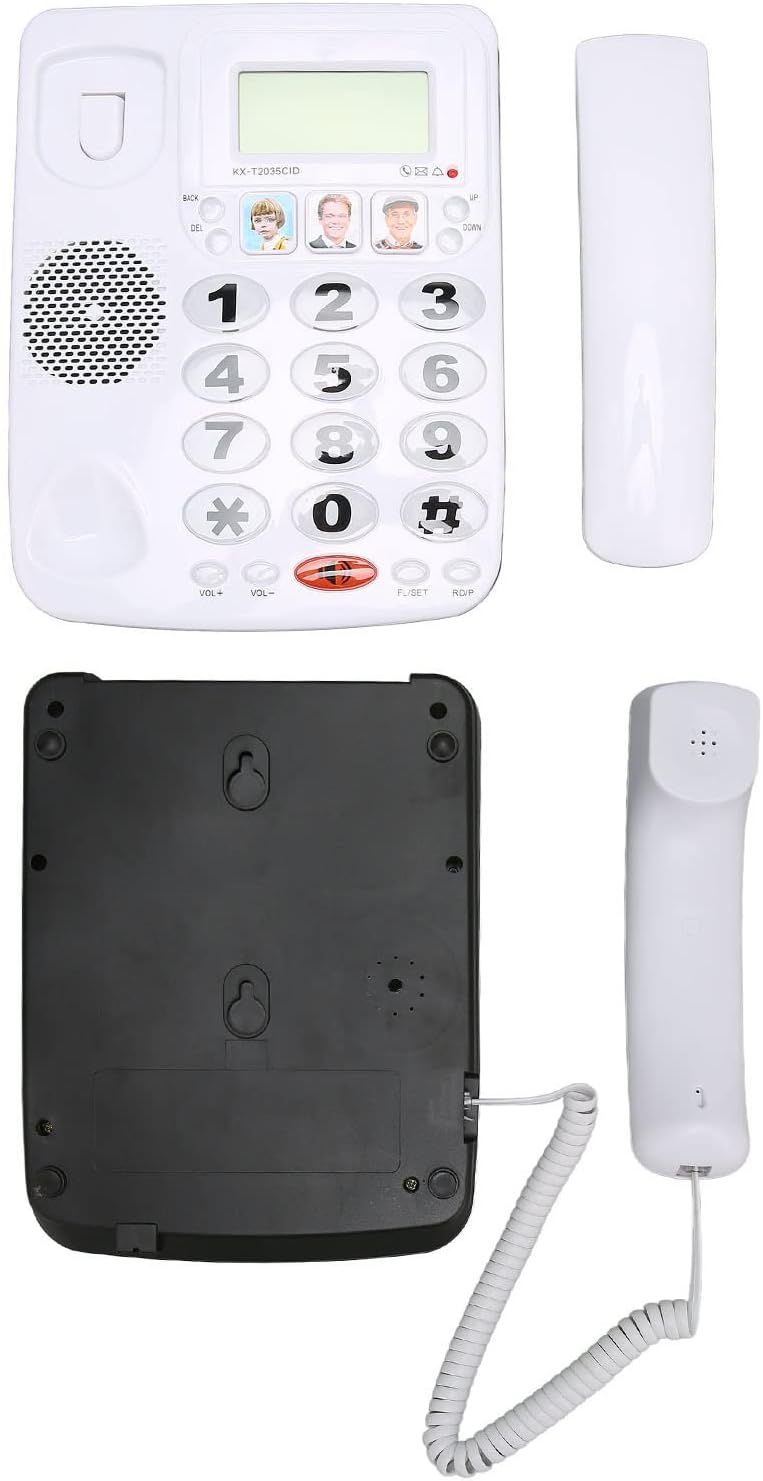
This image displays the underside of the phone base, highlighting the keyhole slots for wall mounting and the overall construction.
تعليمات التشغيل
إجراء مكالمة
- ارفع سماعة الهاتف.
- اطلب رقم الهاتف المطلوب باستخدام لوحة المفاتيح.
- انتظر اتصال المكالمة.
- لإنهاء المكالمة، أعد وضع سماعة الهاتف على الحامل.
تلقي مكالمة
- عندما يرن الهاتف، ارفع السماعة للرد.
- لإنهاء المكالمة، أعد وضع سماعة الهاتف على الحامل.
وظيفة إعادة الاتصال
لإعادة الاتصال بآخر رقم تم الاتصال به:
- ارفع سماعة الهاتف.
- Press the "RDP" (Redial) button. The phone will automatically dial the last number.
وظيفة كتم الصوت
During a call, you can temporarily mute your microphone:
- Press the "MUTE" button. The other party will not hear you, but you can still hear them.
- Press the "MUTE" button again to unmute your microphone.
ضبط مستوى الصوت
To adjust the handset volume during a call:
- Use the "VOL+" and "VOL-" buttons located on the phone base.

This close-up image shows the large, easy-to-read buttons on the phone's keypad, including the "VOL+", "VOL-", "MUTE", and "RDP" (Redial) buttons.
Speed Dial / Memory Dial
The phone allows you to store up to 3 frequently used numbers for quick dialing using the dedicated memory buttons.
- To store a number: Lift the handset, dial the number, then press and hold one of the three picture memory buttons until a confirmation tone is heard.
- لطلب رقم مخزن: Lift the handset, then press the desired picture memory button. The phone will automatically dial the stored number.

This image shows the phone's main interface, highlighting the large numeric keypad and the three dedicated memory buttons, which can be customized with pictures for quick dialing.
الميزات الرئيسية
تقنية الصوت الواضح
This phone incorporates noise reduction technology to ensure clear audio quality during calls, minimizing background interference for enhanced communication.

A person is shown using the Zunate KX-T2035CID phone in a professional environment, illustrating its use for clear communication.
Dual Port Design
The phone features a dual RJ11 port design, allowing you to connect both the phone line from the wall and an additional device (such as a fax machine, answering machine, or another telephone) simultaneously.
This image highlights the two RJ11 ports on the side of the phone, enabling connection to both the main telephone line and an extension device.
صيانة
To ensure the longevity and proper functioning of your Zunate KX-T2035CID phone, follow these simple maintenance guidelines:
- Clean the phone's surface regularly with a soft, damp القماش. تجنب استخدام المنظفات أو المذيبات الكاشطة.
- Keep the phone away from excessive moisture, dust, and direct sunlight.
- Do not attempt to disassemble the phone. Refer to qualified service personnel for repairs.
- تأكد من عدم تشابك الأسلاك أو انضغاطها لمنع التلف.
استكشاف الأخطاء وإصلاحها
If you encounter any issues with your phone, please refer to the table below for common problems and their solutions.
| مشكلة | حل |
|---|---|
| لا يوجد نغمة اتصال | Check all cable connections. Ensure the telephone line cord is securely plugged into both the phone and the wall jack. Test with another phone if possible to rule out line issues. |
| لا أستطيع سماع المتصل / المتصل لا يستطيع سماعي | Adjust the volume using the "VOL+" and "VOL-" buttons. Ensure the "MUTE" function is not active. Check handset cord connection. |
| الهاتف لا يرن | Ensure the ringer volume is not set to minimum or off (if applicable). Check line connection. |
| Last number redial not working | Ensure a number was successfully dialed prior to attempting redial. |
تحديد
| ميزة | التفاصيل |
|---|---|
| ماركة | زونات |
| نموذج | KX-T2035CID |
| يكتب | Wired Landline Phone |
| مادة | أكريلونيتريل بوتادين ستايرين (ABS) |
| لون | أبيض |
| معرف المتصل | نعم |
| تشغيل متعدد الخطوط | نعم |
| تقليل الضوضاء | نعم |
| رقم قطعة الشركة المصنعة | Zunateizbc48u9mx1404-12 |
الضمان والدعم
For warranty information and technical support, please refer to the documentation provided with your purchase or contact Zunate customer service directly. Specific warranty details are not available in this manual.
For further assistance, please visit the Zunate official webالموقع أو الاتصال بقنوات الدعم الخاصة بهم.