1. المقدمة
This manual provides essential information for the proper setup, operation, and maintenance of your Hotsmtbang Replacement Remote Control. This remote is designed to be a direct replacement for various Metz Smart LED LCD HDTV TV models, ensuring seamless compatibility and ease of use.
The remote control is pre-programmed and requires no additional setup or coding. Simply insert the batteries, and it will be ready for immediate use with your compatible Metz television.
2. انتهى المنتجview
Familiarize yourself with the components of your new remote control.

الشكل 2.1: أمام view of the Hotsmtbang Replacement Remote Control, showing all buttons including power, number pad, navigation, volume, channel, and special function keys.
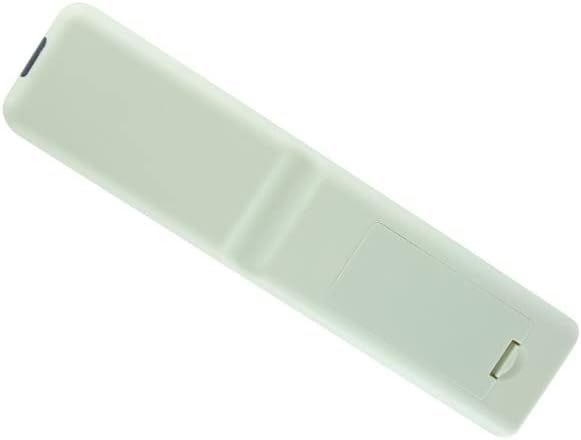
الشكل 2.2: خلف view of the Hotsmtbang Replacement Remote Control, showing the smooth, ergonomic design and the battery compartment cover.

الشكل 2.3: خلف view of the Hotsmtbang Replacement Remote Control with the battery compartment cover removed, revealing the slots for two AAA batteries.
3. الإعداد
Setting up your new remote control is a simple process that primarily involves installing the batteries.
3.1 تركيب البطارية
- حدد موقع حجرة البطارية في الجزء الخلفي من جهاز التحكم عن بعد.
- Slide the battery compartment cover downwards or press the latch and lift to remove it.
- Insert two (2) new AAA batteries into the compartment, ensuring the positive (+) and negative (-) terminals align correctly with the markings inside the compartment.
- قم باستبدال غطاء حجرة البطارية عن طريق تحريكه مرة أخرى إلى مكانه حتى يصدر صوت نقرة آمنة.
مهم: This remote control is pre-programmed and requires no additional programming or pairing. It will function immediately after battery installation.
4. تعليمات التشغيل
Once batteries are installed, your remote is ready to operate your compatible Metz TV. Point the remote directly at the TV's infrared sensor for optimal performance.
4.1 الوظائف الأساسية
- قوة: تشغيل التلفزيون أو إيقاف تشغيله.
- أزرار الأرقام (0-9): يختار القنوات مباشرة.
- المجلد +/-: ضبط مستوى الصوت.
- CH +/- (or PR +/-): تغيير القنوات بالتتابع.
- كتم الصوت: كتم صوت التلفزيون أو إلغاء كتمه.
- MENU: الوصول إلى القائمة الرئيسية للتلفزيون.
- أزرار التنقل (أعلى، أسفل، يسار، يمين): التنقل عبر خيارات القائمة.
- OK (or ENTER): تأكيد الاختيارات في القوائم.
- EXIT: للخروج من القائمة أو الشاشة الحالية.
- SOURCE (or INPUT): تحديد مصادر الإدخال (HDMI، AV، وما إلى ذلك).
- BACK (or RETURN): العودة إلى الشاشة أو القناة السابقة.
Refer to your Metz TV's original user manual for specific functions of advanced buttons if present on this replacement remote.
5. الصيانة
العناية والصيانة المناسبة ستطيل عمر جهاز التحكم عن بعد الخاص بك.
- تنظيف: Use a soft, dry cloth to clean the remote control. Do not use liquid cleaners or aerosols.
- استبدال البطارية: استبدل البطاريات عندما تصبح استجابة جهاز التحكم عن بعد بطيئة أو تتوقف عن العمل. استبدل البطاريتين معًا دائمًا ببطاريات جديدة من نفس النوع (AAA).
- تخزين: إذا لم يتم استخدام جهاز التحكم عن بعد لفترة طويلة، فقم بإزالة البطاريات لمنع التسرب والتلف. خزّنه في مكان بارد وجاف.
- تجنب الضرر: لا تسقط جهاز التحكم عن بعد، أو تعرضه لدرجات حرارة عالية، أو تغمره في الماء.
6. استكشاف الأخطاء وإصلاحها
إذا واجهت مشاكل مع جهاز التحكم عن بعد، فجرب خطوات استكشاف الأخطاء وإصلاحها التالية:
- جهاز التحكم عن بعد لا يستجيب:
- تأكد من إدخال البطاريات بشكل صحيح مع مراعاة القطبية الصحيحة (+/-).
- استبدال البطاريات القديمة ببطاريات AAA جديدة.
- تأكد من عدم وجود أي عوائق بين جهاز التحكم عن بعد ومستشعر الأشعة تحت الحمراء الخاص بالتلفزيون.
- تأكد من أنك ضمن النطاق الفعال لمستشعر التلفزيون.
- عملية متقطعة:
- This often indicates low battery power. Replace batteries.
- Check for strong light sources (like direct sunlight or bright fluorescent lights) that might interfere with the infrared signal.
If the problem persists after trying these steps, please contact the seller for further assistance.
7. المواصفات
| ميزة | التفاصيل |
|---|---|
| ماركة | Generic (Hotsmtbang) |
| توافق النموذج | Metz 40MTB2000, 40MTB2000Z, 32MTB2000, 32MTB2000Z, 40MTB7000, 40MTB7000Z Smart LED LCD HDTV TVs |
| البطاريات المطلوبة | شنومكس x آا (غير مدرجة) |
| ميزة خاصة | لا حاجة إلى برمجة إضافية |
| ASIN | B0B2P2T116 |
| بلد المنشأ | الصين |
8. الضمان والدعم
This manual does not contain specific warranty information. For details regarding warranty coverage, returns, or technical support, please refer to the product listing on the retailer's webالموقع أو الاتصال بالبائع مباشرة.
As per product information, this remote is sold by Hotsmtbang. Please reach out to them for any support inquiries.
9. مقاطع فيديو رسمية للمنتج
لا توجد فيديوهات رسمية للمنتج مقدمة من البائع لهذا المنتج.