
1. المقدمة
The SteelSeries Arctis Nova 1X Gaming Headset delivers an immersive audio experience across multiple platforms. Designed for comfort and clarity, it features the Signature Arctis Sound and a ClearCast Gen 2 Microphone, making it ideal for Xbox Series X|S, PC, PlayStation, Switch, and mobile gaming.
This manual provides detailed instructions for setting up, operating, and maintaining your Arctis Nova 1X headset to ensure optimal performance and longevity.
2. ماذا يوجد في الصندوق
Upon unboxing your SteelSeries Arctis Nova 1X Gaming Headset, you should find the following components:
- سماعة Arctis Nova 1X
- Main Headset Cable (3.5mm)
- Headband (pre-installed or separate, as per packaging)
- دليل معلومات المنتج

الصورة: الجبهة view of the SteelSeries Arctis Nova 1X Gaming Headset, showcasing its sleek design and microphone.
3. الإعداد
3.1 توصيل سماعة الرأس
The Arctis Nova 1X is a wired headset designed for universal compatibility. To connect your headset:
- Locate the 3.5mm main headset cable.
- Plug one end of the 3.5mm cable into the audio jack on the left earcup of your Arctis Nova 1X headset.
- Plug the other end of the 3.5mm cable into the corresponding audio port on your gaming device (Xbox Series X|S controller, PC, PlayStation controller, Nintendo Switch, or mobile device).
Note: Ensure the cable is securely connected to both the headset and your device for optimal audio and microphone performance.

Image: Diagram illustrating the multi-platform compatibility of the Arctis Nova 1X headset, showing connections to various gaming devices.
4. تشغيل سماعة الرأس
4.1 التحكم في مستوى الصوت
Adjust the audio volume directly from the headset:
- Locate the volume wheel on the left earcup.
- Roll the wheel up to increase the volume or down to decrease it.
4.2 كتم صوت الميكروفون
To mute or unmute your microphone:
- Find the microphone mute button on the left earcup, adjacent to the volume wheel.
- Press the button to toggle the microphone on or off. A red indicator will typically show when the microphone is muted.
4.3 Retractable ClearCast Gen 2 Microphone
The ClearCast Gen 2 microphone is retractable for convenience:
- To use the microphone, gently pull it out from the left earcup until it reaches your desired position.
- To store the microphone, push it back into the earcup until it is fully retracted.
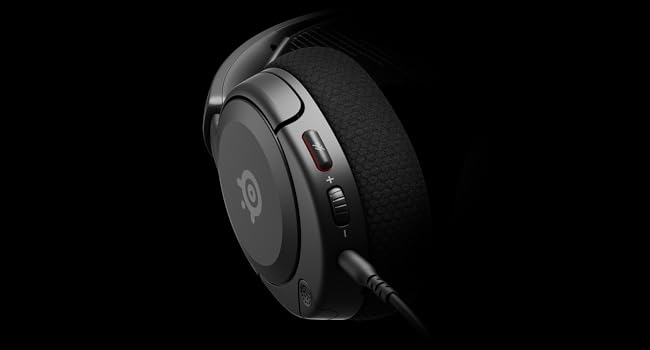
الصورة: عن قرب view of the left earcup of the Arctis Nova 1X, highlighting the volume wheel and microphone mute button for easy access during gameplay.
Video: Official SteelSeries video demonstrating the features of the Arctis Nova 1 headset, including its audio capabilities and microphone design.
5. الراحة والملاءمة
The Arctis Nova 1X is designed for extended gaming sessions with its ComfortMAX System:
- تصميم خفيف الوزن للغاية: Weighing only 236g, the headset minimizes pressure during long use.
- Height-Adjustable Earcups: The earcups can be adjusted vertically to fit various head sizes comfortably.
- Flexible Suspension Headband: The elastic headband conforms to your head for a secure yet gentle fit.

Image: The Arctis Nova 1X headset highlighting its ultra-lightweight and slim profile, designed for comfort.

Image: The Arctis Nova 1X headset demonstrating its height-adjustable earcups for a personalized and comfortable fit.
6. ميزات الصوت
Experience superior sound with the Arctis Nova 1X:
- Almighty Audio: The Nova Acoustic System with High Fidelity Drivers delivers crystal-clear highs, precise mids, and deep bass.
- الصوت المكاني بزاوية 360 درجة: Immerse yourself in the game with surround sound that allows you to pinpoint enemy positions and environmental cues.
- Pro-grade Parametric EQ: خصّص صوتك الاحترافيfile with the SteelSeries Sonar Audio Software Suite for a competitive edge.

Image: The Arctis Nova 1X headset highlighting its "Almighty Audio" capabilities for a rich sound experience.
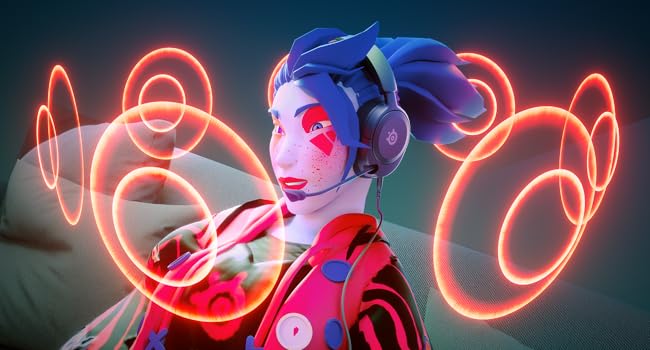
Image: Visual representation of 360° Spatial Audio, showing sound waves surrounding a gamer wearing the Arctis Nova 1X headset.

Image: Graphic illustrating the Pro-grade Parametric EQ, suggesting advanced audio customization options available with the headset.
7. Microphone Features
The ClearCast Gen 2 Mic ensures clear communication:
- AI Noise Cancelling: Advanced AI algorithms filter out background noise, ensuring your voice is heard clearly by teammates.
- تصميم قابل للسحب: The microphone can be fully retracted into the earcup when not in use, maintaining a sleek profile.

Image: The Nova 1 AI Microphone, emphasizing its noise-cancelling capabilities for clear voice communication.
8. الصيانة
To ensure the longevity and optimal performance of your Arctis Nova 1X headset, follow these maintenance guidelines:
- تنظيف: استخدم قطعة قماش ناعمة وجافة لمسح سماعات الأذن وعصابة الرأس. وللتنظيف العميق، استخدم قطعة قماش مبللة قليلاً.amp cloth with mild soap can be used, ensuring no moisture enters the speaker grilles or ports.
- العناية بالكابلات: Avoid sharp bends or excessive pulling on the headset cable to prevent internal damage. Store the cable neatly when not in use.
- تخزين: قم بتخزين سماعة الرأس في مكان بارد وجاف بعيدًا عن أشعة الشمس المباشرة ودرجات الحرارة القصوى.
- نصائح حول سماعات الأذن: If applicable, ensure earbud tips (if using with mobile) fit snugly. Replace worn-out earbud tips to maintain sound quality and comfort.
9. استكشاف الأخطاء وإصلاحها
If you encounter issues with your Arctis Nova 1X headset, try the following solutions:
- لا يوجد صوت/مستوى صوت منخفض:
- Ensure the 3.5mm cable is fully inserted into both the headset and your device.
- Check the volume wheel on the headset and your device's system volume.
- اختبر سماعة الرأس بجهاز آخر لاستبعاد المشكلات الخاصة بالجهاز.
- الميكروفون لا يعمل:
- Ensure the microphone mute button is not activated (red indicator off).
- Verify the microphone is fully extended and positioned correctly.
- Check your device's audio settings to ensure the correct microphone input is selected and its volume is not muted.
- ضعف جودة الصوت:
- Ensure the 3.5mm cable is not damaged and is securely connected.
- Adjust your device's audio settings or equalizer settings.
10. المواصفات
| ميزة | التفاصيل |
|---|---|
| ماركة | سلسلة ستيل |
| اسم الموديل | Arctis نوفا 1X |
| رقم الموديل | 61616 |
| تكنولوجيا الاتصال | سلكي (مقبس 3.5 ملم) |
| وضع الأذن | فوق الأذن |
| التحكم في الضوضاء | إلغاء الضوضاء النشط (الميكروفون) |
| نوع برنامج تشغيل الصوت | سائق ديناميكي |
| نطاق التردد | 20 هرتز - 20,000 هرتز |
| ميكروفون | ClearCast Gen 2 (Retractable, AI Noise Cancelling) |
| الأجهزة المتوافقة | Xbox Series X|S, PC, PlayStation, Switch, Mobile |
| وزن العنصر | 1.1 رطل (حوالي 500 جرام) |
| لون | أسود |
| رمز المنتج الموحد | 850014119737 |
فيديو: 360 درجة view of the SteelSeries Arctis Nova 1X headset in black, showcasing تصميمه من جميع الزوايا.
11. الضمان والدعم
11.1 معلومات الضمان
The SteelSeries Arctis Nova 1X Gaming Headset comes with a ضمان محدود لمدة عامين يسري هذا الضمان من تاريخ الشراء. يغطي هذا الضمان عيوب التصنيع ويضمن عمل منتجك كما هو مُراد في ظل الاستخدام العادي. يُرجى الاحتفاظ بإيصال الشراء للمطالبة بالضمان.
For detailed warranty terms and conditions, please refer to the official SteelSeries webالموقع الإلكتروني أو بطاقة الضمان المرفقة في عبوة المنتج.
11.2 دعم العملاء
For further assistance, technical support, or warranty claims, please contact SteelSeries customer support through their official webموقع:
You may also find additional resources, FAQs, and software downloads on their support page.