
مقدمة
شكرا لك على الشراءasing the Max Power MPD15EQ Portable Rechargeable PA Speaker. This manual provides important information regarding the setup, operation, and maintenance of your speaker. Please read it thoroughly before using the product to ensure proper function and to maximize its lifespan.
تعليمات السلامة
- لا تعرض الوحدة للمطر أو الرطوبة لمنع حدوث حريق أو مخاطر الصدمات.
- Do not open the speaker cabinet. There are no user-serviceable parts inside. Refer all servicing to qualified personnel.
- تأكد من التهوية الجيدة. لا تسد أي فتحات تهوية.
- استخدم فقط محول الطاقة المرفق مع الوحدة.
- Keep the speaker away from heat sources, direct sunlight, and strong magnetic fields.
- نظف فقط بقطعة قماش جافة.
محتويات الحزمة
- Max Power MPD15EQ PA Speaker
- ميكروفون سلكي
- جهاز التحكم عن بعد
- محول الطاقة
- دليل المستخدم (هذا المستند)
المنتج انتهىview
Familiarize yourself with the various parts of your MPD15EQ speaker.
اللوحة الأمامية
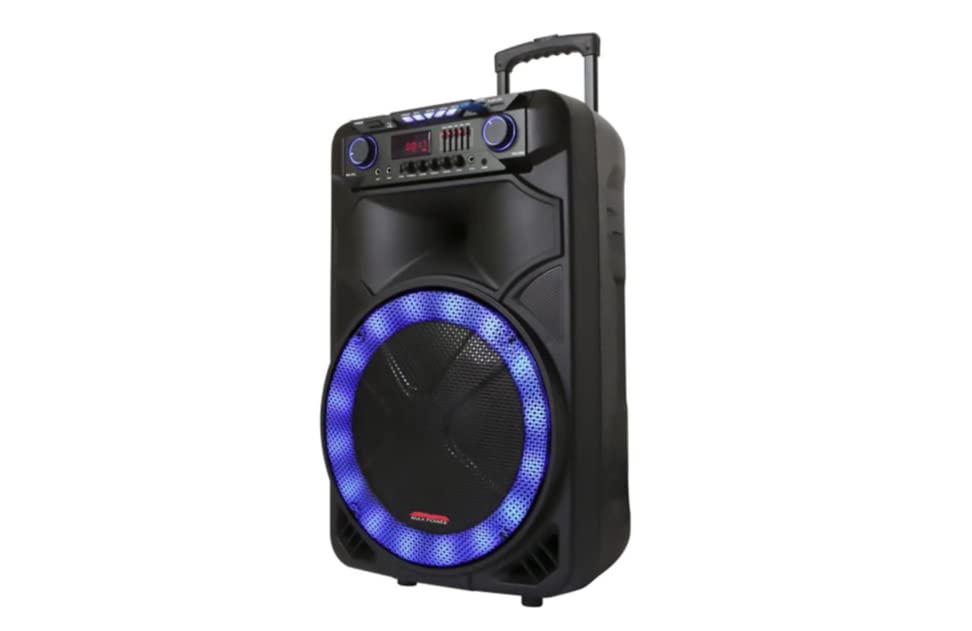
وصف الصورة: This image displays the front of the Max Power MPD15EQ speaker. It features a large 15-inch woofer at the bottom, a 5-inch horn tweeter above it, and a control panel with an LED display screen. The speaker grille covers the woofer and tweeter, and the overall design is robust and portable.
- 15" Woofer: Provides powerful bass frequencies.
- 5" Horn Tweeter: Delivers clear high frequencies.
- شاشة عرض LED: يعرض الوضع الحالي ومعلومات المسار والإعدادات.
- لوحة التحكم: Buttons and knobs for various functions (volume, EQ, mode, etc.).
- LED Light On/Off Switch: يتحكم في إضاءة LED المدمجة.
اللوحة الخلفية (على سبيل المثالample - specific details not provided in source)
The rear panel typically includes input/output ports and the power connection.
- مدخلات الطاقة: For connecting the power adapter to charge the battery or operate the unit.
- منفذ USB: For playing audio from USB drives.
- فتحة بطاقة SD: For playing audio from SD cards.
- مدخل الميكروفون: لتوصيل الميكروفون السلكي.
- المدخل المساعد: For connecting external audio devices via a 3.5mm or RCA cable.
يثبت
شحن البطارية
The MPD15EQ features a built-in rechargeable battery. Before first use, fully charge the speaker for approximately 6-8 hours.
- Connect the supplied power adapter to the speaker's power input port.
- قم بتوصيل محول الطاقة بمأخذ حائط قياسي.
- The LED display or an indicator light will show the charging status.
- بمجرد اكتمال الشحن، افصل محول الطاقة.
التشغيل الأولي
- Ensure the speaker is fully charged or connected to power.
- Locate the power switch (usually on the rear or control panel) and turn it to the "ON" position.
- The LED display will illuminate, indicating the speaker is ready for use.
تعليمات التشغيل
اتصال بلوتوث
- Turn on the MPD15EQ speaker.
- Press the "MODE" button on the control panel until "BLUETOOTH" or "BT" appears on the LED display.
- قم بتفعيل البلوتوث على هاتفك الذكي أو جهازك اللوحي أو أي جهاز صوتي آخر.
- بحث عن available devices and select "MPD15EQ" from the list.
- Once paired, you will hear a confirmation sound, and you can now play audio wirelessly.
استخدام الميكروفون السلكي
- Connect the supplied wired microphone to the "MIC IN" port on the speaker.
- Adjust the microphone volume knob (if available) on the control panel to your desired level.
- تحدث في الميكروفون.
تشغيل بطاقة USB / SD
- Insert a USB flash drive or SD card (pre-loaded with MP3 audio files) إلى المنفذ المعني.
- The speaker should automatically switch to USB/SD mode and begin playing. If not, press the "MODE" button.
- Use the playback controls (Play/Pause, Next, Previous) on the control panel or remote control.
5-Band Graphic EQ Adjustment
The MPD15EQ features a 5-band graphic equalizer to fine-tune your audio output.
- Locate the EQ sliders on the control panel.
- Each slider corresponds to a specific frequency band. Adjust them up or down to boost or cut those frequencies.
- Experiment with the settings to achieve your preferred sound profile.
أضواء LED
The speaker includes integrated LED lights. Use the "LED Light On/Off Switch" to activate or deactivate them.
استخدام جهاز التحكم عن بعد
The included remote control allows for convenient operation from a distance. It typically includes buttons for power, mode selection, volume, track control, and EQ presets.
صيانة
تنظيف
- قم دائمًا بإيقاف تشغيل مكبر الصوت وفصله قبل التنظيف.
- استخدم قطعة قماش ناعمة وجافة لمسح الأسطح الخارجية.
- Do not use liquid cleaners, aerosols, or abrasive chemicals.
تخزين
- قم بتخزين مكبر الصوت في مكان بارد وجاف بعيدًا عن أشعة الشمس المباشرة ودرجات الحرارة القصوى.
- If storing for extended periods, charge the battery periodically (e.g., every 3 months) to maintain battery health.
استكشاف الأخطاء وإصلاحها
| مشكلة | السبب المحتمل | حل |
|---|---|---|
| لا يوجد طاقة | تم تفريغ البطارية؛ كابل الطاقة غير متصل؛ تم إيقاف تشغيل الطاقة. | Charge the battery; Check power cable connection; Turn power switch ON. |
| لا يوجد صوت | مستوى الصوت منخفض جدًا؛ وضع الإدخال غير صحيح؛ الجهاز غير مقترن (بلوتوث). | Increase master volume; Select correct input mode (Bluetooth, USB, AUX); Re-pair Bluetooth device. |
| الميكروفون لا يعمل | Microphone not connected; Microphone volume low; Microphone switch off. | Ensure microphone is securely plugged in; Increase microphone volume; Check microphone's ON/OFF switch. |
| اتصال البلوتوث غير مستقر | الجهاز بعيد جدًا؛ تداخل؛ انخفاض مستوى البطارية. | Move device closer to speaker; Avoid obstacles; Ensure speaker battery is charged. |
تحديد
- مكبر الصوت: Single 15"
- مكبر الصوت: Single 5" Horn
- استجابة التردد: 40 هرتز-20 كيلو هرتز
- مقاومة: 4 أوم
- حساسية: 93 ديسيبل
- الأبعاد (العرض × العمق × الارتفاع): 19 بوصة × 16.75 بوصة × 32 بوصة
- وزن: حوالي 38 رطل
- بطارية: قابلة لإعادة الشحن مدمجة
- الاتصال: Bluetooth, USB, SD Card, Microphone Input, Auxiliary Input
- EQ: 5 باند جرافيك EQ
- عرض: شاشة عرض LED
- الملحقات المتضمنة: Wired Microphone, Remote Control
الضمان والدعم
Max Power products are designed for reliability and performance. For warranty information or technical support, please refer to the warranty card included with your purchase or visit the official Max Power webالموقع. احتفظ بإثبات الشراء الخاص بك لتقديم مطالبات الضمان.
معلومات الاتصال: Please refer to the packaging or official website for the most up-to-date contact details for customer service.
مقاطع فيديو رسمية للمنتج
No official product videos from the seller were available for embedding at this time. If available, they would appear here with detailed descriptions.