
1. المقدمة
This manual provides detailed instructions for the Minno Maverick A10 Rugged 10-inch Android 10 Tablet. It covers initial setup, operation, maintenance, and troubleshooting to ensure optimal performance and longevity of your device. Please read this manual thoroughly before using the tablet.
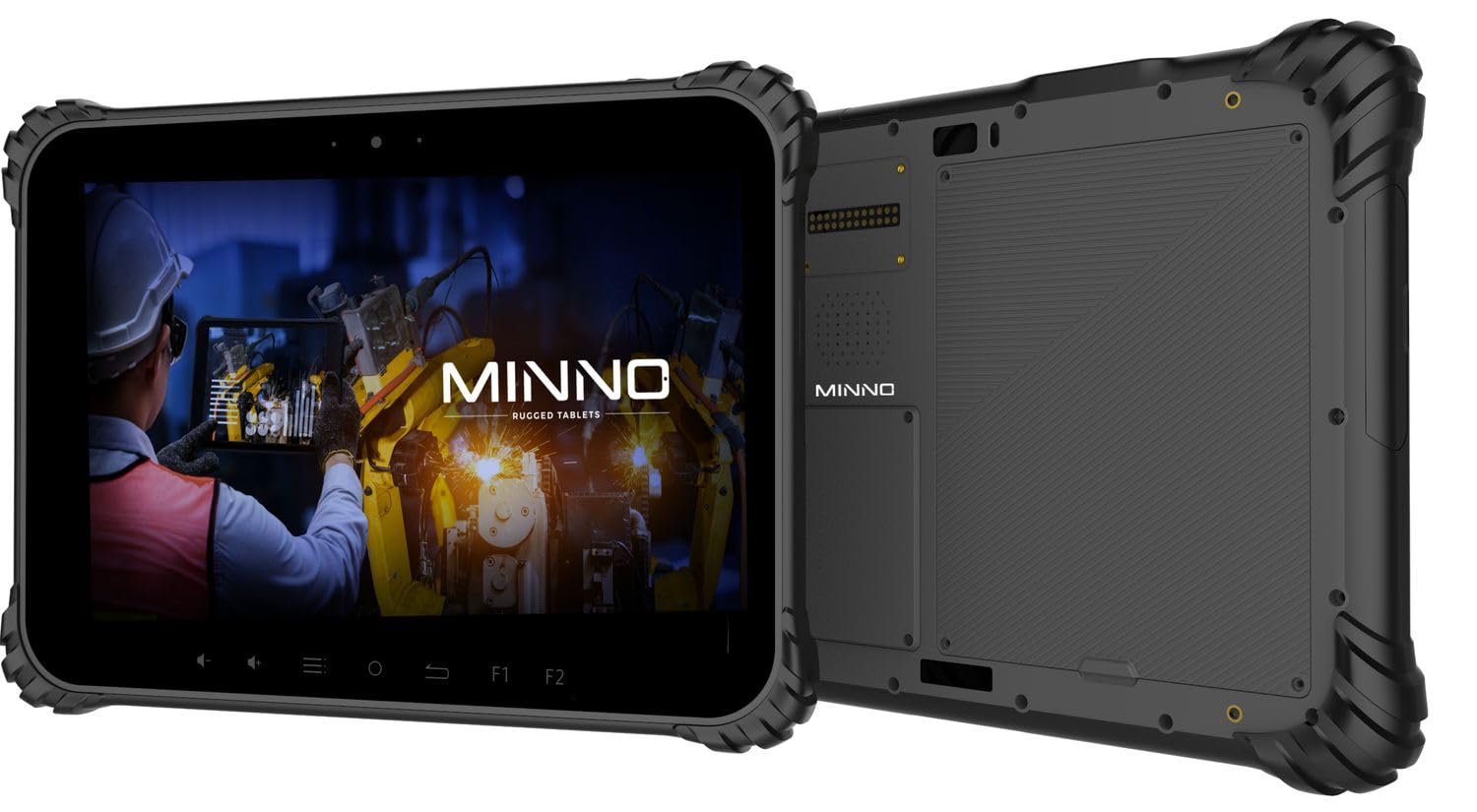
Figure 1.1: Minno Maverick A10 Rugged Tablet
2. محتويات العبوة
تأكد من وجود جميع العناصر في العبوة:
- Minno Maverick A10 Rugged Android Tablet
- محول الطاقة
- مقبض حقيبة العمل
- Hand Strap (pre-installed)
3. انتهى الجهازview
3.1 الميزات الرئيسية
- تصميم قوي: IP67 dust and waterproof, MIL-STD-810H certified for drop, shock, and vibration resistance.
- عرض: 10-inch sunlight-readable touchscreen.
- أداء: Android 10 operating system, 4GB RAM, 64GB internal storage.
- الاتصال: LTE (unlocked for AT&T & T-Mobile), Wi-Fi, Bluetooth, NFC, GPS.
- بطارية: 11,700 mAh swappable battery for extended use.
- الكاميرات: 13 MP rear camera, 5 MP front camera.
- الأزرار المادية: Dedicated buttons for easy access to functions.

Figure 3.1: Minno Maverick A10 with core specifications
3.2 الأزرار والمنافذ المادية
The tablet features physical buttons for common functions and easy access, even in demanding environments.

Figure 3.2: Tablet cameras and easy access buttons
- زر الطاقة: يوجد على الجانب، ويستخدم لتشغيل/إيقاف تشغيل الجهاز أو تنبيهه/إدخاله في وضع السكون.
- رفع/خفض الصوت: ضبط مستوى الصوت.
- أزرار الوظائف (F1، F2): Customizable buttons for quick access to specific applications or features.
- زر العودة: ينتقل مرة أخرى إلى الشاشة السابقة.
- زر الصفحة الرئيسة: يعود إلى الشاشة الرئيسية.
- زر القائمة: Accesses application options or recent apps.
- منافذ USB: للشحن ونقل البيانات.
- المنافذ المغطاة: Designed to protect against dust and water ingress.
4. الإعداد الأولي
4.1 شحن البطارية
Before first use, fully charge the tablet battery. Connect the provided power adapter to the tablet's charging port and plug it into a power outlet. The charging indicator will show the charging status.
4.2 تشغيل/إيقاف التشغيل
- لتشغيل: Press and hold the Power button until the Minno logo appears on the screen.
- لإيقاف التشغيل: اضغط باستمرار على زر التشغيل حتى تظهر قائمة خيارات الطاقة. اختر "إيقاف التشغيل" ثم أكد.
- للنوم/الاستيقاظ: Briefly press the Power button to put the tablet into sleep mode or wake it up.
4.3 التكوين الأولي
عند تشغيل الجهاز لأول مرة، اتبع التعليمات التي تظهر على الشاشة لإكمال الإعداد الأولي، بما في ذلك:
- اختيار اللغة
- اتصال شبكة Wi-Fi
- Google account setup
- إعدادات التاريخ والوقت
4.4 Installing SIM/SD Card
The tablet supports a SIM card for LTE connectivity and an SD card for expanded storage. Locate the covered slot on the side of the tablet. Carefully open the cover, insert the SIM card and/or SD card into their respective slots, ensuring correct orientation. Close the cover securely to maintain IP67 rating.
5. التشغيل الأساسي
5.1 نظام الملاحة بشاشة اللمس
The 10-inch display is a multi-touch screen. Use standard Android gestures:
- مقبض: حدد عنصرًا أو افتح تطبيقًا.
- انقر مع الاستمرار: الوصول إلى القوائم السياقية أو نقل الأيقونات.
- انتقاد: تصفح القوائم أو انتقل بين الشاشات.
- التكبير والتصغير: تكبير أو تصغير الصور و web الصفحات.
5.2 الاتصال
- واي فاي: انتقل إلى الإعدادات > الشبكة والإنترنت > Wi-Fi للاتصال بالشبكات المتاحة.
- LTE: Ensure a valid SIM card is installed. Go to Settings > Network & internet > Mobile network to enable mobile data.
- بلوتوث: انتقل إلى الإعدادات > الأجهزة المتصلة > بلوتوث للاقتران مع ملحقات البلوتوث.
6. الميزات المتقدمة
6.1 استخدام الكاميرا
The tablet is equipped with a 13 MP rear camera and a 5 MP front camera. Open the Camera application to capture photos and videos. Adjust settings such as flash, timer, and mode within the app.
6.2 ملاحة GPS
The integrated GPS module allows for location tracking and navigation. Ensure location services are enabled in Settings > Location for optimal performance with mapping applications.
6.3 وظيفة NFC
NFC (Near Field Communication) allows for short-range wireless communication. Enable NFC in Settings > Connected devices > Connection preferences > NFC to use features like contactless payments or quick data sharing with compatible devices.
7. الرعاية والصيانة
7.1 تنظيف الجهاز اللوحي
Use a soft, lint-free cloth to clean the screen and body of the tablet. For stubborn marks, slightly dampاغسل قطعة القماش بالماء أو بمحلول تنظيف الشاشة. تجنب المواد الكيميائية القاسية أو المواد الكاشطة.
7.2 العناية بالبطارية
The tablet features a swappable 11,700 mAh battery. To maximize battery life:
- تجنب درجات الحرارة القصوى.
- لا تقم بتفريغ البطارية بشكل كامل بانتظام.
- استخدم فقط محول الطاقة المقدم.
- If replacing the battery, ensure it is an official Minno replacement part.
7.3 حماية البيئة
The Minno Maverick A10 is designed for harsh environments with IP67 and MIL-STD-810H certifications.

Figure 7.1: IP67 Dustproof and Spillproof Protection

Figure 7.2: MIL-STD-810H Certified Durability
- تصنيف IP67: Provides protection against dust ingress and immersion in water up to 1 meter for 30 minutes. Ensure all port covers are securely closed.
- MIL-STD-810H: Certified to resist drops up to 4 feet, withstand prolonged intense vibrations, and operate in extreme temperatures from -4°F to 150°F.
8. استكشاف الأخطاء وإصلاحها
If you encounter issues with your Minno Maverick A10, refer to the following common solutions:
| مشكلة | الحل المحتمل |
|---|---|
| الجهاز اللوحي لا يعمل | Ensure the battery is charged. Connect the power adapter and try again. If the battery is swappable, ensure it is correctly seated. |
| شاشة اللمس لا تستجيب | Restart the tablet by holding the power button. If the issue persists, perform a factory reset (data will be lost). |
| لا يمكن الاتصال بشبكة Wi-Fi | Check if Wi-Fi is enabled in settings. Restart your router. Ensure you are entering the correct password. |
| LTE/Mobile data not working | Ensure a valid SIM card is properly inserted. Check mobile data settings and APN configurations. Contact your service provider. |
| Applications are crashing | Clear the cache of the problematic application (Settings > Apps > [App Name] > Storage & cache). Update the app or the Android system. |
9. المواصفات
Detailed technical specifications for the Minno Maverick A10 Rugged Tablet:
| ميزة | مواصفة |
|---|---|
| رقم الموديل | A10Z03001 |
| نظام التشغيل | أندرويد 10 |
| حجم الشاشة | 10 بوصة |
| دقة الشاشة | 1280x800 (Max: 1920x1200 Pixels) |
| كبش | 4 جيجا بايت |
| التخزين الداخلي | 64 جيجا بايت |
| ماركة المعالج | ميدياتك |
| نوع لاسلكي | 802.11ac (Wi-Fi), Bluetooth, NFC, GPS, 4G LTE |
| مؤخرة Webقرار الكاميرا | 13 ميجا بكسل |
| دقة الكاميرا الأمامية | 5 ميجا بكسل |
| بطارية | 11,700 mAh Lithium-ion polymer (swappable) |
| وزن العنصر | 3.89 رطل |
| أبعاد المنتج | 10 × 1 × 8 بوصة |
| لون | أسود |
| شهادات المتانة | IP67, MIL-STD-810H |
10. الضمان والدعم
10.1 معلومات الضمان
Minno warrants its products to be free from material and workmanship defects for سنتان يسري هذا الضمان من تاريخ الشراء. ويغطي عيوب التصنيع في ظل الاستخدام العادي. ولا يغطي الأضرار الناجمة عن سوء الاستخدام أو الحوادث أو التعديلات غير المصرح بها أو الكوارث الطبيعية.
10.2 دعم العملاء
For technical assistance, warranty claims, or further inquiries, please contact Minno customer support through the official Minno website or your point of purchase. Have your model number (A10Z03001) and purchase date ready when contacting support.