
مقدمة
This user manual provides comprehensive instructions for the AOLION Controller Adapter, designed to connect your Xbox One, Xbox One Elite Series, Xbox One X, and Xbox One S controllers wirelessly to Windows PCs, laptops, and tablets. This adapter offers a stable and responsive gaming experience.

Image: The AOLION Controller Adapter, a compact black USB device with a white cross symbol, shown with its protective cap detached, revealing the USB-A connector.
دليل الإعداد
Follow these steps to set up your AOLION Controller Adapter and connect your Xbox controller to your PC.
- أدخل المحول: Plug the AOLION Controller Adapter into an available USB port on your PC, laptop, or tablet.
- بدء الاقتران: Press the pairing button on the adapter. The indicator light on the adapter will begin to flash, indicating it is in pairing mode.
- وحدة تحكم الزوج: On your Xbox One controller, press and hold the pairing button until its light also flashes.
- تأكيد الاتصال: Once the indicator light on the adapter remains steadily on, the pairing is successful, and your controller is ready for use.
ملحوظة: For Windows 7 and Windows 8 systems, you may need to download specific drivers from Microsoft's official website for the adapter to function correctly. Windows 10 and 11 systems typically install drivers automatically upon connection.

Image: A visual guide illustrating the three steps for connecting an Xbox wireless controller to a PC: inserting the adapter, pressing the pair button, and confirming successful pairing by a solid indicator light.

Image: A screenshot of a Microsoft support page, showing various driver downloads for Xbox wireless adapters, with sections highlighted for Windows 7/8 and Windows 10, indicating where users might find necessary drivers.
تعليمات التشغيل
The AOLION Controller Adapter is designed for seamless operation across various Windows environments.
التوافق
This adapter is widely compatible with Xbox One controllers, including Elite Series, Xbox One X, and Xbox One S controllers. It supports PCs, laptops, and tablets running Windows 7, 8, 8.1, 10, and 11. Please note that this adapter is not compatible with Xbox 360 controllers.

Image: A diagram illustrating the compatibility of the AOLION adapter with different Xbox One controller models (Elite S2, Elite S1, S/X, original Xbox One) and various Windows devices (desktop, laptop, tablet).
Multi-Controller Support
The adapter supports connecting up to 8 wireless controllers simultaneously, allowing for multi-player gaming sessions. Additionally, it supports the use of wired chat headsets connected to the controller, though headset functionality is limited to Windows 10 systems.

Image: A group of friends enjoying a game, each with an Xbox controller, demonstrating the adapter's capability to connect up to eight controllers for simultaneous multiplayer gaming.
أداء
Utilizing advanced wireless technologies, the AOLION Controller Adapter provides a stable connection with minimal delay and an extended transmission range of up to 10 meters. This ensures a responsive and uninterrupted gaming experience.
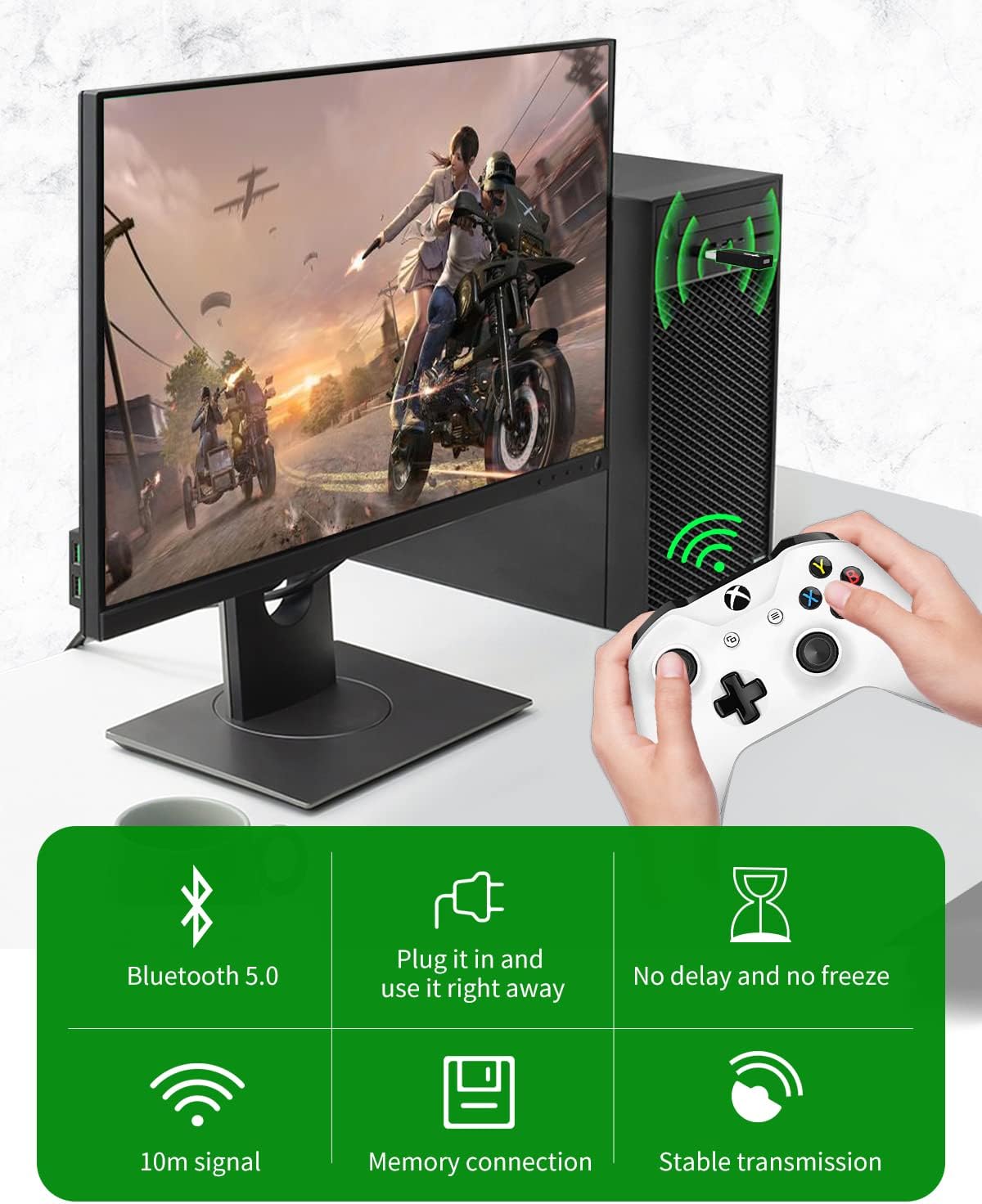
Image: An infographic detailing the adapter's features, including Bluetooth 5.0 connectivity, plug-and-play functionality, no perceptible delay, a 10-meter signal range, memory connection for quick re-pairing, and stable transmission.
صيانة
To ensure the longevity and optimal performance of your AOLION Controller Adapter, follow these simple maintenance guidelines:
- حافظ على نظافة المحول وخلوه من الغبار. استخدم قطعة قماش ناعمة وجافة للتنظيف.
- Store the adapter in a cool, dry place when not in use, preferably with its protective cap on.
- تجنب تعريض المحول لدرجات حرارة قصوى أو لأشعة الشمس المباشرة.
- Do not attempt to disassemble or repair the adapter yourself, as this may void the warranty.
استكشاف الأخطاء وإصلاحها
If you encounter issues with your AOLION Controller Adapter, refer to the following common solutions:
- المحول غير معترف به:
Ensure the adapter is fully inserted into a functioning USB port. Try a different USB port. For Windows 7/8, verify that the necessary drivers have been installed from Microsoft's webموقع.
- وحدة التحكم لا تقترن:
Make sure both the adapter and the controller are in pairing mode (flashing lights). Ensure the controller is an Xbox One series controller (not Xbox 360). Move closer to the adapter to rule out range issues.
- Intermittent Connection/Signal Loss:
Reduce the distance between the controller and the adapter. Ensure there are no major obstructions (e.g., thick walls, large metal objects) between them. Minimize interference from other wireless devices operating on similar frequencies.
- مشاكل الصوت في سماعات الرأس:
Wired chat headset functionality is only supported on Windows 10 systems. Ensure your Windows 10 system is up to date and audio drivers are correctly installed.
تحديد
| ميزة | التفاصيل |
|---|---|
| ماركة | أليون |
| رقم الموديل | xbox-a |
| الأجهزة المتوافقة | Xbox One Controller, Elite Series, Xbox One X, Xbox One S Controller, PC, Laptop, Tablet |
| توافق نظام التشغيل | Windows 7، 8، 8.1، 10، 11 |
| نوع الموصل | يو اس بي نوع ايه |
| لون | أسود |
| أبعاد الحزمة | 5.12 × 3.11 × 0.87 بوصة |
| وزن العنصر | 0.704 أونصات |
| تاريخ أول توفر | 19 أبريل 2022 |
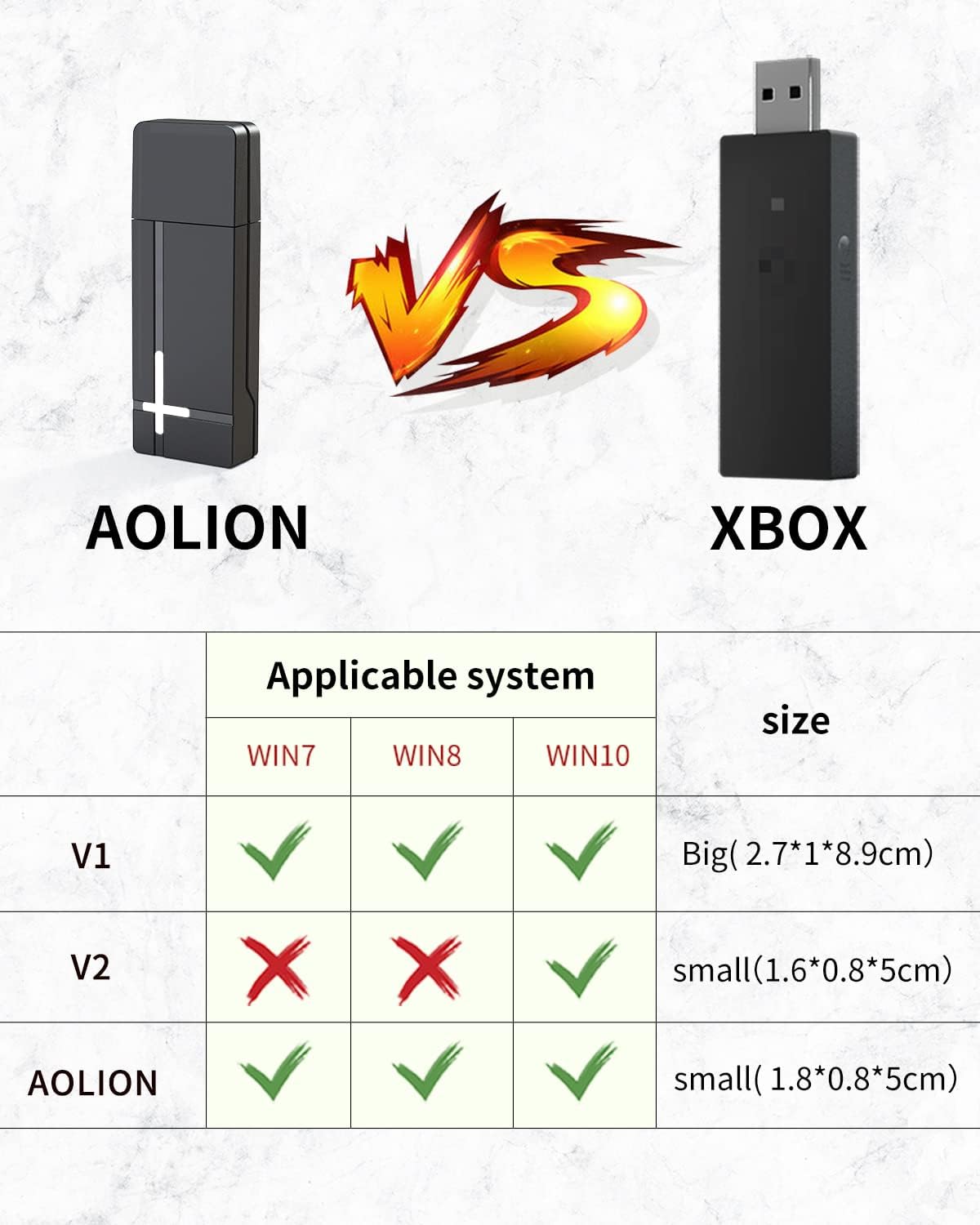
Image: A comparative table illustrating the compatibility with Windows 7, 8, and 10 for AOLION, Xbox V1, and Xbox V2 adapters, alongside their respective physical sizes.
الضمان والدعم
Your AOLION Controller Adapter comes with a ضمان لمدة 12 أشهر, ensuring peace of mind regarding its quality and performance. We are committed to 100% customer satisfaction.
If you encounter any issues or have questions regarding your product, please do not hesitate to contact our customer service team. We aim to provide a reply within 24 hours and are ready to offer free replacement or a refund if necessary.