
Ysametp M10
دليل مستخدم جهاز العرض المصغر Ysametp M10
1080P Full HD Supported Portable Video Projector
مقدمة
شكرا لك على الشراءasing the Ysametp Mini Projector M10. This portable video projector is designed to provide a high-quality home theater experience with its 1080P Full HD support and 10000 Lux LED light source. It features dual built-in stereo speakers with an SRS sound system for immersive audio. Its compact size and multi-connection capabilities make it ideal for various entertainment and presentation needs. Please read this manual thoroughly before operating the projector to ensure proper use and maintenance.
معلومات السلامة
To ensure safe operation and prolong the lifespan of your projector, please observe the following safety precautions:
- لا تسد فتحات التهوية. تأكد من وجود تدفق هواء كافٍ حول جهاز العرض لمنع ارتفاع درجة حرارته.
- لا تعرض جهاز العرض للمطر أو الرطوبة لتجنب الصدمة الكهربائية أو الحريق.
- لا تفتح جهاز العرضasinز. إحالة جميع أعمال الصيانة إلى فنيي صيانة مؤهلين.
- استخدم فقط محول الطاقة المرفق مع جهاز العرض.
- Place the projector on a stable, flat surface to prevent it from falling.
- تجنب تعرض العين المباشر لعدسة جهاز العرض عند تشغيله.amp هو على.
- افصل جهاز العرض عن مأخذ الطاقة أثناء العواصف الرعدية أو عند عدم استخدامه لفترات طويلة.
محتويات الحزمة
يرجى التحقق من محتويات العبوة عند فتح الصندوق:
- 1 x Ysametp Mini Projector M10
- 1 × كابل HDMI
- 1 x 3-in-1 AV Line
- 1 الحبل العاشر الطاقة
- 1 × حامل ثلاثي القوائم
- 1 x Drawstring Backpack
- 1 × جهاز تحكم عن بعد (البطاريات غير متضمنة)
- 1 × دليل المستخدم

المنتج انتهىview
Familiarize yourself with the projector's components and connection ports.

منافذ الإدخال / الإخراج:
- منفذ HDMI: Connect to devices like TV sticks, laptops, gaming consoles.
- منفذ USB: قم بتوصيل محركات أقراص USB لتشغيل الوسائط.
- فتحة بطاقة TF: Insert TF cards for media playback.
- منفذ VGA: Connect to computers or laptops.
- منفذ AV: Connect to older devices like DVD players using the 3-in-1 AV cable.
- مقبس صوت 3.5 ملم: قم بتوصيل سماعات الرأس أو مكبرات الصوت الخارجية.
يثبت
1. موضع الشاشة وحجمها
Position the projector on a flat, stable surface. The projection size can range from 32 inches to 200 inches, with an optimal projection distance between 3.6 feet and 16.4 feet.

2. توصيل الطاقة
Connect the supplied power cord to the projector's power input and then plug it into a power outlet.
3. ضبط التركيز وتصحيح الانحراف
After powering on, adjust the focus and keystone knobs located on top of the projector to achieve a clear and rectangular image. The focus ring adjusts image sharpness, while the keystone correction corrects trapezoidal distortion if the projector is not perfectly perpendicular to the screen.
تعليمات التشغيل
1. تشغيل/إيقاف
- لتشغيل: اضغط على زر الطاقة الموجود بجهاز العرض أو جهاز التحكم عن بُعد.
- لإيقاف التشغيل: اضغط على زر التشغيل مرة أخرى. سيدخل جهاز العرض في عملية إيقاف التشغيل.
2. اختيار مصدر الإدخال
Use the "Source" button on the remote control or the projector's control panel to select the desired input source (HDMI, USB, TF, VGA, AV).
3. توصيل الأجهزة
- HDMI: قم بتوصيل كابل HDMI من جهازك (مثل جهاز استقبال التلفزيون، أو الكمبيوتر المحمول، أو وحدة التحكم بالألعاب) بمنفذ HDMI الخاص بجهاز العرض.
- بطاقة USB/TF: Insert a USB drive or TF card into the respective port. The projector will automatically detect the media or prompt you to select it.
- VGA: Connect a VGA cable from your PC/laptop to the projector's VGA port.
- من: Use the provided 3-in-1 AV cable to connect to devices with AV output.
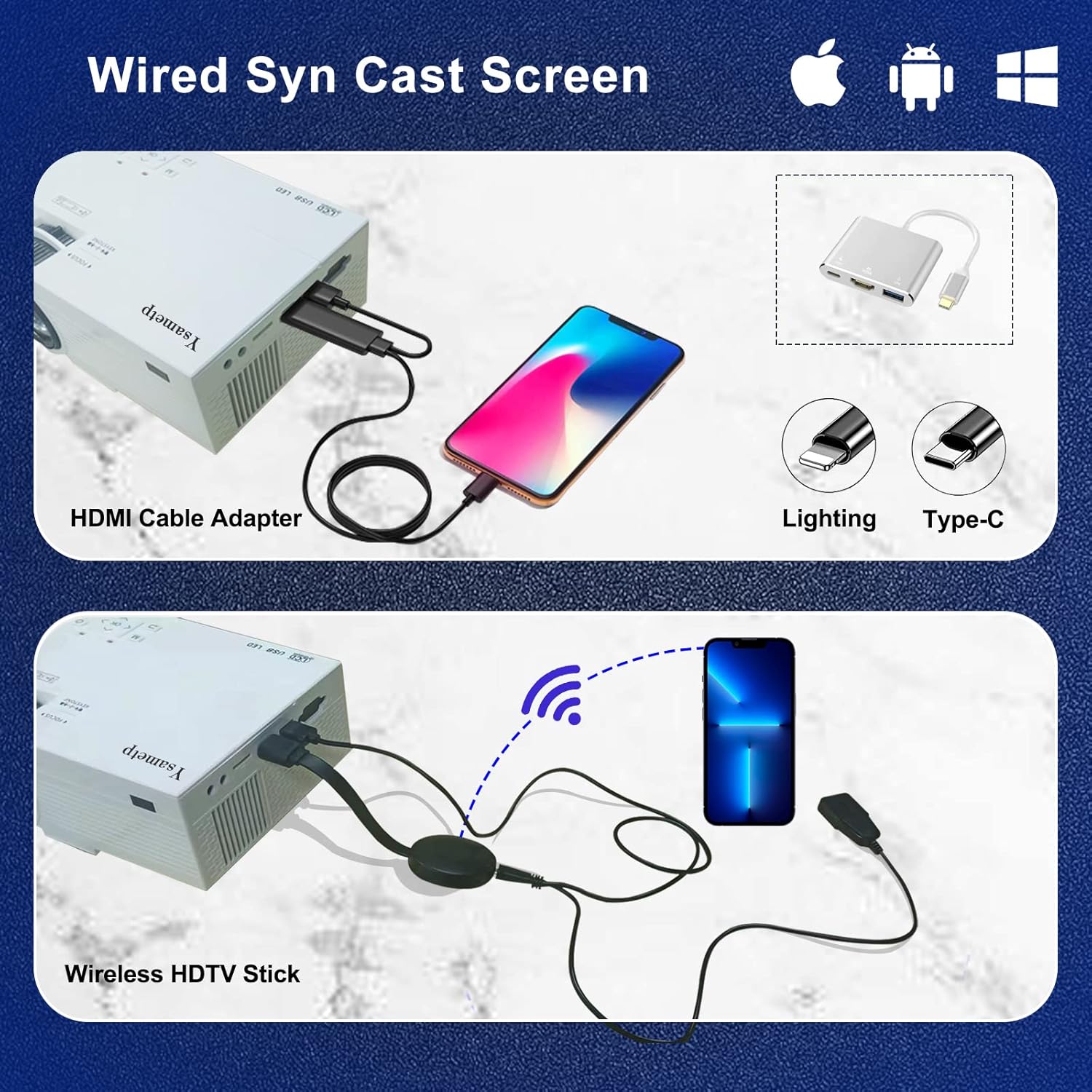
4. Wired Screen Mirroring (for Smartphones)
To mirror your smartphone screen, you will need an HDMI adapter (e.g., Lightning to HDMI for iPhone, USB-C to HDMI for Android) or a Miracast dongle/TV stick (like Roku, Fire TV Stick).

5. مخرج الصوت
The projector has dual built-in stereo speakers. For external audio, connect headphones or external speakers to the 3.5mm audio jack.

صيانة
1. التنظيف
- عدسة: استخدم قطعة قماش ناعمة وخالية من الوبر، مُخصصة للعدسات البصرية. لا تستخدم منظفات كاشطة.
- Casing: امسح الجزء الخارجي من جهاز العرض بقطعة قماش ناعمة وجافة. لا تستخدم المنظفات السائلة أو البخاخات.
- تهوية: Regularly check and clean the ventilation openings to prevent dust buildup, which can affect cooling performance.
2. التخزين
When not in use, store the projector in a cool, dry place, away from direct sunlight and extreme temperatures. Use the provided drawstring backpack for protection during storage or transport.
3. LED Lifespan
The built-in LED light source is designed to support up to 55,000 hours of use, providing long-lasting performance.
استكشاف الأخطاء وإصلاحها
| مشكلة | السبب المحتمل / الحل |
|---|---|
| لا توجد صورة على الشاشة. |
|
| الصورة غير واضحة. |
|
| Image is trapezoidal. |
|
| لا يوجد صوت. |
|
| جهاز التحكم عن بعد لا يعمل. |
|
تحديد
| ميزة | التفاصيل |
|---|---|
| ماركة | يسامطة |
| نموذج | م10 |
| تكنولوجيا العرض | شاشة الكريستال السائل |
| الدقة الأصلية | 1920 x 1080 Pixels (Full HD Supported) |
| سطوع الصورة | 11000 لوكس |
| نسبة تباين الصورة | 10000:1 |
| نسبة العرض إلى الارتفاع | 4:3 |
| حجم العرض | 32 - 200 بوصة |
| مسافة الإسقاط | 3.6ft - 16.4ft |
| عمر الصمام | 55,000 ساعات |
| مستوى الضوضاء | 31 ديسيبل |
| واتtage | 60 واط |
| واجهة الأجهزة | VGA, USB, HDMI, 3.5mm Audio, TF Card |
| الأبعاد (الطول × العرض × الارتفاع) | 23.88 × 15.49 × 8.13 سم |
| وزن | 975.22 غرام (حوالي 2.15 رطل) |
الضمان والدعم
Ysametp provides a ضمان المنتج لمدة 3 عامًا for the Mini Projector M10.
If you encounter any problems or have questions regarding your projector, please do not hesitate to contact our customer support. Refer to the contact information provided on the product packaging or the official Ysametp webموقع للحصول على المساعدة.
Ask a question about this manual
Ask about setup, troubleshooting, compatibility, parts, safety, or missing instructions. Manuals+ will review the question and use this page’s manual context to help answer it.