
1. المقدمة
Thank you for choosing the Toshiba Smart 3-in-1 Portable Electric Air Conditioner. This versatile unit is designed to provide efficient cooling, dehumidification, and fan-only operation for your indoor spaces. Its portable design allows for flexible placement, and smart features offer convenient control. This manual provides essential information for safe and effective operation, setup, maintenance, and troubleshooting.
2. الإعداد والتثبيت
2.1 فك التعبئة
Carefully remove all packaging materials. Ensure all components are present: the portable AC unit, exhaust hose, window slider kit, remote control, and user manual. Inspect the unit for any shipping damage.
2.2 التنسيب
Place the air conditioner on a flat, stable surface. For optimal performance, ensure there is at least 20 inches (50 cm) of space around the unit to allow for proper airflow. This unit is designed to cool areas up to 300 square feet.

الشكل 2.1: الجبهة view of the Toshiba portable air conditioner.
2.3 تركيب مجموعة النوافذ
The window slider kit is essential for exhausting hot air outside.
- قم بتجميع مجموعة انزلاق النافذة لتناسب فتحة نافذتك.
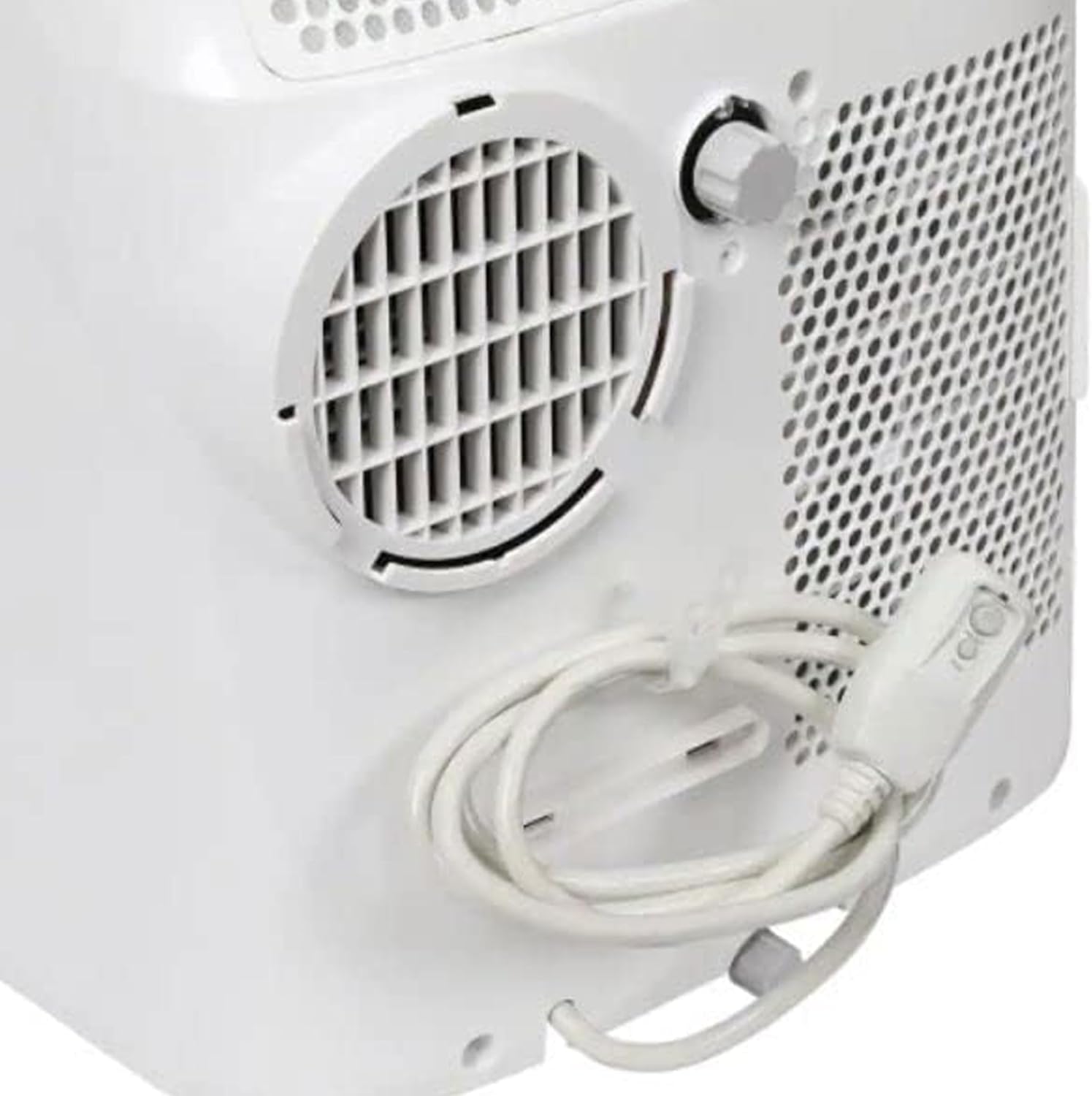
- قم بتوصيل أحد طرفي خرطوم العادم بمخرج الهواء الموجود في الجزء الخلفي من الوحدة.
- Attach the other end of the exhaust hose to the adapter in the window slider kit.
- Secure the window slider kit in the window opening, ensuring a tight seal to prevent hot air from re-entering the room.

الشكل 2.2: العودة view with exhaust port and power cord.
2.4 توصيل الطاقة
Plug the unit into a standard 115 Volt AC outlet. Ensure the power cord is not pinched or damaged.
3. تعليمات التشغيل
3.1 انتهت لوحة التحكمview
تتيح لك لوحة التحكم الموجودة أعلى الوحدة إدارة جميع الوظائف.

Figure 3.1: Control Panel with various buttons and digital display.
- زر الطاقة: يقوم بتشغيل/إيقاف تشغيل الوحدة.
- زر الوضع: يتنقل بين أوضاع التبريد والتهوية والتجفيف (مزيل الرطوبة).
- زر سرعة المروحة: يضبط سرعة المروحة (عالية، متوسطة، منخفضة).
- أسهم رفع/خفض درجة الحرارة: يضبط درجة الحرارة المطلوبة.
- زر المؤقت: Sets the auto On/Off timer.
- Vent Angle Button: Adjusts the angle of the air vent.
- وضع السكون: Optimizes settings for quiet night operation.
3.2 التحكم عن بعد
The included remote control provides convenient access to all functions from a distance. Ensure batteries are correctly inserted.
الشكل 3.2: جهاز تحكم عن بعد لسهولة التشغيل.
3.3 Smart Features (Smartphone Compatibility)
This unit is compatible with smartphones, allowing for remote control and scheduling via a dedicated app. Refer to the separate smart features guide or app instructions for pairing and usage.
4. الصيانة
تضمن الصيانة المنتظمة الأداء الأمثل وطول العمر لمكيف الهواء الخاص بك.
4.1 تنظيف فلتر الهواء
The unit features a reusable air filter. Clean the filter every two weeks or more frequently if used in dusty environments.
- قم بإيقاف تشغيل الوحدة وفصلها.
- Locate the air filter access panel (usually on the back or side).
- Remove the filter and clean it with warm, soapy water.
- اشطف جيداً واتركه يجف تماماً في الهواء قبل إعادة إدخاله.

الشكل 4.1: الجانب view indicating air filter location.
4.2 تصريف المياه
In dehumidifier mode or high humidity conditions, the unit will collect condensed water. The unit may have an internal reservoir that requires periodic draining or a continuous drainage option.
- When the internal reservoir is full, the unit may stop operating and display an indicator.
- Place a shallow pan or bucket under the drainage port (usually at the bottom rear of the unit).
- قم بإزالة سدادة التصريف للسماح بتدفق الماء للخارج.
- For continuous drainage, attach a suitable drain hose (not included) to the drainage port and direct it to a floor drain.
4.3 التخزين
Before long-term storage, ensure the unit is completely drained of water and the filter is clean and dry. Store in a cool, dry place, preferably covered to protect from dust.
5. استكشاف الأخطاء وإصلاحها
إذا واجهت أي مشكلات، راجع المشكلات والحلول الشائعة التالية.
| مشكلة | السبب المحتمل | حل |
|---|---|---|
| الوحدة لا تعمل. | لا يوجد طاقة، قاطع الدائرة معطل، خزان المياه ممتلئ. | افحص سلك الطاقة، وأعد ضبط قاطع الدائرة، وقم بتفريغ خزان المياه. |
| الوحدة لا تقوم بالتبريد بشكل فعال. | فلتر هواء متسخ، مدخل/عادم الهواء مسدود، الغرفة كبيرة جدًا، الأبواب/النوافذ مفتوحة. | Clean filter, clear obstructions, ensure room size is within capacity, close openings. |
| الضوضاء المفرطة. | الوحدة ليست على سطح مستوٍ، والمروحة تعيق الحركة. | Place on a flat surface, check for foreign objects in fan. |
| تسرب المياه. | Drain plug not secured, continuous drainage hose kinked/blocked. | Secure drain plug, check and clear drainage hose. |
بالنسبة للمشكلات غير المذكورة هنا، يرجى الاتصال بدعم العملاء.
6. المواصفات
| ميزة | التفاصيل |
|---|---|
| ماركة | TOSHIBA |
| رقم الموديل | RAC-PD1013CWRU |
| وزن العنصر | 66 رطل |
| أبعاد المنتج | 27.6 × 17.9 × 27.6 بوصة |
| نوع التثبيت | محمول |
| المميزات الخاصة | Portable, Remote control, Smartphone Compatible |
| لون | أبيض |
| المجلدtage | 115 فولت |
| تغطية مساحة الأرضية | ما يصل إلى 300 قدم مربع |
| مادة التبريد | ر 410 أمبير |
| نوع الفلتر | فلتر قابل لإعادة الاستخدام |
| مصدر الطاقة | كهرباء سلكية |
7. الضمان والدعم
For warranty information and customer support, please refer to the documentation included with your product or visit the official Toshiba support webموقع.
This product is part of the Amazon Renewed program, indicating it has been professionally inspected and tested to work and look like new. Renewed products are eligible for replacement or refund under the Amazon Renewed Guarantee if not satisfied with the purchase.
8. مقاطع فيديو رسمية للمنتج
No official seller-created product videos were found for this model in the provided data. Please refer to the written instructions and diagrams for guidance.