
1. انتهى المنتجview
The CNCTOPBAOS CNC 5 Axis MPG Pendant Handwheel is a manual pulse generator designed for precise control of CNC machines. It features a 15-pin connector, an emergency stop function, and supports 5 axes with selectable pulse ratios. This device provides manual control for axis movement, enhancing precision and operational flexibility for various CNC applications.
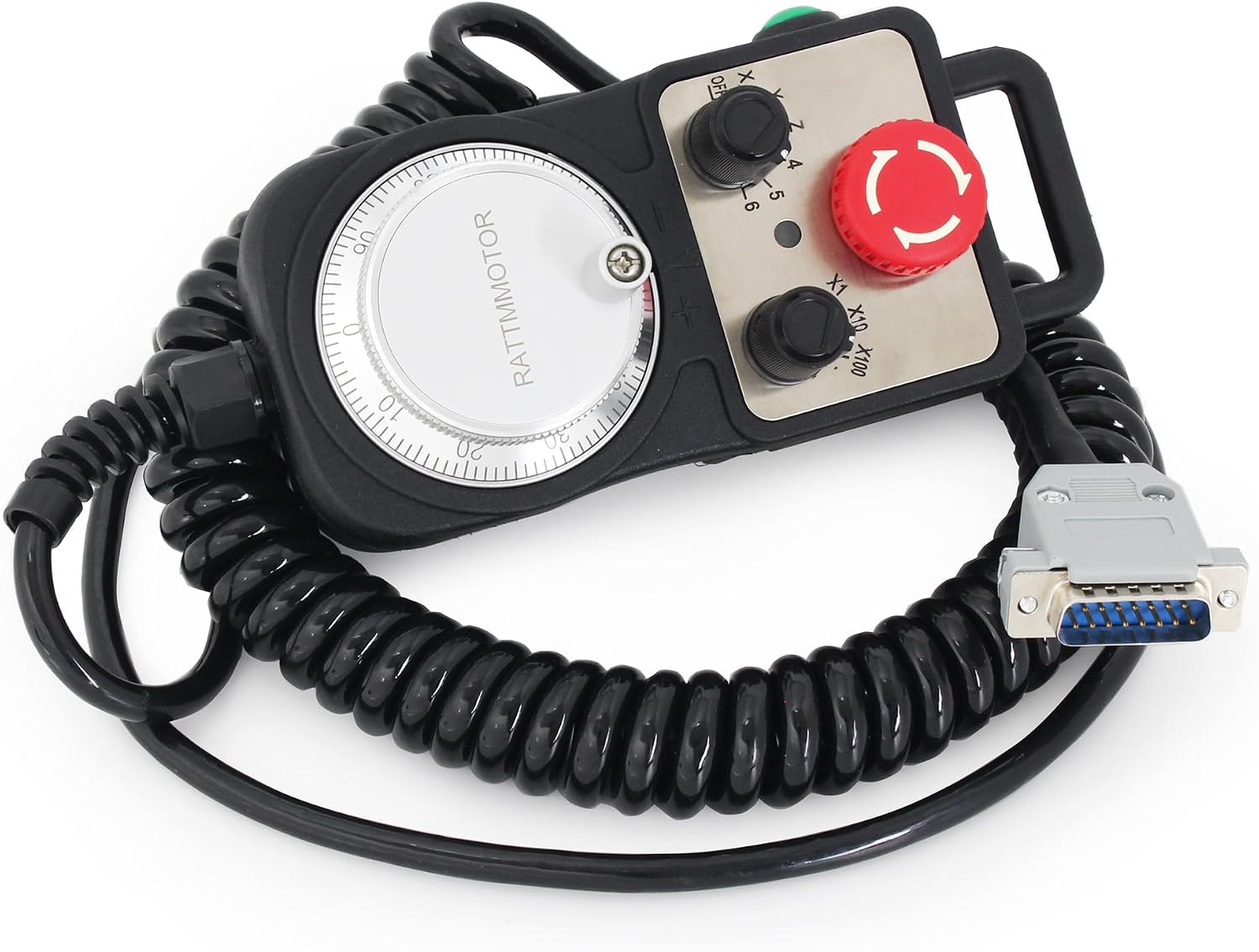
الصورة 1.1: انتهىview of the CNCTOPBAOS CNC 5 Axis MPG Pendant Handwheel.
2. المميزات
- نوع المنتج: 5 Axis Pendant Handwheel with Emergency Stop.
- المفاتيح: Includes x1, x10, x100 selectable pulse ratio switches.
- Axis Selection: Dedicated switches for OFF, X, Y, Z, 4, 5 axes.
- تردد الاستجابة: 0-10 كيلو هرتز.
- متطلبات الطاقة: DC5V +/- 5% supply voltage; <=80 mA supply current.
- مواصفات الإخراج: إخراج المجلدtage >=2.5V and <=0.4V; Output current <40 mA; Drop/rise time <=5 ns.
- بناء: Features a high-precision metal code disc with clear fine-tuning dial scale and stable rotation.
- التوافق: Compatible with DDCS V4.1, DDCS-Expert Offline Controller, Taiwan Pou Yuen M600 M500 M520i T300 series, Higerman, HANUC, GSK, opened NC, KND, Siemens, NUM, Spain FAGOR, and similar CNC systems.
- الاتصال: Equipped with a 15-pin plug for direct, plug-and-play connection to compatible controllers.
3. الإعداد والتثبيت
The CNCTOPBAOS MPG Pendant Handwheel is designed for straightforward installation. Follow these steps to connect the device to your CNC controller:
- إيقاف التشغيل: Ensure your CNC controller and associated machinery are completely powered off before making any connections.
- Connect 15-Pin Plug: Locate the 15-pin D-sub connector on the handwheel cable. Connect this plug securely to the corresponding 15-pin port on your compatible CNC controller (e.g., DDCS V4.1, DDCS-Expert).
- اتصال آمن: Tighten any screws on the D-sub connector to prevent accidental disconnection during operation.
- تشغيل الطاقة: Once the connection is secure, power on your CNC controller. The handwheel should be recognized by the system.

Image 3.1: The handwheel connected to a CNC controller.
4. تعليمات التشغيل
The handwheel provides intuitive control over your CNC machine's axes. Familiarize yourself with the controls:

Image 4.1: Key components and controls of the MPG handwheel.
- Manual Pulse Generator (MPG) Dial: The large rotary dial on the front is used for precise manual movement of the selected axis. Turning the dial generates pulses that translate into axis motion on the CNC machine.
- Axis Selector Switch: This switch allows you to select which axis (X, Y, Z, 4, 5) the MPG dial will control. Set it to 'OFF' when not in use.
- Pulse Ratio Switches (x1, x10, x100): These switches determine the sensitivity of the MPG dial.
- x1: Provides the finest movement (e.g., 1 pulse = 0.001mm).
- x10: Provides medium movement (e.g., 1 pulse = 0.01mm).
- x100: Provides coarser movement (e.g., 1 pulse = 0.1mm).
- زر التوقف في حالات الطوارئ: The large red button immediately halts all machine operations when pressed. To reset, twist the button clockwise until it pops out.
- Enable Switch: The green button typically activates or enables the handwheel's functions. Press and hold or toggle as required by your CNC system.
- Hanging Beam: Use this handle for convenient carrying and positioning of the handwheel.
4.1. Operational Demonstration
Video 4.1: A demonstration of the MPG handwheel in operation with a DDCS offline controller, showing axis movement and control.
5. مخطط الأسلاك
The following table details the pin definitions for the 15-pin connector. It is crucial to ensure correct wiring for proper functionality and to avoid damage to the handwheel or CNC controller. Always cross-reference with your specific CNC controller's documentation.

Image 5.1: 15-pin connector wiring definition table.
| رقم التعريف الشخصي | علامة | تعريف | ملحوظات |
|---|---|---|---|
| 1 | +5 فولت | مزود الطاقة + | MPG Power supply input positive terminal |
| 2 | A+ | Encoder A Phase + | MPG A phase differential input positive terminal |
| 3 | B+ | Encoder B Phase + | MPG B differential input positive terminal |
| 4 | شين | Select X Axis | Connect with GND, then X axis is selected |
| 5 | زين | Select Z Axis | Connect with GND, then Z axis is selected |
| 6 | إكس 100 | X100 Ratio | Connect with GND, then X100 ratio is selected |
| 7 | 5 | Select 5th Axis | Connect with GND, then 5th axis is selected |
| 8 | كوم- | Input signal COMMON | The switch signal common terminal. |
| 9 | أرضي | MPG power supply ground | |
| 10 | A- | Encoder A Phase - | MPG A phase differential input negative terminal |
| 11 | B- | Encoder B Phase - | MPG B differential input negative terminal |
| 12 | يين | Select Y Axis | Connect with GND, then Y axis is selected |
| 13 | 4 | Select 4th Axis | Connect with GND, then the 4th axis is selected |
| 14 | إكس 10 | X10 Ratio | Connect with GND, then X10 ratio is selected |
| 15 | EP | ESTOP Input | Connect with GND, then Estop is active |
Important: Never short connect the COM- and GND pins.
6. المواصفات
Detailed technical specifications for the CNCTOPBAOS CNC 5 Axis MPG Pendant Handwheel:
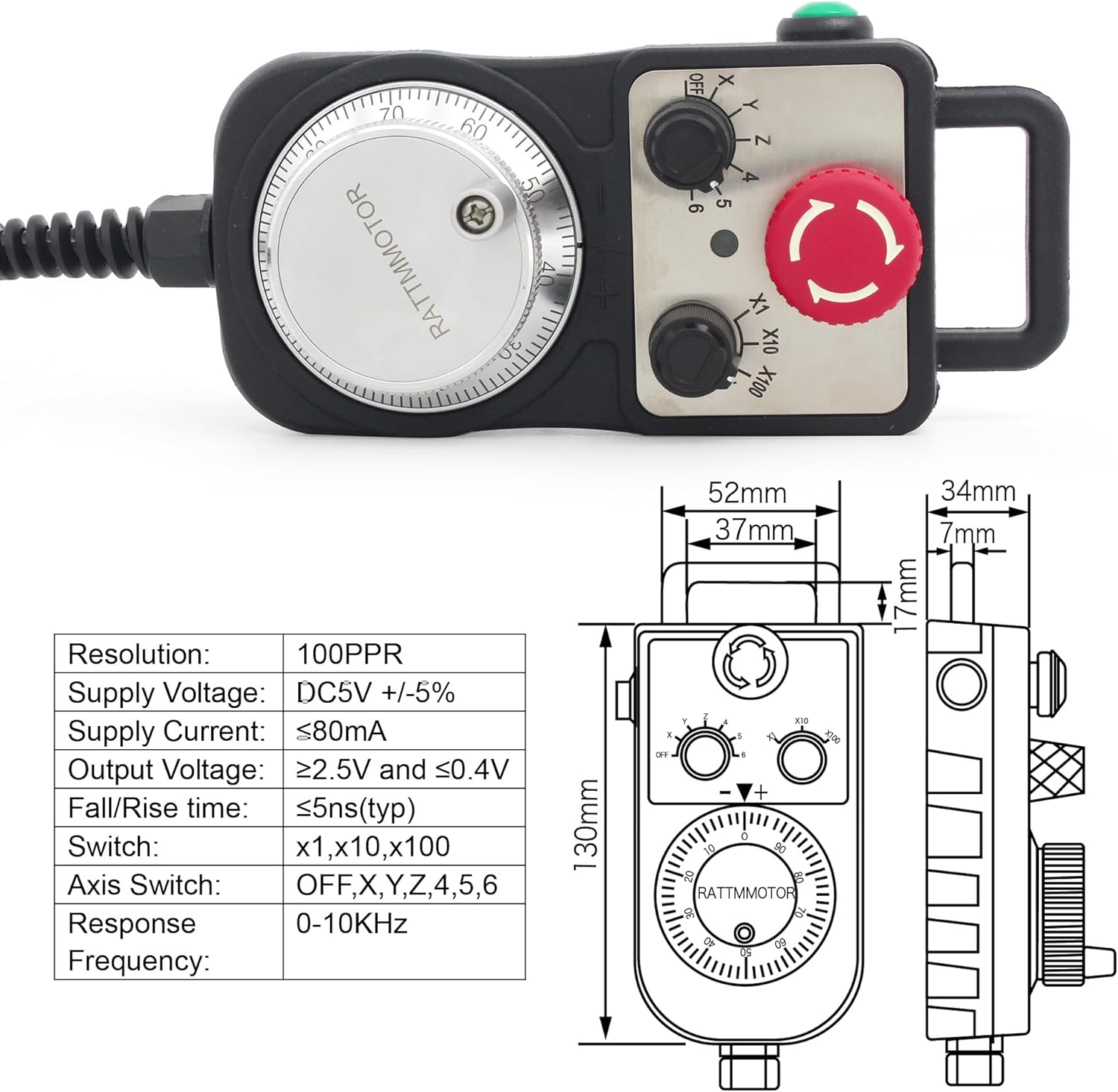
Image 6.1: Dimensions and key specifications of the handwheel.
- رقم الموديل: PLCHANDWHEEL
- دقة: 100PPR (Pulses Per Revolution)
- حجم العرضtage: دسنومكسف +/- شنومكس٪
- العرض الحالي: ≤80 مللي أمبير
- حجم الإخراجtage: ≥2.5V (High) and ≤0.4V (Low)
- تيار الخرج: <40 مللي أمبير
- Drop/Rise Time: ≤5 ns (typical)
- Switch Ratios: x1, x10, x100 selectable
- Axis Selection: OFF, X, Y, Z, 4, 5
- تردد الاستجابة: 0-10 كيلو هرتز
- مادة: بلاستيك
- وزن السلعة: حوالي 1.57 رطل (0.71 كجم)
- أبعاد الحزمة: حوالي 9.76 × 5.16 × 3.43 بوصة (24.8 × 13.1 × 8.7 سم)
- الشركة المصنعة: Changzhou Rattm Motor Co.,Ltd
7. الصيانة
To ensure the longevity and reliable performance of your MPG Pendant Handwheel, adhere to the following maintenance guidelines:
- تنظيف: Keep the handwheel clean and free from dust, metal shavings, and other debris. Use a soft, dry cloth for cleaning. Avoid abrasive cleaners or solvents.
- الظروف البيئية: Avoid exposing the device to excessive moisture, high humidity, or extreme temperatures. Operate within recommended environmental specifications.
- فحص الكابلات والموصلات: Regularly inspect the coiled cable and the 15-pin connector for any signs of wear, cuts, kinks, or damage. Replace if necessary to prevent intermittent connections or electrical issues.
- تخزين: When not in use, store the handwheel in a clean, dry environment, away from direct sunlight and corrosive materials.
8. استكشاف الأخطاء وإصلاحها
If you encounter issues with your MPG Pendant Handwheel, consider the following troubleshooting steps:
- Handwheel Not Responding:
- التحقق من الاتصالات: Ensure the 15-pin connector is firmly seated in the CNC controller's port and any retaining screws are tightened.
- التحقق من الطاقة: Confirm that the CNC controller is powered on and receiving power.
- Enable Switch: Ensure the 'Enable' switch on the handwheel is activated.
- التوقف في حالات الطوارئ: Check if the emergency stop button is pressed. If so, twist it clockwise to release and reset.
- Incorrect Axis Movement or No Movement:
- Axis Selection: Verify that the correct axis (X, Y, Z, 4, or 5) is selected on the handwheel's axis selector switch.
- Pulse Ratio: Experiment with different pulse ratio settings (x1, x10, x100) to see if the sensitivity is affecting movement.
- اختلافات في التوصيلات الكهربائية: ارجع إلى Wiring Diagram (Section 5) and your CNC controller's manual. Some controllers may have variations in pin assignments. Incorrect wiring is a common cause of non-functionality or erratic behavior.
- Erratic or Unstable Movement:
- تدخل: Ensure the handwheel and its cable are not exposed to strong electromagnetic interference from other machinery.
- سلامة الكابل: Inspect the cable for any damage that might cause signal loss or interference.
9. الضمان والدعم
For information regarding product warranty, technical support, or service, please refer to the documentation provided with your purchase or contact CNCTOPBAOS customer service directly. Ensure you have your product model number (PLCHANDWHEEL) and purchase details available when seeking support.