
1. انتهى المنتجview
This diagnostic tool is designed for electric bicycles equipped with Bafang central motorization, specifically compatible with M300, M400, M420, M500, M600, M620, and M800 series motors. It allows users to connect to the motor's electronic control unit (ECU) to read diagnostic information, identify errors, and potentially adjust motor parameters.

Figure 1: The Bafang BESST Diagnostic Tool. The device features multiple connection ports at the top for different motor types (UART, CAN) and a USB port at the bottom for PC connection. Indicator lights on the front panel show the status of PC, UART, CAN Bus, Run, Error, Bluetooth (BT), Test, and Power.
2. الإعداد والاتصال
Before using the diagnostic tool, ensure your electric bicycle's battery is adequately charged and the motor is accessible.
- تثبيت البرنامج: Install the necessary Bafang diagnostic software on your computer. This software is typically provided by the manufacturer or can be downloaded from their official webموقع.
- الاتصال بالكمبيوتر الشخصي: Connect the diagnostic tool to your computer using the provided USB cable. The USB port is located at the bottom of the diagnostic device. Ensure the "Power" indicator light on the tool illuminates, indicating it is receiving power.
- Connect to Motor: Identify the diagnostic port on your Bafang motor. This is usually a multi-pin connector. Select the appropriate cable from the diagnostic tool's top connectors (UART or CAN, depending on your motor model) and securely connect it to the motor's diagnostic port.
- تشغيل الطاقة: Turn on your electric bicycle's power system. The diagnostic tool's "Run" indicator light should illuminate or flash, signifying a successful connection to the motor.
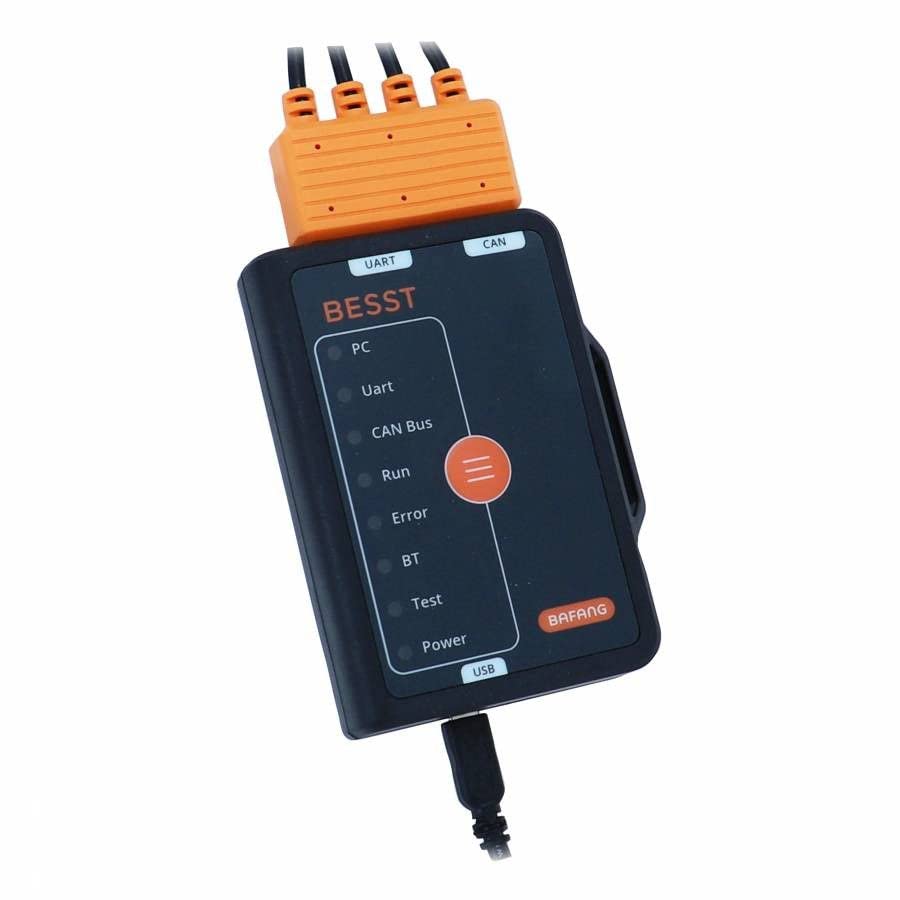
الشكل 2: الجزء العلوي view of the diagnostic tool, highlighting the UART and CAN connection ports for different motor types. Proper selection of the port is crucial for establishing communication.
3. تشغيل الأداة
Once connected, you can use the diagnostic software on your computer to interact with the motor.
- واجهة البرنامج: Open the Bafang diagnostic software. The software interface will display various options for motor diagnostics and parameter adjustments.
- Reading Diagnostic Codes: Navigate to the "Error Codes" or "Diagnostic Information" section within the software. The tool will communicate with the motor to retrieve any stored error codes, which can help identify issues with the motor, controller, or sensors.
- البيانات في الوقت الحقيقي: Some software versions allow for real-time monitoring of motor parameters such as speed, power output, battery voltage, and sensor readings. This can be useful for diagnosing intermittent problems.
- Parameter Adjustment (Advanced Users): The tool may allow for adjustment of certain motor parameters, such as speed limits, power levels, or pedal assist settings. Exercise caution when modifying these settings, as incorrect adjustments can affect motor performance or safety. Refer to the Bafang software manual for detailed instructions on parameter modification.
- تحديثات البرامج الثابتة: In some cases, the tool can be used to update the motor's firmware. Follow the software's instructions carefully during firmware updates to avoid bricking the motor.
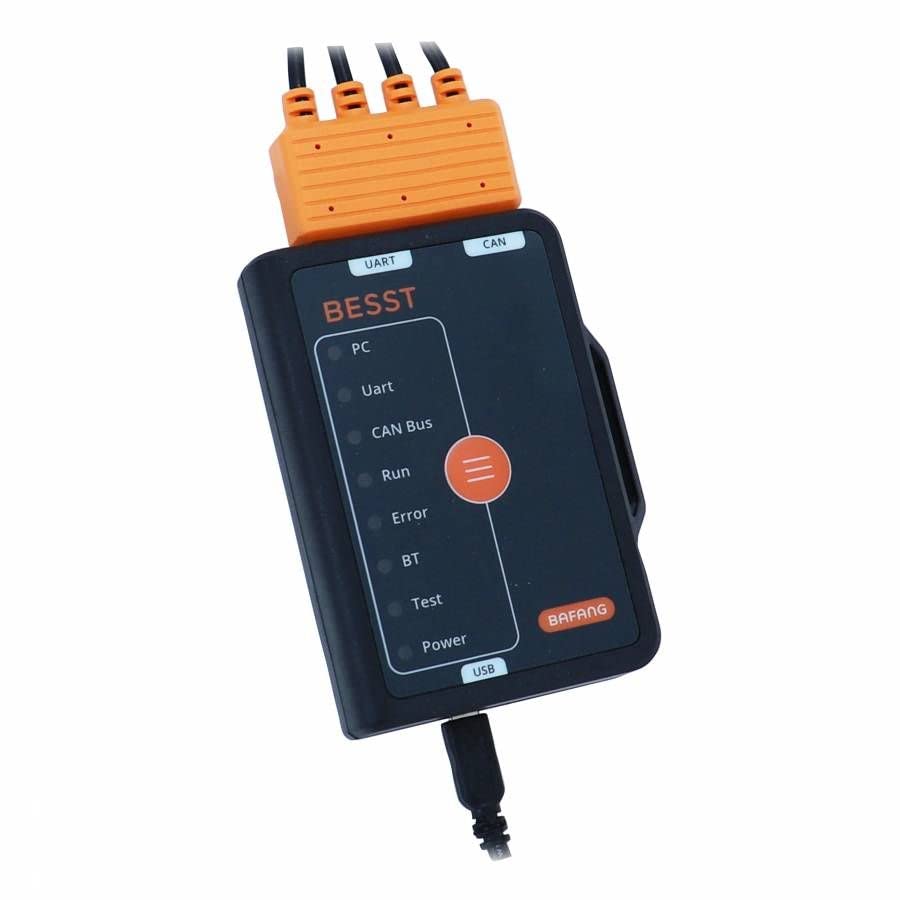
Figure 3: Close-up of the diagnostic tool's indicator lights. These LEDs provide visual feedback on the tool's status: PC (connection to computer), UART/CAN Bus (communication with motor), Run (active operation), Error (fault detected), BT (Bluetooth, if applicable), Test (diagnostic mode), and Power (power supply).
4. الصيانة
Proper maintenance ensures the longevity and reliable operation of your diagnostic tool.
- تنظيف: Wipe the tool with a soft, dry cloth. Do not use abrasive cleaners or solvents, as they can damage the casinأو المكونات الإلكترونية.
- تخزين: Store the tool in a cool, dry place, away from direct sunlight and extreme temperatures. Keep it in its original packaging or a protective case to prevent physical damage.
- العناية بالكابلات: Handle connection cables carefully. Avoid sharp bends, kinks, or pulling on the cables, which can damage internal wires or connectors.
- حماية الموصل: Keep the connectors free from dust, dirt, and moisture. Use protective caps if provided.
5. استكشاف الأخطاء وإصلاحها
If you encounter issues while using the diagnostic tool, refer to the following common problems and solutions:
| مشكلة | السبب المحتمل | حل |
|---|---|---|
| Tool not recognized by PC. |
|
|
| No communication with motor. |
|
|
| "Error" light on tool illuminates. |
|
|
6. المواصفات
- رقم الموديل: 167975
- الشركة المصنعة: الزعيم فوكس
- وزن: 400 جرام
- التوافق: Bafang Central Motorization M300, M400, M420, M500, M600, M620, M800 series.
- الاتصال: USB to PC, UART/CAN to Motor
7. الضمان والدعم
هذا المنتج مشمول بضمان المصنّع القياسي ضد عيوب المواد والتصنيع. تبدأ فترة الضمان عادةً من تاريخ الشراء. يُرجى الاحتفاظ بإثبات الشراء لتقديم مطالبات الضمان.
For technical support, warranty inquiries, or further assistance, please contact your retailer or the official LEADER FOX support channels. Refer to the product packaging or the retailer's webالموقع للحصول على معلومات الاتصال المحددة.
مهم: Unauthorized disassembly or modification of the diagnostic tool will void the warranty.


