
1. المقدمة
Thank you for choosing the Awei TC-7 Wired Earphones. These in-ear earphones are designed for clear audio and convenient communication, featuring a Type-C connector for modern devices and an inline microphone with control buttons. Please read this manual carefully to ensure proper use and maintenance of your earphones.
2. محتويات العبوة
- Awei TC-7 Wired Earphones
- Multiple sizes of Ear Cushions (Small, Medium, Large)

الشكل 2.1: The Awei TC-7 earphones include ear caps in various sizes to ensure a comfortable and secure fit for different users.
3. انتهى المنتجview
The Awei TC-7 earphones feature a durable design with a Type-C plug for direct connection to compatible devices. The inline remote control allows for easy management of audio playback and calls.

الشكل 3.1: A close view of the Awei TC-7 earphones, showcasing their in-ear design for optimal sound delivery.

الشكل 3.2: The inline remote control features multi-function buttons for managing audio and calls.

الشكل 3.3: The integrated HD microphone is designed to pick up clear audio, even in noisy environments.
4. الإعداد
- اختر وسائد الأذن: Choose the ear cushion size (Small, Medium, or Large) that provides the most comfortable and secure fit for your ears. A proper fit enhances sound quality and noise isolation.
- الاتصال بالجهاز: Insert the USB-C plug of the earphones into the Type-C port of your smartphone, tablet, laptop, or other compatible device.
- مخرج الصوت: Ensure your device's audio output is set to the connected earphones. This is usually automatic upon connection.
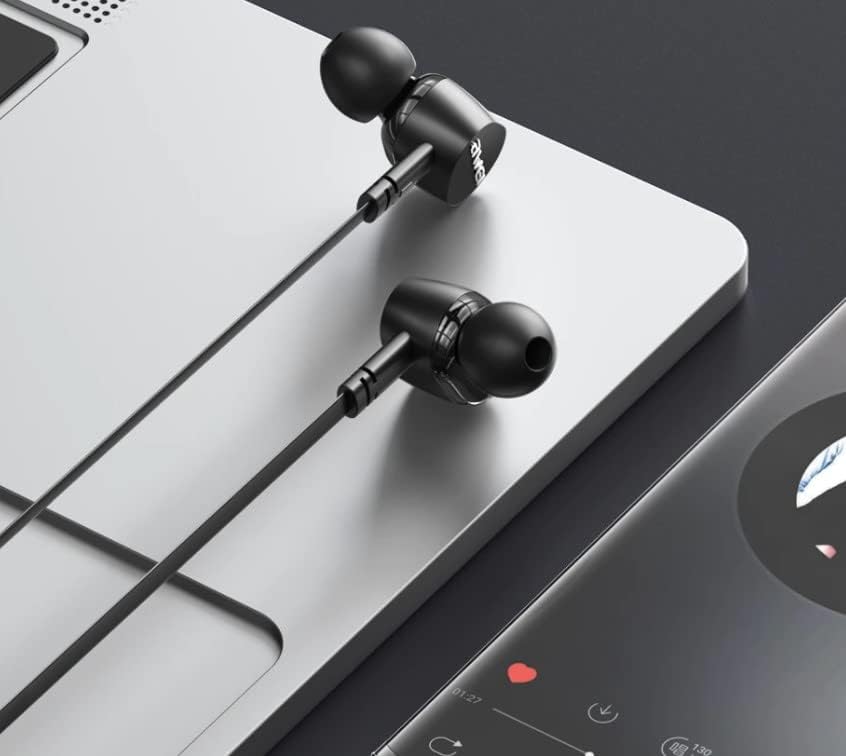
الشكل 4.1: The earphones are compatible with various devices featuring a USB-C port, such as laptops and smartphones.
5. تعليمات التشغيل
The Awei TC-7 earphones feature an inline remote with buttons for convenient control of your audio and calls.
5.1. التحكم في تشغيل الموسيقى
- تشغيل/إيقاف مؤقت: اضغط على زر الوسط مرة واحدة.
- المسار التالي: اضغط على الزر الأوسط مرتين بسرعة.
- المسار السابق: اضغط على الزر الأوسط ثلاث مرات بسرعة.
- رفع الصوت: اضغط على زر "+".
- اخفض الصوت: اضغط على زر '-'.
5.2. إدارة المكالمات
- الرد/إنهاء المكالمة: اضغط على الزر الأوسط مرة واحدة أثناء مكالمة واردة أو مكالمة جارية.
- رفض المكالمة: اضغط مع الاستمرار على الزر الأوسط لمدة ثانيتين تقريبًا أثناء المكالمة الواردة.
6. الصيانة
Proper care will extend the lifespan of your Awei TC-7 earphones.
- تنظيف وسائد الأذن: Regularly remove the ear cushions and clean them with a soft, damp القماش. تأكد من جفافها تمامًا قبل إعادة ربطها.
- العناية بالكابلات: The cable is designed to be tangle-free. Avoid excessive pulling or sharp bending to prevent internal damage.
- تخزين: When not in use, store the earphones in a clean, dry place, away from extreme temperatures.
- مقاومة الماء: The earphones are rated as waterproof. However, avoid prolonged submersion and ensure the USB-C port is dry before connecting to a device after exposure to water.
7. استكشاف الأخطاء وإصلاحها
If you encounter issues with your Awei TC-7 earphones, please refer to the following common solutions:
| مشكلة | السبب المحتمل | حل |
|---|---|---|
| لا يوجد صوت من سماعات الأذن | Earphones not properly connected; device volume too low; incorrect audio output setting on device. | Ensure the USB-C plug is fully inserted. Increase device volume. Check device audio settings to confirm output is set to earphones. |
| الميكروفون لا يعمل | Microphone port blocked; incorrect input setting on device; application permissions. | Ensure the microphone area is clear. Check device sound settings for microphone input. Verify application permissions for microphone access. |
| الأزرار لا تستجيب | Loose connection; device incompatibility; software glitch. | Reconnect the earphones. Test with another compatible device if possible. Restart your device. |
8. المواصفات
| ميزة | التفاصيل |
|---|---|
| اسم الموديل | TC-7 |
| تكنولوجيا الاتصال | سلكي |
| مقبس سماعة الرأس | يو اس بي-سي |
| وضع الأذن | في الأذن |
| نطاق التردد | 20 هرتز - 20 كيلو هرتز |
| مميزات اضافية | Microphone Included, Inline Control |
| مادة | بلاستيك |
| مستوى مقاومة الماء | ضد للماء |
| مميزات الكابل | غير متشابك |
| الأجهزة المتوافقة | Smartphones, Laptops, Tablets, Desktops with USB-C |
9. الضمان والدعم
للحصول على معلومات الضمان ودعم العملاء، يُرجى مراجعة الوثائق المُقدمة عند الشراء أو التواصل مع التاجر. احتفظ بإيصال الشراء لأي مطالبات تتعلق بالضمان.