
مقدمة
The TELE System TS6815 is a DVB-T2 HEVC 10-bit digital terrestrial decoder designed to receive digital television broadcasts. It supports HD, HDR, and HLG technologies, offering enhanced viewing experiences. This manual provides essential information for setting up, operating, and maintaining your decoder.
ماذا يوجد في الصندوق
- TELE System TS6815 Decoder
- جهاز التحكم عن بعد
- مصدر الطاقة الخارجي
- دليل البدء السريع
المنتج انتهىview
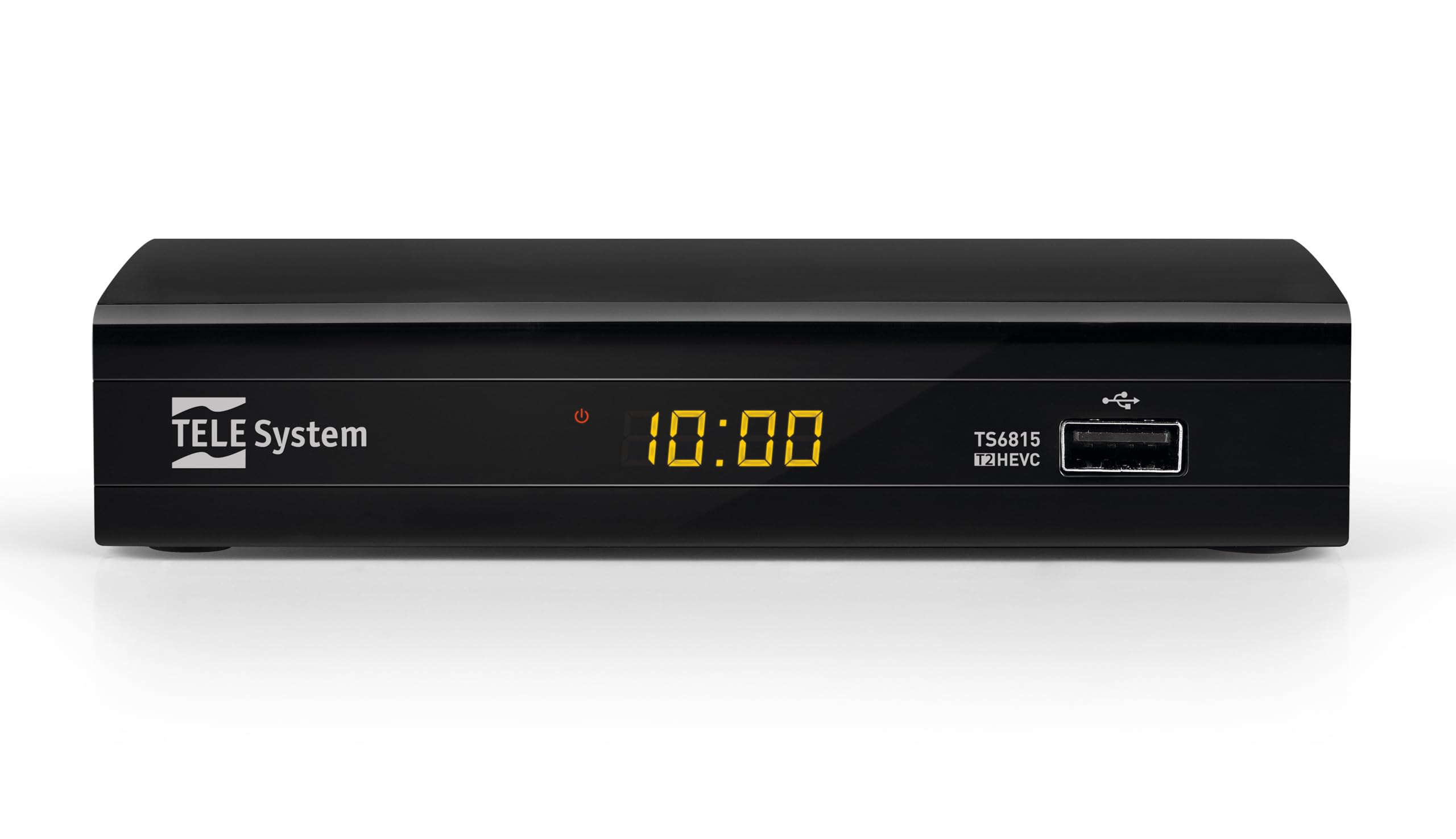
أمام View: The front panel features the TELE System logo, model number TS6815, DVB-T2 HEVC branding, and a USB port for media playback and updates.

مؤخرة View: The rear panel includes an RF IN port for antenna connection, an HDMI output, a TV SCART connector, and a DC IN port for power.

جهاز التحكم عن بعد: The included remote control allows for full functionality, including power, channel selection, volume adjustment, EPG access, and media playback controls.

ملصق المنتج: This label provides important information such as the model number (TS6815 T2HEVC/02), power input (DC 5V = 1A), and maximum power consumption (5W Max).
تعليمات الإعداد
- توصيل الهوائي: Connect your terrestrial antenna cable to the RF IN port on the back of the decoder.
- الاتصال بالتلفزيون: Use an HDMI cable to connect the decoder's HDMI OUT port to an HDMI IN port on your television. Alternatively, use a SCART cable to connect the TV SCART port to your TV's SCART input.
- توصيل الطاقة: Plug the external power supply into the DC IN port on the decoder, then plug the power adapter into a wall outlet.
- تشغيل الطاقة: Turn on your television and select the correct HDMI or SCART input source. The decoder should power on automatically or can be turned on using the remote control.
- Initial Channel Scan (AUTOSCAN): Upon first use, the decoder will typically initiate an automatic channel scan. Follow the on-screen prompts. The AUTOSCAN feature will find all available channels, and LCN (Logical Channel Numbering) will organize them into a logical order.
- Language and Region Settings: Select your preferred language and region during the initial setup process.
تعليمات التشغيل
التشغيل الأساسي
- تشغيل/إيقاف التشغيل: اضغط على قوة الزر الموجود على جهاز التحكم عن بعد.
- اختيار القناة: استخدم CH+ / CH- buttons or the numeric keypad to change channels.
- التحكم في مستوى الصوت: استخدم المجلد+ / المجلد- الأزرار لضبط مستوى الصوت.
- الوصول إلى القائمة: اضغط على قائمة طعام زر للوصول إلى القائمة الرئيسية للإعدادات والميزات.
- دليل البرامج الإلكتروني (EPG): اضغط على دليل البرامج الإلكتروني زر ل view the program schedule for current and upcoming broadcasts.
تشغيل الوسائط عبر USB
The decoder supports media playback from a USB storage device. Insert a USB drive into the front USB port.
- اضغط على وسائط button on the remote control to access the media player interface.
- التنقل عبر files (videos, music, photos) using the arrow keys and press OK للاختيار والتشغيل.
Timeshift Function
The Timeshift function allows you to pause live TV and resume watching later. A USB storage device is required for this feature.
- أثناء مشاهدة البرنامج، اضغط على يوقف button on the remote control to activate Timeshift.
- يضعط يلعب لاستئناف التشغيل.
استكشاف الأخطاء وإصلاحها
- No Signal / Poor Image Quality:
- Ensure the antenna cable is securely connected to the RF IN port.
- Check your TV's HDCP compatibility.
- Try replacing the HDMI or SCART cable.
- In the decoder's AV settings, try changing the "color-space" option to RGB.
- If experiencing image fluidity issues, navigate to AV SET > Screen > Screen Options > Resolution and select a 50Hz format.
- Perform a new channel scan (AUTOSCAN) to refresh the channel list.
- HDMI Signal Issues (e.g., no signal after changing TV source):
- If the signal does not return after switching TV sources, try powering off and on both the TV and the decoder.
- Ensure the HDMI cable is not faulty.
- جهاز التحكم عن بعد لا يستجيب:
- تأكد من تركيب البطاريات بشكل صحيح وعدم نفادها. استبدلها إذا لزم الأمر.
- Ensure there are no obstructions between the remote control and the decoder's IR sensor.
- Decoder Not Compatible with UHD Channels:
- The TS6815 is an HD decoder, not a 4K (UHD) decoder. It is not designed to receive or display UHD channels.
تحديد
| ميزة | وصف |
|---|---|
| نموذج | تي أس 6815 |
| نوع الموالف | دي في بي-تي/تي2 |
| فك تشفير الفيديو | MPEG-2, MPEG-4 H264/AVC, H.265/HEVC Main10 |
| دقة الفيديو | Max. 1080p@50/60Hz |
| المميزات الخاصة | HD, HDR, HLG, AUTOSCAN, LCN, EPG, Timeshift, Media Player |
| الاتصال | 1x HDMI, 1x SCART, 1x USB, Ethernet |
| وضع إخراج الصوت | Surround (5.1 channels) |
| مدخلات الطاقة | 5 فولت تيار مستمر = 1 أمبير |
| استهلاك الطاقة | شنومكسو ماكس |
| لون | أسود |
الضمان والدعم
The TELE System TS6815 decoder comes with a 2-year manufacturer's warranty. For technical support, further assistance, or to access detailed instruction manuals in various languages, please refer to the official TELE System webالموقع أو الاتصال بخدمة العملاء الخاصة بهم.
You can find additional information and support resources by visiting the TELE System Brand Store.