
مقدمة
Thank you for choosing the Carro 52-inch Low Profile Smart Ceiling Fan with Light. This manual provides essential information for the safe installation, operation, and maintenance of your new smart ceiling fan. Please read this manual thoroughly before installation and keep it for future reference.
This smart ceiling fan is designed to provide efficient air circulation and illumination, featuring smart control options via app, voice commands (Alexa, Google Assistant, Siri Shortcuts), and a wall control switch. Its low-profile design is ideal for various indoor spaces, including living rooms, bedrooms, and kitchens.
معلومات السلامة
تحذير: To reduce the risk of fire, electric shock, or personal injury, always turn off power at the main circuit breaker or fuse box before beginning installation or performing any maintenance.
- يجب أن تتوافق جميع التوصيلات الكهربائية مع القوانين واللوائح المحلية أو الوطنية. إذا لم تكن على دراية بالتوصيلات الكهربائية الصحيحة، فاستشر فني كهرباء مؤهل.
- تأكد من أن موقع التثبيت سليم من الناحية البنيوية وقادر على تحمل وزن المروحة.
- Do not connect the fan to a dimmer switch unless specifically designed for ceiling fans. The included wall control switch is designed for this fan.
- This fan is designed for flush-mount installation only and cannot be angled.
- Requires Neutral Wire (White), Live Wire (Red or Black), Bare or Ground Wire (Green), and separate Load Wires (2 wires) for Fan & Light. Confirm your home's wiring compatibility before purchase.
محتويات الحزمة
Carefully unpack all components and ensure all items are present before beginning installation. If any parts are missing or damaged, contact customer support.
- مجموعة محرك مروحة السقف
- ريش المروحة (3)
- LED Light Kit with Frosted Glass Cover
- مفتاح تحكم جداري
- أدوات التثبيت (براغي، صواميل أسلاك، إلخ).
- دليل التعليمات

Image: The Carro 52-inch Low Profile Smart Ceiling Fan with Light, showcasing its gold/black finish and three blades.
تحديد
| ميزة | التفاصيل |
|---|---|
| ماركة | كارو |
| رقم الموديل | VWGS-523B-L11-G2-1 |
| لون | ذهبي/اسود |
| مادة | Engineered Wood (Blades), Glass (Shade) |
| أبعاد المنتج | 52 بوصة طول × 52 بوصة عرض × 11.6 بوصة ارتفاع |
| الاستخدام الداخلي والخارجي | داخلي |
| مصدر الطاقة | كهرباء سلكية |
| نوع التثبيت | Flush Mount (Cannot be angled) |
| نوع مصدر الضوء | قاد |
| سطوع | 1062 لومن |
| لون فاتح | ضوء دافئ (3000 كلفن) |
| المجلدtage | 120 فولت |
| واتtage | 68 واط |
| طريقة التحكم | App, Wall Control, Voice (Alexa/Google Assistant/Siri) |
| نوع المحرك | محرك تيار متردد قابل للعكس |
| وزن العنصر | 16.7 رطل |
تثبيت
Before starting, ensure the power is turned off at the circuit breaker. It is recommended to have a second person assist with the installation.
1. تركيب المروحة
- Secure the mounting bracket to the ceiling junction box. Ensure the junction box is securely fastened to the building structure.
- قم بتوصيل مجموعة محرك المروحة بحامل التثبيت.

Image: The Carro 52-inch Low Profile Smart Ceiling Fan installed flush against a ceiling in a room.
2. توصيل المروحة
This fan requires specific wiring for proper operation. You will need a Neutral Wire (White), Live Wire (Red or Black), Bare or Ground Wire (Green), and two separate Load Wires for the fan and light functions.
- Connect the fan's light wire to the light load wire from the ceiling.
- Connect the fan's motor wire to the fan load wire from the ceiling.
- Connect the fan's neutral wire to the neutral wire from the ceiling.
- Connect the fan's ground wire to the ground wire from the ceiling.

Image: A detailed diagram illustrating the wiring connections for the Carro Smart Ceiling Fan's wall control switch, showing connections for Live, Neutral, Ground, and separate Load wires for fan and light.
3. Wiring Instruction Video
For a visual guide on wiring, please refer to the official instruction video below:
Video: A step-by-step guide demonstrating the wire connection process for the smart ceiling fan, showing how to link light, neutral, motor, and ground wires.
4. Attaching the Blades and Light Kit
- Attach the fan blades securely to the motor housing.
- Install the LED light kit and secure the frosted glass cover.
Setup & Smart Features
Your Carro Smart Ceiling Fan offers multiple control methods for convenience.
1. التحكم في الحائط
The included wall control switch allows direct control of fan speeds and light functions. The fan and light can be operated separately.
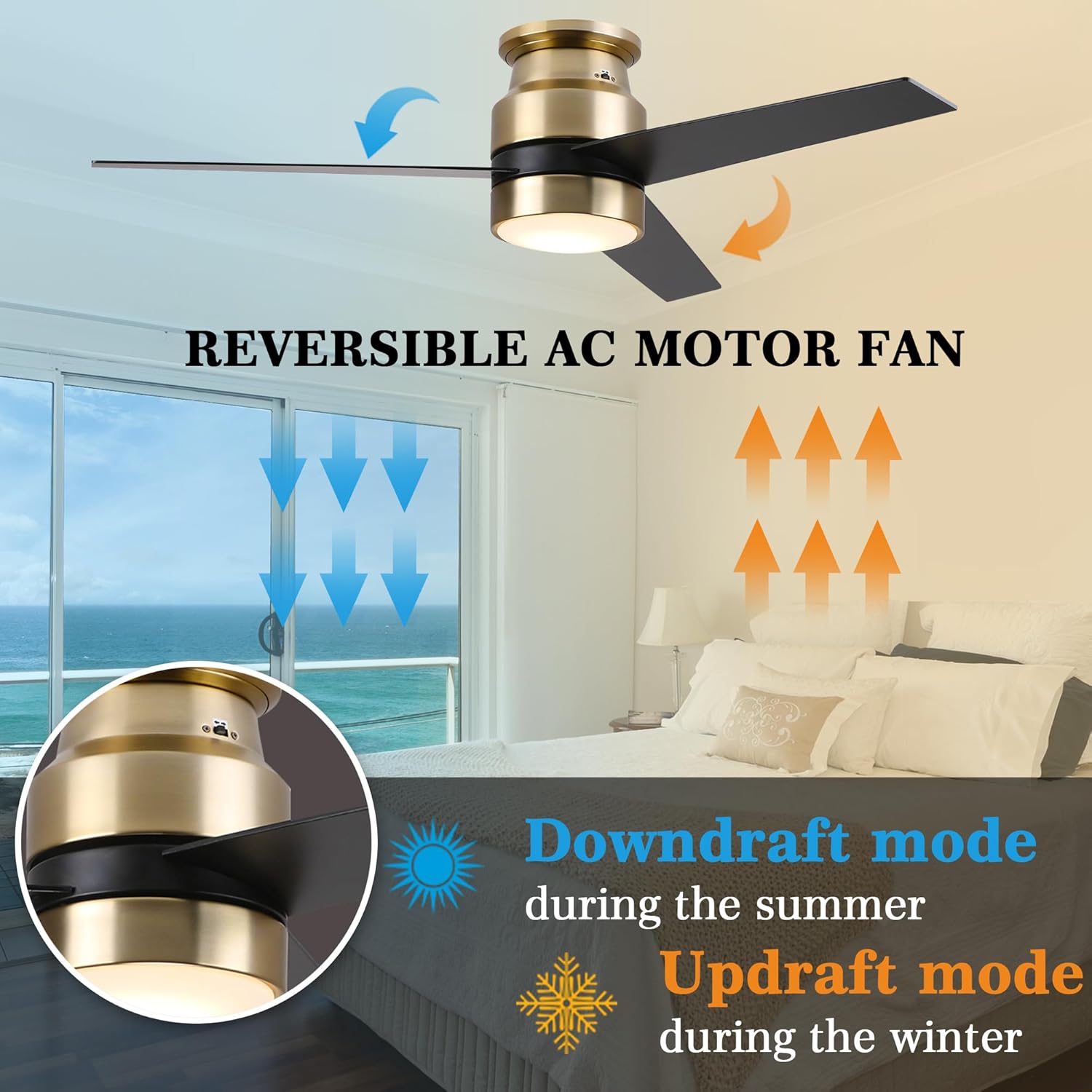
Image: The Carro Smart Ceiling Fan wall control switch, showing buttons for fan speed, light on/off, and other functions.
2. التحكم في التطبيق
Download the official Carro app from your smartphone's app store. Follow the in-app instructions to connect your fan. The fan requires a 2.4GHz Wi-Fi connection for initial setup; after connection, it can operate on 5GHz networks.
The app provides full functionality, including fan speed adjustment, light control, and advanced features like scheduling and timing (up to 24 hours).

Image: An illustration showing the four control methods for the Carro Smart Ceiling Fan: Wall Control, App Control, Voice of Alexa, and Google Assistant, with a couple dancing in a room with the fan.
3. Voice Control (Alexa, Google Assistant, Siri Shortcuts)
Integrate your Carro Smart Ceiling Fan with your preferred smart home ecosystem. Once connected via the app, you can use simple voice commands to control the fan and light.
- "Alexa, turn on ceiling fan to speed 3."
- "Hey Google, turn off the ceiling fan and light."
- "Siri, set fan to low."

Image: A kitchen scene demonstrating voice control, with an Amazon Echo device and speech bubbles showing commands like "Alex, turn on ceiling fan to speed 3" and "Alex turn off the ceiling fan and light."
تعليمات التشغيل
التحكم في سرعة المروحة
Adjust the fan speed using the wall control or the Carro app. The fan offers multiple speed settings to suit your comfort needs.
التحكم في الضوء
Turn the LED light on or off using the wall control, app, or voice commands. The integrated LED light provides 1062 Lumens of 3000K warm light.
وظيفة المحرك العكسية
The fan features a reversible AC motor, allowing you to change the direction of airflow for year-round comfort. This function is typically controlled via a button on the fan housing or through the app.
- وضع التيار الهابط (الصيف): تدور الشفرات عكس اتجاه عقارب الساعة، دافعة الهواء البارد إلى الأسفل.
- وضع التيار الصاعد (الشتاء): تدور الشفرات في اتجاه عقارب الساعة، مما يؤدي إلى سحب الهواء البارد لأعلى وتدوير الهواء الدافئ المحصور بالقرب من السقف.

Image: An illustration demonstrating the downdraft mode (blue arrows, pushing air down for summer) and updraft mode (orange arrows, pulling air up for winter) of the reversible AC motor fan.
Scheduling and Timer
Utilize the Carro app to set schedules for your fan and light to automate operation according to your daily routine. You can also set countdown timers for automatic shut-off.
Image: A visual representation of the timer and scheduling features, showing examples like "Timer: 7:30/ON" and "Countdown: 15 min/OFF" with people waking up and sleeping.
صيانة
Regular maintenance will help prolong the life and performance of your ceiling fan.
- تنظيف: لتجنب تلف الطلاء، نظف المروحة بقطعة قماش ناعمة و...amp استخدم قطعة قماش فقط. لا تستخدم المنظفات الكاشطة أو المذيبات.
- العناية بالشفرة: تحقق دورياً من إحكام ربط براغي الشفرة. فالشفرات غير المحكمة قد تسبب اهتزازاً وضوضاء.
- مجموعة الإضاءة: The LED light kit is integrated and designed for long life (50,000+ hours). Replacement of individual LEDs is not typically required.
استكشاف الأخطاء وإصلاحها
إذا واجهت مشاكل مع المروحة، فراجع خطوات استكشاف الأخطاء وإصلاحها الشائعة التالية:
| مشكلة | السبب المحتمل | حل |
|---|---|---|
| المروحة لا تعمل | No power; loose wiring; incorrect wiring; circuit breaker tripped. | Check power supply; ensure all wire connections are secure; verify wiring against diagram; reset circuit breaker. |
| الضوء لا يعمل | Loose wiring; incorrect wiring; LED failure (rare). | Check light wire connections; verify wiring; contact support if LED is suspected to be faulty. |
| تذبذب المروحة | Loose blades; unbalanced blades; loose mounting bracket. | Tighten blade screws; ensure blades are balanced (balancing kit not included, but can be purchased); secure mounting bracket. |
| لا يمكن الاتصال بشبكة Wi-Fi/التطبيق | Incorrect Wi-Fi band (not 2.4GHz); weak signal; incorrect password. | Ensure your router is broadcasting a 2.4GHz network; move closer to router; re-enter Wi-Fi password carefully. |
| التحكم الصوتي لا يستجيب | Not linked to smart assistant; incorrect voice commands. | Verify fan is linked in Alexa/Google Home app; use precise commands as listed in manual or app. |
الضمان والدعم
Carro offers a 5-year guarantee to resolve any quality problems related to the motor. If there is any problem with the product, please contact us. We will be glad to assist with replacement or refund.
For further assistance, please visit the official Carro webالموقع أو تواصل مع خدمة العملاء مباشرةً. احتفظ بإيصال الشراء لطلبات الضمان.
معلومات الاتصال: Please refer to the product packaging or official Carro webالموقع للحصول على تفاصيل الاتصال الأكثر تحديثًا.