
1. المقدمة
Thank you for choosing the Xoopar Mini Xboy Eco Bluetooth Portable Speaker. This speaker combines innovative design with eco-friendly materials, offering powerful 360° sound and an integrated selfie remote control. This manual provides essential information for setting up, operating, and maintaining your device.
The Mini Xboy Eco features a head made from recycled plastic bottles and a body incorporating non-food wheat fiber with a biosphere additive to enhance biodegradability. Its compact size and integrated wrist strap make it ideal for portable use.

Image: The Xoopar Mini Xboy Eco Bluetooth Portable Speaker.
2. محتويات العبوة
يرجى تحديد المربع للعناصر التالية:
- Xoopar Mini Xboy Eco Bluetooth Portable Speaker
- Integrated Hand Strap
- كابل شحن USB (assumed to be included for charging functionality)
- دليل المستخدم (هذا المستند)

الصورة: الأمامية والجانبية view of the Xoopar Mini Xboy Eco speaker.
3. الإعداد
3.1 الرسوم الأولية
Before first use, fully charge your Mini Xboy Eco speaker. Connect the provided USB charging cable to the charging port on the speaker and to a standard USB power source (e.g., computer USB port, USB wall adapter). The LED indicator will show charging status (refer to product packaging for specific LED behavior).
3.2 تشغيل/إيقاف التشغيل
- لتشغيل: اضغط مع الاستمرار على زر الطاقة (refer to speaker for button location) حتى يضيء مؤشر LED.
- لإيقاف التشغيل: اضغط مع الاستمرار على زر الطاقة حتى ينطفئ مؤشر LED.
4. تعليمات التشغيل
4.1 اقتران بلوتوث
The Mini Xboy Eco uses Bluetooth 5.0 for wireless connectivity, with a transmission distance of up to 10 meters (33 feet).
- Ensure the speaker is powered on and within range of your device.
- قم بتفعيل البلوتوث على هاتفك الذكي أو جهازك اللوحي أو جهاز الكمبيوتر الخاص بك.
- بحث عن available Bluetooth devices. The speaker will typically appear as "Xoopar Mini Xboy Eco" or similar.
- Select the speaker from the list to pair. A confirmation sound or LED indication will confirm successful pairing.
Once paired, the speaker will automatically connect to your device when both are powered on and within range.

Image: The Mini Xboy Eco speaker connected to a tablet for audio playback.
4.2 اقتران ستيريو (وظيفة TWS)
If you have two Xoopar Mini Xboy Eco speakers, you can pair them together for a stereo sound experience.
- تأكد من تشغيل كلا السماعتين وعدم توصيلهما بأي جهاز بلوتوث آخر.
- On one speaker (this will be the primary speaker), double-press the power button (refer to speaker for specific action) to initiate TWS pairing mode.
- The speakers will automatically search for and connect to each other. A confirmation sound will indicate successful stereo pairing.
- Connect your device to the primary speaker via Bluetooth as described in Section 4.1. Both speakers will now play audio in stereo.
4.3 Selfie Remote Control
The Mini Xboy Eco features an integrated selfie remote control function.
- Ensure the speaker is paired with your smartphone via Bluetooth.
- افتح تطبيق الكاميرا على هاتفك الذكي.
- Press the designated button on the speaker (refer to speaker for button location) to trigger the camera shutter.
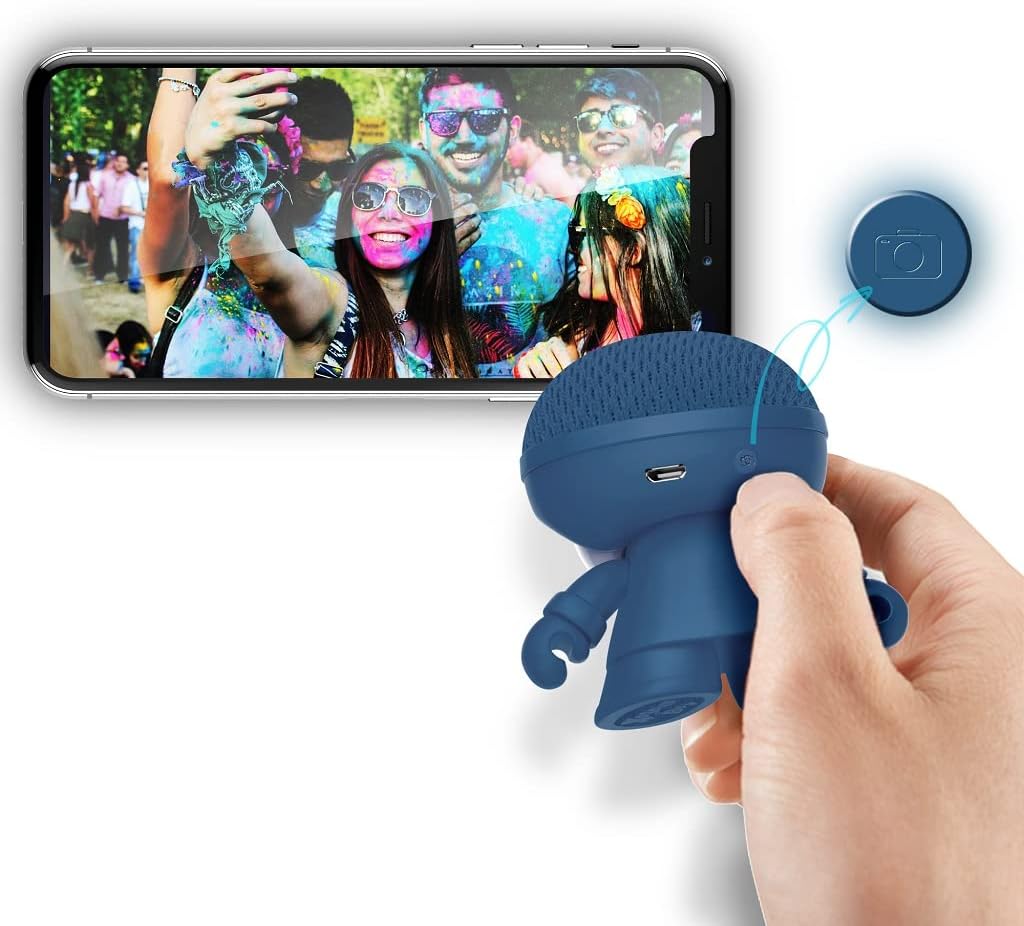
Image: The Xoopar Mini Xboy Eco speaker can be used as a remote shutter for your smartphone camera.
4.4 وظيفة إضاءة LED
The Mini Xboy Eco features a multi-LED lighted face. The lights may indicate power status, charging status, or simply provide ambient lighting.

Image: The Mini Xboy Eco speaker features a multi-LED lighted face.
5. الصيانة
5.1 التنظيف
To clean your speaker, gently wipe the surface with a soft, dry, or slightly damp cloth. Do not use harsh chemicals, solvents, or abrasive cleaners, as these may damage the finish or internal components.
5.2 التخزين
When not in use for extended periods, store the speaker in a cool, dry place away from direct sunlight and extreme temperatures. It is recommended to charge the battery periodically (e.g., every 3-6 months) to maintain battery health.
6. استكشاف الأخطاء وإصلاحها
| مشكلة | السبب المحتمل | حل |
|---|---|---|
| لا يتم تشغيل مكبر الصوت. | نفدت طاقة البطارية. | قم بشحن السماعة باستخدام كابل USB المرفق. |
| لا يمكن الاقتران عبر البلوتوث. | Speaker is not in pairing mode or out of range. | Ensure speaker is on and within 10 meters. Turn Bluetooth off/on on your device. Restart both devices. |
| لا يوجد صوت أو مستوى الصوت منخفض. | Volume too low on speaker or connected device. | قم بزيادة مستوى الصوت على كل من مكبر الصوت والجهاز المتصل به. |
| جهاز التحكم عن بعد الخاص بكاميرا السيلفي لا يعمل. | Speaker not paired or camera app not open. | Ensure speaker is paired and camera app is active. |
7. المواصفات
- اسم الموديل: Mini Xboy Eco
- رقم موديل المنتج: XBOY81001.16BO
- ماركة: يشق
- تقنية الاتصال: بلوتوث 5.0
- الحد الأقصى لقوة إخراج مكبر الصوت: 3 واط
- وضع إخراج الصوت: ستيريو (مع اقتران TWS)
- نوع السماعة: متحد المحور
- استجابة التردد: 20 GHz (Note: This value is unusually high for a speaker and may be a typo in the source data. Typical speaker frequency ranges are in Hz-kHz.)
- بطارية: 1 ليثيوم بوليمر (متضمنة)
- استقلالية البطارية: حوالي 4 ساعات
- مسافة الإرسال: حتى 10 مترا (33 قدما)
- أبعاد المنتج: 1 × 1 × 1 سم
- وزن السلعة: 50 جرام
- مادة: ABS, Acrylonitrile Butadiene Styrene (head from recycled plastic bottles, body with non-food wheat fiber and biosphere additive)
- نوع التركيب: تركيب سطح الطاولة
- ميزة خاصة: Mini portable Bluetooth speaker, integrated selfie remote, multi-LED lighted face
8. الضمان والدعم
For warranty information and customer support, please refer to the documentation provided with your purchase or visit the official Xoopar webالموقع. احتفظ بإثبات الشراء الخاص بك لاستخدامه في أي مطالبات بالضمان.
الشركة المصنعة: يشق