
بيريكس بيريبورد-332
دليل مستخدم لوحة المفاتيح السلكية المزودة بإضاءة خلفية USB طراز Perixx PERIBOARD-332
مقدمة
This manual provides detailed instructions for the setup, operation, maintenance, and troubleshooting of your Perixx PERIBOARD-332 Wired Backlit USB Keyboard. Please read this manual thoroughly before using the product to ensure optimal performance and longevity.

Image: The Perixx PERIBOARD-332 Wired Backlit USB Keyboard, showcasinتصميمها المدمج.
محتويات الحزمة
تأكد من وجود جميع العناصر في العبوة:
- Perixx PERIBOARD-332 Wired Backlit USB Keyboard
- كابل يو اس بي متكامل
- دليل المستخدم (هذا المستند)

Image: The Perixx PERIBOARD-332 keyboard, its integrated USB cable, the user manual, and the product packaging.
تعليمات الإعداد
توصيل لوحة المفاتيح: Locate an available USB port on your computer (PC, laptop, tablet, or smartphone with appropriate adapter). Insert the USB cable from the PERIBOARD-332 into the USB port.
تثبيت برنامج التشغيل: The keyboard is plug-and-play and typically does not require additional drivers for basic functionality on Windows, macOS, Linux, or Chrome OS. Your operating system should automatically detect and configure the device.
الموقع: Place the keyboard on a stable, flat surface. The compact design is ideal for small workspaces.

Image: A user typing on the Perixx PERIBOARD-332 keyboard, demonstrating its compact size and wired connection on a desk.
تعليمات التشغيل
الاستخدام العام
The Perixx PERIBOARD-332 features a standard US English QWERTY layout with 84 keys. Its low-profile scissor keys provide a quiet and comfortable typing experience, similar to laptop keyboards. The compact design helps optimize desk space.

Image: A user typing on the Perixx PERIBOARD-332 keyboard, highlighting its compact size and ergonomic placement in a workspace.

الصورة: عن قرب view of the sculpted, low-profile scissor keys of the Perixx PERIBOARD-332, highlighting their design.
Function Keys (Fn Hotkeys)
The keyboard includes integrated Fn hotkeys for quick access to multimedia and system functions. These functions are primarily designed for Windows operating systems. For other operating systems (macOS, Linux, Chrome OS), their functionality may vary or require specific system settings/configurations.
- الجبهة الوطنية + F1: قفل الجبهة الوطنية
- الجبهة الوطنية + F2: Backlight Brightness Adjustment (Cycle through levels)
- الجبهة الوطنية + F3: صامت
- الجبهة الوطنية + F4: خفض الصوت
- الجبهة الوطنية + F5: رفع الصوت
- الجبهة الوطنية + F6: المسار السابق
- الجبهة الوطنية + F7: تشغيل/إيقاف مؤقت
- الجبهة الوطنية + F8: المسار التالي
- الجبهة الوطنية + F9: يوقف
- الجبهة الوطنية + F10: قفل التمرير
- الجبهة الوطنية + F11: إدراج
- الجبهة الوطنية + F12: طباعة الشاشة
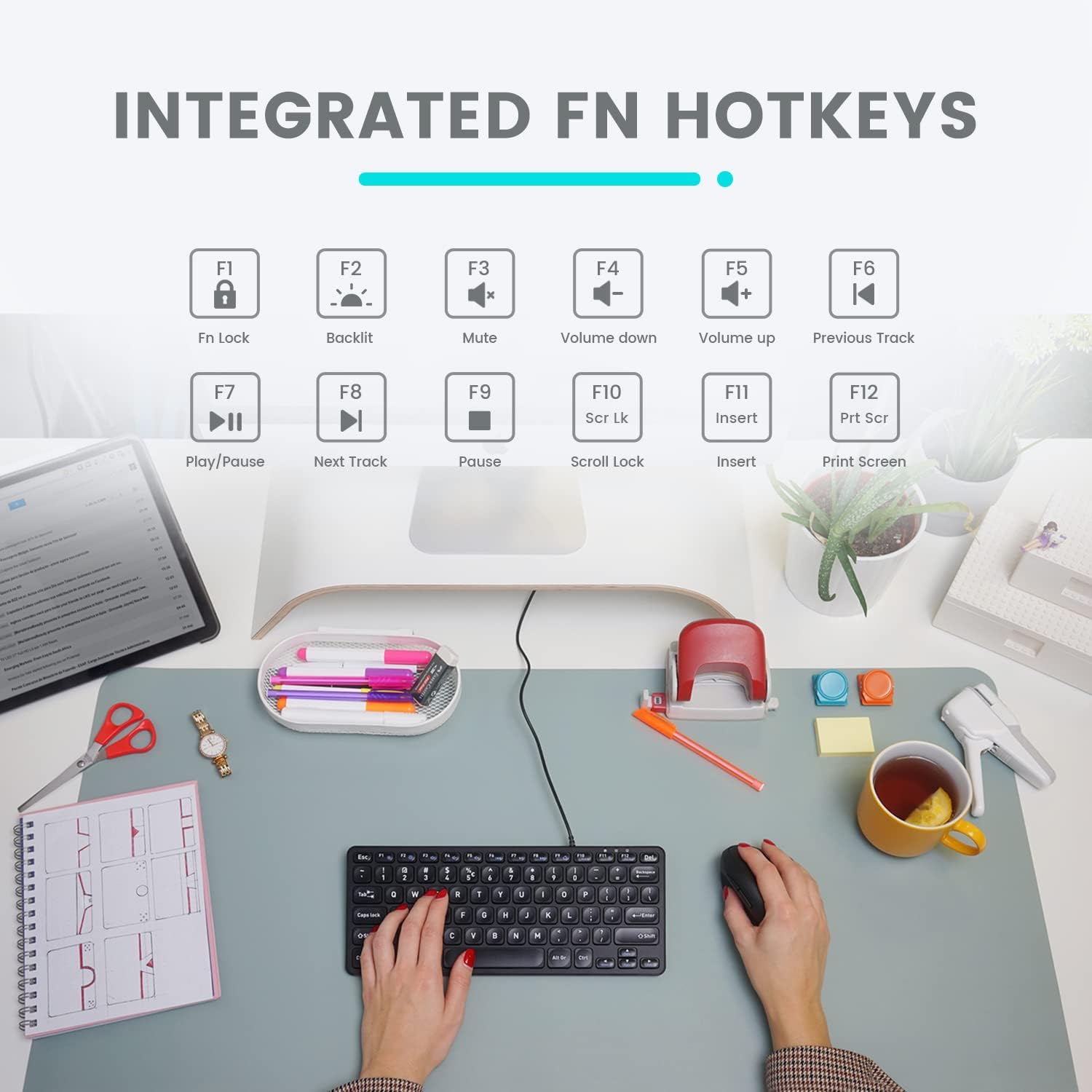
Image: Diagram illustrating the integrated Fn hotkeys on the Perixx PERIBOARD-332, showing the function of each F-key when pressed with the Fn key.
التحكم في الإضاءة الخلفية
The PERIBOARD-332 features white LED backlighting with adjustable brightness. To adjust the backlight brightness, press the فن + F2 keys simultaneously. Repeatedly pressing this combination will cycle through different brightness levels (including off).
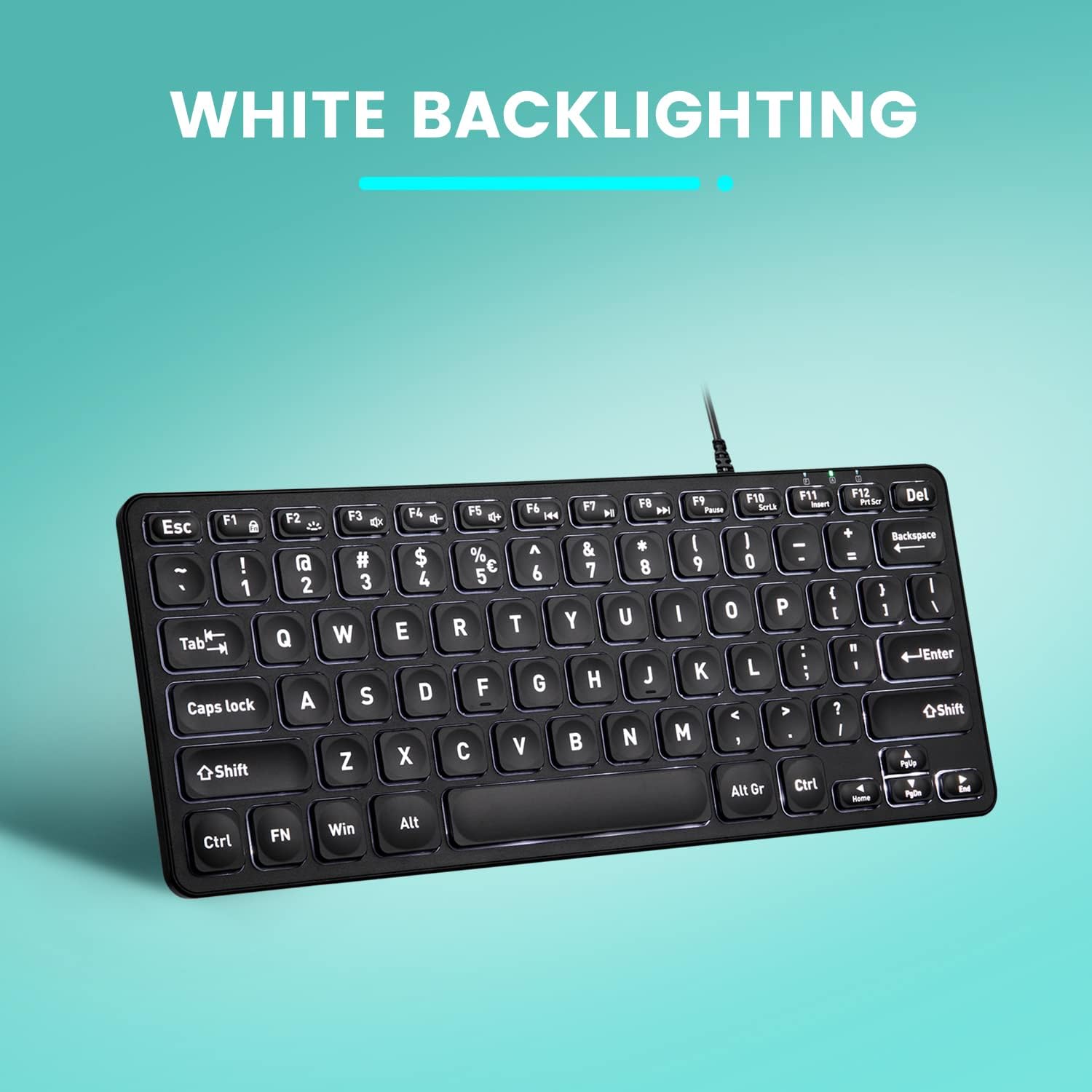
الصورة: من أعلى إلى أسفل view of the Perixx PERIBOARD-332 keyboard with its white LED backlighting illuminated, showcasing the clear, large font on the keys.
صيانة
لضمان طول عمر لوحة المفاتيح وحسن أدائها، اتبع إرشادات الصيانة التالية:
- تنظيف: استخدم قطعة قماش ناعمة وخالية من الوبر وامسحها برفق.ampامسح سطح لوحة المفاتيح بالماء أو بمحلول تنظيف خفيف. تجنب الرطوبة الزائدة. لا ترش المنظفات مباشرة على لوحة المفاتيح.
- إزالة الغبار: استخدم الهواء المضغوط لإزالة الغبار والحطام من بين المفاتيح.
- تجنب الانسكابات: Keep liquids away from the keyboard to prevent damage. The keyboard is not water-resistant.
- تخزين: عند عدم الاستخدام، قم بتخزين لوحة المفاتيح في بيئة نظيفة وجافة بعيدًا عن درجات الحرارة القصوى.
استكشاف الأخطاء وإصلاحها
If you encounter issues with your Perixx PERIBOARD-332, refer to the following common solutions:
لوحة المفاتيح لا تستجيب
- التحقق من اتصال USB: Ensure the USB cable is securely plugged into both the keyboard and the computer's USB port. Try a different USB port.
- إعادة تشغيل الكمبيوتر: في بعض الأحيان، يمكن أن تؤدي إعادة تشغيل الكمبيوتر البسيطة إلى حل مشكلات الاتصال.
- اختبار على جهاز آخر: Connect the keyboard to another computer or device to determine if the issue is with the keyboard or the original computer.
الإضاءة الخلفية لا تعمل أو لا يمكن ضبطها
- Check Brightness Setting: يضعط فن + F2 repeatedly to cycle through all brightness levels, including off. Ensure it's not set to the lowest or off setting.
- مصدر الطاقة: Ensure the keyboard is properly connected to a powered USB port.
المفاتيح لا تعمل بشكل صحيح
- مفاتيح نظيفة: تحقق من وجود أي حطام أو عوائق أسفل المفاتيح المتضررة. استخدم الهواء المضغوط لإزالتها.
- تعارضات البرامج: If specific keys are not working, check for any software or driver conflicts on your computer.
Multimedia Keys Not Working on macOS/Linux/Chrome OS
- توافق نظام التشغيل: The multimedia shortcut keys are primarily designed for Windows. On other operating systems, their functionality may vary or require specific system settings/configurations.
تحديد
| ميزة | التفاصيل |
|---|---|
| ماركة | بيريكس |
| رقم الموديل | بيريبورد -332 |
| تكنولوجيا الاتصال | USB (سلكي) |
| وصف لوحة المفاتيح | US English QWERTY |
| ميزة خاصة | بإضاءة خلفية (LED أبيض) |
| نوع المفتاح | Scissor Switches |
| عدد المفاتيح | 84 |
| أبعاد المنتج (الطول × العرض × الارتفاع) | 11.22 بوصة × 4.57 بوصة × 0.83 بوصة (28.5 سم × 11.6 سم × 2.1 سم) |
| وزن العنصر | 0.79 lbs (12.3 Ounces / 350 grams approx.) |
| الأجهزة المتوافقة | PC, Laptop, Tablet, Smartphone (with compatible USB port/adapter) |
| توافق نظام التشغيل | Windows 7, 8, 10, 11; macOS; Linux; Chrome OS |
| مادة | بلاستيك |
الضمان والدعم
معلومات الضمان
Your Perixx PERIBOARD-332 keyboard comes with a ضمان محدود لمدة 12 شهرًا from the date of purchase. This warranty covers manufacturing defects and workmanship under normal use. It does not cover damage caused by misuse, accidents, unauthorized modifications, or external factors.
يرجى الاحتفاظ بإثبات الشراء الخاص بك لمطالبات الضمان.
دعم العملاء
For technical assistance, warranty claims, or any questions regarding your Perixx product, please visit the official Perixx website or contact their customer support team. Contact information can typically be found on the Perixx webالموقع أو في عبوة المنتج.
يمكنك أيضًا زيارة متجر بيريكس على أمازون لمزيد من المعلومات وموارد الدعم.
Ask a question about this manual
Ask about setup, troubleshooting, compatibility, parts, safety, or missing instructions. Manuals+ will review the question and use this page’s manual context to help answer it.