
1. المقدمة
Thank you for choosing the ROVPRO WRJ02 4K Dual Camera Foldable Drone. This manual provides essential information for the safe operation, setup, and maintenance of your drone. Please read it thoroughly before your first flight to ensure optimal performance and to prevent damage or injury.
2. إرشادات السلامة
Always prioritize safety during drone operation. Failure to follow these guidelines may result in injury, property damage, or legal consequences.
- بيئة الرحلة: Fly in open areas, away from people, animals, buildings, and power lines. Avoid flying in strong winds, rain, or snow.
- خط البصر: حافظ دائمًا على خط رؤية مباشر مع طائرتك بدون طيار.
- سلامة البطارية: Use only approved batteries and chargers. Do not overcharge or puncture batteries. Discontinue use if batteries are damaged or swollen.
- سلامة المروحة: أبقِ يديك ووجهك وملابسك الفضفاضة بعيدة عن المراوح الدوارة. تأكد من تركيب المراوح بشكل صحيح قبل الطيران.
- توصية العمر: This drone is suitable for adults and supervised beginners.
- اللوائح المحلية: Be aware of and comply with all local drone regulations and airspace restrictions.
3. Package Contents & Component Identification
Verify that all items are present in your package. Familiarize yourself with the drone's components and the remote control layout.
3.1 محتويات العبوة
- ROVPRO WRJ02 Foldable Drone
- جهاز التحكم عن بعد
- 2 x 3.7V 1600mAh Lithium Polymer Batteries
- كابل شحن USB
- مراوح احتياطية
- Propeller Protectors (4)
- مفك البراغي
- دليل المستخدم
- حقيبة الحمل
3.2 مكونات الطائرات بدون طيار

Image: The ROVPRO WRJ02 drone, showcasing its foldable design, propellers, and dual cameras.
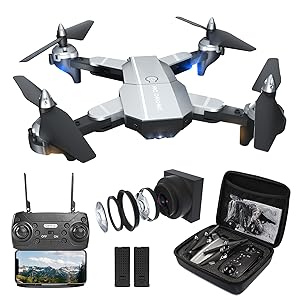
Image: All components of the ROVPRO WRJ02 drone kit, including the drone, remote, batteries, and accessories, neatly packed in a carrying case.
- أذرع قابلة للطي: للتخزين والنقل بشكل مضغوط.
- مراوح: أربع مراوح رئيسية للرفع والدفع.
- Propeller Protectors: Attach to arms to shield propellers from impacts.
- كاميرا أمامية بدقة 4K: High-resolution camera for aerial photography and video.
- كاميرا سفلية بدقة 1080 بكسل: Secondary camera for additional perspectives.
- حجرة البطارية: يقع في الجانب السفلي من الطائرة بدون طيار.
- زر الطاقة: لتشغيل/إيقاف الطائرة بدون طيار.
3.3 تصميم جهاز التحكم عن بعد
The remote control features dual joysticks and various buttons for flight functions and camera control. A smartphone holder is integrated for FPV viewعمل.
4. الإعداد
اتبع هذه الخطوات لتجهيز طائرتك بدون طيار لأول رحلة لها.
4.1 تركيب البطارية وشحنها
- Insert the fully charged drone battery into the battery compartment until it clicks into place.
- Install 3 AA batteries (not included) into the remote control.
- To charge the drone battery, connect it to the USB charging cable and plug into a USB power source (e.g., computer, USB adapter). The indicator light will show charging status.
4.2 تركيب المروحة
Ensure propellers are securely attached to the correct motor shafts. Match 'A' propellers with 'A' motors and 'B' propellers with 'B' motors.
4.3 Remote Control and Drone Pairing
- ضع الطائرة بدون طيار على سطح مستوٍ ومستوٍ.
- قم بتشغيل جهاز التحكم عن بعد.
- Long press the power button on the drone to turn it on. The drone's indicator lights will flash.
- Push the left joystick on the remote control up and then down once. The drone lights will stop flashing and remain solid, indicating successful pairing.
Video: This video demonstrates the process of connecting the remote control to the ROVPRO drone, including powering on both devices and performing the joystick calibration for pairing.
4.4 تثبيت التطبيق واتصال WiFi
- Scan the QR code provided in the manual or search for the 'HF UFO' app in your smartphone's app store (App Store for iOS, Google Play for Android).
- تنزيل التطبيق وتثبيته.
- قم بتشغيل الطائرة بدون طيار.
- On your smartphone, go to WiFi settings and connect to the network named 'HF-XXX' (where XXX is a unique identifier for your drone).
- Open the 'HF UFO' app. You should see the live FPV feed from the drone's camera.

Image: A smartphone screen showing the live FPV (First Person View) feed from the drone's camera, demonstrating real-time transmission.
5. تعليمات التشغيل
Learn how to fly your ROVPRO WRJ02 drone and utilize its various features.
5.1 قائمة مراجعة ما قبل الرحلة
- تأكد من شحن بطاريات الطائرة بدون طيار وجهاز التحكم عن بعد بالكامل.
- تأكد من أن المراوح مثبتة بشكل آمن وغير تالفة.
- Verify that the drone and remote are paired.
- Confirm the app is connected and displaying the FPV feed.
- اختر منطقة طيران آمنة ومفتوحة.
5.2 الإقلاع والهبوط

Image: Visual representation of the drone's easy-to-use features for beginners, including one-key start/landing and headless mode.
- انطلاق بمفتاح واحد: After pairing, press the One-Key Takeoff/Landing button on the remote or in the app. The drone will automatically ascend to a stable hovering altitude.
- الإقلاع اليدوي: Push both joysticks down and outwards to start the motors. Then, gently push the left joystick up to ascend.
- هبوط بمفتاح واحد: اضغط على زر الإقلاع/الهبوط بمفتاح واحد مرة أخرى. ستهبط الطائرة بدون طيار تلقائيًا.
- الهبوط اليدوي: Gently pull the left joystick down to descend. Once landed, push both joysticks down and inwards to stop the motors.
Video: A demonstration of the ROVPRO drone performing a stable takeoff and hovering, showcasing its flight capabilities.
5.3 عناصر التحكم الأساسية في الطيران
- عصا التحكم اليسرى (الخانق/الانحراف): أعلى/أسفل للارتفاع، يسار/يمين للدوران (الانحراف).
- عصا التحكم اليمنى (الميل/الدوران): Up/Down for forward/backward movement (pitch), Left/Right for left/right movement (roll).
5.4 أوضاع الطيران المتقدمة

الصورة: أكثر منview of the ROVPRO drone's key features, including 4K FPV, 3D Flip, Altitude Hold, Headless Mode, Follow Me, Waypoints Fly, Gravity Control, and One Key Return.
- تثبيت الارتفاع: The drone maintains a stable altitude automatically, allowing you to focus on directional control.
- الوضع بدون رأس: In this mode, the drone's orientation is relative to the pilot, regardless of its actual front direction. Press the Headless Mode button to activate/deactivate.
- تقلبات ثمانية الأبعاد: Fly the drone to a height of at least 3 meters. Press the 3D Flip button, then push the right joystick in any direction to perform a flip.
- Waypoint Fly: In the app, draw a path on the screen, and the drone will automatically follow the designated route.
- وضع اتبعني: The drone will automatically follow the position of your smartphone. Ensure GPS is enabled on your device.
- التحكم بالإيماءات: Use specific hand gestures in front of the drone's camera to trigger photo or video recording.
- أوضاع السرعة: The drone has 3 speed settings (low, medium, high) to suit different flying skill levels and environments. Press the speed button on the remote to cycle through them.

Image: The ROVPRO drone executing a 360-degree 3D flip, alongside an illustration of its three adjustable speed modes (30%, 60%, 100%).
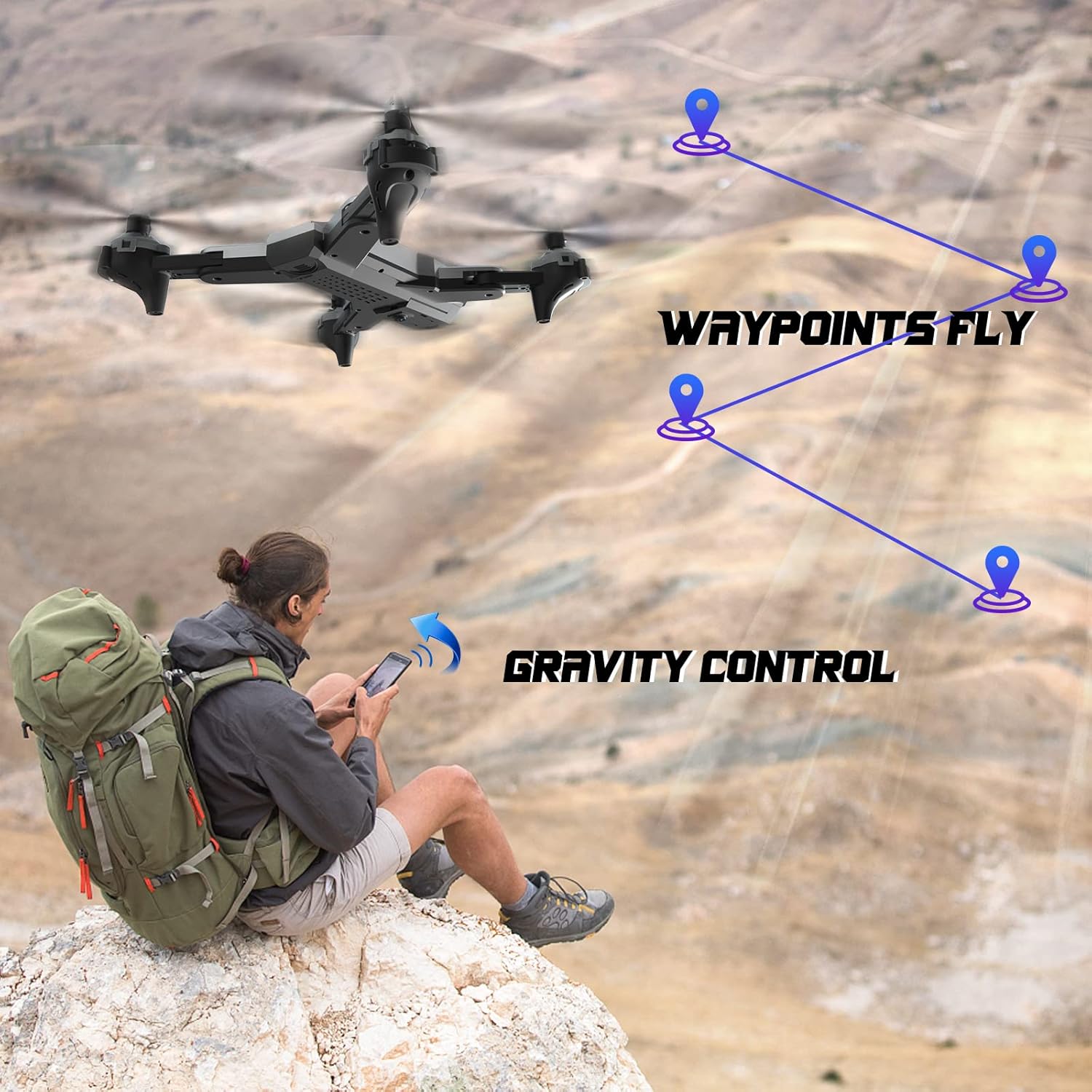
Image: The ROVPRO drone flying along a pre-defined waypoint path, and a user controlling the drone via smartphone's gravity sensor.

Image: The ROVPRO drone responding to hand gestures, with visual cues for taking photos (V-sign) and videos (open palm).
5.5 تشغيل الكاميرا

Image: A side-by-side comparison illustrating the superior image quality of the ROVPRO 4K FPV HD wide-angle camera with 90° adjustable viewing angle, compared to a standard 1080P camera.
- تسجيل الصور/الفيديو: استخدم الأزرار المخصصة على جهاز التحكم عن بعد أو واجهة التطبيق لالتقاط الصور أو بدء/إيقاف تسجيل الفيديو.
- منظور الشخص الأول (FPV) View): The live video feed from the drone's camera is transmitted to your smartphone via WiFi, allowing for immersive flight experience.
- زاوية الكاميرا قابلة للتعديل: الكاميرا viewing angle can be adjusted to capture different perspectives.
6. الصيانة
تضمن الصيانة المناسبة طول عمر وأداء طائرتك بدون طيار.
- تنظيف: استخدم قطعة قماش ناعمة وجافة لتنظيف جسم الطائرة وعدسة الكاميرا. تجنب استخدام المواد الكيميائية القاسية.
- استبدال المروحة: If propellers are damaged, replace them with spare parts provided. Ensure correct 'A' and 'B' propeller types are used.
- العناية بالبطارية: خزّن البطاريات في مكان بارد وجاف. لا تترك البطاريات مشحونة بالكامل أو فارغة تماماً لفترات طويلة.
- تخزين: When not in use, fold the drone arms and store it in its carrying case to protect it from dust and damage.
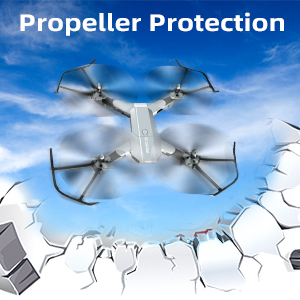
Image: The ROVPRO drone equipped with propeller protectors, highlighting the importance of safeguarding the propellers during flight and handling.
7. استكشاف الأخطاء وإصلاحها
راجع هذا القسم للتعرف على المشكلات الشائعة وحلولها.
| مشكلة | السبب المحتمل | حل |
|---|---|---|
| الطائرة بدون طيار لا تستجيب للتحكم عن بعد. | Not paired; low remote battery. | Re-pair drone and remote; replace remote batteries. |
| Drone cannot take off or flies unstably. | Low drone battery; damaged propellers; uneven surface for takeoff. | Charge drone battery; replace damaged propellers; place on a flat surface. |
| FPV feed is not displayed in the app. | Not connected to drone's WiFi; app not open. | Connect to 'HF-XXX' WiFi network; open the 'HF UFO' app. |
| وقت الرحلة قصير. | البطارية غير مشحونة بالكامل؛ البطارية قديمة. | تأكد من شحن البطارية بالكامل؛ وفكّر في استبدال البطاريات القديمة. |
8. المواصفات
Key technical specifications of the ROVPRO WRJ02 drone.
- ماركة: روفبرو
- اسم الموديل: WRJ02
- لون: فضي
- دقة التقاط الفيديو: 4K (Front Camera), 1080p (Bottom Camera)
- مستوى المهارة: مبتدئ
- نوع التحكم: جهاز التحكم عن بعد ، التحكم في التطبيق
- تكنولوجيا الاتصالات اللاسلكية: واي فاي
- تكوين خلية البطارية: بوليمر الليثيوم
- سعة البطارية: 3.7V 1600mAh (x2 included)
- أبعاد المنتج: 13 بوصة طول × 13 بوصة عرض × 2.5 بوصة ارتفاع
- وزن السلعة: 1.2 رطل
- رمز المنتج العالمي: 715444418297
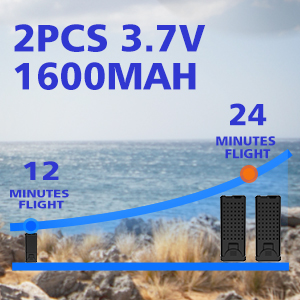
Image: An illustration showing the extended flight time provided by two 3.7V 1600mAh batteries, offering up to 24 minutes of flight.
9. الضمان والدعم
ROVPRO is committed to providing high-quality products and customer satisfaction. For any questions, technical support, or warranty claims, please contact our customer service team through the retailer where you purchased the product or visit the official ROVPRO webموقع.
يرجى الاحتفاظ بإثبات الشراء لأغراض الضمان.