
AOLION WGXB004005
دليل مستخدم محول سماعة الرأس الاستريو من AOLION
Model: WGXB004005
مقدمة
The AOLION Stereo Headset Adapter is designed to enhance your gaming experience on Xbox One controllers. This adapter allows you to connect most wired stereo gaming headsets with a 3.5mm audio jack (CTIA plug standard) directly to your Xbox controller, providing convenient control over game sound and voice chat.
محتويات الحزمة
- 1 × AOLION Stereo Headset Adapter
- دليل المستخدم (1 ×)
المنتج انتهىview
The adapter features intuitive controls for managing your audio experience during gameplay.

الشكل 1: الجبهة view of the headset adapter showing control buttons.
- Game Balance Button: Adjusts the balance towards game audio.
- Chat Balance Button: Adjusts the balance towards voice chat audio.
- زر كتم صوت الميكروفون: يقوم بتشغيل/إيقاف الميكروفون.
- زر رفع الصوت: Increases overall volume.
- زر خفض الصوت: Decreases overall volume.
- مقبس صوت 3.5 ملم: For connecting your stereo gaming headset.
- موصل USB: For connecting to the Xbox controller.
التوافق
This headset adapter is compatible with a wide range of Xbox One controllers and stereo gaming headsets:
- Xbox Controllers: Xbox One, Xbox One S, Xbox One X, Xbox Elite Wireless Controller Series 1, Xbox Elite Wireless Controller Series 2, Xbox Series S, and Xbox Series X Controllers.
- سماعات الرأس: Most wired stereo gaming headsets featuring a 3.5mm audio jack (using the CTIA plug standard).

Figure 2: The adapter is compatible with multiple Xbox controller models.

Figure 3: The adapter supports standard 3.5mm CTIA headsets.
يثبت
Setting up your AOLION Stereo Headset Adapter is a simple plug-and-play process.
- Connect the Adapter to the Controller: Align the USB connector of the headset adapter with the expansion port at the bottom of your Xbox controller. Gently push until it clicks securely into place.
- قم بتوصيل سماعة الرأس الخاصة بك: Plug your wired stereo gaming headset's 3.5mm audio jack into the corresponding port on the bottom of the headset adapter.
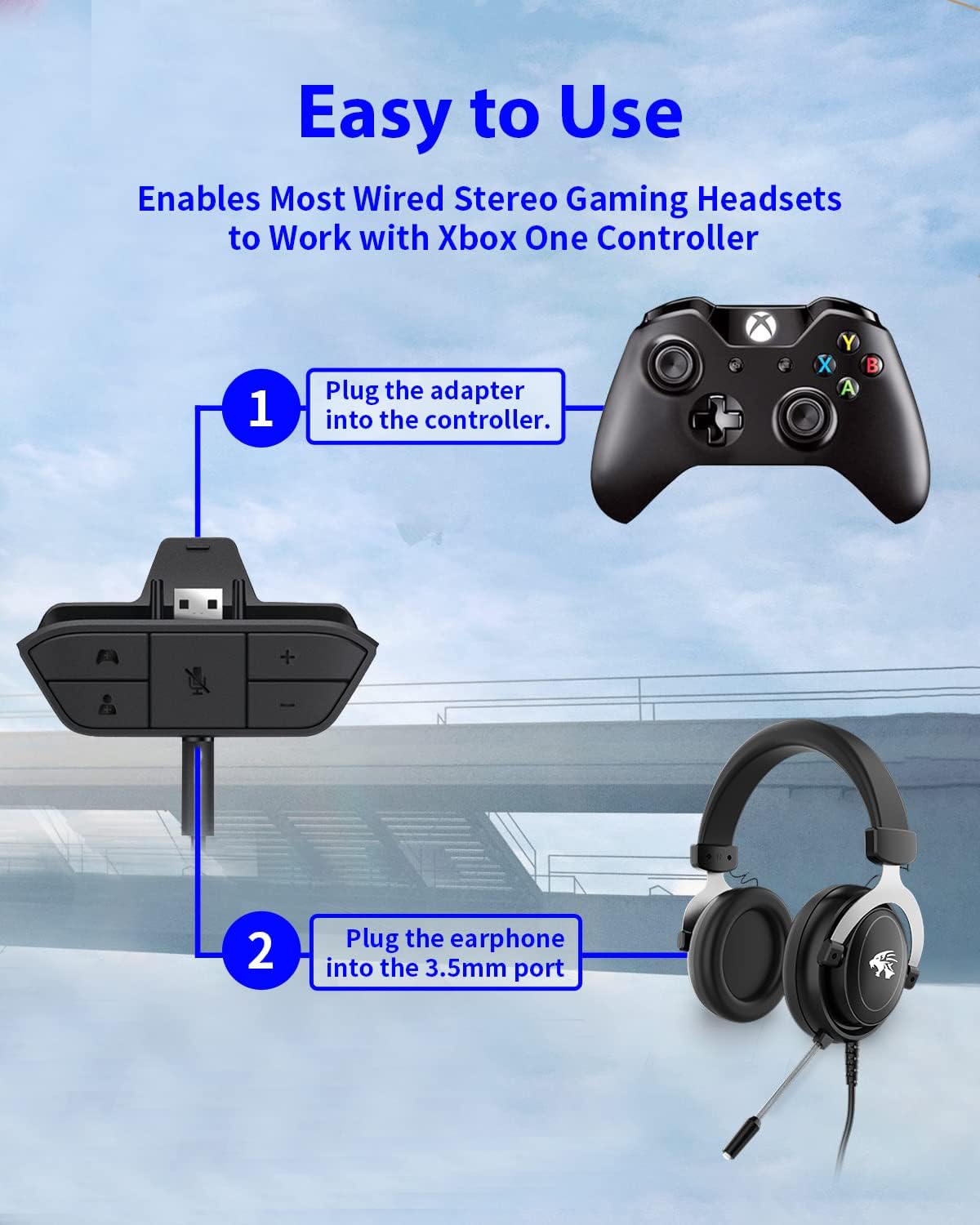
Figure 4: Step-by-step connection guide for the headset adapter.
Video 1: Demonstration of connecting the headset adapter to an Xbox controller.
ملاحظة هامة: For optimal performance and to resolve potential audio issues, it is recommended to update your Xbox controller's firmware after connecting the adapter. This can typically be done through your Xbox console's settings (Settings > Devices & connections > Accessories > Select your controller > ... > Controller settings > Update firmware).
تعليمات التشغيل
Once connected, use the buttons on the adapter to control your audio:
- رفع/خفض مستوى الصوت (+/-): Press the '+' button to increase the overall volume of both game and chat audio. Press the '-' button to decrease it.
- Microphone Mute (Microphone Icon): Press this button to mute or unmute your microphone. An indicator light (if present) or on-screen notification may confirm the mute status.
- Game/Chat Balance (Controller Icon / Person Icon):
- اضغط على رمز وحدة التحكم button to increase game audio volume and decrease chat audio volume.
- اضغط على أيقونة الشخص button to increase chat audio volume and decrease game audio volume.
الشكل 5: مفصل view of the adapter's control buttons.
صيانة
To ensure the longevity and optimal performance of your headset adapter, follow these simple maintenance guidelines:
- حافظ على نظافة المحول وخلوه من الغبار والأوساخ. استخدم قطعة قماش ناعمة وجافة للتنظيف.
- تجنب تعريض المحول لدرجات الحرارة العالية أو الرطوبة أو أشعة الشمس المباشرة.
- لا تحاول تفكيك أو إصلاح المحول بنفسك، لأن ذلك سيؤدي إلى إلغاء الضمان.
- قم بتخزين المحول في مكان آمن عند عدم استخدامه لمنع حدوث تلف مادي.
استكشاف الأخطاء وإصلاحها
If you encounter issues with your AOLION Stereo Headset Adapter, please refer to the following common solutions:
| مشكلة | السبب المحتمل / الحل |
|---|---|
| No audio or poor audio quality (buzzing, peaking) |
|
| الميكروفون لا يعمل |
|
| Game/Chat balance not working |
|
إذا استمرت المشكلة بعد تجربة هذه الخطوات، فيرجى الاتصال بدعم العملاء.
تحديد
| ميزة | التفاصيل |
|---|---|
| رقم الموديل | WGXB004005 |
| ماركة | أليون |
| أبعاد المنتج (الطول × العرض × الارتفاع) | 3.15 × 1.57 × 0.79 بوصة (8 × 4 × 2 سم) |
| لون | أسود |
| نوع الموصل | Auxiliary (3.5mm CTIA standard) |
| الأجهزة المتوافقة | Xbox One, One S, One X, Elite 1, Elite 2, Series S, Series X Controllers; 3.5mm CTIA Stereo Headsets |
الضمان والدعم
AOLION stands behind the quality of its products. This Stereo Headset Adapter comes with:
- ضمان استرداد الأموال خلال 60 يومًا: If you are not entirely satisfied with your purchase within 60 days, you may be eligible for a full refund.
- ضمان 24-Month: We provide a 24-month warranty against manufacturing defects from the date of purchase.
For any questions, concerns, or warranty claims, please contact us through Amazon. We are committed to responding to your inquiries within 12 hours to ensure your complete satisfaction.
Ask a question about this manual
Ask about setup, troubleshooting, compatibility, parts, safety, or missing instructions. Manuals+ will review the question and use this page’s manual context to help answer it.