
1. المقدمة
This manual provides comprehensive instructions for the installation, operation, and maintenance of your zemismart Tuya Zigbee Rechargeable Roller Blind Motor (Model ZM25EL). This motor is designed to automate roller blinds with 38mm tubes, offering smart control via the Tuya Smart Life app, remote control, and voice assistants. Please read this manual carefully before installation and use to ensure proper function and safety.
2. مواصفات المنتج
- Integrated Tuya Zigbee Receiver: Converts normal blinds into smart, controllable devices.
- التوافق: Designed for 38mm (1-1/2 inch) roller blind tubes.
- بطارية قابلة لإعادة الشحن: Features a built-in 3000mAh lithium battery for cordless operation.
- خيارات تحكم متعددة: Supports Tuya Smart / Smart Life app control, RF433 remote control, and voice control via Alexa, Google Home, and Siri.
- الشحن عبر USB: شحن مريح عبر كابل USB قياسي.
- Optional Solar Panel: Can be charged directly using an optional solar panel (sold separately).
- وظيفة الموقت: Set schedules for automatic opening and closing of blinds.
3. الإعداد والتثبيت
3.1 محتويات العبوة
قبل البدء، تأكد من تواجد جميع المكونات:
- zemismart Tuya Zigbee Roller Blind Motor (ZM25EL)
- مجموعة التاج والقيادة
- أقواس التثبيت
- RF433 جهاز التحكم عن بعد
- كابل شحن USB
- دليل المستخدم (هذا المستند)
3.2 Motor Components Overview

الصورة: مفصلة view of the motor components, highlighting the motor set key, battery power switch, and USB charging port.
3.3 التثبيت المادي
- Prepare the Roller Blind Tube: Ensure your roller blind tube has an inner diameter of 38mm. The motor is designed to fit snugly inside.
- Attach Crown and Drive Set: Slide the crown and drive set onto the motor shaft. These components ensure the motor properly engages with the blind tube.
- Insert Motor into Tube: Carefully insert the motor assembly into the roller blind tube. Ensure it is fully seated and secure.
- جبل المكفوفين: Install the roller blind assembly, including the motor, into your window frame using the provided mounting brackets. This motor supports interior mounting. The maximum recommended blind width for installation is 3 meters, and the maximum weight is 4kg.

Image: Illustration of the motor's dimensions and its fit within a 38mm tube, alongside mounting accessories.
3.4 الشحن الأولي
Before first use, fully charge the motor's built-in 3000mAh lithium battery. Connect the provided USB charging cable to the motor's USB charging port and to a standard USB power adapter (not included). A full charge typically takes several hours.
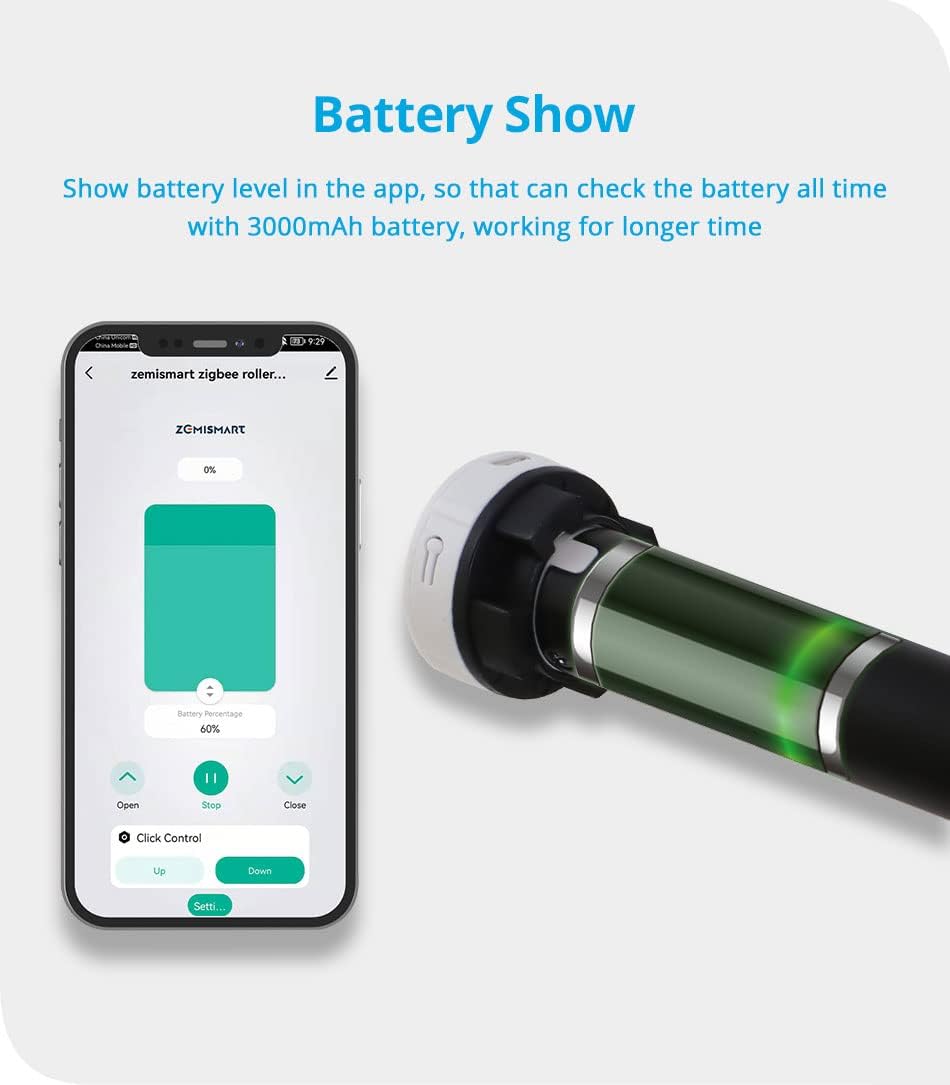
Image: The motor's battery level can be monitored via the app. The motor features a USB charging port for convenience.
An optional solar panel can be connected for continuous charging, reducing the need for manual USB charging.
4. تعليمات التشغيل
4.1 Tuya Zigbee Hub Requirement
This motor requires a Tuya Zigbee Gateway (hub) to function with the Tuya Smart / Smart Life app and for voice control integration. Ensure your Zigbee hub is set up and connected to your home network.

Image: A visual reminder that a Tuya Zigbee Hub is essential for smart functionality.
4.2 App Control (Tuya Smart / Smart Life)
- تحميل التطبيق: قم بتنزيل تطبيق "Tuya Smart" أو "Smart Life" من متجر التطبيقات الخاص بهاتفك الذكي.
- إضافة جهاز: Open the app, log in, and follow the instructions to add a new device. Select 'Curtain Motor' or similar, and ensure your Zigbee hub is detected.
- الاقتران: Follow the app's instructions to put the motor into pairing mode (usually by pressing a button on the motor or remote).
- التشغيل الأساسي: Once paired, you can use the app to open, close, or stop the blinds at any position.
- وضع الحدود: Use the app's settings to define the upper and lower limits for your blinds. This ensures the motor stops precisely at the desired open and closed positions.
- الجدولة: Create schedules within the app to automate the opening and closing of your blinds at specific times.

Image: The Tuya Smart Life app interface demonstrating control over the roller blind, including open, stop, and close functions.

الصورة: السابقample of setting schedules in the app for automatic blind operation at specific times, such as 7:00 AM and 4:00 PM.
4.3 جهاز تحكم عن بعد RF433
The included RF433 remote control provides direct and convenient operation of your blinds.
- الاقتران عن بعد: Refer to the motor's specific pairing instructions (usually a combination of button presses on the motor and remote) to link the remote control.
- أزرار: The remote typically features 'Up', 'Down', and 'Stop' buttons for basic control.
- التحكم متعدد القنوات: Some remotes support multiple channels, allowing control of several motors individually or in groups. One remote can control up to 50 motors.

Image: A user operating roller blinds with the RF remote control, showing simple and direct control.
4.4 Voice Control (Alexa, Google Home, Siri)
Once the motor is integrated with your Tuya Zigbee hub and linked to your smart home platform (Alexa, Google Home, or Apple HomeKit via Siri), you can use voice commands.
- ربط الحسابات: In the Alexa, Google Home, or Apple Home app, link your Tuya Smart / Smart Life account.
- اكتشاف الأجهزة: اطلب من مساعدك الصوتي اكتشاف أجهزة جديدة.
- الأوامر الصوتية: استخدم الأوامر مثل:
- "Alexa, open the blinds."
- "يا جوجل، أغلق ستائر غرفة المعيشة."
- "Hey Siri, set the bedroom blinds to 50%."

Image: Diagram illustrating the connectivity for voice control, showing the motor, Zigbee hub, router, and smart speakers (Amazon Echo, Google Home).

Image: An integrated smart home environment where blinds are controlled via voice assistants and a smartphone app.
5. الصيانة
5.1 شحن البطارية
Regularly check the battery level via the Tuya Smart / Smart Life app. Recharge the motor using the USB cable when the battery is low. If using an optional solar panel, ensure it is clean and positioned to receive adequate sunlight for optimal charging.
5.2 التنظيف
The motor itself requires minimal cleaning. If necessary, use a soft, dry cloth to wipe the exterior. For the roller blind fabric, follow the manufacturer's instructions, typically involving spot cleaning.
6. استكشاف الأخطاء وإصلاحها
- المحرك لا يستجيب:
- تحقق من مستوى البطارية وأعد شحنها إذا لزم الأمر.
- Ensure the RF remote control has working batteries.
- Verify the motor is properly paired with the remote and the Zigbee hub.
- مشكلات اتصال التطبيق:
- Ensure your Tuya Zigbee hub is powered on and connected to your home Wi-Fi network.
- تحقق من اتصالك بالإنترنت.
- Restart the Tuya Smart / Smart Life app.
- If issues persist, try re-pairing the motor with the Zigbee hub.
- التحكم الصوتي لا يعمل:
- Confirm that your Tuya Smart / Smart Life account is correctly linked to Alexa, Google Home, or Apple Home.
- Ensure your voice assistant device is online and functioning.
- حاول إعادة اكتشاف الأجهزة من خلال تطبيق المساعد الصوتي الخاص بك.
- Limits Not Set Correctly:
- Access the motor settings in the Tuya Smart / Smart Life app and re-calibrate the upper and lower limits.
7. المواصفات
| ميزة | مواصفة |
|---|---|
| رقم الموديل | زد ام 25 اي ال |
| ماركة | zemismart |
| مادة | الألومنيوم |
| حجم الإدخالtage | تيار مستمر 7.4 فولت |
| القدرة المقدرة | 8W |
| الحد الأقصى الحالي | 1A |
| سعة البطارية | 3000 مللي أمبير |
| عزم الدوران | 0.8 نيوتن متر |
| عدد الدورات في الدقيقة المقدر | 25PRM |
| تشغيل الضوضاء | 35-40 ديسيبل |
| توافق الأنبوب | 38mm (1-1/2 inch) |
| Max Supported Blind Width | 3 متر |
| Max Supported Blind Weight | 4 كجم |
| نوع التركيب | Interior Mount |
| الاستخدام الموصى به | Doors, Windows |

Image: Detailed product parameters including physical dimensions and technical specifications of the motor and accessories.
8. الضمان والدعم
For warranty information and technical support, please refer to the zemismart official webالموقع أو تواصل مع بائع التجزئة. احتفظ بإيصال الشراء كإثبات للشراء في حال وجود أي مطالبات بالضمان.