
FORGING MOUNT HY9414-EU
FORGING MOUNT Corner TV Wall Mount HY9414-EU Instruction Manual
Model: HY9414-EU | Brand: FORGING MOUNT
مقدمة
This manual provides detailed instructions for the safe and proper installation, operation, and maintenance of your FORGING MOUNT HY9414-EU Corner TV Wall Mount. Please read this manual thoroughly before installation and retain it for future reference. This full-motion TV wall mount is designed to securely hold your television, offering flexible viewing angles with its swivel, tilt, and extension capabilities.
معلومات السلامة
تحذير: Failure to read and follow these instructions may result in serious personal injury, property damage, or voiding your warranty. If you do not understand these instructions or have doubts about the safety of the installation, please contact customer service or a qualified installer.
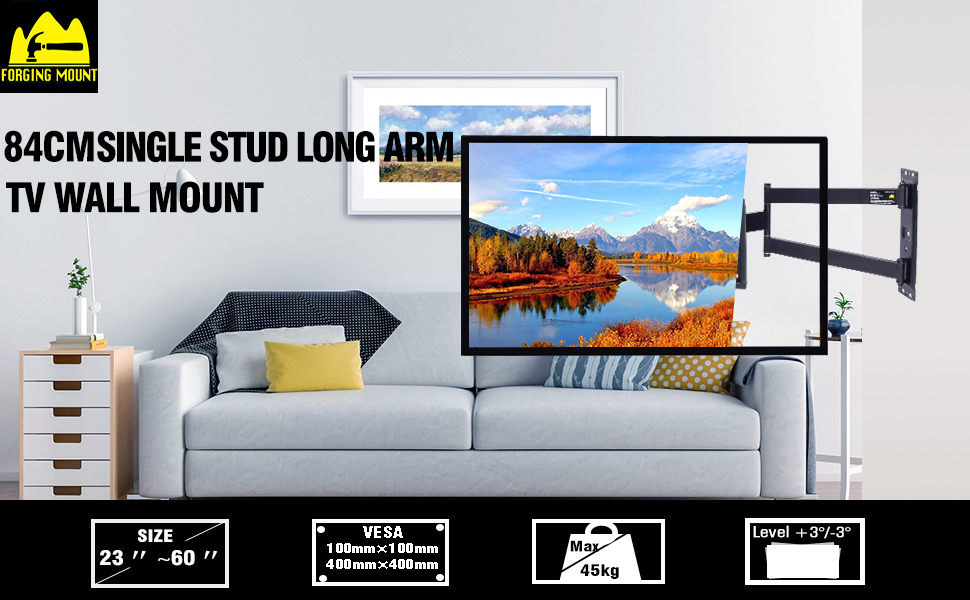
- قدرة الوزن: Do not exceed the maximum weight capacity of 45 kg (99 lbs). This mount is intended for use only with the maximum weights indicated. Use with products heavier than the maximum weights indicated may result in instability causing possible injury.
- حجم التلفزيون: This mount is designed for televisions between 26 and 65 inches. Ensure your TV's size falls within this range.
- التوافق مع VESA: Verify your TV's VESA mounting pattern is between 100x100mm and 400x400mm.
- نوع الجدار: This mount is designed for installation on solid concrete walls, brick walls, or wood studs. DO NOT INSTALL IT IN DRYWALL ALONE. تأكد من أن سطح التثبيت يمكنه تحمل الوزن الإجمالي للحامل وجهاز التلفزيون بشكل آمن.
- التثبيت الاحترافي: If you are unsure about the installation process or wall type, consult a professional installer.
- فحص المكونات: Before installation, ensure all components are present and undamaged. Do not use damaged parts.
محتويات الحزمة
The package includes the TV wall mount assembly and all necessary hardware for installation. This typically includes:
- Wall plate assembly
- TV bracket arms
- Mounting hardware (screws, anchors, washers for various TV models and wall types)
- مستوى الروح
- Pre-drilled template
- روابط الكابلات
Please check the included parts list against your package contents to ensure everything is present before beginning installation.
تحديد
| ميزة | مواصفة |
|---|---|
| رقم الموديل | HY9414-EU |
| ماركة | جبل تزوير |
| مادة | سبائك الفولاذ |
| لون | أسود |
| أحجام التلفزيون المتوافقة | 26 - 65 بوصة |
| سعة الوزن | حتى 45 كجم (99 رطل) |
| التوافق مع VESA | 100x100mm إلى 400x400mm |
| امتداد من الجدار | 68 ملم (مُنسحب) إلى 840 ملم (ممتد) |
| زاوية الدوران | +/- 90 درجة |
| زاوية الميل | +5 degrees / -10 degrees |
| ضبط المستوى | +/- 3 degrees (post-installation) |
| نوع التركيب | Full Motion, Articulated Arm, Corner Mount |
التحقق من التوافق
Before proceeding with installation, ensure your television and wall meet the following requirements:
- وزن التلفزيون: Your TV must weigh no more than 45 kg (99 lbs).
- حجم التلفزيون: Your TV's screen size should be between 26 and 65 inches.
- نمط VESA: Check the four mounting holes on the back of your TV. The horizontal and vertical distances (VESA pattern) must be between 100x100mm and 400x400mm.
- نوع الجدار: The mount must be installed on a solid concrete wall, brick wall, or into wood studs. لا تقم بالتركيب على الجدران الجصية فقط.

الإعداد والتثبيت
Follow these general steps for installing your TV wall mount. Refer to the detailed instruction sheet included in your package for specific measurements and hardware usage.
- Step 1: Mark and Drill Mounting Holes. Use the provided template and spirit level to mark the desired mounting position on your wall. Ensure the location is suitable for your TV size and viewing angles. Drill pilot holes according to the instructions for your specific wall type (wood stud, concrete, or brick).
- Step 2: Mount the Wall Plate. Secure the wall plate assembly to the wall using the appropriate screws and anchors. Ensure it is firmly attached and level.
- الخطوة الثانية: قم بتثبيت الأقواس على التلفزيون. Attach the TV bracket arms to the back of your television using the correct screws and spacers from the hardware kit. Ensure the brackets are centered and securely fastened.
- Step 4: Hang TV and Secure. Carefully lift the TV with the attached brackets and hook it onto the wall plate. Secure the TV to the wall plate using the safety screws or locking mechanisms provided.


Operating Instructions (Adjustments)
Once installed, your FORGING MOUNT TV wall mount offers various adjustments to achieve your desired viewالخبرة:
- الامتداد والانكماش: Gently pull the TV away from the wall to extend the arm up to 840 mm (33 inches). Push it back towards the wall to retract it to a minimum of 68 mm (2.68 inches) for a sleek profile.
- قطب: The mount allows for a full +/- 90-degree swivel. Carefully pivot the TV left or right to adjust the viewزاوية لأوضاع الجلوس المختلفة.
- الإمالة: Adjust the vertical tilt of your TV by +5 degrees upwards or -10 degrees downwards to reduce glare and optimize your viewزاوية جي.
- تعديل المستوى: After installation, you can make minor horizontal adjustments of +/- 3 degrees to ensure your TV is perfectly level.


صيانة
To ensure the longevity and safe operation of your TV wall mount, perform the following maintenance:
- الفحوصات الدورية: قم بفحص جميع البراغي والوصلات بشكل دوري للتأكد من أنها تبقى محكمة وآمنة.
- تنظيف: امسح الحامل بقطعة قماش ناعمة وجافة لإزالة الغبار. تجنب استخدام المنظفات الكاشطة أو المذيبات.
- حركة: If the arm movement becomes stiff, apply a small amount of silicone-based lubricant to the joints. Do not use oil-based lubricants.
استكشاف الأخطاء وإصلاحها
If you encounter any issues with your TV wall mount, refer to the following common problems and solutions:
| مشكلة | السبب المحتمل | حل |
|---|---|---|
| التلفزيون ليس مستويًا بعد التثبيت. | عدم محاذاة بسيط أثناء التثبيت. | Use the post-installation level adjustment feature (+/- 3 degrees) to correct the tilt. Refer to the operating instructions. |
| يبدو الحامل مرتخياً أو غير مستقر. | Mounting screws are not fully tightened or incorrect anchors were used. | Immediately remove the TV. Re-check all wall plate and TV bracket screws. Ensure appropriate anchors were used for your wall type. If unsure, consult a professional. |
| Difficulty moving the arm (swivel/extension). | قد تكون المفاصل متيبسة أو تحتاج إلى تزييت. | Apply a small amount of silicone-based lubricant to the moving joints. Do not force movement. |
| التلفزيون لا يتناسب مع الحامل. | حجم التلفزيون أو وزنه أو نمط VESA غير صحيح. | Verify your TV's specifications against the mount's compatibility requirements (26-65 inches, max 45kg, VESA 100x100 to 400x400mm). |
الضمان والدعم
FORGING MOUNT products are backed by a ضمان لمدة 1 سنوات, ensuring quality and reliability. If you have any questions, require assistance with installation, or need to report a missing/damaged part, please contact FORGING MOUNT customer service.
Our customer service team is committed to providing quick responses and support tailored to your needs.


Ask a question about this manual
Ask about setup, troubleshooting, compatibility, parts, safety, or missing instructions. Manuals+ will review the question and use this page’s manual context to help answer it.