
1. المقدمة
This manual provides detailed instructions for the BoxWave SlimKeys Bluetooth Keyboard with Trackpad, designed for use with the Apple iPhone 13 mini. Please read this manual thoroughly before using the product to ensure proper operation and to maximize its lifespan.
The SlimKeys Bluetooth Keyboard integrates responsive chiclet-style keys and a full-functioning trackpad, transforming your iPhone 13 mini into a portable workstation. Its ultra-thin and lightweight design makes it an ideal travel companion.
2. محتويات العبوة
- BoxWave SlimKeys Bluetooth Keyboard with Trackpad
- كابل شحن USB
- دليل المستخدم
3. مواصفات المنتج
- Integrated Keyboard and Trackpad: Combines a full QWERTY keyboard with a responsive trackpad for enhanced navigation.
- تصميم نحيف وخفيف الوزن: At approximately 3/16 inch thick, it is highly portable without compromising key size for comfortable typing.
- إصدار البلوتوث 3.0: Ensures fast pairing and seamless wireless communication with your device.
- الحفاظ على البطارية: Features an on/off switch to extend battery life when not in use.
- محمول: Designed for easy transport in bags or luggage.

الشكل 3.1: من أعلى إلى أسفل view of the SlimKeys Bluetooth Keyboard, showing the full keyboard layout and integrated trackpad.
4. الإعداد
4.1 شحن لوحة المفاتيح
- Locate the charging port on the side of the keyboard.
- Connect the small end of the provided USB charging cable to the keyboard's charging port.
- قم بتوصيل الطرف الأكبر من كابل USB بمصدر طاقة USB (مثل منفذ USB في الكمبيوتر، أو محول USB الجداري).
- The charging indicator light will illuminate. Once fully charged, the light will typically change color or turn off.
4.2 تشغيل/إيقاف التشغيل
- To power on the keyboard, slide the 'ON/OFF' switch, usually located on the side or back, to the 'ON' position. A power indicator light will briefly illuminate.
- To power off the keyboard, slide the 'ON/OFF' switch to the 'OFF' position. This conserves battery life when the keyboard is not in use.
4.3 اقتران بلوتوث
Follow these steps to pair your BoxWave SlimKeys Bluetooth Keyboard with your Apple iPhone 13 mini:
- Ensure the keyboard is fully charged and powered on.
- On your iPhone 13 mini, go to الإعدادات > البلوتوث.
- Turn on Bluetooth. Your iPhone will begin searching for nearby Bluetooth devices.
- On the keyboard, press the Bluetooth pairing button (often labeled 'Connect' or with a Bluetooth symbol). The Bluetooth indicator light on the keyboard will start blinking, indicating it is in pairing mode.
- On your iPhone, locate 'BoxWave Keyboard' or a similar name in the list of 'Other Devices' and tap on it.
- If prompted, enter the pairing code displayed on your iPhone screen using the keyboard, then press Enter.
- Once paired, the Bluetooth indicator light on the keyboard will stop blinking and remain solid or turn off, and your iPhone will show the keyboard as 'Connected'.

Figure 4.1: Keyboard with highlighted power switch and Bluetooth pairing button locations.
5. تعليمات التشغيل
5.1 استخدام لوحة المفاتيح
Once paired, the keyboard functions like a standard computer keyboard. Simply open any application on your iPhone that requires text input (e.g., Messages, Notes, Safari) and begin typing. The on-screen keyboard will automatically disappear, allowing you to use the physical keyboard.
5.2 استخدام لوحة اللمس
The integrated trackpad allows for precise cursor control and navigation on your iPhone 13 mini. Basic gestures include:
- النقر بإصبع واحد: Functions as a left-click to select items or activate buttons.
- التمرير بإصبعين: Drag two fingers up or down on the trackpad to scroll through content.
- حركة المؤشر: Move a single finger across the trackpad to move the cursor on your iPhone screen.
5.3 Special Function Keys
The keyboard may include function keys (F1-F12) or dedicated media control keys. These keys often require pressing the 'Fn' key simultaneously with the desired function key to activate their secondary functions (e.g., volume control, play/pause, screen lock).
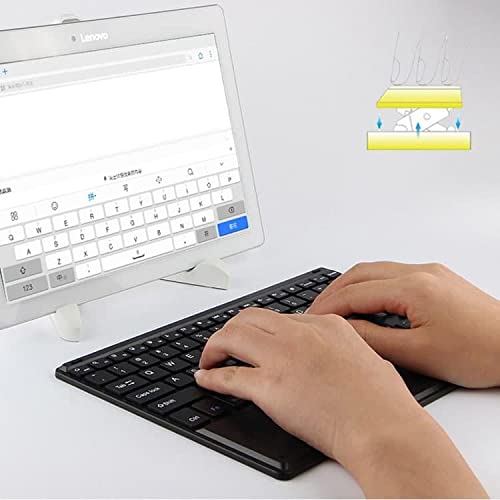
Figure 5.1: User demonstrating typing on the SlimKeys Bluetooth Keyboard.
6. الصيانة
6.1 التنظيف
- تأكد من إيقاف تشغيل لوحة المفاتيح قبل التنظيف.
- استخدم قطعة قماش ناعمة وخالية من الوبر وامسحها برفق.ampened with water or a mild electronics cleaner to wipe the surface.
- تجنب استخدام المواد الكيميائية القاسية أو المنظفات الكاشطة أو الرطوبة الزائدة، لأن هذه المواد يمكن أن تتلف لوحة المفاتيح.
- For dust or debris between keys, use compressed air.
6.2 العناية بالبطارية
- To prolong battery life, power off the keyboard when not in use.
- تجنب تفريغ البطارية بالكامل بشكل متكرر. أعد شحنها عند ظهور مؤشر انخفاض مستوى البطارية.
- قم بتخزين لوحة المفاتيح في مكان بارد وجاف إذا لم يتم استخدامها لفترات طويلة.
7. استكشاف الأخطاء وإصلاحها
If you encounter issues with your BoxWave SlimKeys Bluetooth Keyboard, refer to the following common solutions:
- Keyboard not powering on: تأكد من شحن البطارية. قم بتوصيل كابل الشحن واتركها تشحن لمدة 30 دقيقة على الأقل قبل محاولة تشغيلها مرة أخرى.
- لوحة المفاتيح غير مقترنة:
- Ensure the keyboard is in pairing mode (Bluetooth indicator blinking).
- Make sure Bluetooth is enabled on your iPhone 13 mini.
- Move the keyboard closer to your iPhone.
- Forget the device from your iPhone's Bluetooth settings and attempt to pair again.
- Restart both the keyboard and your iPhone.
- المفاتيح لا تستجيب:
- Check if the keyboard is still connected via Bluetooth.
- تأكد من أن مستوى شحن البطارية ليس منخفضاً بشكل حرج.
- Try reconnecting the keyboard by turning it off and on, or by re-pairing.
- لوحة اللمس لا تعمل:
- تأكد من توصيل لوحة المفاتيح.
- Check for any settings on your iPhone that might disable external trackpads.
- نظف سطح لوحة اللمس لإزالة أي شوائب.
8. المواصفات
| ميزة | مواصفة |
|---|---|
| ماركة | بوكس ويف |
| رقم الموديل | بى دبليو-1977-29861-11782 |
| واجهة الأجهزة | بلوتوث |
| نسخة البلوتوث | 3.0 |
| الأجهزة المتوافقة | Apple iPhone 13 mini, Smartphones, Laptops |
| وصف لوحة المفاتيح | لاسلكي |
| المميزات الخاصة | Portable, Integrated Trackpad |
| مصدر الطاقة | تعمل بالبطارية |
| الأبعاد (تقريبًا) | 257 مم × 172 مم × 5 مم |

Figure 8.1: Dimensions and operating system compatibility of the SlimKeys Bluetooth Keyboard.
9. الضمان والدعم
9.1 معلومات الضمان
For specific warranty details, please refer to the warranty card included with your product or visit the official BoxWave webالموقع. احتفظ بإثبات الشراء الخاص بك لاستخدامه في أي مطالبات بالضمان.
9.2 دعم العملاء
If you require further assistance or have questions not covered in this manual, please contact BoxWave customer support through their official webالموقع أو معلومات الاتصال المقدمة مع وثائق الشراء الخاصة بك.