
1. المقدمة
The HQ-Power DMX 4-Channel Splitter (Model HQDB10001) is designed to distribute a single DMX512 input signal into four isolated DMX512 outputs. This device ensures reliable signal transmission over longer distances and prevents signal degradation or interference between connected DMX devices. Its compact and robust design makes it suitable for various professional lighting applications.
2. تعليمات السلامة
- اقرأ كافة التعليمات بعناية قبل تشغيل الجهاز.
- احتفظ بهذا الدليل للرجوع إليه في المستقبل.
- هذا الجهاز مخصص للاستخدام الداخلي فقط. لا تعرضه للمطر أو الرطوبة.
- تأكد من حجم امدادات الطاقةtage يطابق المتطلبات المحددة على الجهاز.
- Always disconnect the device from the power outlet before cleaning or servicing.
- لا تقم بتشغيل الجهاز إذا كان سلك الطاقة تالفًا.
- تجنب وضع الجهاز بالقرب من مصادر الحرارة أو تحت أشعة الشمس المباشرة.
- لا تحاول إصلاح الجهاز أو تعديله بنفسك. قم بإحالة جميع أعمال الصيانة إلى فنيين مؤهلين.
- تأكد من التهوية المناسبة حول الوحدة لمنع ارتفاع درجة الحرارة.
3. انتهى المنتجview
Familiarize yourself with the various components and connections of your HQ-Power DMX 4-Channel Splitter.

3.1 Front Panel: DMX Signal Outputs
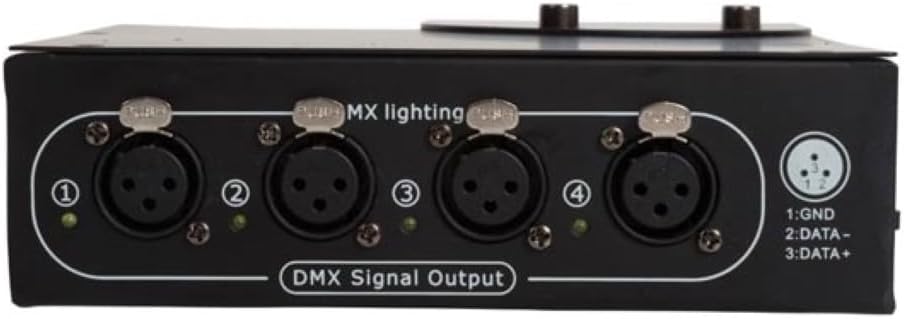
- DMX Signal Output (1-4): Four isolated 3-pin XLR outputs for connecting DMX-controlled lighting fixtures.
- مؤشرات LED: Green LEDs next to each output illuminate when a DMX signal is present on that channel.
3.2 Rear Panel: Power and DMX Input/Thru

- مدخلات الطاقة: موصل طاقة قياسي من نوع IEC لتوصيل كابل الطاقة المرفق.
- مدخلات DMX: 3-pin XLR connector for receiving the DMX512 signal from a DMX controller.
- DMX Thru Output: 3-pin XLR connector for passing the DMX input signal directly to another DMX device or splitter.
- Terminal Switch (120R): A switch to activate or deactivate the 120 Ohm DMX termination resistor.
4. الإعداد
- فك التعبئة: Carefully remove the DMX splitter from its packaging. Inspect the device for any signs of damage during transit.
- توصيل الطاقة: Connect the provided power cable to the IEC power input on the rear panel of the splitter and then to a suitable AC power outlet (100-240V~, 50/60Hz).
- DMX Input Connection: Connect your DMX controller's output to the مدخلات DMX (3-pin XLR) on the rear panel of the splitter.
- DMX Output Connections: Connect your DMX-controlled lighting fixtures to the إخراج إشارة DMX ports (1-4) on the front panel using standard 3-pin XLR DMX cables.
- DMX Thru (Optional): If you need to daisy-chain the DMX signal to another DMX device or splitter, connect a DMX cable from the DMX Thru Output on the rear panel to the input of the next device.
- الإنهاء:
- For the last device in a DMX chain, it is recommended to terminate the DMX signal with a 120 Ohm resistor to prevent signal reflections.
- If this DMX splitter is the last device in your DMX chain (i.e., nothing is connected to the DMX Thru output and no other DMX devices are connected after the splitter's outputs), set the Terminal Switch (120R) on the rear panel to the 'ON' position.
- If other DMX devices are connected after the splitter (via Thru or its outputs), ensure the termination is applied at the very end of the entire DMX chain, not necessarily on the splitter itself.
5. التشغيل
Once all connections are made and the device is powered on, the HQ-Power DMX 4-Channel Splitter operates automatically.
- تشغيل الطاقة: Plug the power cable into a wall socket. The power indicator (if present, usually a small LED near the power input) will illuminate.
- توزيع الإشارة: The DMX signal received at the DMX Input will be amplified and distributed to all four DMX Signal Outputs.
- مؤشرات الإخراج: The green LEDs next to each DMX output port will flash or illuminate steadily when a valid DMX signal is being transmitted through that output. This indicates proper signal flow.
- عزل: Each output is electrically isolated, meaning a fault on one output line will not affect the other outputs or the DMX input.
6. الصيانة
- تنظيف: Disconnect the device from power before cleaning. Use a soft, dry cloth to wipe the exterior. Do not use abrasive cleaners or solvents.
- تخزين: When not in use for extended periods, store the device in a dry, dust-free environment, preferably in its original packaging.
- تقتيش: افحص جميع الكابلات والموصلات دوريًا للتأكد من عدم وجود تآكل أو تلف. استبدل أي مكونات تالفة على الفور.
7. استكشاف الأخطاء وإصلاحها
| مشكلة | السبب المحتمل | حل |
|---|---|---|
| لا يوجد ضوء مؤشر الطاقة. | No power supply; faulty cable; faulty power outlet. | Check power cable connection; try a different power outlet; replace power cable if damaged. |
| No DMX signal at outputs (LEDs off). | No DMX input signal; faulty DMX input cable; DMX controller issue. | Verify DMX controller is sending a signal; check DMX input cable; test with a different DMX controller or cable. |
| Flickering lights or erratic behavior. | Improper DMX termination; faulty DMX cables; signal interference. | Ensure DMX termination is correctly applied at the end of the chain (120R switch); replace DMX cables; check for strong electromagnetic interference. |
| Only some outputs work. | Faulty output port; faulty DMX output cable. | Test the problematic output with a known good DMX cable and fixture; if issue persists, the unit may require servicing. |
If troubleshooting steps do not resolve the issue, contact HQ-Power customer support or a qualified technician.
8. المواصفات
| ميزة | التفاصيل |
|---|---|
| نموذج | HQDB10001 |
| ماركة | HQ-Power |
| حجم الإدخالtage | 100-240 فولت، 50/60 هرتز |
| استهلاك الطاقة | 2 W, pf 0.3 |
| قنوات دي ام اكس | 1 Input, 4 Outputs, 1 Thru Output |
| موصلات DMX | 3-pin XLR (Input, Thru, Outputs) |
| عزل | Galvanic isolation between input and outputs, and between outputs. |
| إنهاء | Built-in switchable 120 Ohm DMX terminator |
| الأبعاد (الطول × العرض × الارتفاع) | 7.5 × 24.5 × 21.5 سم (تقريبًا 2.95 × 9.65 × 8.46 بوصة) |
| وزن | 1.65 كجم (حوالي 3.64 رطلاً) |
| مواد الإسكان | غلاف معدني متين |
| بيئة التشغيل | للاستخدام الداخلي فقط |
9. الضمان والدعم
Warranty information for the HQ-Power DMX 4-Channel Splitter (Model HQDB10001) is typically provided with your purchase documentation or on the product packaging. Please retain your proof of purchase for warranty claims.
For technical support, service, or further inquiries, please visit the official HQ-Power webالموقع أو الاتصال بالموزع المحلي.