
مقدمة
This user manual provides detailed instructions for the safe and efficient operation of your Powerextra 4-Channel LCD Battery Charger. Please read this manual thoroughly before use and retain it for future reference.

Image: The Powerextra 4-Channel LCD Battery Charger, designed for Sony NP-F series batteries.
معلومات السلامة
لضمان التشغيل الآمن ومنع الضرر، اتبع الاحتياطات التالية:
- Do not disassemble the charger. Servicing should only be performed by qualified personnel.
- احتفظ بالشاحن بعيدًا عن الماء والرطوبة.
- Use only with compatible batteries as specified in this manual.
- Avoid extreme temperatures. Operate and store the charger in a dry, well-ventilated area.
- افصل الشاحن عن مأخذ الطاقة عندما لا يكون قيد الاستخدام أو أثناء العواصف الكهربائية.
- This charger incorporates multiple protection features including over-charging, short-circuit, high-temperature, and surge protection.

Image: Visual representation of the charger's six protection features: short circuit, over-charge, over-voltage, over-discharge, over-current, and no memory effect.
محتويات الحزمة
تأكد من وجود جميع العناصر في الحزمة الخاصة بك:
- 1x Powerextra 4-Channel Battery Charger
- 1 × كابل طاقة التيار المتردد
- 1 × قطعة قماش تنظيف من الألياف الدقيقة

Image: The charger, AC cable, and cleaning cloth neatly arranged next to the product box.
يثبت
- Connect the AC Power Cable: Insert one end of the provided AC power cable into the charger's power input port.

Image: Close-up of the charger's power input port.
- قم بتوصيله بمنفذ الطاقة: Plug the other end of the AC power cable into a standard wall outlet (100-240V, 50/60Hz). The charger's LCD display will illuminate.
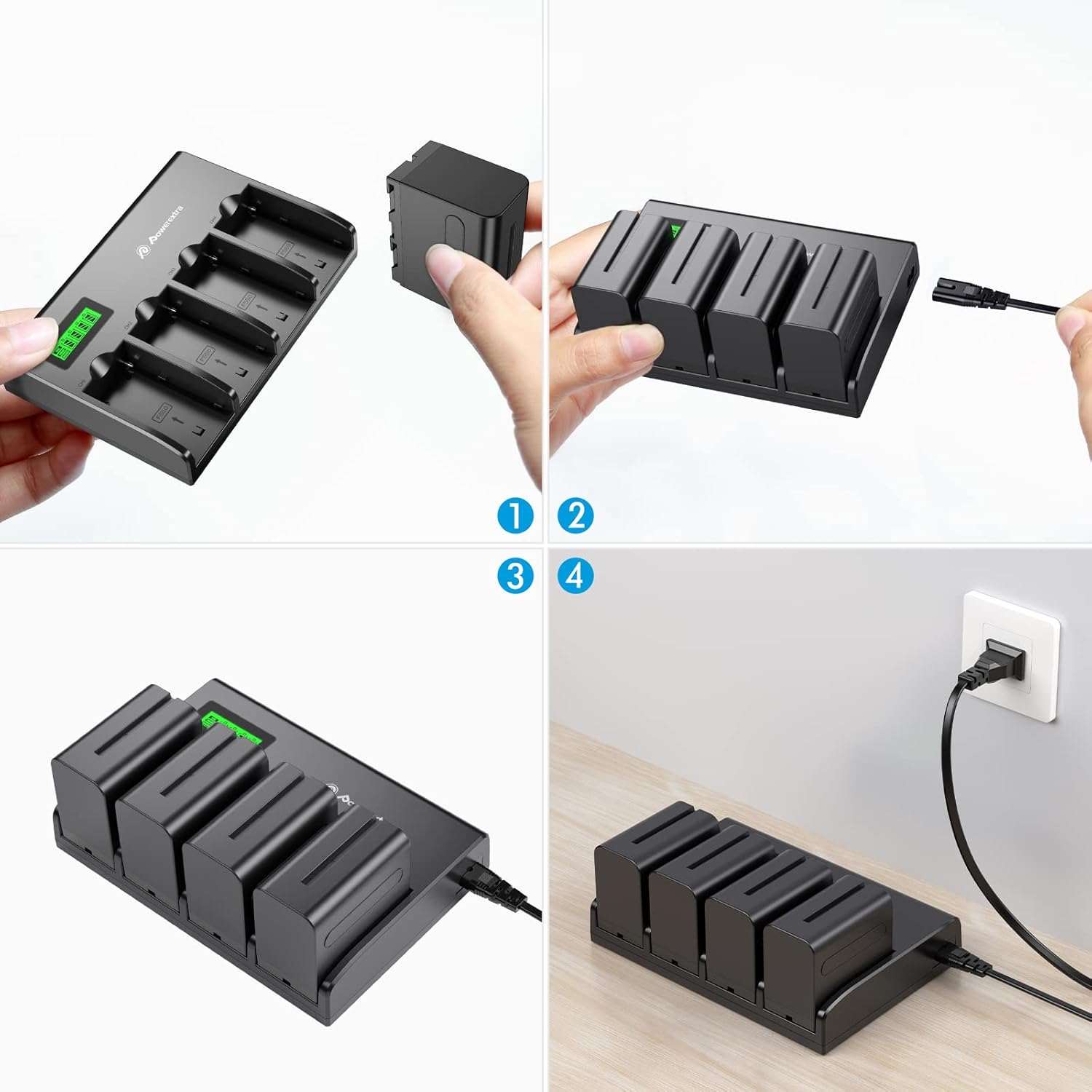
Image: Visual steps showing how to insert batteries and connect the charger to a power source.
تعليمات التشغيل
- أدخل البطاريات: Carefully insert up to four compatible Sony NP-F series batteries into the charging slots. Ensure the battery is oriented correctly according to the arrows on the charger.

Image: A hand inserting a battery into one of the charger's slots.
- مراقبة حالة الشحن: The LCD display will show the charging status for each battery individually.
- The display indicates the current charge level (0-25%, 25-50%, 50-75%, 75-100%).
- "CHG" indicates charging in progress.
- "ERROR" indicates a charging error.
- "DISCHG" indicates discharging (if applicable, though this model primarily charges).

Image: The charger's LCD screen displaying the charge status of four batteries.

Image: An animated GIF demonstrating the real-time battery power display on the LCD screen.
- اكتمال الشحن: Once a battery is fully charged, its indicator on the LCD will show 100% and stop flashing.
- إزالة البطاريات: Gently remove the charged batteries from the slots.
فيديو المنتج الرسمي
Video: An official product video demonstrating the features and operation of the Powerextra 4-Channel Battery Charger with LCD Display.
التوافق
This charger is compatible with the following Sony NP-F series batteries:
- NP-F550
- NP-F570
- NP-F750
- NP-F770
- NP-F930
- NP-F950
- NP-F960
- NP-F970
- NP-F975
It is suitable for use with Sony Handycams, LED video lights, and field monitors that utilize these battery types.

Image: The charger displayed alongside various compatible Sony NP-F series batteries, illustrating its broad compatibility.
الميزات الرئيسية
- 4-Channel Simultaneous Charging: Efficiently charges up to four batteries at once.
- شاشة LCD الذكية: Provides real-time battery power status and charging indication for each slot.
- حماية السلامة المتقدمة: Built-in safeguards against over-charging, short-circuiting, high temperatures, and power surges.
- حجم واسعtagالمدخلات الإلكترونية: Supports 100-240V, 50/60Hz power input for global use.
- تصميم مضغوط: Designed for portability and convenience.

Image: The charger with four batteries inserted, highlighting its innovative design for simultaneous charging.
تحديد
| ميزة | التفاصيل |
|---|---|
| رقم الموديل | NP-F970 |
| مدخل | 100-240V, 50/60Hz, 60W Max |
| الناتج | DC 8.4V 1000mA x 4 |
| أبعاد المنتج | 7.28 × 5.03 × 1.25 بوصة (18.49 × 12.78 × 3.18 سم) |
| وزن العنصر | 10.6 أونصة (300 جرام) |
| الشركة المصنعة | بوويركسترا |

Image: The charger with its dimensions (5.03 in, 7.28 in, 1.25 in) highlighted, showing its compact size.
استكشاف الأخطاء وإصلاحها
- الشاحن لا يعمل: Ensure the AC power cable is securely connected to both the charger and a working wall outlet.
- البطارية لا تشحن:
- Verify the battery is correctly inserted into the slot.
- Check if the battery is compatible with the charger.
- If the LCD shows "ERROR", the battery might be faulty or severely discharged. Try another battery.
- الشحن البطيء: Ensure the power source is stable and meets the input specifications.
صيانة
- تنظيف: Use the provided microfiber cleaning cloth to gently wipe the charger's surface. Do not use liquid cleaners or solvents.
- تخزين: قم بتخزين الشاحن في مكان بارد وجاف بعيدًا عن أشعة الشمس المباشرة ودرجات الحرارة القصوى عند عدم استخدامه.
- العناية بالبطارية: For optimal battery life, avoid fully discharging batteries frequently.
الضمان والدعم
Powerextra is committed to customer satisfaction. If you encounter any issues or have questions regarding your product, please contact Powerextra customer service for assistance. Refer to the product packaging or the official Powerextra webالموقع للحصول على تفاصيل الضمان المحددة ومعلومات الاتصال.
Customer Service: Powerextra is a trustworthy brand that focuses on the customer experience. If you have any questions about the product or it is not clear, please feel free to contact us, we are at your service 24 hours. We listen to every feedback and fine-tune every detail to ensure quality.