
1. المقدمة
Thank you for choosing the TRONIC 61-Key Mechanical Gaming Keyboard. This manual provides essential information for setting up, operating, maintaining, and troubleshooting your new keyboard. Please read this manual thoroughly before use to ensure optimal performance and longevity of your device.
2. انتهى المنتجview
The TRONIC 61-Key Mechanical Gaming Keyboard is a compact, wired keyboard designed for gaming and typing efficiency. It features professional mechanical keys, vibrant RGB backlighting, and full anti-ghosting capabilities. Its ergonomic design ensures comfort during extended use, and the durable ABS construction provides resistance against accidental drops and splashes.
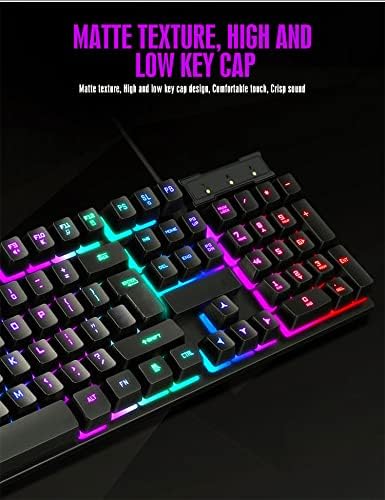
النفقات العامة view of the TRONIC 61-Key Mechanical Gaming Keyboard, showcasing its compact layout and vibrant RGB backlighting across all keys.
المميزات الرئيسية:
- لوحة مفاتيح مدمجة بـ 61 مفتاحًا: Provides more desk space for mouse movement and other peripherals.
- مفاتيح ميكانيكية: Professional mechanical switches for responsive and tactile feedback.
- الإضاءة الخلفية RGB: Customizable rainbow backlighting with various effects and colors (red, green, yellow, blue, purple, cyan, pink).
- Full Anti-Ghosting: يسمح بتسجيل ضغطات مفاتيح متعددة في وقت واحد دون حدوث تعارض، وهو أمر بالغ الأهمية للألعاب.
- بناء متين: Made from high-resistance ABS thermoplastic material, designed to withstand daily use and minor liquid splashes.
- Laser-Engraved Keycaps: Characters are clear and luminous, ensuring visibility in dark environments.
- تصميم مريح: Engineered for comfort during long typing and gaming sessions.

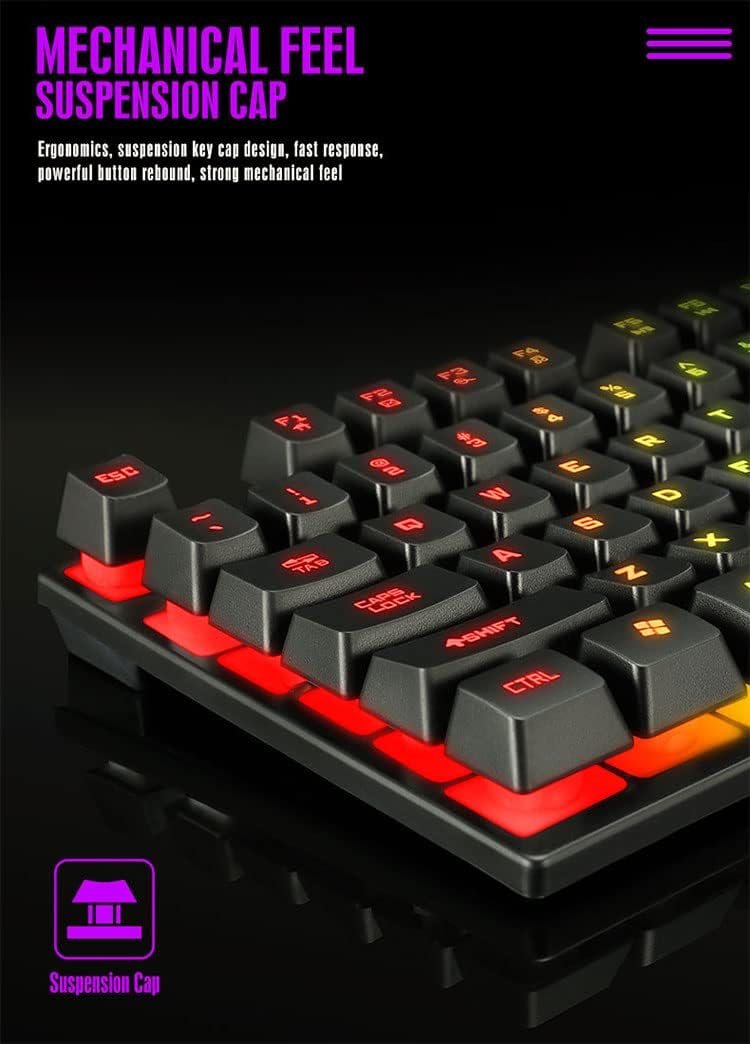
تفصيلية view of the keyboard's suspension keycap design, highlighting the mechanical feel and ergonomic profile for comfortable typing and gaming.
3. الإعداد
Setting up your TRONIC Mechanical Gaming Keyboard is a straightforward process.
توصيل لوحة المفاتيح:
- Unpack the keyboard and its USB cable from the packaging.
- قم بتوصيل كابل USB بمنفذ USB الخاص بلوحة المفاتيح.
- Plug the other end of the USB cable into an available USB port on your computer or laptop.
- The keyboard is plug-and-play; your operating system (Windows or Linux) should automatically detect and install the necessary drivers.
The TRONIC keyboard connected to a device via its integrated USB cable, ready for use.
التوافق:
The keyboard is compatible with Windows and Linux operating systems. ملحوظة: This keyboard is not compatible with PS4 or XBOX gaming consoles.
4. تعليمات التشغيل
Basic Keyboard Use:
Once connected, the keyboard functions as a standard QWERTY layout keyboard. The 61-key compact design includes all essential keys for typing and gaming. The UK layout ensures familiarity for users accustomed to this standard.
التحكم في الإضاءة الخلفية:
The keyboard features dynamic RGB backlighting. You can control the lighting effects and turn them on or off using a dedicated button on the keyboard. This button typically cycles through various rainbow lighting modes, including a cyclical breathing effect, and allows you to disable the lighting when not needed.

This image illustrates the location of the dedicated button for controlling the keyboard's RGB backlighting, allowing users to easily switch the lighting effects on or off.
Anti-Ghosting Function:
The full anti-ghosting feature ensures that every key press is registered accurately, even when multiple keys are pressed simultaneously. This is particularly beneficial in fast-paced gaming scenarios where complex key combinations are common.
5. الصيانة
Proper maintenance will help extend the life and performance of your TRONIC keyboard.
تنظيف:
- افصل لوحة المفاتيح عن الكمبيوتر قبل التنظيف.
- استخدم قطعة قماش ناعمة وجافة لمسح أغطية المفاتيح وسطح لوحة المفاتيح.
- بالنسبة للأوساخ العنيدة، يتم وضع كمية قليلة منamp يمكن استخدام قطعة قماش مبللة بمحلول تنظيف خفيف، مع التأكد من عدم دخول أي سائل إلى لوحة المفاتيح.
- Compressed air can be used to remove dust and debris from between the keys.
متانة:
The keyboard's ABS construction provides a degree of resistance to minor impacts and liquid splashes. However, it is not fully waterproof. Avoid submerging the keyboard in liquid or exposing it to excessive moisture.
6. استكشاف الأخطاء وإصلاحها
If you encounter issues with your TRONIC keyboard, refer to the following common solutions:
- لوحة المفاتيح لا تستجيب:
- تأكد من توصيل كابل USB بشكل آمن بكل من لوحة المفاتيح والكمبيوتر.
- حاول توصيل لوحة المفاتيح بمنفذ USB مختلف على جهاز الكمبيوتر الخاص بك.
- أعد تشغيل الكمبيوتر الخاص بك.
- الإضاءة الخلفية لا تعمل:
- Press the dedicated backlight control button to cycle through lighting modes or turn the backlight on.
- تأكد من توصيل لوحة المفاتيح بشكل صحيح واستقبال الطاقة.
- المفاتيح غير مسجلة:
- Check for any physical obstructions under the keycaps.
- Ensure the keyboard drivers are correctly installed (usually automatic).
- مشاكل التوافق:
- Remember, the keyboard is compatible with Windows and Linux. It is لا compatible with PS4 or XBOX consoles.
If these steps do not resolve your issue, please contact TRONIC customer support for further assistance.
7. المواصفات
| ميزة | مواصفة |
|---|---|
| ماركة | ترونيك |
| رقم الموديل | B09MH9ZC6M |
| تكنولوجيا الاتصال | USB سلكي |
| وصف لوحة المفاتيح | ميكانيكي |
| تخطيط لوحة المفاتيح | QWERTY (UK Layout) |
| عدد المفاتيح | 61 |
| دعم الإضاءة الخلفية | RGB (Rainbow) |
| أنظمة التشغيل المتوافقة | ويندوز، لينكس |
| مصدر الطاقة | Cable Powered |
| المميزات الخاصة | Backlit, Anti-Ghosting |
| مادة | ABS بالحرارة |
| عمر ضغطات المفاتيح | 10,000,000 ضغطة مفتاح |
| وقت الاستجابة | 2 مللي ثانية |
| رمز المنتج العالمي / رقم GTIN | 793072706689 |
8. الضمان والدعم
For warranty information and customer support, please refer to the documentation included with your purchase or visit the official TRONIC webالموقع. احتفظ بإثبات الشراء الخاص بك لاستخدامه في أي مطالبات بالضمان.