
مقدمة
Thank you for choosing the Galax Slider-04 Optical Wired Gaming Mouse. This manual provides essential information for setting up, operating, maintaining, and troubleshooting your new gaming mouse. Please read it carefully to ensure optimal performance and longevity of your device.
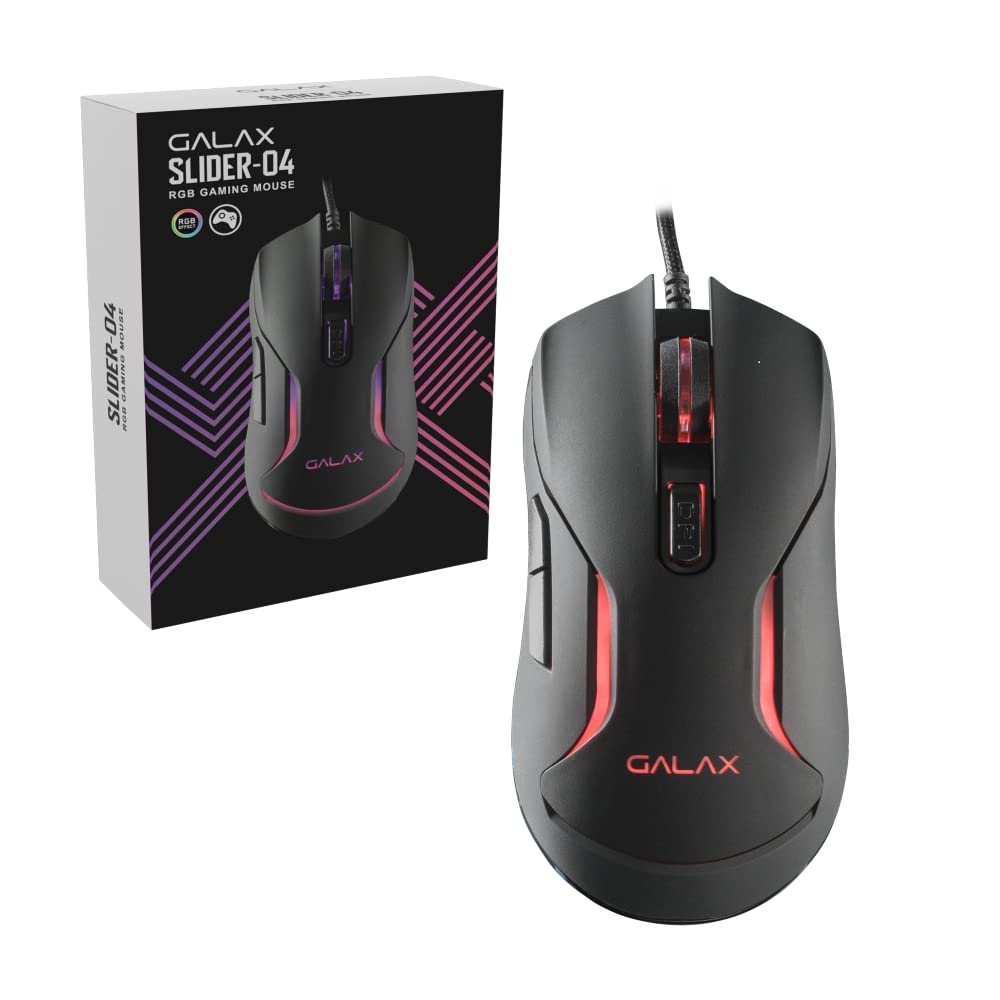
الصورة: أعلى view of the Galax Slider-04 Optical Wired Gaming Mouse, showcasinبفضل تصميمها المريح وعجلة التمرير المركزية.
يثبت
The Galax Slider-04 Gaming Mouse is designed for simple plug-and-play functionality, requiring no additional software installation for basic use.
- فك تغليف الفأرة: أخرج الفأرة من عبوتها بعناية.
- الاتصال بجهاز الكمبيوتر: Plug the USB connector of the mouse into an available USB port on your desktop, laptop, or PC.
- التعرف على النظام: Your operating system (Windows, macOS, Unix) will automatically detect and install the necessary drivers. This process usually takes a few seconds.
- جاهز للاستخدام: بمجرد تثبيت برامج التشغيل، يصبح الماوس جاهزًا للاستخدام الفوري.

Image: The Galax Slider-04 mouse with its braided USB cable, ready for connection to a computer.
تعليمات التشغيل
The Galax Slider-04 features multiple buttons and customizable settings to enhance your gaming and productivity experience.
وظائف الأزرار
The mouse is equipped with 6 function keys for versatile control:
- 1. Left Mouse Button: وظيفة النقر الأساسية القياسية.
- 2. Right Mouse Button: وظيفة النقر الثانوي القياسية (قائمة السياق).
- 3. Scroll Wheel: يُستخدم للتمرير لأعلى/لأسفل، ويعمل كزر نقر أوسط.
- 4. زر التوجيه للأمام: يتنقل للأمام في web المتصفحات أو file المستكشفون.
- 5. زر الرجوع: يتنقل للخلف في web المتصفحات أو file المستكشفون.
- 6. DPI Button: يتنقل بين إعدادات حساسية DPI.

Image: A detailed diagram illustrating the location and numbering of the 6 function keys on the Galax Slider-04 mouse.
ضبط DPI
Adjust the mouse sensitivity (DPI) to match your preference and task requirements. The Slider-04 offers four preset DPI levels:
- 1000 نقطة في البوصة
- 1600 نقطة في البوصة
- 3200 نقطة في البوصة
- 6400 نقطة في البوصة
اضغط على زر DPI (Button 6) located behind the scroll wheel to cycle through these settings. Each change will typically be indicated by a change in the mouse's RGB lighting color.

Image: Visual representation of the four selectable DPI settings available on the Galax Slider-04 mouse.
إضاءة RGB LED
The Galax Slider-04 features dynamic RGB LED lighting that enhances your gaming setup's aesthetics. The lighting effects cycle automatically, often changing color to indicate the current DPI setting.
Video: A short demonstration of the Galax Slider-04 mouse's RGB LED lighting effects, showcasing the dynamic color changes.

Image: The Galax Slider-04 mouse displayed with various RGB color presets, illustrating the range of lighting options.
تصميم مريح
The mouse is designed with ergonomics to provide comfort and reduce hand fatigue during prolonged use. Its shape supports both fingertip and claw grip styles, promoting a natural hand posture.

Image: A diagram demonstrating how the ergonomic design of the Galax Slider-04 mouse accommodates both fingertip and claw grip styles.
صيانة
Proper care will extend the life and performance of your Galax Slider-04 Gaming Mouse.
- تنظيف: استخدم قطعة قماش ناعمة وجافة لمسح سطح الفأرة. لإزالة الأوساخ العنيدة، امسحها برفق.ampاغسل قطعة القماش بالماء. تجنب المواد الكيميائية القاسية أو المنظفات الكاشطة.
- أجهزة الاستشعار البصرية: احرص على إبقاء المستشعر البصري الموجود على الجانب السفلي من الماوس نظيفًا وخاليًا من الغبار أو الحطام لضمان التتبع الدقيق.
- العناية بالكابلات: Avoid sharply bending or twisting the braided USB cable. Store the cable neatly to prevent tangling and damage.
- تخزين: عند عدم الاستخدام، قم بتخزين الماوس في بيئة نظيفة وجافة بعيدًا عن درجات الحرارة القصوى.
استكشاف الأخطاء وإصلاحها
If you encounter issues with your Galax Slider-04 Gaming Mouse, refer to the following common solutions:
- Mouse Not Detected:
- تأكد من توصيل كابل USB بشكل آمن بمنفذ USB العامل.
- جرب توصيل الماوس بمنفذ USB مختلف على جهاز الكمبيوتر الخاص بك.
- أعد تشغيل الكمبيوتر الخاص بك.
- Check your computer's Device Manager (Windows) or System Information (macOS) to see if the mouse is listed.
- لم يتغير معدل DPI:
- Ensure you are pressing the dedicated DPI button (Button 6).
- Verify that the mouse is properly connected and recognized by your system.
- أضواء RGB لا تعمل:
- تأكد من توصيل الماوس بجهاز الكمبيوتر الخاص بك بشكل صحيح.
- The RGB lighting is typically automatic and cycles through colors. If no lights appear, try reconnecting the mouse or restarting your computer.
- التتبع غير الدقيق:
- قم بتنظيف المستشعر البصري الموجود على الجانب السفلي للفأرة.
- استخدم الماوس على سطح نظيف ومتجانس أو على لوحة ماوس عالية الجودة.
- Adjust the DPI setting to a level suitable for your surface and preference.
تحديد
Below are the technical specifications for the Galax Slider-04 Optical Wired Gaming Mouse:
| ميزة | التفاصيل |
|---|---|
| ماركة | Galax |
| اسم الموديل | منزلق |
| رقم الموديل | MGS04UX26RG2B0 |
| لون | أسود |
| تكنولوجيا الاتصال | USB (سلكي) |
| تقنية كشف الحركة | بصري |
| Mouse Maximum Sensitivity | 6400 نقطة في البوصة |
| إعدادات DPI | 1000 / 1600 / 3200 / 6400 |
| كمية الأزرار | 6 |
| عمر الزر | 3 مليون نقرة |
| معدل التصويت | 125 هرتز |
| المميزات الخاصة | Ergonomic Design, RGB LED Lights, Lightweight |
| طول الكابل | 1.5 meters (Braided) |
| الأجهزة المتوافقة | كمبيوتر شخصي |
| دعم نظام التشغيل | Unix, Windows 7/8/10, macOS 10.12 Sierra and above |
| وزن العنصر | 250 جرام |
| أبعاد المنتج (الطول × العرض) | 12.9 طول × 4.1 عرض سم |
| مصدر الطاقة | كهرباء سلكية |
| مواد التغليف | بلاستيك |
| Product Finish Type | مطفي |

Image: A table summarizing the key specifications of the Galax Slider-04 gaming mouse.
الضمان والدعم
The Galax Slider-04 Optical Wired Gaming Mouse comes with a ضمان الشركة المصنعة لمدة عامين من تاريخ الشراء.
للاستفسار عن الضمان أو الدعم الفني، يرجى الاتصال بـ:
- الشركة المصنعة: Galax Technology, Galaxy Microsystems Ltd., Hong Kong, Kowloon Bay, Sheung Yuet Rd, 3號企業廣場二期
- المستورد (الهند): Technology And Gadgets, Gala no.142/143, 1st Floor, Building no.6, Mittal Industrial Estate, Marol, Andheri (East), Mumbai - 400059., Mumbai, India, Maharashtra
يرجى الاحتفاظ بإيصال الشراء الخاص بك كإثبات للشراء لأغراض الضمان.