
1. المقدمة
The AOPUTTRIVER AP-5800M is a high-precision air quality monitor designed to detect fine particulate matter, specifically PM2.5, PM1.0, and PM10. Utilizing a laser PM2.5 sensor and single-chip microcomputer technology, this device provides accurate readings displayed on a 2.8-inch TFT color LCD. It is suitable for monitoring air quality in various environments, including indoor spaces, outdoor areas, bedrooms, factories, construction sites, and during travel.
This manual provides essential information for the safe and effective use of your AP-5800M air quality monitor. Please read it thoroughly before operation.
2. معلومات السلامة
- لا تحاول تفكيك الجهاز أو تعديله. قد تؤدي التعديلات غير المصرح بها إلى خلل أو إصابة.
- Keep the device away from water and high humidity to prevent electrical shock or damage.
- تجنب تعريض الجهاز لدرجات حرارة قصوى أو لأشعة الشمس المباشرة أو للمواد المسببة للتآكل.
- Use only the provided USB cable for charging. Ensure the charging voltage متوافق مع الجهاز.
- يحفظ بعيدًا عن متناول الأطفال.
- تخلص من الجهاز وبطاريته وفقًا للوائح البيئية المحلية.
3. محتويات العبوة
عند فتح العبوة، يرجى التأكد من أن جميع العناصر المذكورة أدناه موجودة وفي حالة جيدة:
- 1 x AOPUTTRIVER AP-5800M Air Quality Monitor
- 1 × كابل شحن USB
- 1 × حقيبة حمل
- 1 × دليل المستخدم

This image displays the items included in the product package: the AP-5800M air quality monitor, a USB cable, a carrying case, and the user manual.
4. انتهى المنتجview
4.1 تصميم الجهاز والأزرار
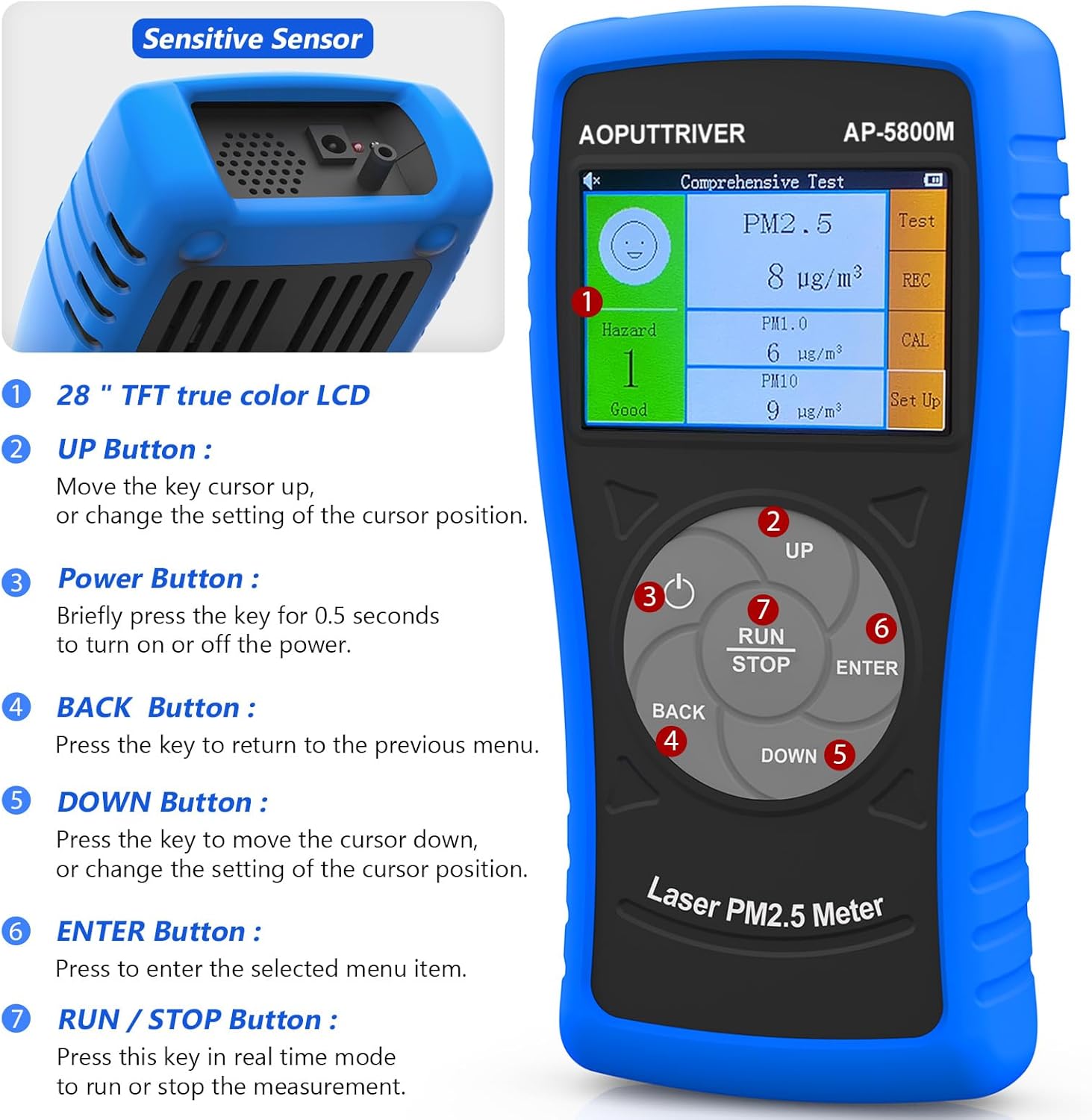
تظهر هذه الصورة الواجهة الأمامية view of the AOPUTTRIVER AP-5800M Air Quality Monitor, highlighting the 2.8-inch TFT true color LCD, the sensitive sensor area, and the functions of the UP, Power, BACK, DOWN, ENTER, and RUN/STOP buttons.
- Sensitive Sensor: Located at the top, responsible for detecting particulate matter.
- زر لأعلى: Moves the cursor up or changes the setting of the cursor position.
- زر الطاقة: Briefly press for 0.5 seconds to turn the device on or off.
- زر العودة: اضغط للعودة إلى القائمة السابقة.
- زر لأسفل: Moves the cursor down or changes the setting of the cursor position.
- زر الإدخال: Press to select the highlighted menu item.
- RUN/STOP Button: Press this key in real-time mode to start or stop the measurement.
4.2 الشاشة والمؤشرات
The device features a 2.8-inch TFT true color LCD, providing clear visibility even in low-light conditions. The display shows real-time readings for PM2.5, PM1.0, and PM10, along with a hazard index and battery indicator.

توفر هذه الصورة لقطة مقربة view of the AP-5800M's colorful LCD display, showing the comprehensive test results for PM2.5, PM1.0, and PM10, along with the hazard index.
4.3 المكونات الداخلية

This diagram shows the internal components of the AP-5800M, emphasizing the high-precision laser PM2.5 sensor and the 3rd generation particle sensor responsible for detecting PM2.5 and PM10 in air sampليز.

توفر هذه الصورة لقطة مقربة view of the air outlet and inlet on the device, illustrating how air samples are drawn in and expelled for particle detection.
5. الإعداد
5.1 شحن الجهاز
The AP-5800M is equipped with a rechargeable battery. Before first use, or when the battery indicator shows low power, charge the device using the provided USB cable.
- Connect the USB cable to the device's charging port and to a standard USB power source (e.g., computer, USB wall adapter).
- سيضيء مؤشر ضوئي أحمر أثناء الشحن.
- The indicator light will turn green once the battery is fully charged.

This image depicts the charging process of the AP-5800M's 2000mAh rechargeable battery via a USB cable, with an indicator showing the battery level.
5.2 التشغيل المبدئي
After charging, press the Power Button briefly (for approximately 0.5 seconds) to turn on the device. The display will light up, and the device will begin its startup sequence.
6. تعليمات التشغيل
6.1 تشغيل/إيقاف التشغيل
- لتشغيل: اضغط على زر الطاقة (labeled '3' in the diagram) for approximately 0.5 seconds.
- لإيقاف التشغيل: اضغط على زر الطاقة for approximately 0.5 seconds. The device also features an automatic power-off mode to conserve battery.
6.2 التنقل بين القوائم
Use the following buttons for menu navigation:
- زر لأعلى: Move cursor up or increase values.
- زر لأسفل: Move cursor down or decrease values.
- زر الإدخال: قم بتأكيد الاختيار أو ادخل إلى قائمة فرعية.
- زر العودة: Return to the previous menu or cancel an action.
6.3 Starting and Stopping Measurements
In real-time measurement mode, press the زر RUN / STOP to initiate or pause the air quality measurement process.
6.4 فهم العرض
The 2.8-inch TFT color LCD displays various parameters:
- PM2.5, PM1.0, PM10 Values: Real-time concentration in µg/m³.
- Hazard Index: A calculated risk value based on PM2.5, PM1.0, and PM10 levels. The formula used is: Hazard Value = PM2.5/6 + PM1.0/20 + PM10/20.
- مؤشر البطارية: يظهر مستوى البطارية الحالي.

This image illustrates the AP-5800M monitor on its stand, alongside a color-coded chart explaining PM2.5 and PM10 health concern levels, ranging from Good to Hazardous.

تظهر هذه الصورة مكبرة view of the hazard index chart displayed on the AP-5800M, detailing the color-coded levels of air quality from Good to Hazardous for PM2.5 and PM10.
6.5 Setting Parameters and Alarms
The AP-5800M allows for various settings adjustments, including:
- ضبط الوقت: Adjust the device's internal clock.
- تسجيل البيانات: Enable or disable the recording of measurement data.
- امسك المعلومات: Freeze the current display readings.
- Hazard Index Alarm: Set thresholds for an audible alarm to activate when air quality levels exceed predefined limits. The device features an audible alarm.

This image highlights the audible alarm function of the AP-5800M, showing an alarm icon on the display and indicating that the device can emit sound alerts for high particle levels.
6.6 Usage Environments
The AP-5800M is versatile and can be used in a variety of settings to monitor air quality:
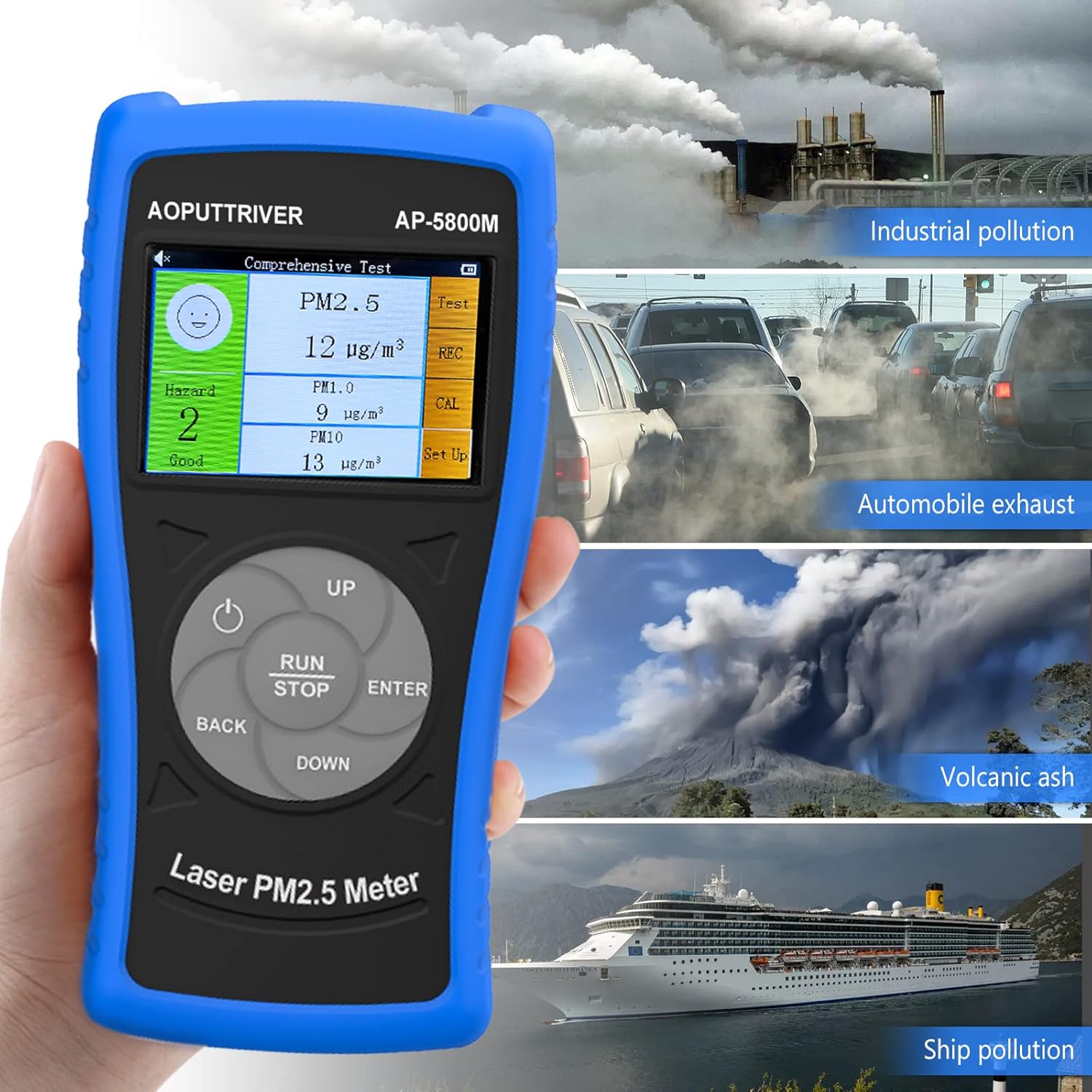
This image demonstrates the versatility of the AP-5800M, showing it in different scenarios such as industrial pollution, automobile exhaust, volcanic ash, and ship pollution, indicating its suitability for diverse testing environments.

This image combines a PM2.5/PM10 air quality level guide with illustrations of various suitable usage environments, including home, school, car, and office, demonstrating the monitor's versatility.
7. الصيانة
7.1 تنظيف الجهاز
- امسح الجزء الخارجي من الجهاز بقطعة قماش ناعمة وجافة.
- Do not use abrasive cleaners, solvents, or harsh chemicals, as these can damage the casing أو العرض.
- Ensure the air inlet and outlet are free from dust and obstructions for accurate readings.
7.2 العناية بالبطارية
- لإطالة عمر البطارية، تجنب تفريغ البطارية بالكامل بشكل متكرر.
- If storing the device for an extended period, charge it to approximately 50% and recharge every few months.
7.3 التخزين
قم بتخزين الجهاز في حقيبة الحمل الخاصة به في مكان بارد وجاف، بعيدًا عن أشعة الشمس المباشرة ودرجات الحرارة القصوى.
8. استكشاف الأخطاء وإصلاحها
If you encounter issues with your AP-5800M, refer to the following common problems and solutions:
| مشكلة | السبب المحتمل | حل |
|---|---|---|
| الجهاز لا يعمل. | مشكلة في البطارية أو الطاقة المنخفضة. | Charge the device using the provided USB cable. Ensure the charging indicator lights up. If the issue persists, contact customer support. |
| قراءات غير دقيقة أو غير متسقة. | Blocked air inlet/outlet, sensor contamination, or environmental interference. | Ensure the air inlet/outlet is clear. Clean the device exterior. Move the device away from strong air currents, dust sources, or chemical fumes. |
| العرض فارغ أو متجمد. | خلل في البرنامج أو انخفاض البطارية. | Try restarting the device by holding the Power Button. If unresponsive, charge the device. |
| يصدر صوت التنبيه بشكل غير متوقع. | High particulate levels detected or alarm threshold set too low. | Check the displayed PM values. If levels are high, ventilate the area. Adjust the alarm threshold in the settings if necessary. |
9. المواصفات
| المعلمة | قيمة |
|---|---|
| رقم الموديل | UK-AP-5800M |
| نطاق الكشف عن PM2.5 | 0 ~ 999.9 µg/m³ |
| PM2.5 Resolution | 0.1 ميكروغرام/م³ |
| نطاق الكشف عن PM10 | 0 ~ 999.9 µg/m³ |
| PM10 Resolution | 0.1 ميكروغرام/م³ |
| عرض | شاشة LCD ملونة TFT مقاس 2.8 بوصة |
| مصدر الطاقة | Rechargeable Battery (2000mAh), USB Powered |
| إنذار | مسموع |
| أبعاد المنتج | 196 مم (7.71 بوصة) × 95 مم (3.74 بوصة) × 46 مم (1.81 بوصة) |
| وزن العنصر | 500 جرام |

توفر هذه الصورة تفصيلاً view of the AP-5800M, showing its dimensions (196mm height, 95mm width, 46mm depth), the 90-degree support stand, the double protective shell, and the tripod hole for mounting.
10. الضمان والدعم
AOPUTTRIVER offers a 2-year warranty for the AP-5800M Air Quality Monitor and provides lifetime customer service. If you encounter any issues with this product or require assistance, please do not hesitate to contact our customer support team. We are committed to ensuring your satisfaction.